There are quite a few good Yahoo-based (and a couple of independent) backlink checking tools (both web-based and desk-top) that are great for investigating, organizing and keeping track of your own or competitors’ link building techniques. However we have very few tools so far allowing for some fun: i.e. visualizing the backlink statistics in any types of graphs or charts.
Here are 4 backlink visualizing tools I manages to find (please add those I missed out):
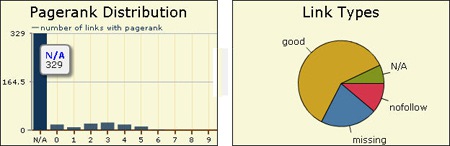
1. Link Diagnosis visualizes:
- Google PageRank distribution of the domain external links;
- Link types (’good’, ‘N/A’, ‘nofollow’, ‘missing’):

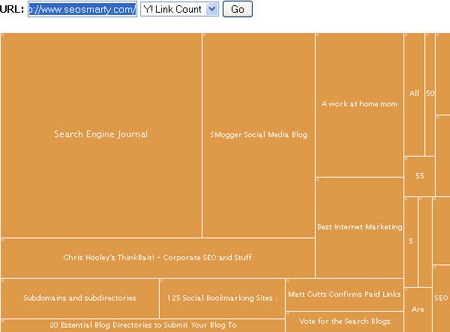
2. Freshmash.com evidently (I wasn’t able to locate any official “about this tool” information on the site) compares most heavily “linked-out” domains:
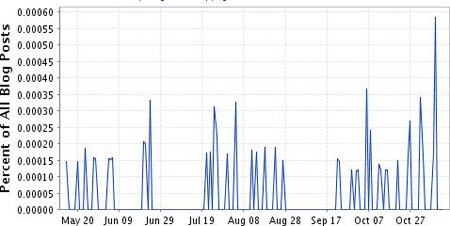
3. BlogPulse “trends” domain backlinks from blogs (I am not sure why it skips really powerful blogs and prefers their scrapers though):
4. Crazy Egg - not a backlink checking tool but due to its “Confetti” feature you can get an idea which backlinks (referring domains) bring which types of audience (i.e. where people coming from various sites tend to click on your page):



Comments
15 responses so far ↓
CanarsieBK on Nov 17, 2008 at 10:20 am
have you checked out the glync firefox extension? just downloaded last week, but haven’t had chance to play around with yet.
Ann Smarty on Nov 17, 2008 at 10:41 am
Yes, I mentioned it in one of my latest posts: http://www.searchenginejournal.com/firefox-addons-to-explore-backlinks-in-google-webmaster-tools/7987/
Matt Gio on Nov 17, 2008 at 11:16 am
Great list, I personally use http://www.backlinkwatch.com but I really like
http://www.linkdiagnosis.com/. Thanks for the links
Perma on Nov 17, 2008 at 2:14 pm
Crazy Egg looks sweet. Too bad it’s not free, though. But it’s not a bad price point, so maybe I’ll get the low-level option to play with
Nicole on Nov 17, 2008 at 4:09 pm
I’m a Yahoo Site Explorer girl, but it is a constant annoyance to have to get on Anonymouse or YouHide.com so that I can avoid being blocked from Site Explorer. I use backlinkwatch occasionally, too. Not as much success with Link Diagnosis, but we do refer to that sometimes. I wish Crazy Egg were free, too.
Loren Baker, Editor on Nov 17, 2008 at 4:28 pm
While CrazyEgg may not be free, the information you can gather from the service, and apply to your site’s usability, may be able to increase your conversion rates substantially, therefore paying for itself very easily.
Match on Nov 18, 2008 at 1:14 am
Excite tools! I will try out backlink checking tools.
Joseph Manna on Nov 18, 2008 at 12:22 pm
Sweet list of tools for backlink research. I am a frequent user of Backlink Watch, http://www.backlinkwatch.com and Google Webmaster Central for keeping tabs on backlinks.
Link Diagnosis seems sweet, and a new tool in my arsenal now.
Thanks,
Joe
Dan Kennedy on Nov 18, 2008 at 6:05 pm
Ann,
Great tools!
Another excellent tool is:
http://www.touchgraph.com/TGGoogleBrowser.html
Try a search and you’ll likely find your website and several competitors in an interactive chart.
Very cool tool for finding link partners!
Dating Malaysian on Nov 18, 2008 at 7:50 pm
Nice tool, will try it out.
Michael Y on Nov 18, 2008 at 9:47 pm
Am totally impressed and haven’t even gone past Link Diagnosis as of yet.
Internet Marketing Resume on Nov 20, 2008 at 3:10 pm
I can vouch for Crazy Egg. Great data for your own analysis but the screen shots can be very eye opening for clients as well!
John Williams on Dec 9, 2008 at 3:33 am
Great Stuff Annie! Thanks for sharing it here.
Surabaya info on Dec 21, 2008 at 8:17 am
Thanks for sharing Annie…
i am looking for it..i will try it out.
Social Bookmarking on Apr 30, 2009 at 7:56 pm
Thanks for sharing.
It’s help me for Wallpaper site
Leave a Comment