
Your clients trust you to create real results and hit KPIs that drive their businesses forward.
Understanding the intricacies of how that works can be difficult, so it’s essential to demonstrate your progress and efforts.
SEO reporting software showcases important metrics in a digestible and visually represented way. They save guesswork and manual referencing, highlighting achievements over a specified time.
A great tool can also help you formulate action items, gauge the performance of campaigns, and see real results that can help you create new and innovative evaluations.
The latest and allegedly greatest tools hit the market all the time, promising to transform how you conduct reports.
Certainly, you have to weigh a few factors when deciding which software to implement. Price, features, and ease of use are the most important to consider.
A cost-effective tool with a steep learning curve might not be worth it for the features. Similarly, an expensive tool might be more appealing if it is user-friendly but could quickly run up costs.
Just like any transformational business decision, you’ll have to weigh the pros and cons carefully to determine the right one for you.
[Discover:] The most essential SEO tools for agency success
Key Takeaways
- Cost, accessibility, and features are the common thread of comparison for SEO reporting tools.
- To truly get the best use out of an SEO reporting tool for your agency, you’ll need to weigh several details, including scalability, customization, integrations, and access to support.
- What might be considered a subpar tool could be a game-changer for an agency. Due diligence and research are the keys to knowing what will work for your team.
What To Look For In SEO Reporting Tools
It can be tough to make heads or tails of the available tools and choose which will benefit your agency the most.
Here are the 10 essential requirements of SEO reporting tools.
1. Accurate And Current Regional Data
SEO reporting is all about data. The software must have access to accurate and current data localized to your client’s targeted region.
Search data from the U.S. is meaningless if your client tries to rank for [London plumbing services], so localization matters.
The tool must update data regularly and with reliable accuracy so you can make informed decisions about where your client stands against the competition.
2. Integration With Third-Party Tools
Especially for full-scale digital marketing campaigns, the ability to report on all KPIs in one place is essential.
The more available integrations with third-party tools (e.g., Google Analytics, Google Business Profile, Majestic), the better.
Some tools even allow you to upload custom data sets.
3. Scalability
You don’t want to have to retrain or reinvest in new software every time your agency reaches a new tier.
The right SEO reporting tool should work well for your current business size and leave room for expansion as you onboard more clients.
4. Strong Suite Of Features
A great SEO reporting tool should include:
- Position tracking.
- Backlink monitoring.
- Competitor data.
- Analytics.
It is a bonus if the tool has reporting features for social media, email marketing, call tracking, and/or paid ads to make it a full-suite digital marketing software.
5. Continually Improving And Updating Features
SEO is constantly evolving, and so should SEO reporting tools.
As we continue the transition from website optimization to web presence optimization, a tool’s ability to integrate new features is essential.
6. Ability To Customize Reports
Each client will have different KPIs, objectives, and priorities.
Presenting the information that clients want to see is paramount to successful campaigns and retention.
Your reporting software of choice should be able to emphasize the correct data at the right times.
7. Client Integration
A good SEO reporting tool must have the client in mind.
It should have a simple bird’s eye overview of the basics but also be easy for clients to dig into the data at a deeper level.
This can mean automated summary reports or 24/7 client access to the dashboard.
8. Ability To White Label Reports
While white labeling is not essential (no client will sniff at receiving a report with a Google logo in the top corner), it helps keep branding consistent and gives a professional sheen to everything you send a client’s way.
9. Access To Support Resources
Quality support resources can help you find a detour when you encounter a roadblock.
Whether it’s detailed support documentation, a chat feature/support desk, or responsive customer support on social media, finding the help you need to solve the issue is important.
10. Cost-To-Value Ratio
With a proper process, time investment, and leveraging support resources, it is possible to get better results from a free reporting tool than one that breaks the bank.
This can mean automated summary reports or 24/7 client access to the dashboard.
Top 5 SEO Reporting Tools
In evaluating five of the most popular SEO reporting tools, based on the above criteria, here is how they stack up:
1. AgencyAnalytics
My Overall Rating: 4.7/5
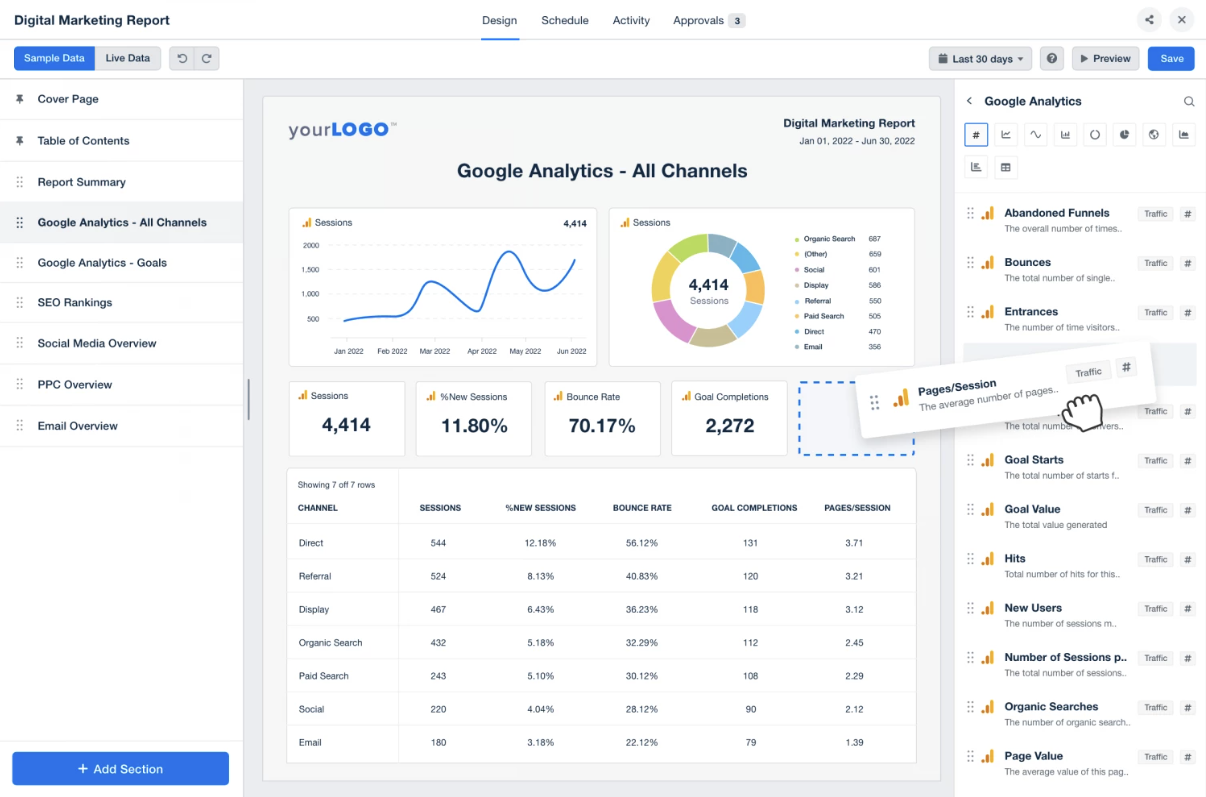
AgencyAnalytics is a quality introductory/intermediate reporting tool for agencies.
Among the tools on this list, it is one of the easiest to use for small to mid-sized agencies.
It starts at $12 per month, per client, with unlimited staff and client logins, a white-label dashboard, and automated branded reports. The minimum purchase requirements mean the first two tiers work out to $60 per month and $180 per month, respectively. But your ability to change the payment based on the number of clients could help keep costs lean.
AgencyAnalytics comes with 70+ supported third-party data integrations.
However, this reliance on third-party data means you may have incomplete reports when there is an interruption in the transmission.
Though new integrations are always being added, they can be glitchy at first, making them unreliable to share with clients until stabilized.
With the ability for clients to log in and view daily data updates, it provides real-time transparency.
Automated reports can be customized, and the drag-and-drop customized dashboard makes it easy to emphasize priority KPIs.
2. SE Ranking
My Overall Rating: 4.5/5
SE Ranking has plans starting at $39.20 per month, although the $87.20 per month plan is necessary if you need historical data or more than 10 projects.
Setup is a breeze, as the on-screen tutorial guides you through the process.
SE Ranking features a strong collection of SEO-related tools, including current and historical position tracking, competitor SEO research, keyword suggestion, a backlink explorer, and more.
SE Ranking is hooked up with Zapier, which allows users to integrate thousands of apps and provide a high level of automation between apps like Klipfolio, Salesforce, HubSpot, and Google Apps.
SE Ranking is an effective SEO reporting tool at a beginner to intermediate level.
However, you may want to look in a different direction if your agency requires more technical implementations or advanced customization.
3. Semrush
My Overall Rating: 4.4/5
Semrush is one of the most SEO-focused reporting tools on the list, which is reflected in its features.
Starting at $229.95 per month for the agency package, it’s one of the more expensive tools on the list. But Semrush provides a full suite of tools that can be learned at an intermediate level.
A major downside of Semrush, especially for cost-conscious agencies, is that an account comes with only one user login.
Having to purchase individual licenses for each SEO analyst or account manager adds up quickly, and the users you can add are limited by the plan features. This makes scalability an issue.
Semrush has both branded and white-label reports, depending on your subscription level. It uses a proprietary data stream, tracking more than 800 million keywords.
The ever-expanding “projects” feature covers everything from position tracking to backlink monitoring and social media analysis.
Though it doesn’t fall specifically under the scope of SEO reporting, Semrush’s innovation makes it a one-stop shop for many agencies.
Project features include Ad Builder, which helps craft compelling ad text for Google Ads, and Social Media Poster, which allows agencies to schedule client social posts.
Combining such diverse features under the Semrush umbrella offsets its relatively high cost, especially if you can cancel other redundant software.
4. Looker Studio
My Overall Rating: 3.6/5
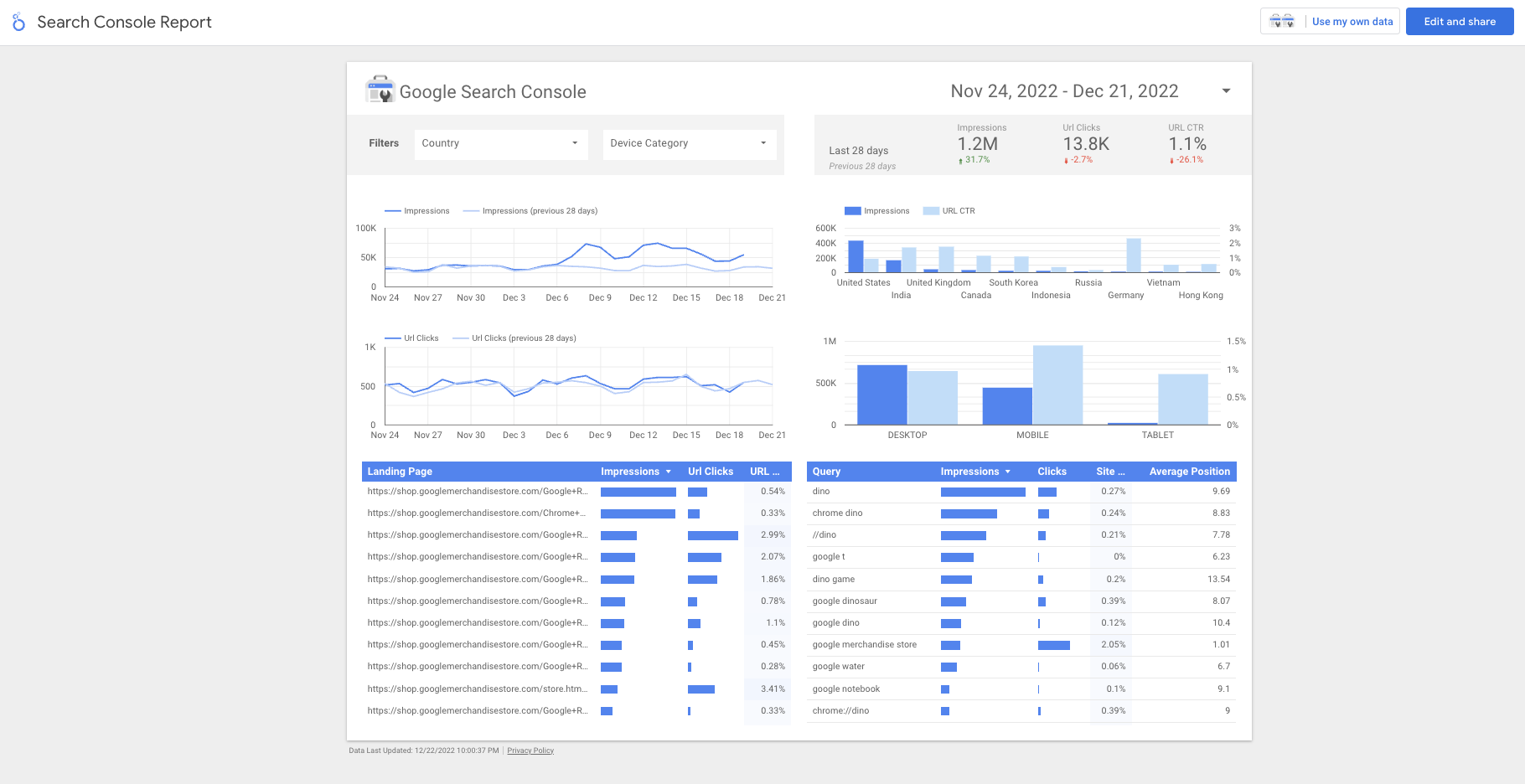
Formerly known as Google Data Studio, Looker Studio is a Google service that has grown considerably since its initial launch.
Though it is much more technical and requires more time investment to set up than most other tools on this list, it should be intuitive for staff familiar with Google Analytics.
If you’re on the fence, Looker Studio is completely free.
A major upside to this software is superior integration with other Google properties like Analytics, Search Console, Ads, and YouTube.
Like other reporting tools, it also allows third-party data integration, but the ability to query data from databases, including MySQL, PostgreSQL, and Google’s Cloud SQL, sets it apart.
You can customize reports with important KPIs with proper setup, pulling from lead and customer information. For eCommerce clients, you can even integrate sales data.
Though the initial setup will be much more technical, the ability to import templates saves time and effort.
You can also create your own templates that better reflect your processes and can be shared across clients. Google also has introductory video walk-throughs to help you get started.
5. Authority Labs
My Overall Rating: 3.2/5
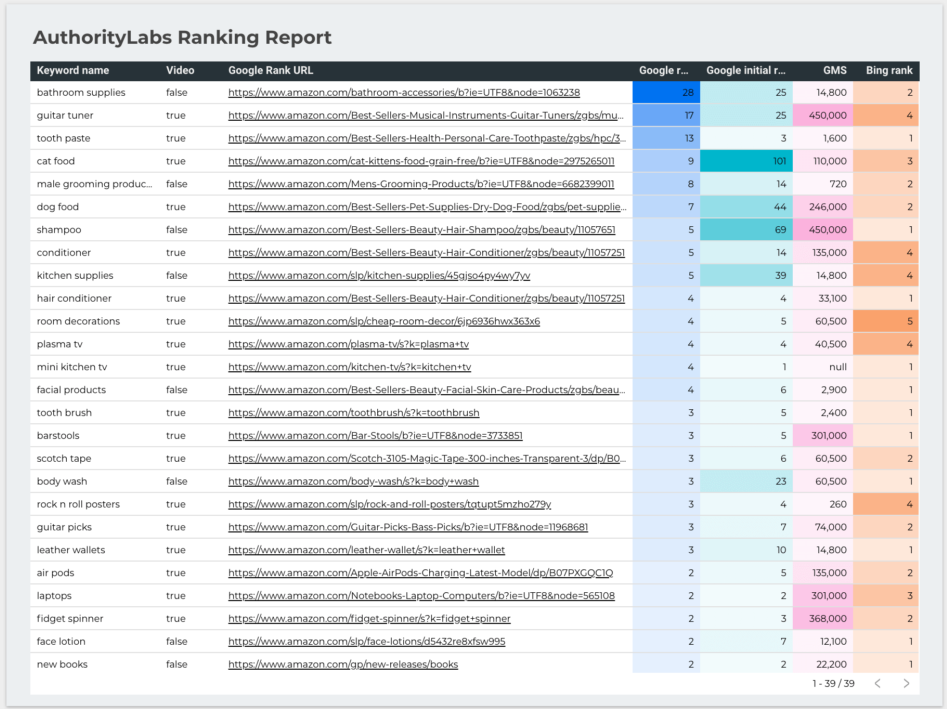
Authority Labs does the job if you’re looking for a straightforward position-tracking tool.
Authority Labs is $49 per month for unlimited users, though you will need to upgrade to the $99 per month plan for white-label reporting.
You can track regional ranking data, get insights into “(not provided)” keywords, track competitor keywords, and schedule automated reporting.
However, lacking other essential features like backlink monitoring or analytic data means you will have to supplement this tool to provide a full SEO reporting picture for clients.
Conclusion
There are many quality SEO reporting tools on the market. What makes them valuable depends on their ability to work for your clients’ needs.
SE Ranking has a fantastic cost-to-value ratio, while Looker Studio has advanced reporting capabilities if you can withstand a higher barrier to entry.
Agency Analytics prioritizes client access, which is a big deal if transparency is a core value for your agency.
Authority Labs keeps it lean and clean, while Semrush always adds innovative features.
These five are simply a snapshot of what is available. There are new and emerging tools that might have some features more appealing to your current clients or fill gaps that other software creates despite being a great solution.
Ultimately, you need to consider what matters most to your agency. Is it:
- Feature depth?
- Scalability?
- Cost-to-value ratio?
Once you weigh the factors that matter most for your agency, you can find the right SEO reporting tool. In the meantime, don’t shy away from testing out a few for a trial period.
If you don’t want to sign up for a full month’s usage, you can also explore walkthrough videos and reviews from current users. The most informed decision requires an understanding of the intricate details.
Featured Image: Paulo Bobita/Search Engine Journal
