
Over the past few years, automated bidding has become more consistent at delivering solid performance for search advertisers.
They no longer need to pick a CPC bid for every keyword and can instead set CPA or ROAS goals and let machine learning calculate the correct bid to achieve the stated goal for every single search that happens.
But in this move towards more hands-off campaign management, it still pays to know the details of how the underlying system works.
There is money to be saved by working hand-in-hand with automation to deliver even better results than the machine can deliver on its own.
When turning on automated bidding, an advertiser’s work is far from done.
While there are many levers for optimizing automated campaigns and bids, this chapter is about using Quality Score to increase an ad’s exposure while at the same time driving down its cost.
How Quality Score (QS) works to lower costs can be a mystery to new and old advertisers.
With thousands of advertisers vying for top rankings on the same keywords and many of them using the same tools for automating their bids, how does the search engine decide which ad gets the top spot and how much every advertiser pays?
QS is a big part of the equation, and something advertisers can influence, even when they may have stopped controlling the other lever that factors into this: the bid.
Why does Google use QS, how do they calculate it, and how can advertisers improve it?
I served on the QS team for AdWords while working at Google, so let me shed some light.
What Is Quality Score?
Quality Score is Google’s measure of how relevant a keyword has been based on data from past ad auctions.
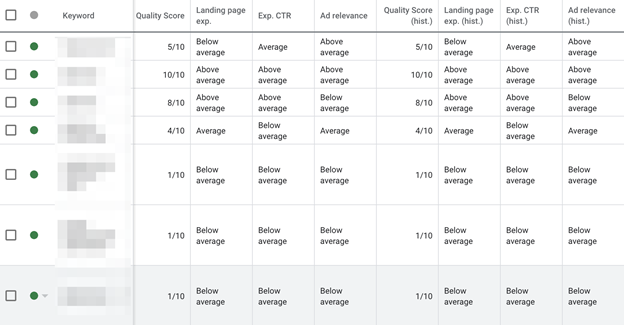
As soon as Google has enough data, keywords in an advertiser’s account are assigned a QS number between 1 and 10, with 10 being the best.
Before they have enough data, the QS will be shown as “—” in the interface or null (0) in some reports.
This number is a representation of the aggregate relevance of the keyword across the many auctions in which it participates.
It is meant to guide advertisers, but it is not used to rank ads.
What is used to rank ads behind the scenes of every ad auction is the auction-time QS that takes a lot of additional factors into account.
While the 1-10 number helps advertisers gauge how good a job they are doing at choosing the right keywords, writing good ads, and driving users to helpful landing pages, it’s the real-time QS that really matters.
The auction-time QS is more granular than a 1-10 number, but it is not shared with advertisers because it fluctuates all the time.
It is also different for every single search that happens on Google and depends on the context of those searches, like:
- Where the user is located.
- The time of day.
- The nature of the search term and its relationship to your keyword.
- And other factors.
On a side note, there are two types of automated bidding tools from Google.
One is called just “automated,” and the other is called “smart.”
The key difference is that smart bidding can set different bids for every auction, thereby taking the real-time QS factor into consideration and setting “smarter” bids that are more likely to match the advertiser’s target.
Why Does Google Have Quality Score?
All of that sounds complicated, so why does Google have Quality Score?
They use it to help show more relevant ads to users every time a search happens.
Google depends on revenue from advertising, so they have a big incentive to make sure users find the ads interesting and click on them.
After all, remember that the Google ad auction is based on a cost per click (CPC) model, so Google only makes money when ads are clicked.
If they allowed low-quality ads to take up space that could be filled with more relevant ones, they’d make less money in the short term and risk alienating users in the long-term.
While it can sometimes be a struggle to improve QS, it is useful for advertisers too because they like getting the type of high-quality leads that are possible with Google Ads.
For those leads to keep coming, advertisers have to do their part in picking relevant keywords, writing compelling ads, and directing users to high quality, helpful landing pages.
And when they do, it can lead to big wins by reducing their CPCs.
How Quality Score Is Calculated
Google has so much data about how users interact with search results that they can use “big data” with machine learning techniques to come up with a measure of the expected relevance of every ad, keyword, and landing page relative to every search that happens.
That’s a mouthful, so it’s called QS.
Rather than asking Google employees to judge the relevance of every keyword (which is how it used to work when Google Ads was invented), a process that would be hugely time-consuming, subjective, and prone to errors, they use the principle of the “wisdom of the crowds” to assign QS.
Specifically, their algorithms monitor what users interact with on the search results page (SERP) to make predictions about future interactions.
At its heart, QS is really a predicted click-through rate (CTR).
In the early days of AdWords before there was QS, they used CTR to determine if keywords were of low relevance and should be disabled, or had to pay more to participate in the ad auction.
Over time, as machine learning techniques became better, Google started to consider more factors when determining expected CTR, and the term Quality Score was introduced to replace the CTR component that had been part of the ad ranking mechanism before.
So the simplest way to think about QS is as a measure of how likely it is that users will find your ad relevant for what they just searched for and the chance of this resulting in a click on your ad.
Why Quality Score Matters
Advertisers care a lot about their QS because it is one of the factors used to decide:
- Which ads are eligible to enter the ad auction
- How the eligible ads are ranked
- What actual CPC the advertiser needs to pay
Entering the Auction
Google doesn’t want to show irrelevant ads, and it’s easy to understand why.
They charge advertisers primarily for clicks on their ads. If an advertiser uses a very high bid to hog a high position on the page with an irrelevant ad, it won’t get clicked on, and Google won’t make any money.
Search advertising is primarily about getting users to take action in response to an ad, and not merely building a brand.
For example, while a car manufacturer may think an ad for a new pickup truck would really resonate with someone looking up the score for the big game, that ad is unlikely to garner a click and hence is detrimental to Google Ads.
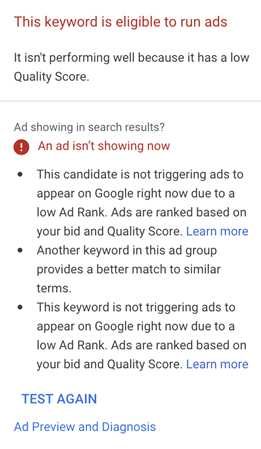
So when Google predicts a particular keyword to be very irrelevant and assigns it a very low QS, that ad may not even enter into the auction for most searches.
On the flip side, having a high QS ensures an ad is eligible to participate in more ad auctions, so it moves on to the ranking step.
Ad Ranking
Once Google has selected the keywords and ads that are likely to be relevant for a search, those are entered into the ad auction.
This is a split-second auction where Google evaluates:
- How much each one is bidding (max CPC).
- How relevant they are (QS).
- What other factors, like ad extensions, may give a boost to the CTR.
Each ad gets a score, and the resulting rank determines who gets their ad shown in the top slot and who misses out on the first page of results.
Advertisers benefit from a higher ad rank because ads in higher positions tend to get more clicks, and that means more leads and chances to make a sale.
But what happens when advertisers use automated bidding and instead of having a maximum CPC, have a target CPA, target ROAS, or another goal?
Even in those cases, the ad auction still works with a CPC bid. The automated bidding process simply translates the advertiser’s goal into a unique CPC bid for every auction.
CPC Discounting
Finally, the actual CPC, an advertiser, has to pay for a click is calculated based on the CPC. They would need to maintain their rank above the next ad in the auction.
This discount is the reason most advertisers have an average CPC that is lower than their max CPC.
Advertisers benefit from a higher QS because it means they have to pay less to maintain their position versus their next competitor.
In effect, the higher the QS, the less they have to pay for the same click.
This applies to all advertisers, even those using automated bidding.
If an advertiser has a great real-time QS for a particular search, the automated bidding process may determine that it can achieve the advertiser’s goal with a lower CPC (and save money), or it may find that keeping the bid higher might lead to more conversions.
Either way, the advertiser wins as a result of having worked to achieve high QS, something we’ll explain how to do next.
How to Improve Quality Score
You can improve QS by improving the relevance of your keywords, ads, and landing pages.
To focus your efforts, start by looking at the relative score of the three subcomponents of QS:
- Expected clickthrough rate.
- Ad relevance.
- Landing page experience.
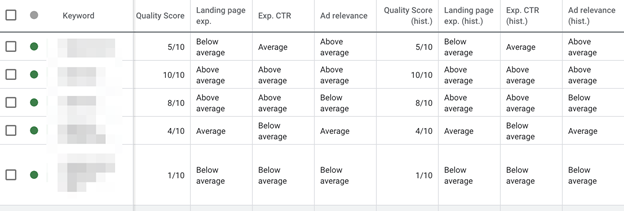
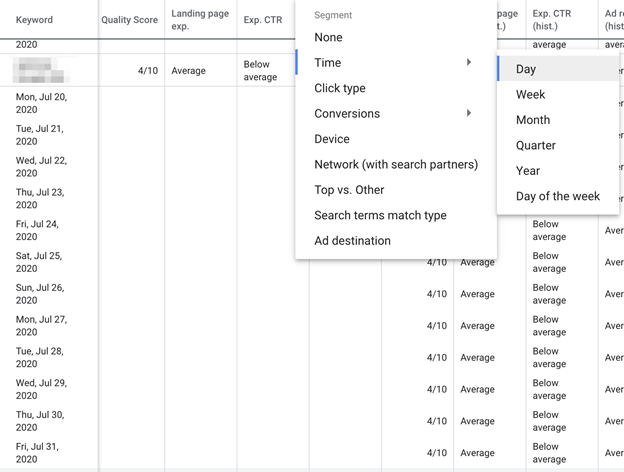
The value for each component will be Below Average, Average, or Above Average, so this can guide you toward what to optimize.
There are also historical values that can inform advertisers if recent changes have improved or hurt the various elements of QS.
Note that the historical field represents the value on the last day of the selected date range.
To see daily values, advertisers can turn on daily segments.
Expected Click-Through Rate
This is a measure of how likely your ad is to generate a click when the search term is exactly the same as your keyword.
This score is normalized to remove any effect from the ad’s position on the page, the presence of ad extensions, and other factors that aren’t a direct measure of relevance.
If it’s low, make sure the keyword is specific and relevant to what you’re offering.
Also, consider that it may only be relevant in a limited number of cases.
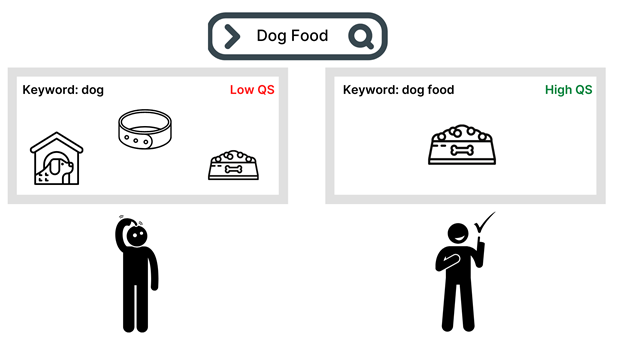
For example, a dog walking service may sometimes be relevant for the keyword “dog.”
However, there are many searches a user might do, including the word dog when they’re not looking for your service, but instead need a vet, dog food, or photos of dogs.
This will negatively impact the CTR of the keyword, and it may be time to consider adding more relevant keywords to the account.
If your keyword is relevant, but this score is low, try writing a stronger ad that is more compelling by highlighting its relevance to the keyword or by including a stronger call to action or a unique value proposition.
Ad Relevance
This component measures how well the message in your ad matches the keyword.
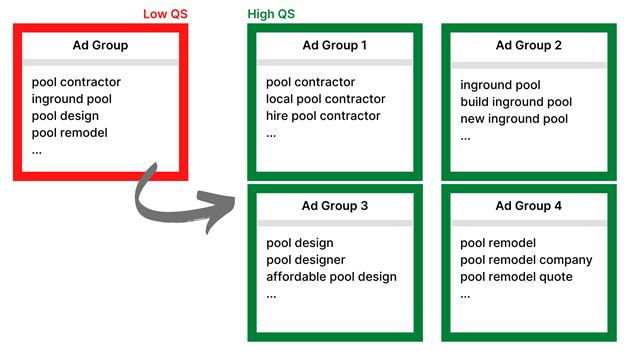
If this component is low, it may be because your ad groups cover too broad a range of themes.
A solution may be to split the ad group into smaller, more tightly themed ad groups.
For example, if you’re a pool contractor, keywords like “pool design,” “in-ground pool construction,” and “pool renovation” may all be highly relevant, but when they are all in the same ad group where they share the same ad text, some relevance is bound to be lost.
By having too disparate a list of keywords grouped in one ad group, you can cause the ad that is shown to be too generic or about the wrong theme.
Don’t just rely on dynamic keyword insertion, but take the time to properly structure your account by building separate ad groups for each set of closely related keywords.
In the example before, each of the three pool-related keywords is a different theme and should be placed in different ad groups.
Landing Page Experience
This final QS component measures what happens after a user clicks the ad.
When they arrive on your landing page, are they happy they came, or did they turn right around and leave?
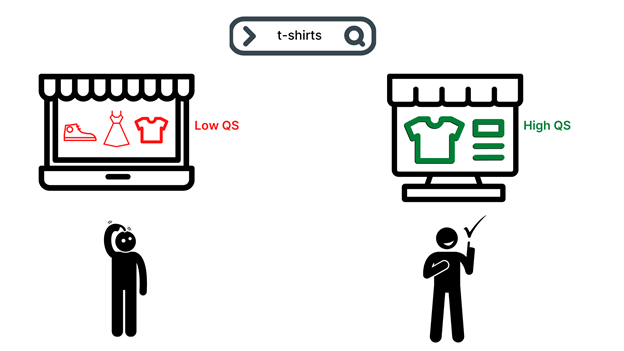
If this component is too low, make sure that the landing page is closely related to what the user searched for and delivers on the ad’s promise.
Usually, deep linking is better than taking someone to the homepage.
Make it easy to use the landing page on both mobile and desktop devices.
Make the page load fast and consider using an AMP.
Offer unique and valuable content and treat the user’s data with respect.
Conclusion
Along with the bid, Quality Score is a major part of how Google decides which ads to show and how to rank them.
Thus, a good QS can be just as beneficial as a high bid.
Ads with lower bids can beat those of higher-paying competitors by having better relevance.
This makes PPC very appealing because it’s not just the advertiser with the deepest pockets who always wins.
Monitor your QS and tackle optimizations when a low QS is holding you back from achieving your targets.
But at the end of the day, don’t get so bogged down that you lose track of the ultimate business goals related to revenue, profitability, and growth.
