
To many, URLs are just seemingly inconsequential addresses to webpages. However, how you structure URLs for SEO matters.
They may seem less important than the title and heading elements but URLs can be a powerful tool for achieving SEO success.
Are Keywords in URLs Used for Ranking?
There’s no clear answer to whether keywords in the URL are used for ranking. Here’s why.
2010: Approach Keywords in URL Like a User
In 2010, Google’s Matt Cutts published a video where he discussed keywords in the path name versus keywords in the filename.
The path name is:
/tools/wood/drills.html
The multi-hyphen filename is:
/tools-wood-drills.html
Cutts recommended approaching the problem from the point of what a user might prefer.
He stated that the multi-hyphenated version may appear spammy to users.
He then affirmed that there is no multi-hyphen algorithm that will penalize multiple hyphens, doubling down on the approach of looking at it from a user perspective.
Cutts implied that there was a user impact effect in the following statement:
“As far as search engine ranking, I’m not sure that there’s really that much difference between the two.
But you might want to be a little careful because of the user experience of having a really long filename that’s just stuffed with hyphens. People might not like it if they see dash, dash, dash, dash, dash, dash and so they might not click on it.”
Matt didn’t address the ranking factor aspect.
It could be that what he wanted to stress was that the user experience part – what people would click on in the search engine results pages (SERPs) – was more important than any ranking factor-related benefit.
2011: Keywords in Domain are Ranking Factors
In 2011, in a somewhat related video about keywords in domains, he stated that Google was thinking about turning down the influence of keywords in the domain.
Like keywords in URLs, keywords in domains were also ranking factors.
But they were downplayed in terms of how important they were.
Matt downplays their ranking factor role in favor of other factors related to user experience and marketing – which is similar to how he also downplayed keywords in the URL.
2016: Google Says Keywords are Very Small Ranking Factor
In a Webmaster Central hangout in January 2016, John Mueller did in fact acknowledge that keywords in the URL were a ranking factor.
However, he minimized the importance of that as a ranking factor, describing its influence as being “very small.”
Mueller:
“I believe that’s a very small ranking factor, so it’s not something I’d really try to force. And it’s not something where I’d say it’s even worth your effort to kind of restructure your site just so you can include keywords in the URL.”
Calling it “very small” lines up well with what Cutts had been saying all along – that there are other areas of a site that are more important to focus on.
2017: Keywords in URL are Overrated
Mueller continued to minimize the importance of keywords in the URL as a ranking factor.
In 2017, he called them overrated.
Keywords in URLs are overrated for Google SEO. Make URLs for users. Also, on mobile you usually don't even see them.
— 🍌 John 🍌 (@JohnMu) March 8, 2017
2018: Don’t Worry About Keywords in URL
As recently as 2018, Mueller continued to downplay keywords in URL as a ranking factor, saying that they’re not even seen by users.
(Presumably, he’s referencing URLs invisibility in the Google SERPs.)
I wouldn't worry about keywords or words in a URL. In many cases, URLs aren't seen by users anyway.
— 🍌 John 🍌 (@JohnMu) December 6, 2018
Keywords in a URL may be a ranking factor but judging from Googler statements, it’s a very minor one.
Are Keywords in Bare URL Links Used as Anchor Text?
There’s an idea around that if someone links to your site with just the link, Google will at least use the keywords in the URL as anchor text, which will help that site rank better for that anchor text.
That kind of link is sometimes called a naked link.
It’s called naked because it is a link in the form of a URL instead of hidden in an anchor text.
Bare URL:
http://www.example.com/
URL in an anchor text:
Click here!
Mueller said (How Google Handles Naked Links, September 2020) that naked links do not pass anchor text information.
This is what he said:
“From what I understand, our systems do try to recognize this and say well, this is just a URL that is linked, it’s not that there’s a valuable anchor here.
So we can take this into account as a link but we can’t really use that anchor text for anything in particular.
So from that point of view it’s a normal link but we don’t have any context there.”
Can Keywords in a URL Increase Clicks From SERPS?
There’s an old SEO idea that says using keywords in the URL will help stimulate a higher click-through rate (CTR) from the search results pages (SERPs).
This might have been true in the past.
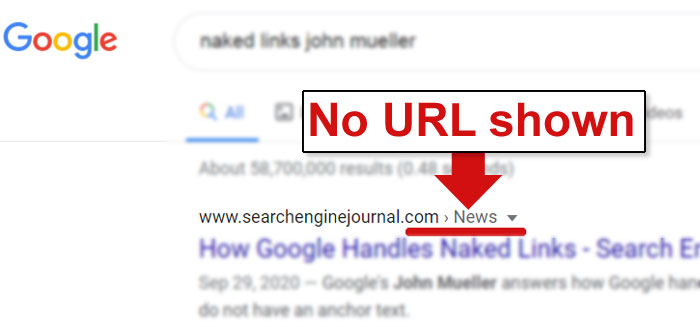
It’s less true today, particularly for sites that use breadcrumb navigation and/or breadcrumb navigation structured data.
Google is instead using the category name in the search results for sites that feature breadcrumb navigation or breadcrumb navigation structured data.
The keywords in the URL are not visible.
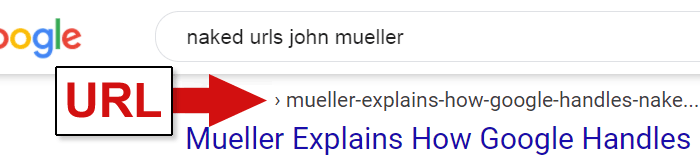
For sites that don’t use breadcrumb navigation or the breadcrumb structured data, Google does display the URLs with keywords in them.
But Google does not highlight them.
If Google did highlight the keywords in the URL, it might have helped to draw the eye to the listing—but this is not the case.
What Use Are Keywords in a URL?
Aside from a very minor possible ranking factor weight, there are clear benefits to site visitors for keywords in a URL.
Keywords in the URL can help users understand what a page is about.
Even though those keywords might not always show up in the SERPs, they will show when linked as a bare URL.
Example of a bare URL:
https:www.example.com/widgets/best-widgets
When in doubt, optimize for the user because Google always recommends making pages useful for users.
This tends to align with the kinds of webpages Google wants to rank.
Best Practices for URL Structure
Standardize Your URLs in Lowercase
Most servers don’t have problems with mixed case URLs.
Even so, it’s a good idea to standardize what your URLs look like.
URLs are commonly written in the lowercase “like-this-dot-com” as opposed to mixed case “Like-That-Dot-Net” or in all uppercase “LIKE-THIS-DOT-BIZ.”
It’s best to do that as well if only because that’s what users expect and it is easier to read than all caps.
Keeping your URLs standardized will help prevent linking errors within the site and from outside of the site, too.
Use Hyphens, Not Underscores
Always use hyphens (-) and not underscores (_) because underscores cannot be seen when the URL is published as a bare link.
Here’s an example of how underscores in links are a bad practice:

Use Accurate Keywords in Category URL Structure
Using a less relevant keyword as the category name is a common mistake that comes from choosing the keyword with the most traffic.
Sometimes the highest traffic keyword isn’t necessarily what the pages in the category are about.
Select category names that truly describe what the pages contained within it are about.
When in doubt, pick the words that are most relevant to users who are looking for the content or products that are contained within those categories.
Avoid Using Superfluous Words in URL Structure
Sometimes a CMS might add the word /category/ into the URL structure.
This is an undesirable URL structure.
There is no justification for a URL structure that looks like /category/widget/.
It should simply be /widget/.
Similarly, if a better word than “blog” exists for telling users what to expect out of a section of your site, then use that instead.
Words guide users to content they are looking for.
Use them appropriately.
Future Proof Your URLs
Just because a date is in the title of the article doesn’t mean it belongs in the URL.
If you intend to create a “Top xxx for 20xx” type of post, it is generally a better practice to use the same URL year after year.
So instead of:
example.com/widgets/top-widgets-2020
Try removing the year and simply go with:
example.com/widgets/top-widgets
The benefit of updating the content and the title year after year and keeping the same URL is that all of the links that went to the previous year of content remain.
Anyone who follows the old links will find the updated content.
It’s possible to create an archive of previous years, as well.
That’s up to you.
Trailing Slash or No Trailing Slash
A trailing slash is this symbol: [ / ].
The Worldwide Web Consortium (W3C) – the group responsible for web standards – recommends best practice is that the trailing slash should be used to indicate a “container URI” for denoting parent/child relationships.
(A URI is used to identify resources in the same way as a URL, except those resources may not be on the web.)
A parent/child relationship is when a category contains numerous webpages.
The category “container” is the parent and the webpages contained within it are the children documents that are contained within the category.
This is what the W3C states in the section called, Linked Data Platform Best Practices and Guidelines:
“2.6 Include a trailing slash in container URIs
When representing container membership with hierarchical URLs, including the trailing slash in a container’s URI makes it easier to use relative URIs.”
In HTML, the trailing slash is supposed to indicate the presence of a directory or a category section.
In 2017 Google’s John Mueller tweeted that apart from the home page, a URL with and a URL without a trailing slash are different web pages.
For example:
https://www.example.com/widgets
can be a different page from:
https://www.example.com/widgets/
/widgets denotes a page while /widgets/ represents a directory or category section.
I noticed there was some confusion around trailing slashes on URLs, so I hope this helps. tl;dr: slash on root/hostname=doesn't matter; slash elsewhere=does matter (they're different URLs) pic.twitter.com/qjKebMa8V8
— 🍌 John 🍌 (@JohnMu) December 19, 2017
Mueller’s tweet in 2017 reaffirmed an official Google blog post from 2010 (To Slash or Not to Slash) that made similar statements.
However, even in that 2010 blog post, Google pretty much left it up to publishers to decide how to use trailing slashes.
But Google’s adherence to a common trailing slash convention reflects that point of view.
Google Is Flexible on Trailing Slash Best Practices
Here’s an example of how Google codes URLs.
This URL features the .html at the end and is clearly a web page:
https://webmasters.googleblog.com/2020/11/timing-for-page-experience.html
This URL ending with a trailing slash is a category page:
https://webmasters.googleblog.com/2020/11/
And this is the container for the month year of 2020:
https://webmasters.googleblog.com/2020/
The above examples conform with the standard recommendation to use trailing slashes at the end for a category directory and to not use it at the end of the URL when it’s a web page.
Google URLs Lacking Trailing Slash Altogether
However, other sections published by Google don’t conform to that standard.
The following examples are categories and webpages that do not use a trailing slash.
- This is a URL for a category section:
https://developers.google.com/analytics - This is a web page:
https://developers.google.com/analytics/devguides/integrate - And this is another web page:
https://developers.google.com/analytics/devguides/collection/firebase/android
All of those webpages and category pages look similar because they don’t use a trailing slash.
Google Is Flexible in Use of Trailing Slash
The above examples show that yes, there are best practices.
But this is one of those best practices that can be ignored.
As far back as 2010, Google’s advice on the use of trailing slashes was flexible.
“…you’re free to choose whichever you like.”
Perhaps the most important point about trailing slash in the URL is that you choose one way of doing it and sticking with that so you can avoid confusion.
It also makes it easier to redirect non-trailing slash URLs to the trailing slash, etc.
URLs for SEO Purposes
The topic of SEO-friendly URLs is deeper than one may suspect, with many nuances to it.
While Google is increasingly not showing URLs in the SERPs, popular search engines like Bing and DuckDuckGo still show them.
URLs are a good way to signal to a potential site visitor what a page is about.
The proper use of URLs can help improve click-through rates wherever the links are shared.
And keeping URLs shorter makes them user friendly and easier to share.
Webpages that make it easy to share are helping users make the pages popular.
Don’t underestimate the power of popularity for ranking purposes because some of what search engines do is to show users what the users are expecting to see.
The URL is a humble and somewhat overlooked part of the SEO equation but it can contribute a great deal to helping your pages rank well.
More Resources:
- Multilingual SEO: A Guide to URL Structure
- An SEO Guide to URL Parameter Handling
- Advanced Technical SEO: A Complete Guide
Image Credits
Featured image and screenshots by author, November 2020
