
A while ago I took a quick look at Amazon.com navigation menus evolution and a few really interesting questions popped up after I published the post. I am going to discuss them here weekly, so please share your thoughts and opinions.
The first question to discuss is the preferred ordering criteria of the long category list in the menus. Assuming all the categories have no logical relation (they are of the same topic layer, so can’t be grouped semantically), we are basically offered two options: to list them alphabetically or based on user choice / popularity.
Alphabetical Ordering
The most important thing about alphabetical ordering is that it makes the list predictable. A user sees what he expects and where he expects to see.
Alphabetical ordering is most often used when:
- there is not better way to order the items (no logical relations between the items listed, no hierarchy: e.g. from small to large, etc);
- you have to organize a huge list of data:
Alphabet is best used when you have enormous amount of data. For example words in a dictionary or names in a telephone. As usually everybody is familiar with the Alphabet, categorizing by Alphabet is recommendable when not all the audience is familiar with different kind of groupings or categories you could use instead.
As most of us have already memorized the twenty-six letters of the alphabet, the organization of information by alphabet works when the audience or readership encompasses a broad spectrum of society that might not understand classification by another form such as category or location.

Ordering by Popularity
In this case categories are ordered based on users’ priorities. This method seems to cater for the need of the majority allowing them to find what they want quicker. The common example of this type of ordering is listing countries – when we are always recommended to put the U.S. on the top of the list, with the rest of the countries below it in alphabetical order.
In this case users are given what they want to see (but for some the list might appear to be randomized):
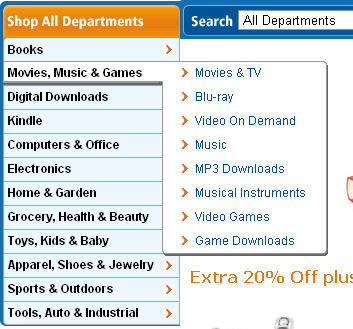
(Note: I have no confirmation that Amazon is using category popularity as the ordering factor)
