

Twitter is one of the most dominant social networks in the world today, with more than 300 million active monthly users.
If you’re looking to grow traffic to your WordPress site, it only makes sense to tap into such a huge user base.
After all, wouldn’t it be great if you could push traffic to your website by sharing the content you’ve been working so hard on?
Or maybe grow your Twitter following with fans of your website, adding legitimacy to your brand that can only help your digital marketing goals?
That’s where Twitter plugins for WordPress come in.
There’s no shortage of plugins out there promising seamless Twitter and WordPress integration, but not all plugins are created equal.
Here are some of the best Twitter plugins for WordPress today.
AccessPress Twitter Feed Plugin
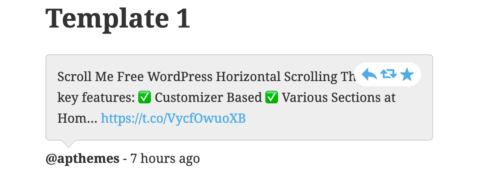

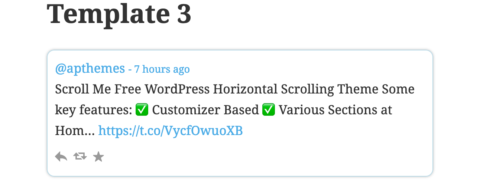
AccessPress Twitter Feed is one of the most popular Twitter plugins for WordPress today, and it’s easy to see why.
For starters, the plugin is extremely user-friendly and easy to use, with setup taking just a few minutes.
The ease of use does not come at the cost of features, though, as AccessPress Twitter Feed is one of the most comprehensive and customizable twitter plugins available for WordPress today.
This powerful little plugin allows you to display real-time tweets from any Twitter account on your WordPress site, either in classical feed form or in slider form.
The premium version of this product even allows you to use multiple Twitter accounts.
Another thing WordPress users are bound to love is how good this plugin looks.
The free version offers three great-looking themes, while the premium upgrade gives you 12 beautifully crafted themes to choose from.
With all these features, AccessPress Twitter Feed is a lightweight plugin that packs a heavyweight-level punch.
Revive Old Post Plugin
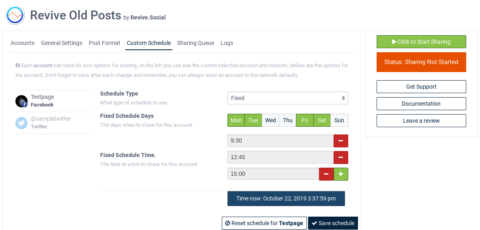
It should be pretty obvious what the Revive Old Post (ROP for short) Twitter plugin is all about, just based on the name.
If you are a WordPress user looking to get a little more run out of your past content, ROP is the plugin for you.
The benefits aren’t limited to just older content.
ROP helps WordPress users by automating the tedious task of sharing all your content on social media, Twitter included.
ROP can be useful for anybody looking to boost website traffic and gain social media followers.
Users can schedule when they want to share older and newer content to social media, making sure that their existing followers are always engaged.
The plugin also allows you to set specific filters when it comes to what posts are going to be shared automatically.
For example, you can filter which posts to share based on the post’s age and category.
ROP even automatically generates a hashtag for your shares, based on the post’s tags and categories.
If you’re wondering if sharing content on social media can really help boost your website’s traffic, now you can find out for certain.
ROP shares include a UTM tag that can help you objectively see which social media shares generate the most traffic for you.
With all the features, Revive Old Post just may be what your WordPress site needs to revive its traffic numbers.
Rotating Tweets Plugin

Just as the name implies, Rotating Tweets is a Twitter plugin that shows tweets one at a time instead of all at once.
This is particularly useful when you are trying to save space on your WordPress site.
Instead of a feed that takes up valuable real estate on your website, you will only need to allocate enough space to show one tweet.
The plugin is also extremely customizable.
You can choose what kind of tweets to show on the rotating feed, whether it’s just your favorite tweets or the entire user timeline.
You can also choose whether to include retweets and replies, customize the format in which the tweets appear, the type of rotation, and the speed of the rotation itself.
Want to show tweets from more than one account? No problem.
The plugin supports multiple users, however, so you can show all the tweets you want.
And the best part?
Everything is extremely easy and simple to set up, with an intuitive user interface.
Rotating Tweets is also reliable, working even when the Twitter website is down.
The plugin also automatically readjusts its size as your page resizes, making sure that it always looks like it belongs on your website.
Oh, and did we mention that Rotating Tweets is also GDPR-friendly?
The default settings of the plugin do not collect – or send – any user data to the Twitter website.
All these features make Rotating Tweets a Twitter plugin any WordPress user should consider adding to their site.
FS Poster Plugin
FS Poster is a plugin for WordPress that lets you share posts to up to 12 social networks at the same time, Twitter included, automatically.
Plus, this amazing plugin is loaded with tons of features that can help any WordPress user share their content, grow their following, and expand their reach.
With FS Poster, you can schedule when to post what content to which social media network.
If that sounds confusing, that’s because it can be.
It can be nearly impossible to keep track of every scheduled posting.
Luckily, FS Poster offers a calendar view feature that will allow you to see exactly what posts you have scheduled for when and where.
This can be especially useful because FS Poster lets you use unlimited accounts on all social media platforms, so having an organized view is crucial.
Aside from scheduled posts, this powerful plugin can also share your new content automatically to Twitter or your other chosen social media networks.
You can filter what content you want to share by post categories.
For example, you might want to share posts in a specific category only to Facebook, and posts in a different category only to Twitter.
FS Poster also allows you to customize the post URL for the content that you share.
And if you’re wondering if all your posting is really working, or if sharing to multiple social media networks is making a difference in your reach, FS Poster has you covered.
With the Insights Tool, you can track what how many visits specific posts get from different social networks.
Having this data will allow you to adjust and optimize your sharing strategy, making it an invaluable part of what FS Poster has to offer.
For anybody serious about using Twitter plugins on their WordPress site to help build traffic, FS Poster will rank highly on any list.
Custom Twitter Feeds Plugin
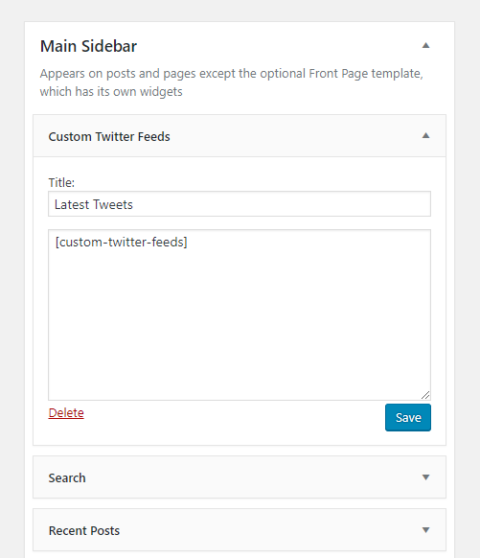
It should come as no surprise that the Custom Twitter Feeds plugin is extremely customizable and automatically adapts to your WordPress theme’s look and style.
What might surprise you is that this terrific plugin goes way beyond its looks.
Custom Twitter Feeds is one of the best Twitter plugins for WordPress, and there’s no shortage of reasons for this.
One of the biggest reasons for its popularity is the fact that unlike some other plugins that use iframes, Custom Twitter Feeds embeds your Twitter feed directly onto your website.
This means tons and tons of search engine crawl-able content onto your site for SEO purposes.
You can also display feeds from multiple users, letting you add even more valuable SEO content to your website.
What’s more, Custom Twitter Feeds can help you build visitor engagement.
Visitors on your website will be able to reply and like your tweets directly.
They will also follow your accounts straight from your website.
Unsurprisingly, the plugin is optimized for mobile, and will automatically respond to whatever screen size visitors use.
Oh, and did we mention that the plugin loads tweets super fast?
Nobody likes slow-loading plugins, and with post caching, Custom Twitter Feeds makes sure that everything is running at lightning speed.
Last but not least, the support team at Custom Twitter Feeds is second to none.
Reviews consistently laud the customer service and support the plugin offers, with many reviewers saying the support for the free version of Custom Twitter Feeds is even better than the support for premium versions of other Twitter plugins for WordPress.
Official Twitter Plugin
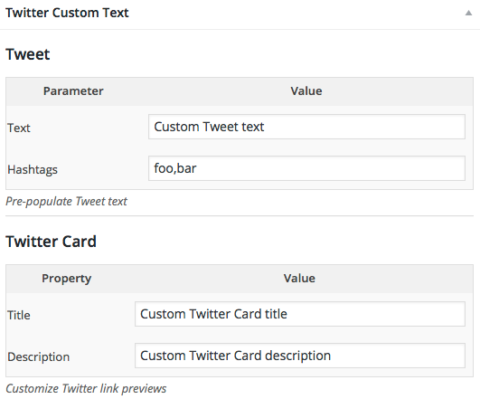
We can’t talk about the best Twitter plugins for WordPress without THE official plugin from Twitter itself.
Using this plugin, you can embed your Twitter content directly to your site, and customize different aspects of your Twitter feed’s appearance so that it seamlessly integrates with your sites design.
In fact, you can choose from dark or light backgrounds, change the color of your links and borders, and match the embedded text style to your WordPress theme.
The official Twitter plugin for WordPress also lets you add a Tweet button to your posts, so your site visitors can easily share your content.
More shares means more web visibility.
And isn’t that what we’re all after?
There’s even an option to add a follow button so your site visitors can become your new Twitter followers.
If you are running Twitter advertising campaigns, the official Twitter plugin can help you add a Twitter website tag to your WordPress sites so you can monitor how your campaigns are doing.
It can also help you craft tailored audiences so you can better suit the Twitter ads for your WordPress site visitors.
Use Twitter to Improve Brand Awareness and Better Engage with Your Sites Visitors
If you’re serious about growing your WordPress site’s traffic, you can’t afford to ignore Twitter.
There is a huge, untapped audience of more than 300 million users just waiting to be wowed by your content.
Whether you’re trying to grow your Twitter following by sharing tweets on your website or trying to reach a new audience by sharing your content on Twitter, both are extremely effective digital marketing practices.
Don’t miss out on the Twitter gold rush.
Try one of these plugins today!
