How to Highlight Your Site Listing in Google SERPs

Do you feel inspired each time you see your site within Google SERPs as you search? I bet you are! Here’s a quick tip on how to easier highlight your domain within Google results page whenever you search (by PoundBangWhack.com):

1. Install the Greasemonkey script (You will need to install Greasemonkey before that);

2. Make sure it works: search for anything in Google and make sure all Google results are highlighted in red;

3. Edit the userscript to specify your domain name; for that:

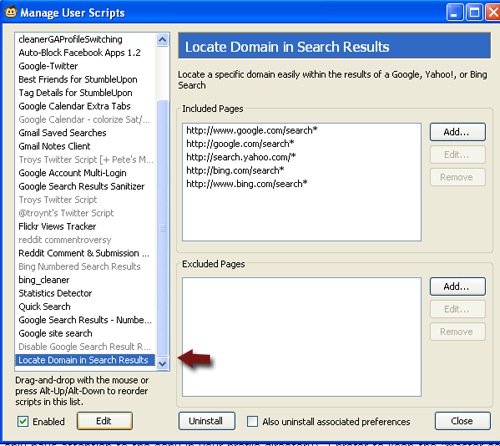
  • Select Tools -> Greasemonkey -> Manage user scripts;
  • Choose “Locate domain in search results” in the left-hand pane;
  • Click “Edit”. This should open the installed version of the script in your favorite text editor. (If it doesn’t, choose any text editor to open the script);
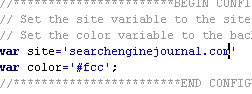
Locate domain script - edit

  • Add your domain name

Locate domain script - edit

Note: you can also edit the color to highlight the listing.

Important update: thanks to Alex Hall, the script now allows to highlight multiple domains.

  • You are done! You will now see your domain each time it pops up within Google SERPs:
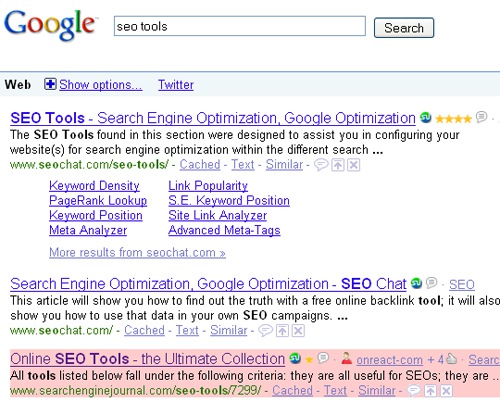
Locate domain script - result

Known bugs: URLs that have the domain name in them, but are not the primary domain of the site are also highlighted.

Written By:
PG

Ann Smarty | My Blog Guest | @seosmarty

Ann Smarty is the blogger and marketer specializing in SEO consulting and guest blogging. Ann's expertise in blogging and tools serve as a base for her writing, tutorials and her guest blogging project, MyBlogGuest.com

More Posts By

Comments

  1. larry says:

    I have been using a Firefox extension called Highlight My Site for the same purpose. Maybe I’ll give this one a try to see if I like it better.

    • Cliff says:

      I was using Highlight My Site but it isn’t compatible with FireFox 3.5. I’ll give this a try!

  2. Stoyan says:

    Yeahhh!!!!!
    This is great tool. I am “browsing” on serp pages more that 100 times of the day. This definitely will make things more comfortable.
    Thanks

  3. Josh says:

    how would you add multiple domains to this script? separate with a space or comma?

  4. benenuts says:

    Good one, i’ll be interested in knowing how to add multiple site to the script? do we need to set up a table?

  5. Mark says:

    @Josh, @benenuts
    I actually wrote this GM script and was thrilled to see a site like Search Engine Journal post it today and read all the positive feedback. I am currently working on some revisions to it including fixing the bug listed as adding the ability to highlight multiple sites. You can bookmark my homepage for this script at http://www.poundbangwhack.com/greasemonkey/highlight-domain-in-search-results/ and watch for changes. Glad to hear the you like it. You can post comments on that page if you have any other ideas or features you’d like to see. Thanks again.

  6. infoweblink says:

    Thanks for this info, i like and excellent tips!

  7. Lee Johnson says:

    Looking forward to the multiple sites Mark. In fact I cant wait !!!!!!! Great script and is going to get even better.

  8. Tag44 says:

    Nice script Ann thanks for the sharing such a lovely info with us. I have downloaded the script and now i am going to see my site highlighted whenever i surf for my site keywords.

  9. Jeff Laurie says:

    Question! (Naive question?) — Will this script highlight a domain within Google’s SERP for all searchers?

  10. Ann Smarty says:

    @Alex, that’s awesome news. Mark has updated the script and I gave your site the credit in the post itself.

  11. GENIUS. I may be an oddity for not having known about this kind of massive time saver, but I’m a HAPPY oddity now that I’ve installed this and tested it. Ann, thanks for posting this article! Alex, thanks for the multi-domain script!

    Client SERP review is going to be so much faster and I might even enjoy it from now on!!!

  12. Tom Harvey says:

    Ann

    thanks for the info, will get the script installed and see how I go!

    Tom

  13. Just wanted to know if this plugin shows the rank of the webpage in the SERP of google. I knew an extension that does it, but unfortunately it doesn’t work for FF3.5 (highlight my site : http://freesoftware.cr.uz ).