

Every time you use a website like Google or ChatGPT, your browser and a collection of backend services have a long and surprisingly candid conversation about what you asked for. That conversation sits in plain sight in the Network tab of Chrome DevTools, a single F12 away, and most people never look at it. I have spent an unreasonable amount of my time staring at this data, and want to share what I’ve learned with you.
Staring into this network abyss is what turned up a Google search exploit worth a $13,337 bug bounty. It provided actual data that gave some insight into how Google was working, including not only names of its parameters, but actual values for things such as Google’s site_quality_score, and Google’s own rq_semantic_class. It also led me to be one of the first to discover the different source sets ChatGPT pulls its results from, and later, the freshness windows it asks for when it searches, and evidence that Reddit is still being read by ChatGPT just as much as ever, even though it has largely stopped being cited.
None of this needs a data science team. It needs curiosity, a browser, and these days an AI agent willing to do the tedious bits. The point is not that network data is cool (it is, mildly). The point is that knowing things your competitors don’t is the closest thing SEO has to a sustainable edge, and this is one of the last places those things are still lying around for free.
Why Anyone Would Do This To Themselves
“Why?” is a reasonable question, and one I suspect most SEOs ask the bathroom mirror most mornings. Anyone that knows me, knows I enjoy playing games, particularly video games, and I love a new challenge of figuring out how to win. That is the game for me.
Case in point, my best friend recently taught me backgammon. As with any new game, I learned the rules and then lost repeatedly; learning the rules of a game is not the same as knowing how to play well. I think I lost around 20 or 30 games on the trot. They say 50. The figure is contested. At some point during this run of humiliation, rather than simply enjoying a pleasant board game like a well-adjusted adult, I started figuring out how to get small edges. For instance, working out which distances on the board are actually reachable from two dice, and how likely each one is. That matters, because it tells you where you need to block your opponent and where you can safely leave a piece exposed.
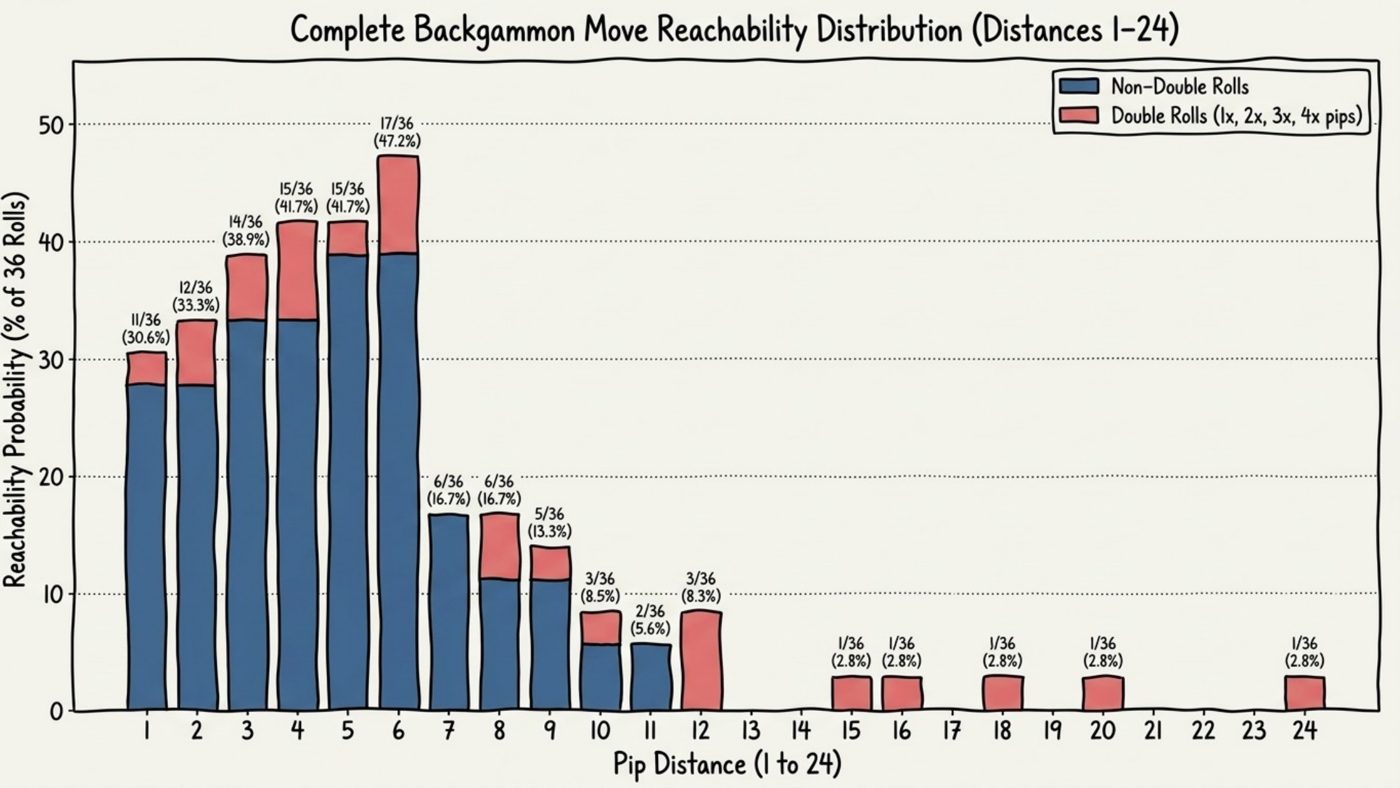
As I see it, SEO works the same way. You can learn every best practice in the guide and you will still be bad at it until you have experience and learn how to play the game.
Optimization is the sum of cumulative gains and edges. Gaining this knowledge allows you to stack 1% on your competition over time in a way that is impossible for that to imitate. This isn’t some “hack” technique like a listicle they can copy in 10 minutes.
The Paper, Scissors, Rock Analogy
I discovered an analogy that I know others find useful to explain this approach to clients or managers with the game paper, scissors, rock.
Here’s the scenario:
Imagine you are playing endless rounds against someone whose stated strategy is to play rock every single time. What is the optimal way to play against them?

Most people immediately say “play paper every time” is the optimal way to approach this problem, and they would be wrong. While you will win the first five or ten games, your opponent, who is not a houseplant, notices they are losing every game and changes what they are doing. This then steals any advantage you have and puts you back onto an even footing.
The optimal approach is to play randomly but play paper slightly more often. Your “optimization” will likely not be perceptible by your opponent, and with no obvious reason to adapt, you slowly, quietly carve out an ever-increasing lead over time.
Blackhat Vs. Whitehat; Expected Value (EV)
The paper, scissors, rock analogy essentially encapsulates the argument between blackhat and whitehat SEO approaches.
Blackhat SEO absolutely works, and you can make a great deal of money. In the analogy we outlined above, blackhat SEO is the “playing paper every time” strategy. It is effective; your short-term expected value (EV) is high, but you force the other side (Google, ChatGPT, whoever) to change what they do, at which point your advantage evaporates and occasionally takes your domain with it.
Whitehat SEO is the “play paper slightly more” approach, which focuses on generating value without anyone needing to change the rules, and to stack it up over time.
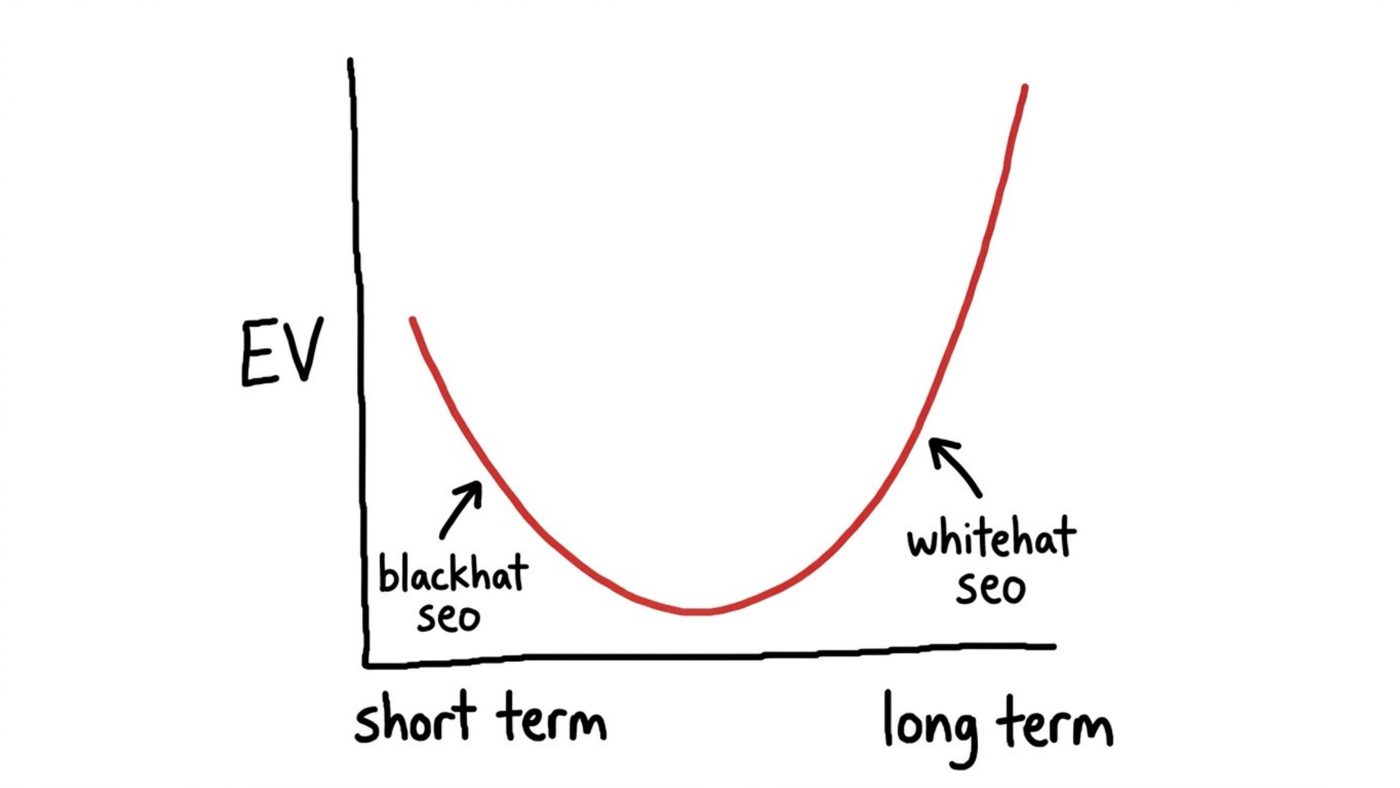
Network data is one of the best places I know to find this kind of information to give you an edge over the competition.
What Network Data Actually Is
When you use a web app like Google or ChatGPT, your browser is sending data to backend services and receiving data back. The least technical way I can describe it is shipping crates traveling to and from a warehouse.
Some crates have clear labels, so you know roughly what is inside. Some have labels that make no sense whatsoever. And some you can simply open, look inside, and infer what is going on from the contents.
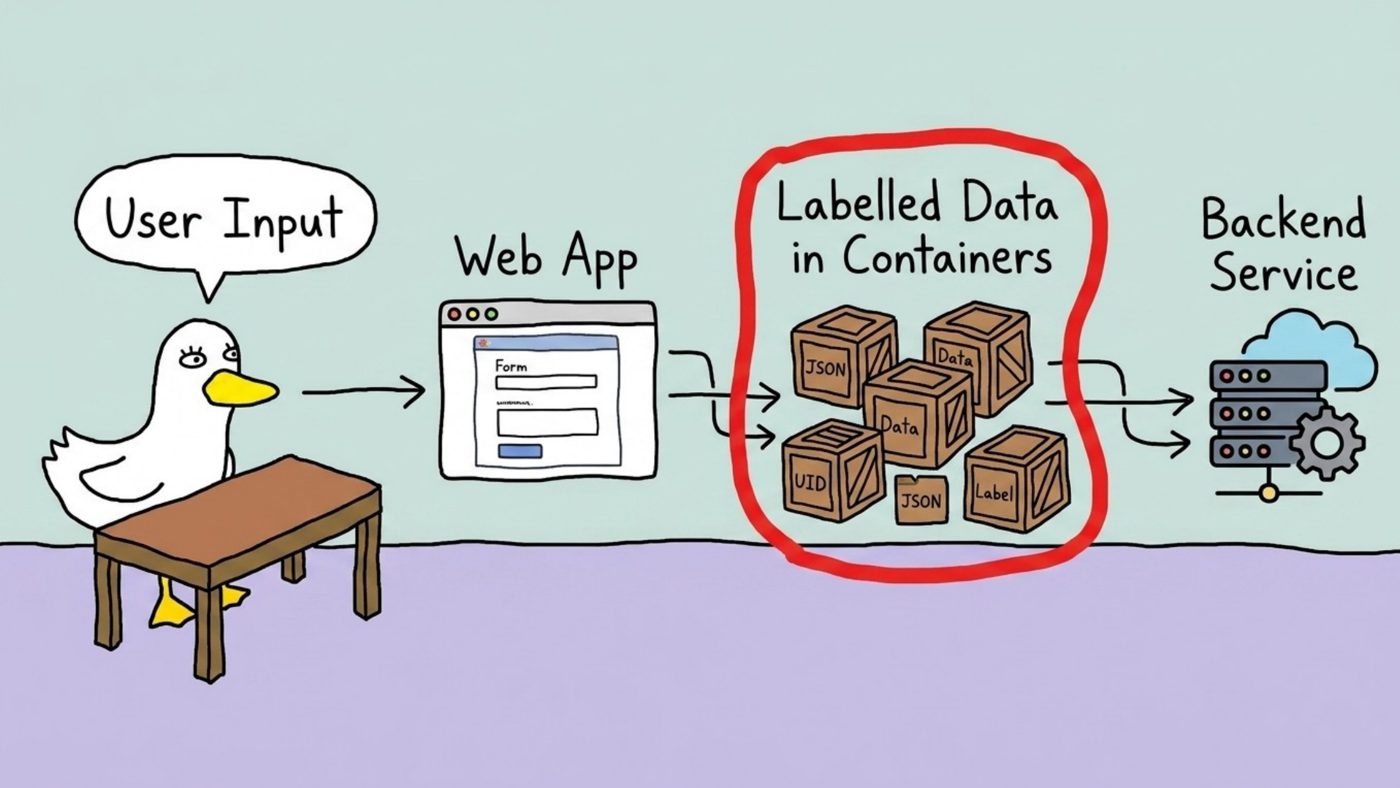
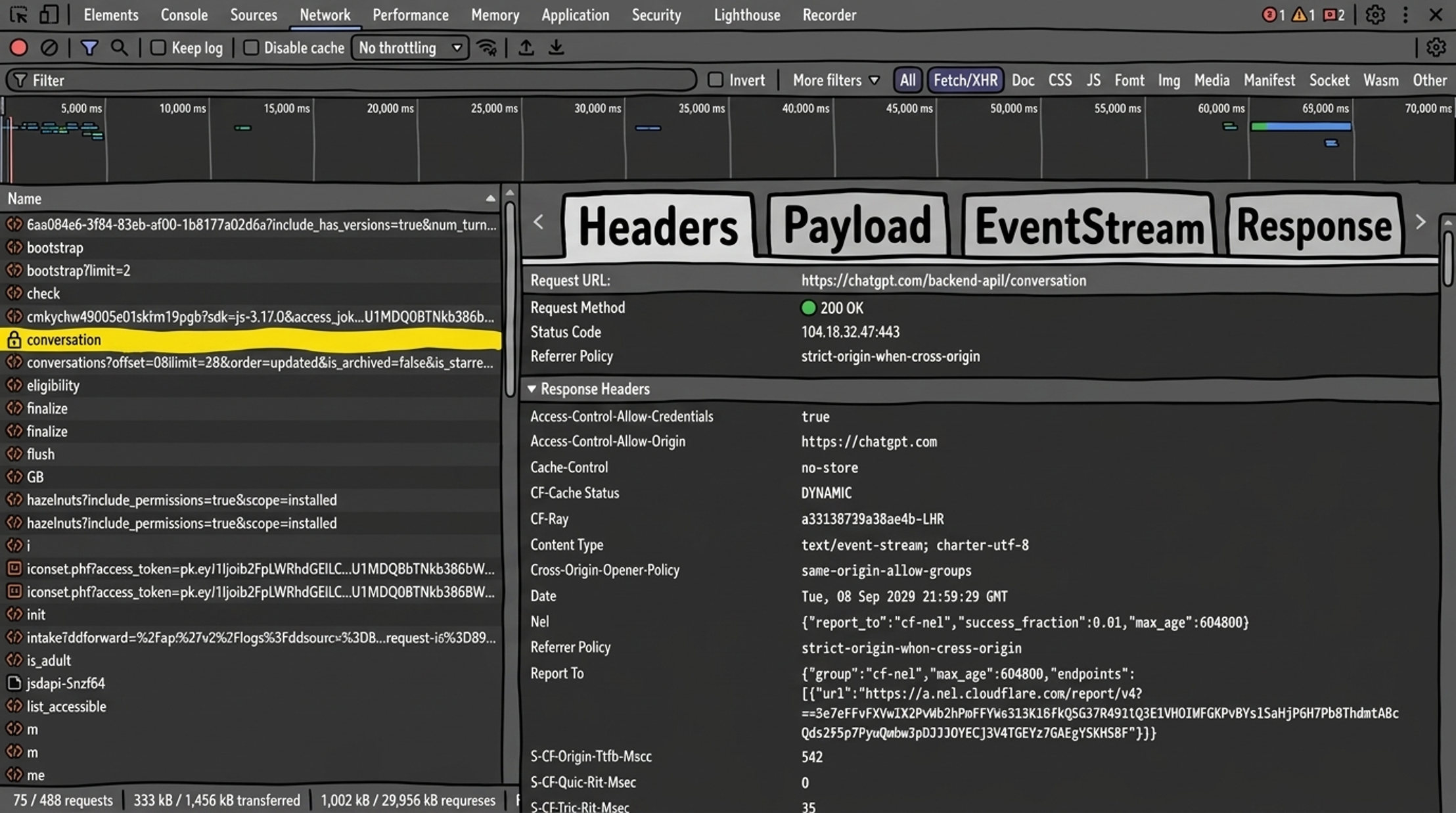
Getting at these crates is not difficult. Press F12, do a Google search or ChatGPT prompt, and you are, for all practical purposes, in the Matrix. Click the Network tab, filter to Fetch/XHR, and you get a list of requests. Click on any one of them, and you get a set of tabs that look intimidating and are not:
- Headers: instructions and metadata about the request.
- Payload: what you sent.
- EventStream: what continues arriving live, as data bounces back and forth between your browser and the backend (ChatGPT uses this heavily while it is generating an answer).
- Response: what you got back.
The reason this is interesting rather than merely nerdy is the way these systems are built. Mario Fischer’s diagram of how Google’s ranking systems fit together, assembled from the leaked Content Warehouse documentation and DOJ trial exhibits, makes the point visually: what looks from the outside like one monolithic search engine is actually a vast number of small subsystems talking to each other.
Systems at the front end, like Google’s Superroot, need to know what you searched for, and they pull in scores and signals generated elsewhere in the stack. Those scores and signals have to travel somewhere. Sometimes they travel through your browser, and sometimes nobody remembered to take the labels off.
How We Found The Google Exploit (A Manual Example)
A small confession before we begin. The reason we spend so much time doing this is that we run AlsoAsked, which involves a great deal of work with Google’s People Also Ask data. I mention this so that you judge me slightly less for the amount of time I spend staring at Google’s network requests. Only slightly.
While digging through request headers, we came across a callback URL with a huuugee and interesting parameter string attached to it.
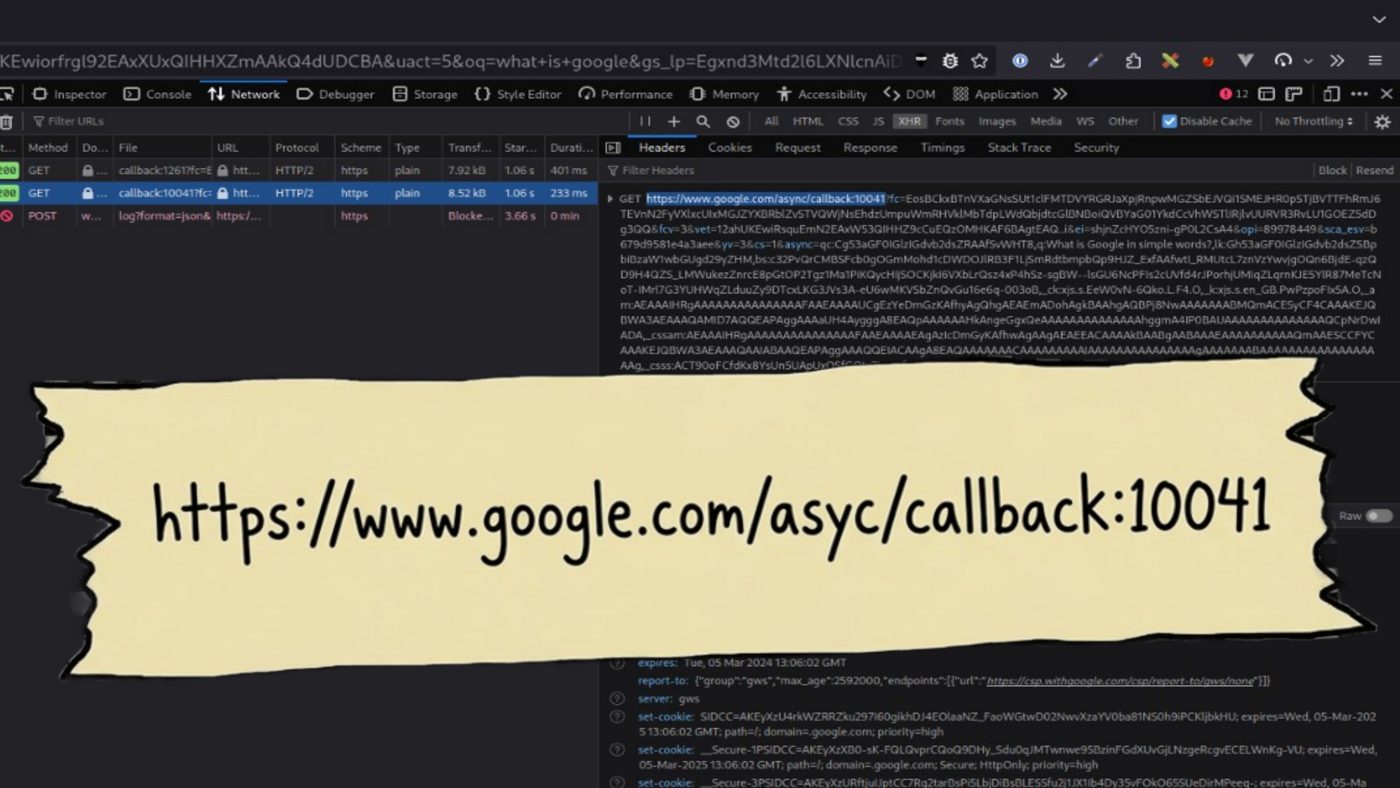
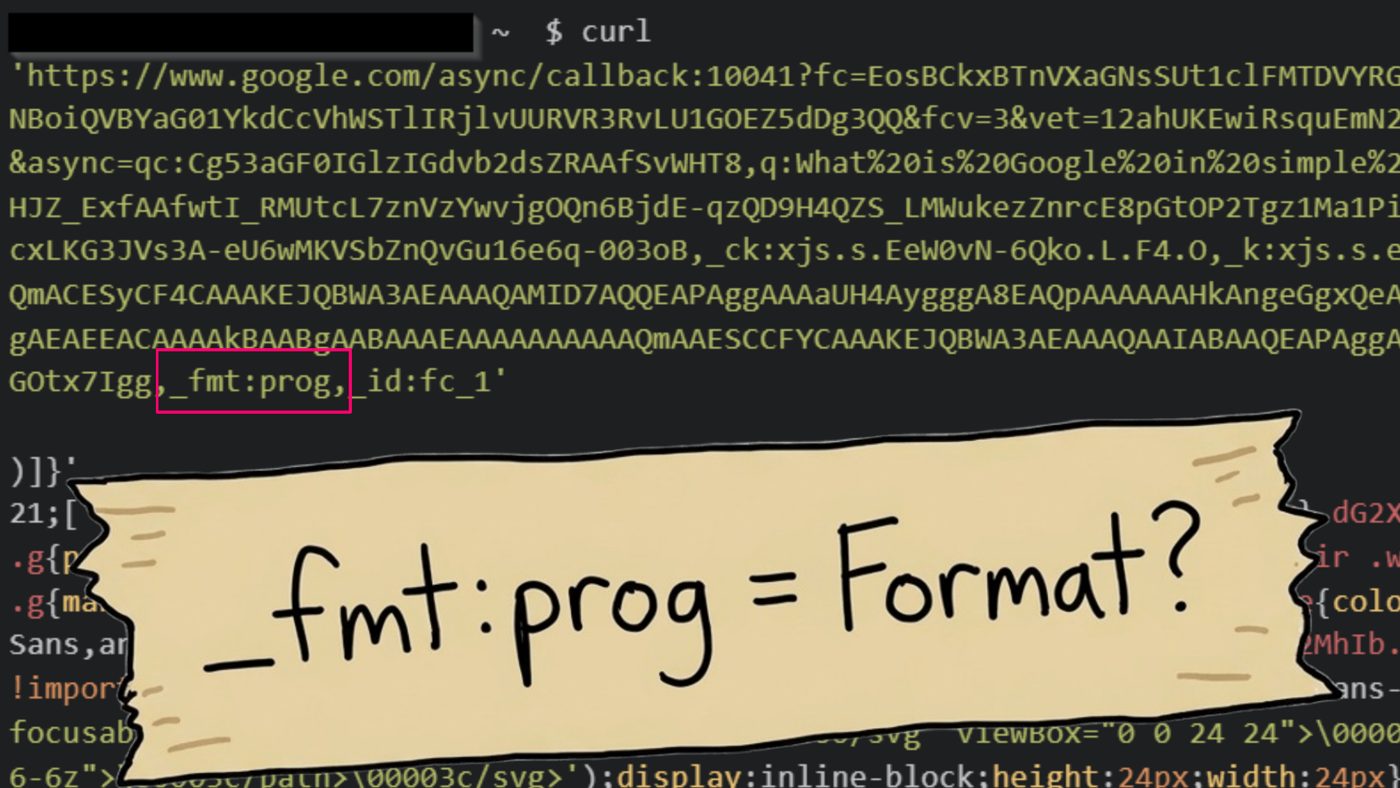
Naturally, the first thought was to copy the request into a terminal, fire it off with curl, and see what Google sent back. (This activity is also a recommended Tinder first date activity; YMMV). We got a lot of… stuff back, but it didn’t really make a lot of sense.
We noticed a parameter called _fmt, set to prog. We guessed, with no real justification, that it might mean “format.” For reasons I genuinely cannot now remember, in what real data scientists would describe as “dumb luck,” wondered what would happen if we simply deleted it.
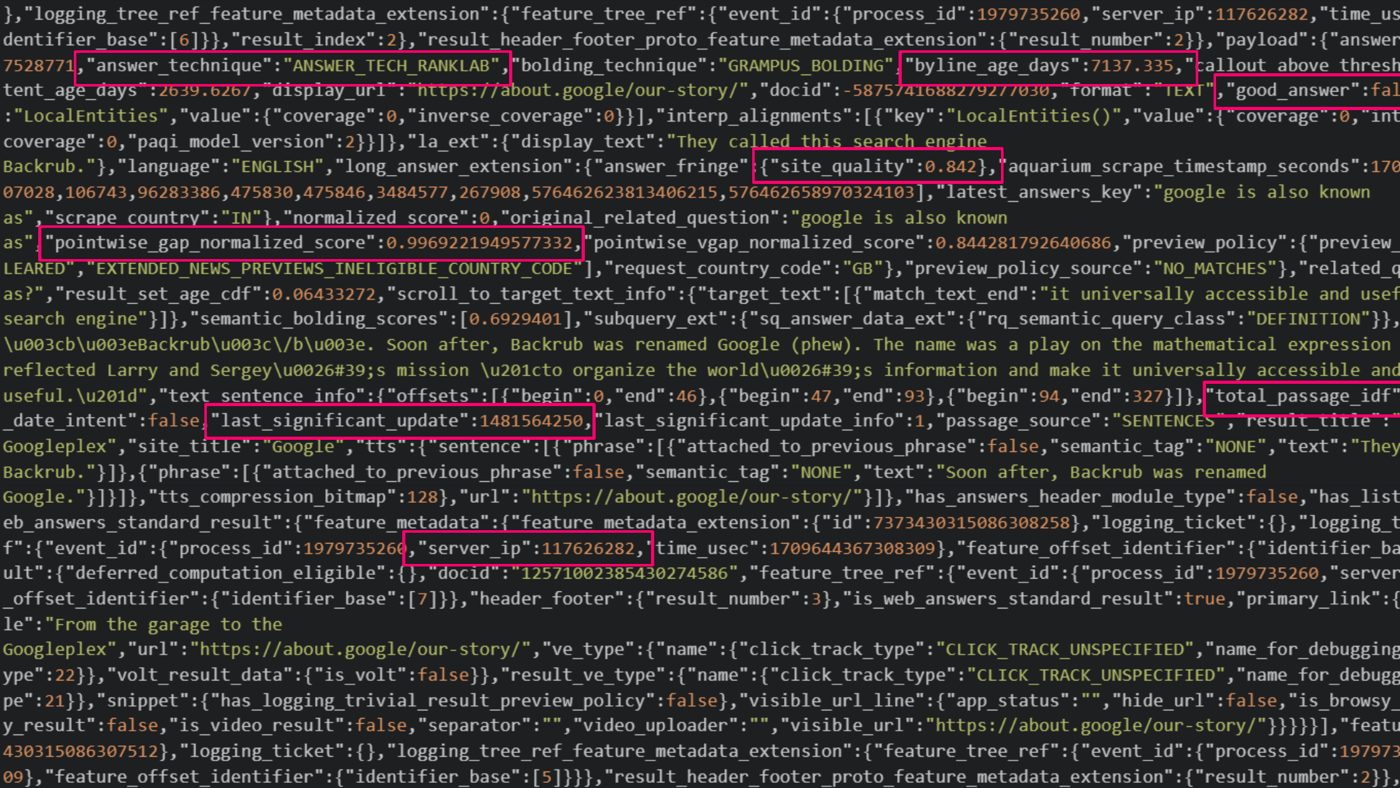
What happened was that Google sent back structured data. Lots of it. Site quality scores. Inverse document frequency scores. When the page was last significantly updated, in epoch time. The server IP. All sorts of information that Google very much did not intend us to have.
Which is how we ended up with a bug bounty from Google. We did report it, in fairness. About a year after we found it. We will not dwell on that.
The Google Vulnerability Reward Program panel awarded $13,337.00, noting that “exploitation likelihood is high” and that the issue “qualified as an abuse-related methodology with high impact.” I have chosen to take that as a compliment.
Getting Value From the Data
While there was a lot of direct value in that data, I want to pick a slightly more unusual example of how it turned into something useful.
One of the things we noticed while hoovering everything up was that Google classifies pretty much every query into one of eight “refined query” semantic classes. Across a sample of 4.8 million English queries, the distribution looked like this:
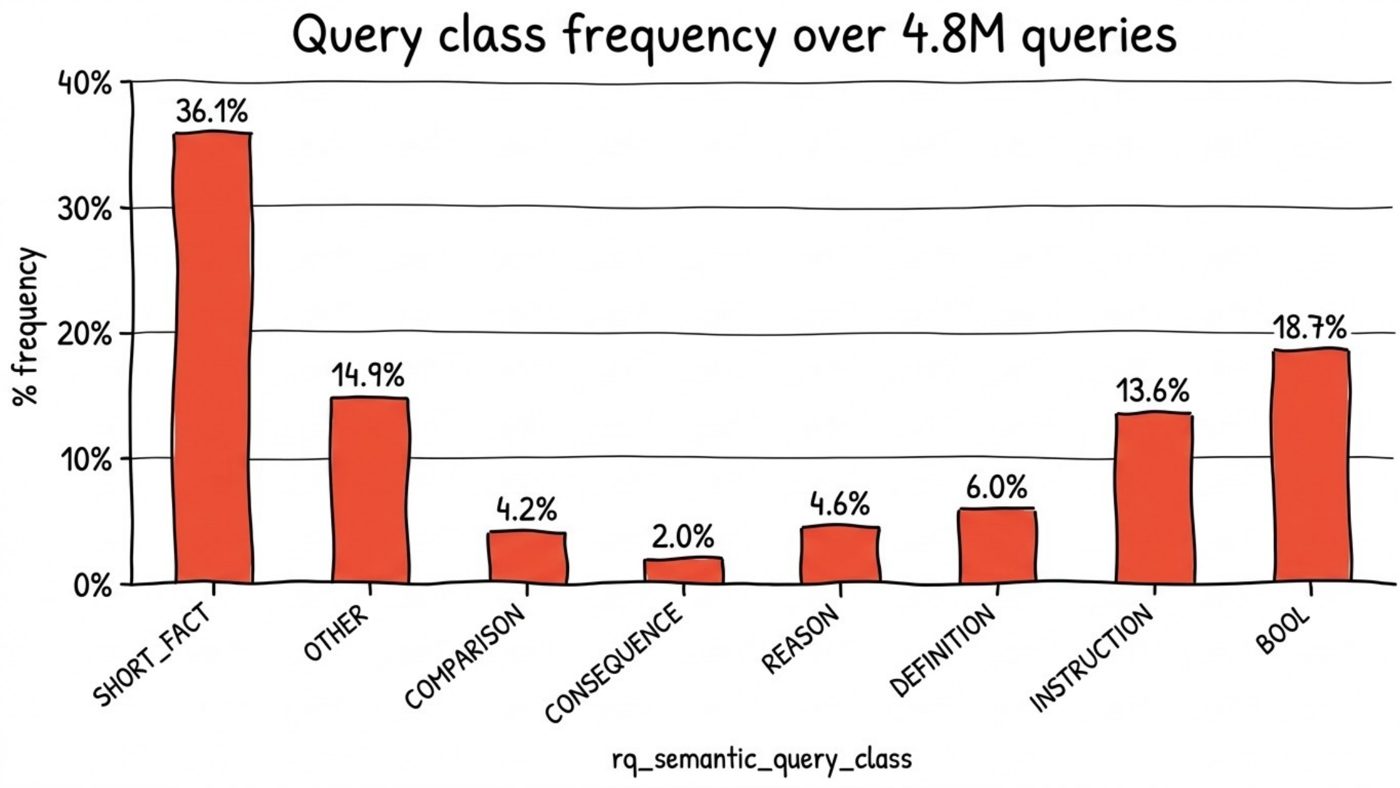
A pile of labelled data like that is exactly what you need to train a classifier. I went to Hugging Face, the AI community and model hub, and downloaded DistilBERT, a smaller, faster version of Google’s BERT model (40% smaller, 60% faster at inference, and retaining around 96% of BERT’s performance). It is small enough to run on your own computer, which is technically true in the sense that I managed to complete the fine-tuning based on all 4.8 million queries and Google labels in about 50 hours on a gaming laptop (which was doing a great job heating my room).
The result is QueryClassifier, which we put online for free. You give it any search query, and it predicts how Google is going to classify it.
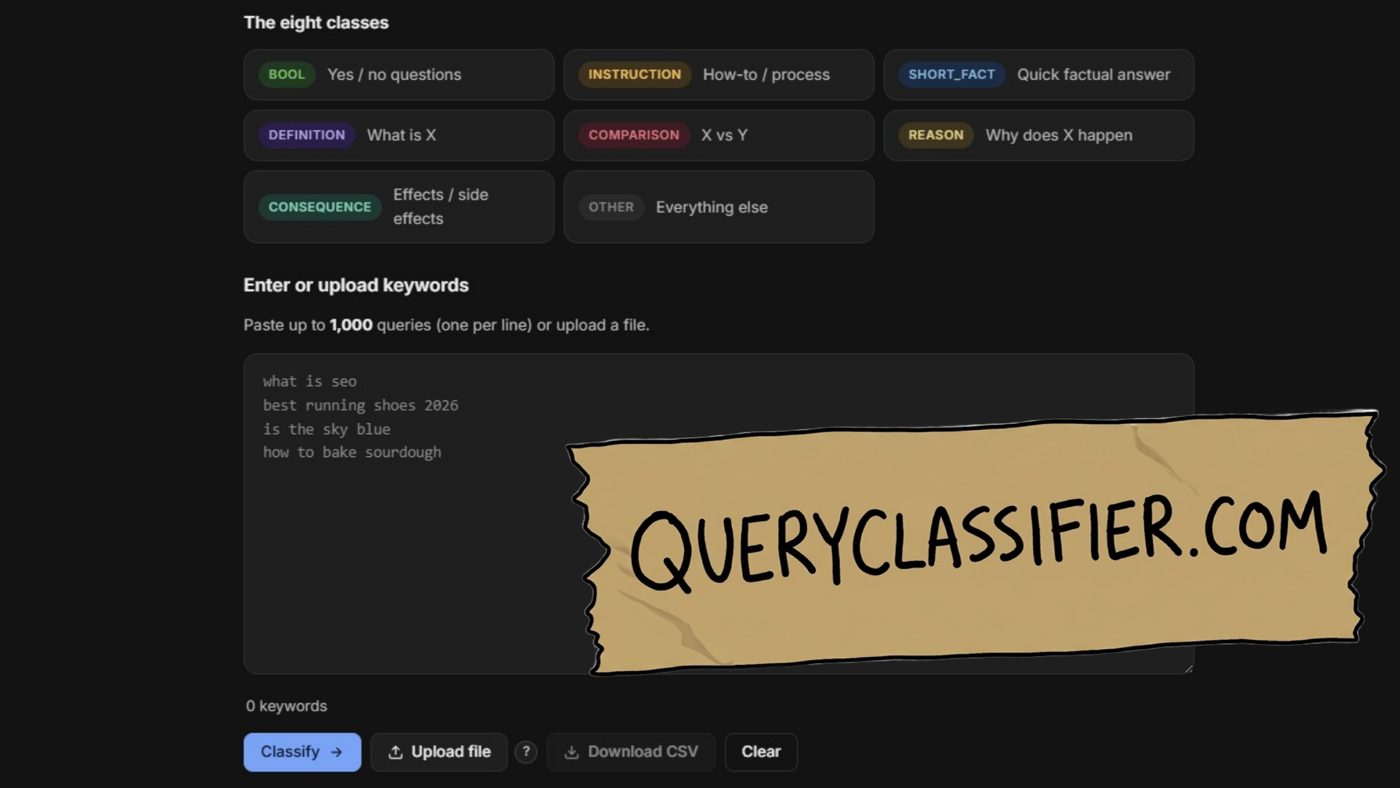
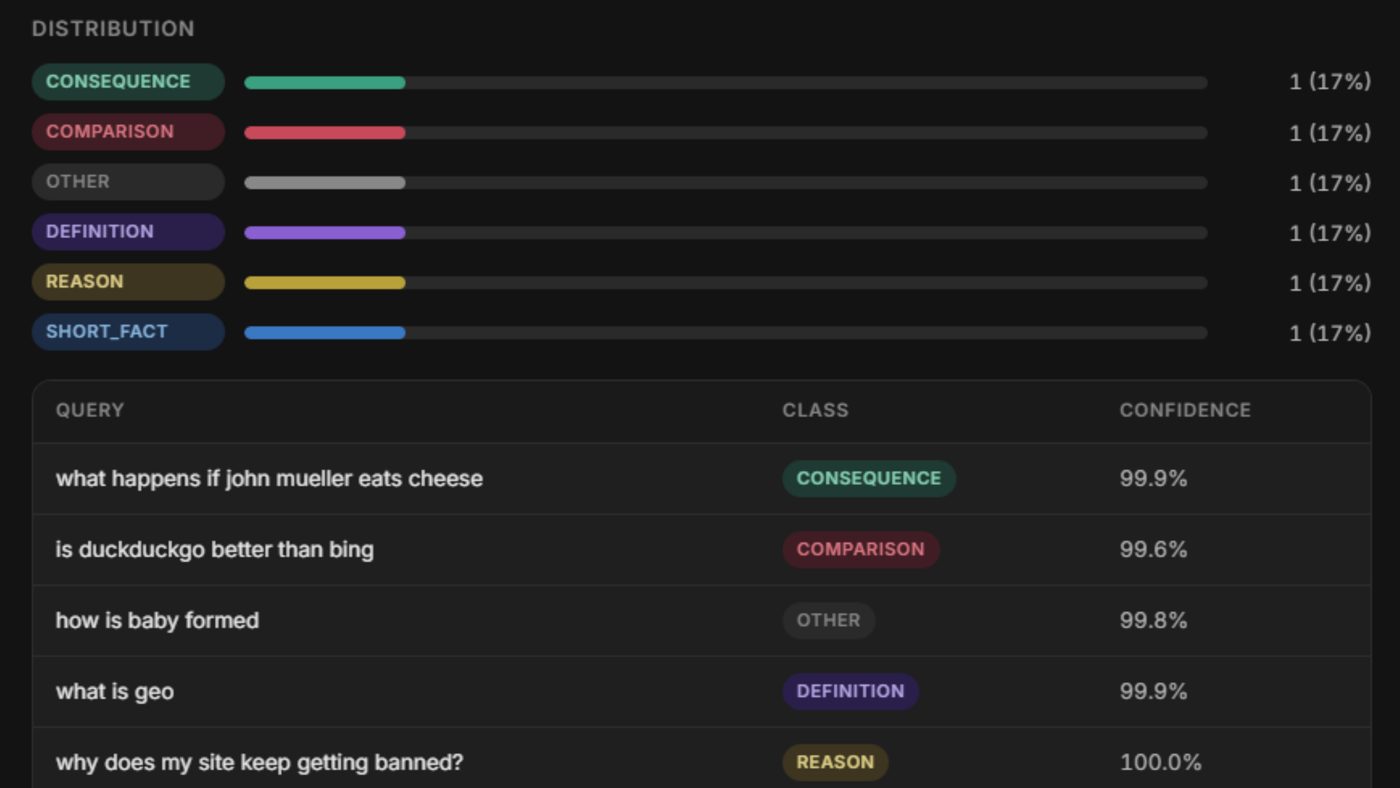
This output is more useful than it looks for a content pipeline. Knowing the query class tells you what type of content Google is expecting to answer it with, and there is a strong correlation between query class and the SERP features Google chooses to show. So you can know ahead of time, and at scale, which features you need to be optimizing for. You can also find out, with 99.9% confidence, that “what happens if john mueller eats cheese” is a CONSEQUENCE query, which I consider a public service.
Getting ChatGPT Fan Outs First
I have been doing this kind of manual analysis for years. Over a year ago, I was posting tips on how to watch ChatGPT’s fan-out queries in the Network tab: Open the conversation request, look at the Response, and search for search_model_queries. At the time, I don’t think anyone else had that.
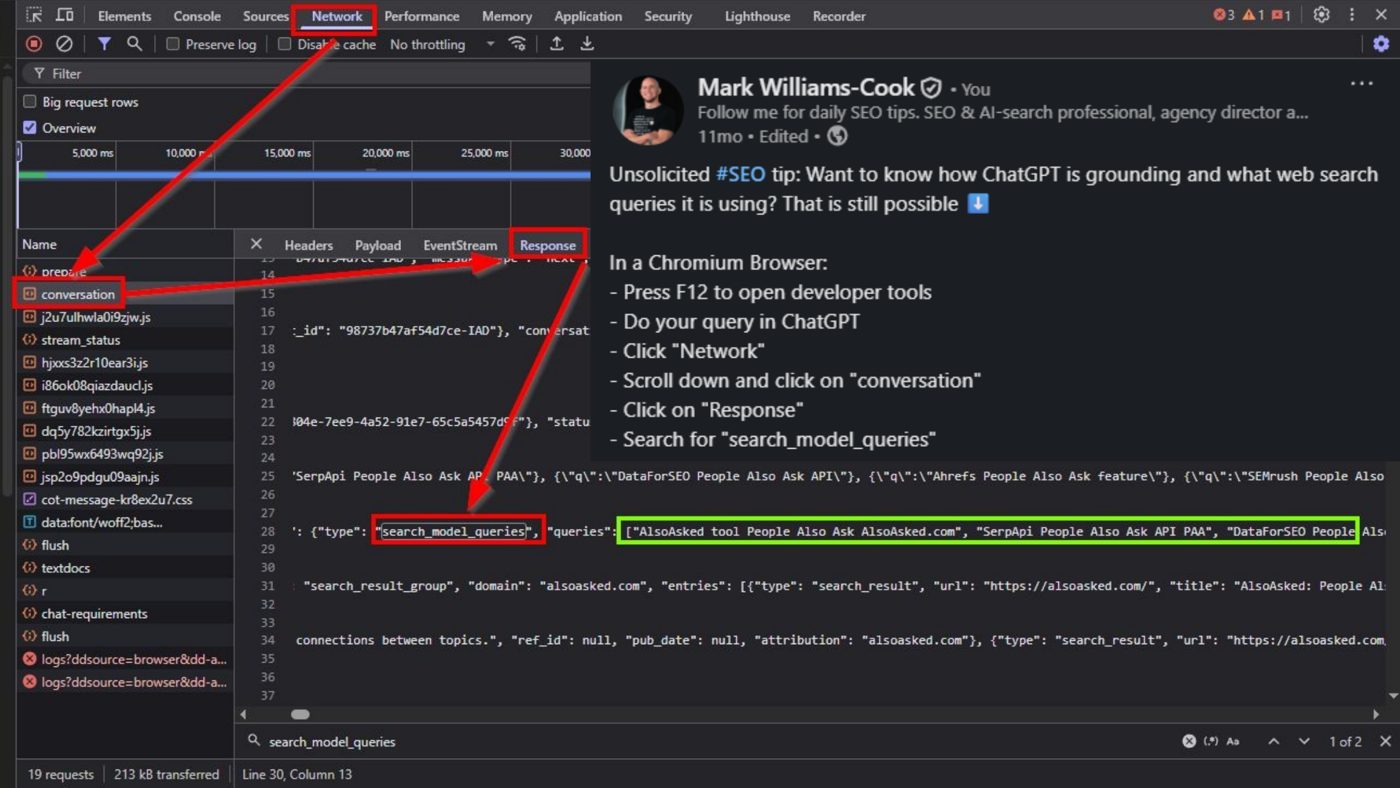
That specific trick no longer works, because the format has since changed (more on that shortly). But the principle stands. The interesting information is not in the answer ChatGPT shows you. It is in the crates.
Now You Can Vibe Code Your Way to This
Fortunately(?), we now live in a world of vibe coding, which means you no longer have to do all of this by hand.
My weapon of choice is Perplexity Computer, Perplexity’s agent orchestration system. I gave it what Gen Z would describe as a “pretty beg” prompt. In essence, I’m telling Perplexity that I am trying to work out how ChatGPT works by analyzing its network data in Chrome. I give it some examples of the types of things I am looking for (search_model_queries), and I want it to help me run some searches, analyze what comes back, and identify anything else that might hint at how the system works.
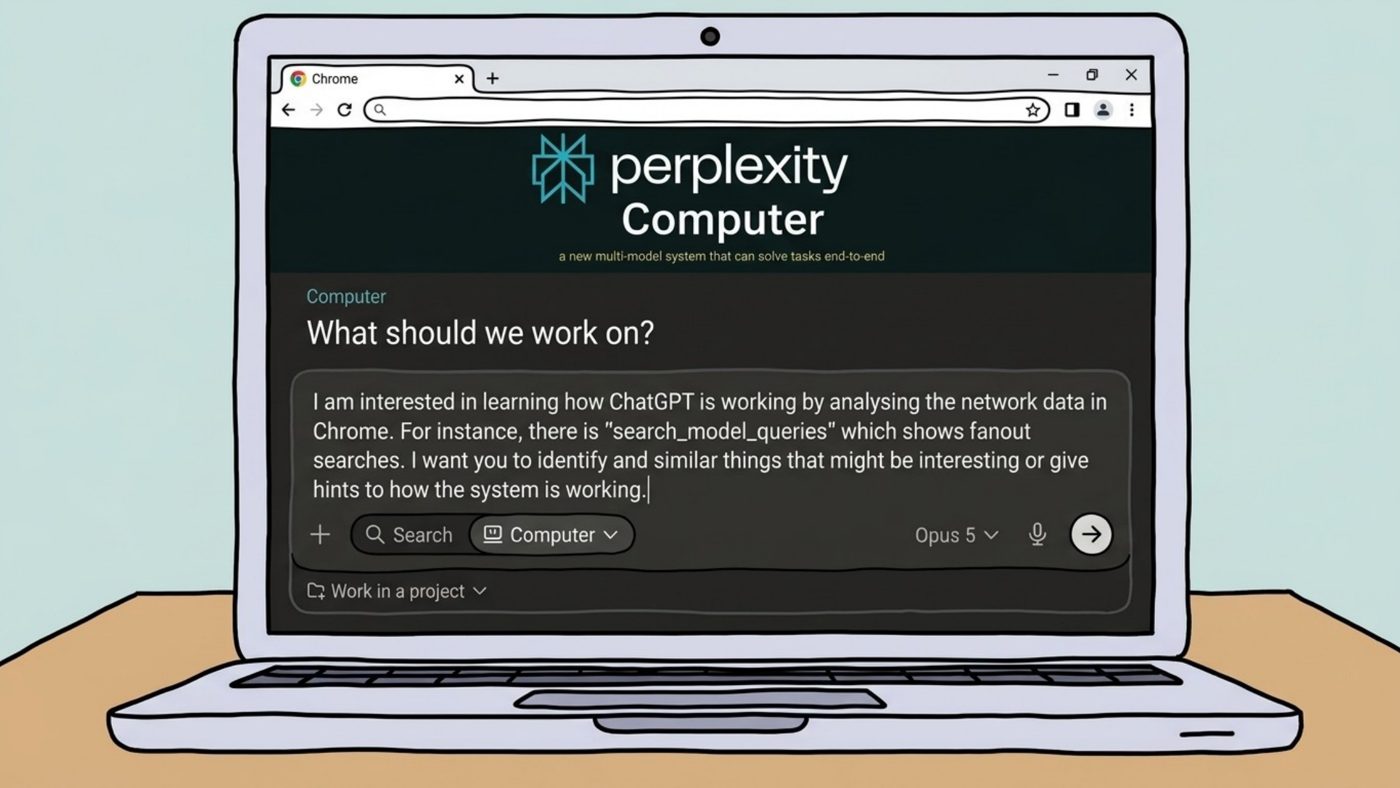
Perplexity was very adept at this task. In the background, it used Playwright to fire up real Chrome instances, ran searches on ChatGPT, captured the network data, and produced a twenty-something-page report that we could then have a discussion about.
That is how I was one of the first to discover that ChatGPT was pulling its results from different source sets, labelled in a result_source field:
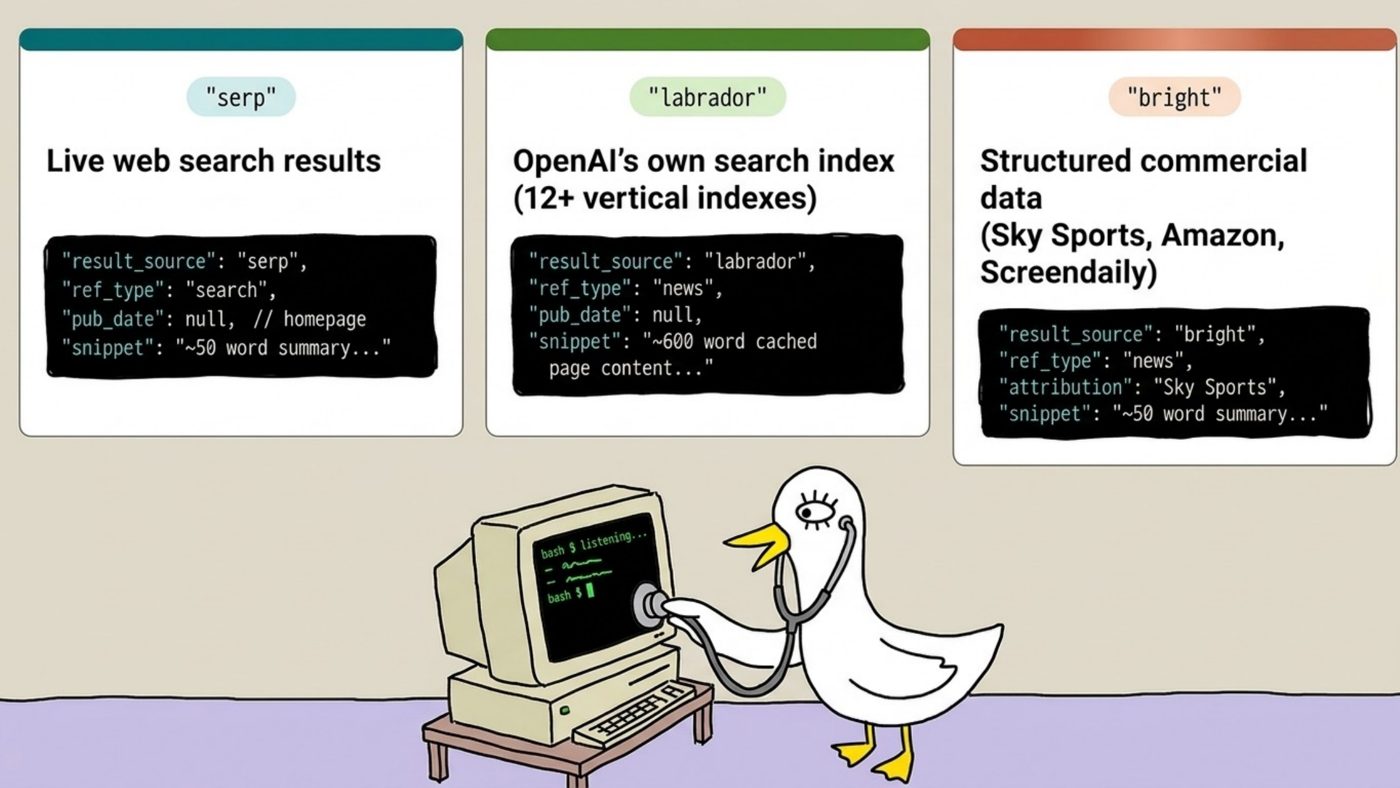
At the time, with the limited dataset, I believed these to be:
- serp: live web search results, scraped from a search engine in the background. Classic retrieval-augmented generation.
- labrador: which I did not recognise at the time, and which appears to be OpenAI’s own index.
- bright: which I believe is Bright Data, a provider of structured commercial data packs.
I ended up publishing this research before I’d really had a chance to dig into it for the noble reason of blind panic. Metehan Yesilyurt had teased he had a big reveal on LinkedIn around how ChatGPT works, and I had a horrible feeling I knew exactly what it was going to be about. So I messaged him to apologize in advance, explained I had been doing the same research, and posted mine immediately. This is what passes for etiquette in technical SEO.
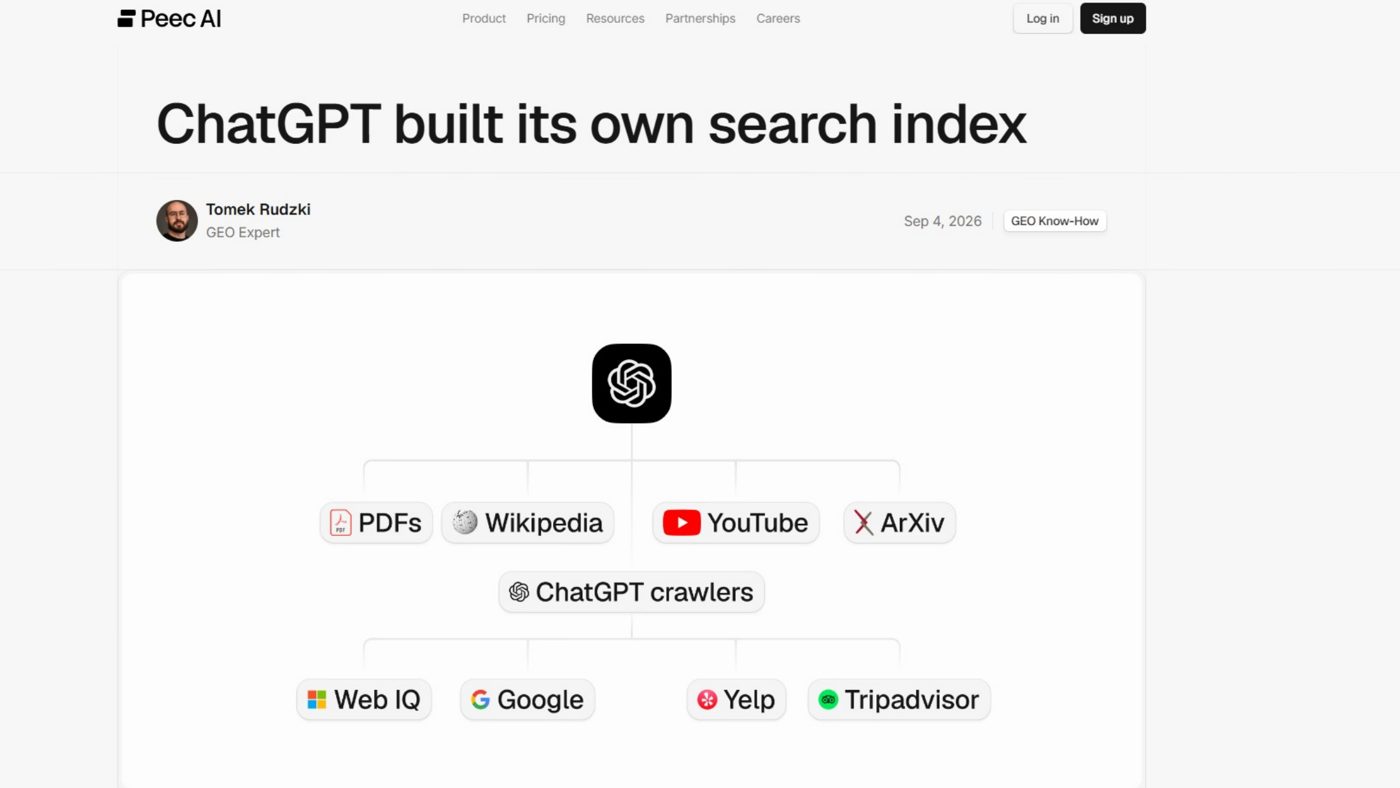
To be clear, people have since done much better, deeper work on this than I did. Tomek Rudzki‘s research for Peec AI found that result_source only ever carried four values (Labrador, Bright, Oxylabs and SERP) and that Labrador is not a single index but a family of vertical indexes covering the general web, PDFs, YouTube, news, arXiv, Wikipedia, local, finance, legal, medical, shopping and images. If this subject interests you, read that, and follow Metehan, who writes a great deal of good material on it.
Getting Around the Scraper Bouncers
When you are playing this kind of game at scale, there is a problem you will run into quickly: getting blocked. Google blocks you. ChatGPT blocks you. Automated browsers driven by vibe-coded scripts are not subtle, and the platforms have noticed.
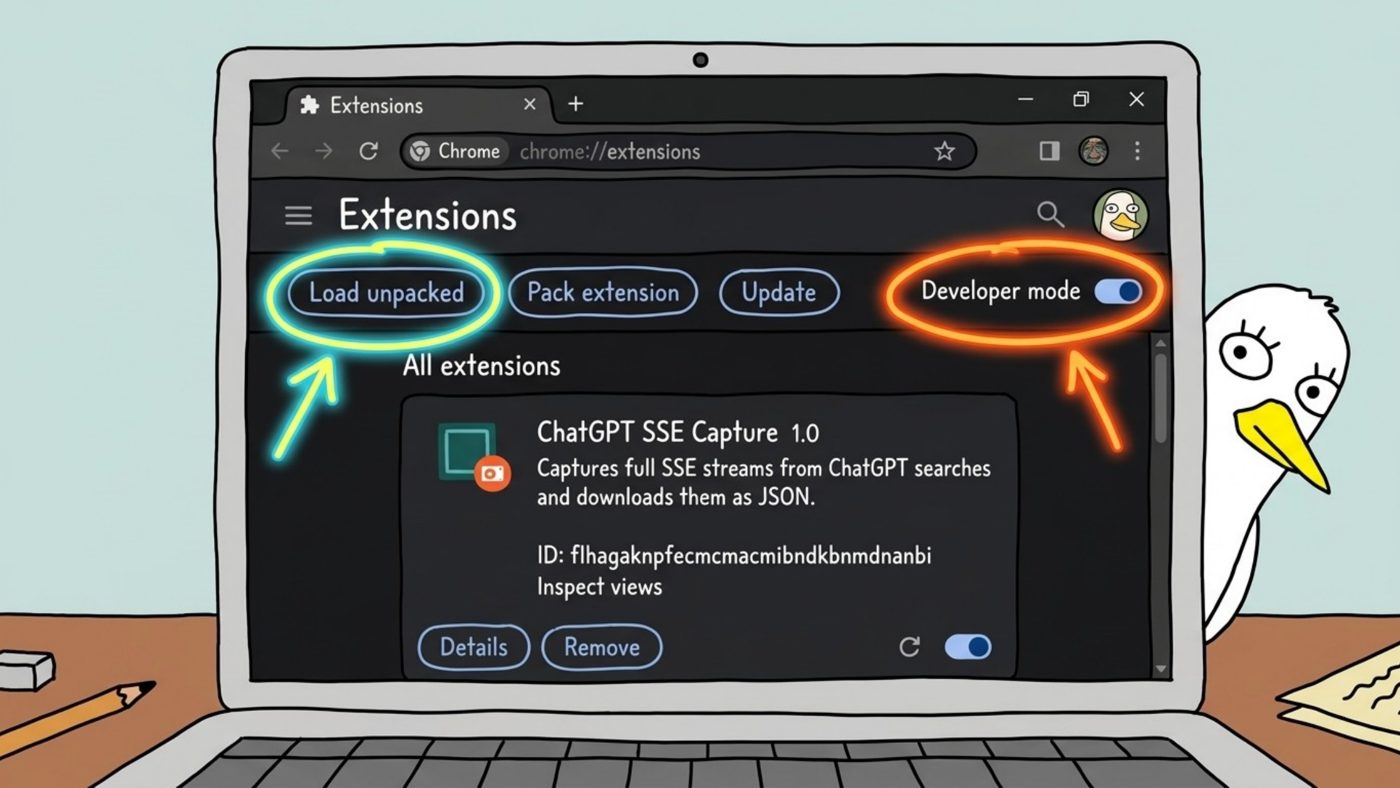
The workaround I landed on was to get Perplexity Computer to build me a custom Chrome extension to automate my local browser. This means I could assist with human checks; I could have easy control over which models, accounts, and settings I was using (which all impact results).
The cool thing is, you do not need to publish it to the Chrome Web Store and wait for someone to review it. You go to chrome://extensions, switch on Developer mode, click “Load unpacked,” and point it at the folder. That is it. No hoops.
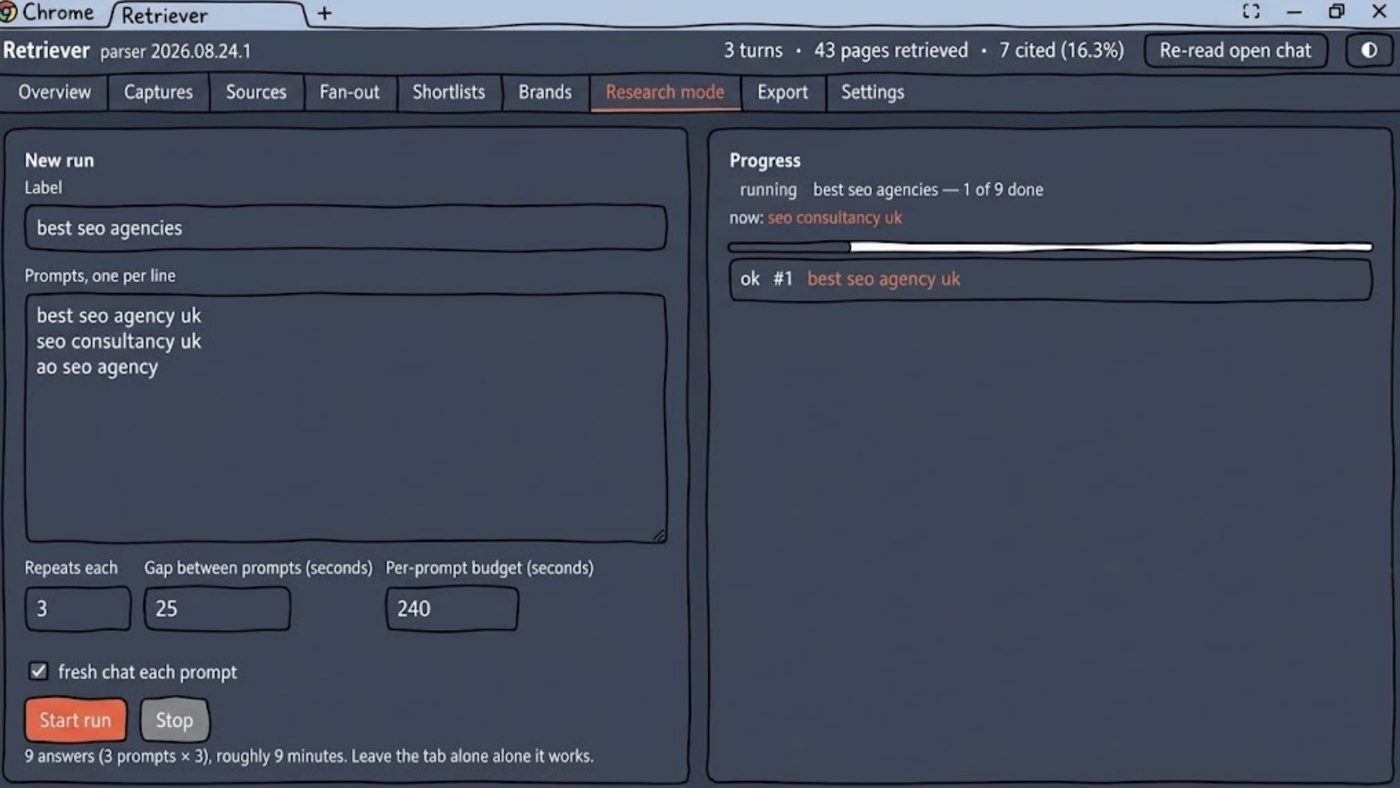
Apart from pulling apart the network data of ChatGPT, the extension “I” built includes a “research mod” which lets me paste in a whole list of prompts, then automates the browser for me: with repeats and gaps between runs, saving all of the network data that comes back. That let me do this analysis at a much larger scale than poking at DevTools by hand.
I was going to tidy up a version of this for public release, but it turned out I never needed to, because my good friend Suganthan Mohanadasan had been doing very similar research at the same time and released FanoutFox, a free Chrome extension that does essentially what mine does, minus the bulk checker, and does it extremely well. It reads your own ChatGPT session and shows you the fan-out queries, the sources fetched, who got cited, and who only got mentioned.
What FanoutFox Data Showed
1. ChatGPT’s Freshness Windows
One of Suganthan’s findings is the sort of thing I would previously have expected to need a leak to learn. When ChatGPT runs a search, the network data includes the query it ran followed by a vertical pipe and a number. That number turns out to be a time window, in days.
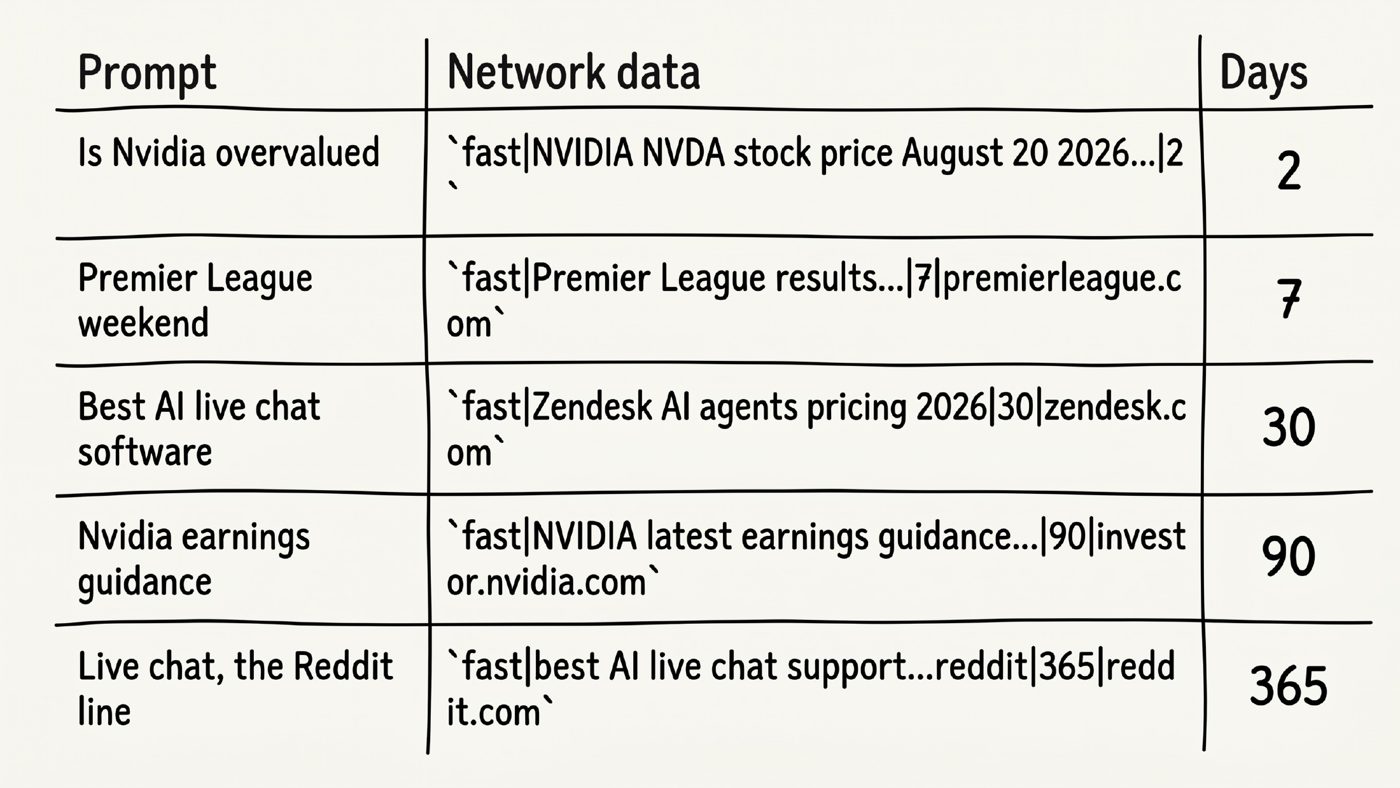
Ask whether Nvidia is overvalued and ChatGPT searches for stock price information with a window of two days. Premier League weekend results get seven. “Best AI live chat software” gets 30. Nvidia earnings guidance gets 90. And when it goes looking at Reddit for live chat support opinions, it targets reddit.com specifically, with a window of 365 days.
There is no shortage of confident opinion in the industry about how fresh content needs to be. This is one of the very few places you can get an objective answer, from the system itself, about the window it is actually looking in for a given topic. That is a superb starting point for a content pipeline: For this kind of query, this is roughly how up to date the information has to be to qualify at all.
2. Whether ChatGPT Is Even Searching
FanoutFox will also tell you whether retrieval is happening at all for a given prompt, or whether the answer came entirely from the model’s parametric memory, meaning its training data.
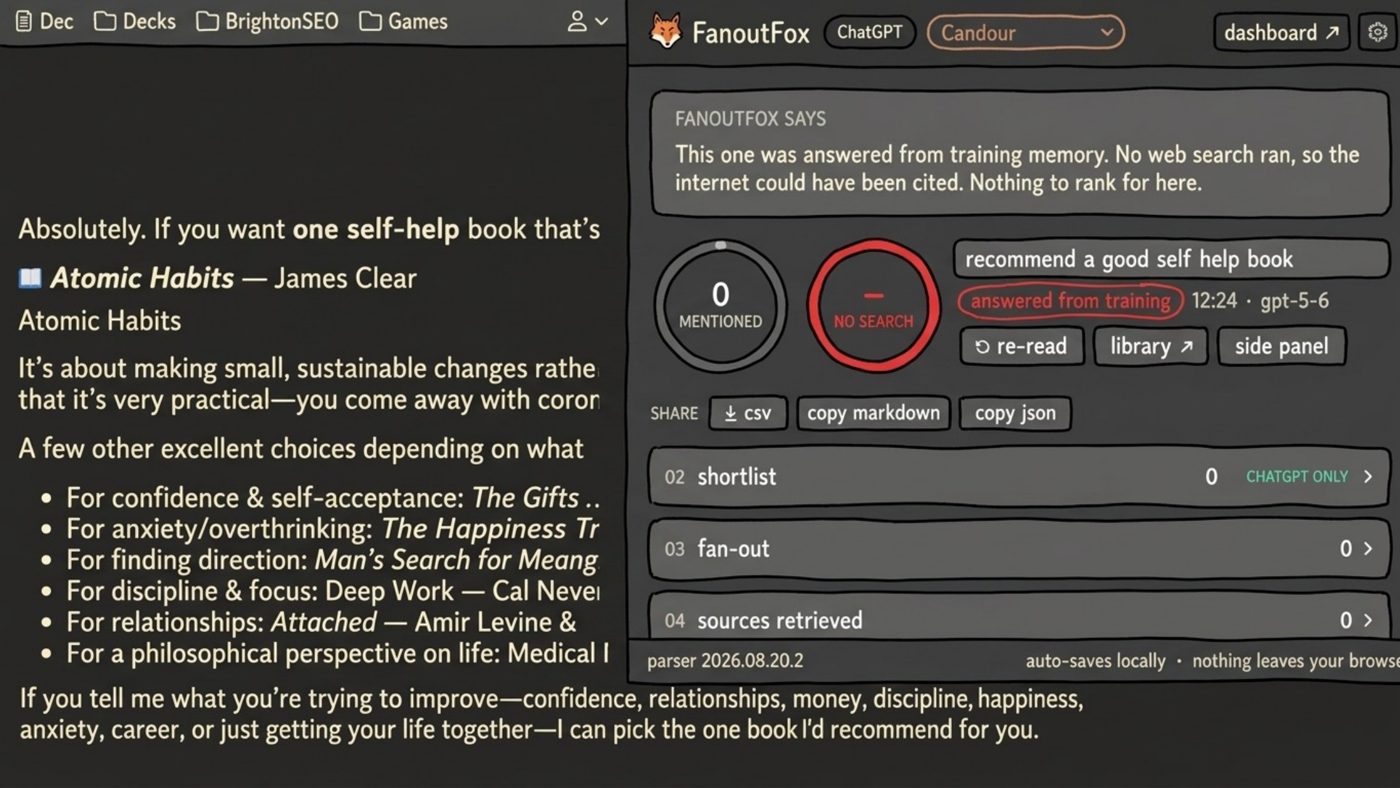
I asked it to recommend a good self-help book (another reliable way to tell someone works in SEO). Somewhat to my surprise, the answer came completely from training. No web search ran. ChatGPT was simply recommending books based on what it had read.
That is genuinely useful to know, because it means it is close to impossible for you to influence that answer in the short term. If the response is coming from training data, changing it is a long-term project, not something you fix with a new landing page next Tuesday. Knowing which of your target prompts trigger retrieval and which don’t tells you where effort will pay off now and where it is a slow burn.
3. Reddit Didn’t Go Anywhere
You will probably have seen that Reddit is being cited far less by ChatGPT. Petra Labs’ analysis of 113,500 ChatGPT runs showed Reddit’s share of final citations falling roughly 80% in a single day in mid-August 2026, shortly after GPT-5.6 became the default model.
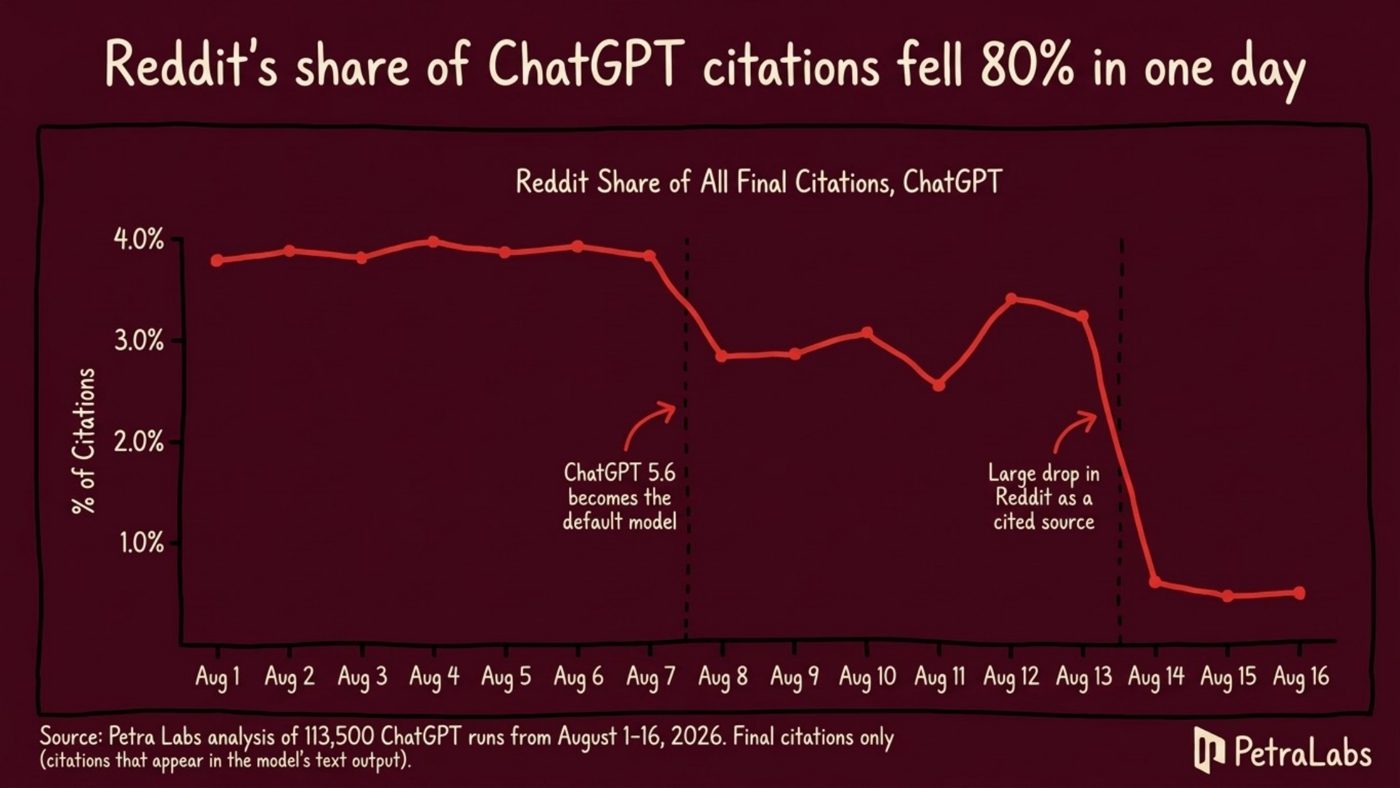
It would be very easy to look at that chart and conclude Reddit is no longer worth bothering with for AI visibility. The network data says otherwise. Suganthan’s research, and the data coming out of FanoutFox, showed that while Reddit is being cited a great deal less, it is still being used just as much in the background. The biggest change since GPT-5.6 is that the fan-out searches lean heavily on site: queries, and Reddit is still very much among them. ChatGPT is still reading what people say on Reddit to decide whether to recommend a brand. It has simply decided to cite the vendor’s own page instead of the thread.
That is a competitive advantage for anyone who knows it, and a trap for anyone who only reads the citation charts. It is also a good example of the qualitative insight that big citation studies tend to miss: counting the links in an answer tells you what the model chose to show, not what it chose to read.
But Wait, There’s More…
A few takeaways to encapsulate the broad and specific:
This data is functionally helpful for your optimization. Knowing the freshness window for your topic, or that Reddit is still being read, is only interesting until you use it to decide what content to build, when to update it, and where to spend effort. Then it is money.
These systems change regularly, and there is a great deal to learn. The way ChatGPT sends its network data has changed radically over the last few months, apparently at random. Suganthan has documented ChatGPT rebuilding its search tool to the point where the search_queries field he and I both relied on vanished entirely. I post about this less than I used to, partly because things seem to change shortly after people post about them. Make of that what you will.
Use the tools that now exist. You don’t need to be a developer to do any of this anymore. Perplexity Computer can run the browsers, capture the traffic, and summarize what is interesting. It can build you a Chrome extension that you load in two clicks. And FanoutFox will do a lot of the ChatGPT reading for you, for free.
The data is all there, moving between your browser and the backend every time you search. Most people never open the crates. You should.
More Resources:
- How ChatGPT Actually Picks Sources (I Read The Network Traffic, Not The Outputs)
- Checking A Page Is Part Of A Retrieval Pipeline For AI
- Analysis: Google Is Poisoning Search Results For Rank Trackers
This post was originally published on Mark Williams-Cook.
Featured Image: TippaPatt/Shutterstock
