

WordPress 7.2 is due on Dec. 8. This version has, in beta, turned on a new public address on updated sites. /random/ directs you to a random published post. Versions of the address also do this within categories, tags, author archives, or eligible custom post types.
This feature is on by default. Switching it off will require coding, as there are no settings available via the WordPress dashboard to disable this feature. Further, in the November roundup of the WordPress Developer Blog, the filter name listed doesn’t match the actual filter name used in the code. Copying the name from the Developer Blog will have no effect.
That makes /random/ the 7.2 change most sites will need to decide on before updating. The new Secrets API, a way for plugins to store credentials, was removed from 7.2 on Nov. 17. That came days after Matt Mullenweg, who leads the release, sided with a request to pull it.
Core’s new AI pieces are tools for developers and plugins, and none of them adds an AI feature visitors or editors will see.
Beta five is the latest test release, and WordPress says not to run it on production sites. The first release candidate (RC1) is due Nov. 17, so details can still change before the final release.
The /Random/ Redirect Is On By Default
Aaron Jorbin’s developer note opens, “A request to example.com/random/ will lead end users to a randomly selected published post. The feature is on by default.”
The /random/ path and its category, tag, author, and post type versions use the default base with pretty permalinks. The base is translatable, and a new field on the Permalinks screen changes it. The development code also responds to a random query variable, so ?random works too on the home page and archives. Since a Nov. 16 change, a search URL that includes it redirects to the same search without the parameter.
By default, posts are eligible. Pages and attachments aren’t. Custom post types are considered eligible if they’re publicly queryable, have archives and the developer hasn’t registered them with 'randomable' => false. The code filters for only published posts (with no password).
It uses a 302 redirect. The development code sends no-cache headers and includes the header X-Robots-Tag: noindex, follow with the 302 redirect response. This header covers the original /random/ request, but not the post this redirects to. If there is no match to the query, the request will return a 404.
If you’ve created a published page with the slug “random,” then this will override the redirect. The same thing happens if you create a post with the slug “random,” when permalinks are set to use the post name. Peter Wilson confirmed this in the comments after Daniel Iser raised it, and recommended using a base like “shuffle” instead.
Random queries run from the main WP_Query, so pre_get_posts callbacks that change archives will also affect their random redirect. Developers wishing to target random requests only should use wp_is_random_content_query().
Turning this feature off is done by adding the one-line mu-plugin shown in the note, add_filter( 'wp_enable_random_content_redirect', '__return_false' );. This will prevent WordPress from generating rewrite rules for random content, hide the base field on the Permalinks screen, and ignore the query variable. The code’s documentation says that flushing the rewrite rules is necessary after changing the filter value.
The roundup’s version, wp_enable_random_content_direct, isn’t used anywhere in the code.
How /Random/ Went From Off By Default To On
Random redirects made their initial appearance in the code on Sept. 21; at this point they were an optional ?random query that needed sites to return true for a filter called enable_random_content_redirect if they wanted them to be active.
They were reverted two days after that. The commit message said of the feature, “The feature is intended to land in WordPress 7.2 but will need some work.”
On Oct. 16, they returned as /random/ rewrite rules turned on, with the filter name changed and the default for the filter set to true. They were added to Beta 1 on Oct. 20.
Jorbin’s post drew a long thread of objections. Joost de Valk wrote, “This is a horrible idea to turn on by default.” In a later reply, he added, “Now I fear people will randomly end up on invoices, offers, client specific pages, etc.” Responding to another commenter, Jorbin wrote, “The WordPress Philosophies mean that opt-out options are not added for every feature, otherwise the options pages would become unusable.”
Mullenweg replied to a commenter whose site already has a page named “random,” writing, “I agree it should not use page URL structure.” In a separate comment, he wrote, “I don’t think this should be an appended pretty URL; the request was just for /?random, just at root.” He also addressed concerns about performance and exposure, saying query strings, searches, and REST calls offer “far more ways” to exhaust a site’s resources.
As of Nov. 17, no one maintaining the feature had posted a change to its default or its URL structure. Since the note, code changes from Nov. 12 to Nov. 17 have adjusted when the redirect fires, how it treats searches and how it picks a post.
See also: Web Almanac Data Reveals CMS Plugins Are Setting Technical SEO Standards (Not SEOs)
The Secrets API Was Pulled From 7.2
The Secrets API would have allowed plugins to save API keys, tokens and more via libsodium encryption, and would have utilized the options tables, which hosts could replace with their own keyring or storage utilizing a secrets.php drop-in.
WordPress reverted the API on Nov. 17. The commit points to feedback on the announcement that questioned the design, including whether one API should both write secrets and read the ones a host supplies. Peter Wilson had also found that the API never checked its manage_secrets and manage_network_secrets capabilities when secrets were set. The commit message opens, “Removes the Secrets API from WordPress 7.2 to allow more time for the API to mature before it ships in a future release.”
Earlier, Ryan McCue, a contributor, had commented that he believes secrets managed outside WordPress should only be readable and never writable to WordPress and that allowing writes to be part of this feature and easy to accomplish makes the API “likely to ossify” around that design. He argued that, under this design, a secrets store backed by hardware security modules offered no additional protection over an already encrypted database. He concluded, “I am a strong -1 on this feature, and I think this should be backed out of core for 7.2 until the above is resolved.”
Mullenweg replied, “I agree with @rmccue here.” Two minutes later, he wrote, “It’s also not a great time to be making ourselves a target for very sensitive things like that.”
Eric Mann, the writer of the developer note, responded to the encryption point, writing, “Encryption at rest protects against someone walking off with the disk. It does nothing about SQL injection, a leaked mysqldump, a misconfigured backup bucket.” Mann initially wanted to leave the API in 7.2 and referenced a proposed solution for how the AI plugin handles failed write operations, one of the items that was mentioned by McCue.
After Wilson’s finding, Mann replied, “I’m not excited about it but agree more time will help us ship a more solid foundation here. I’d still like to target at least 7.3 if possible.”
The AI plugin version 1.5.0 (released Oct. 29) moved its opt-in Key Encryption experiment into a bundled version of the Secrets API which stores the plugin’s AI service keys. Its maintainers had a pull request open to update it to the version planned for core. After the revert, Jeffrey Paul, who had approved it, wrote that the plugin should “use an approach here that leverages the functionality outside of core” instead. The pull request was still open on Nov. 17, and 1.5.0 was still the latest release.
See also: When The WordPress Plugin Update Is The Security Risk: Why SEOs Should Pay Attention
What 7.2 Adds For AI In Core
WordPress put AI building blocks into core before this release. Roger Montti reported in May that 7.0 shipped four of them, including the WP AI Client and a Connectors screen for AI services. In October, he reported that WordPress had released a canonical MCP Adapter plugin for connecting AI systems through the Model Context Protocol (MCP).
WordPress 7.2 is set to add three new read-only abilities, which are registered actions called by other applications. The new read-only abilities allow other applications to query content, users, and WordPress settings. A developer will be able to build an embedding, a numeric representation of text, through the AI client to provide similarity search functionality.
In addition to adding the three read-only abilities, the WordPress core team has marked those abilities as exposed to clients such as the WordPress core REST API, MCP, or AI agents. According to the documentation, “Exposure flags do not grant execution permission.” The content query ability requires a logged-in user and checks if the user has read permission for the returned posts. There is currently no MCP server included in the WordPress core.
According to a post released about version 1.5.0 of the AI plugin, the AI plugin provides versions of these new abilities that are expected to be identical to the versions “coming in WordPress core with 7.2 this December.” Additionally, the post says there are breaking changes in how existing integrations work because of this update.
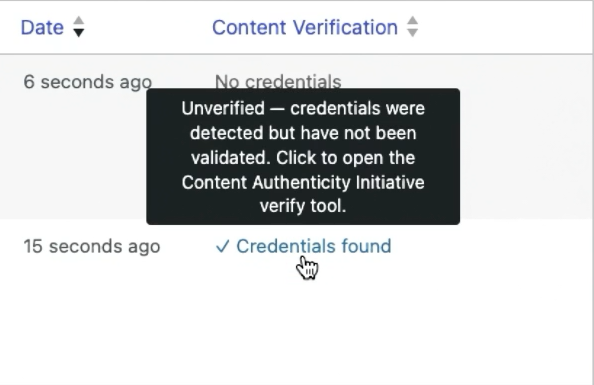
The AI features editors will experience live within the AI plugin itself, where they are currently being tested as opt-in experiments with different requirements; two examples include text-to-speech and revision summaries where content is sent to the site’s selected AI provider. In addition, Content Verification identifies C2PA Content Credentials, a standard for providing provenance information for digital media. However, according to the release post, Content Verification “does not yet perform cryptographic verification” of C2PA Content Credentials. Another feature, MCP Access, decides what the plugin makes available over MCP.
The AI plugin’s screenshot shows the “Unverified” notice displayed when Content Credentials are detected.
Supporting broader types of agents in the future is part of plans for the next release. WordPress’s agentic-web proposal says, “Agents can already accomplish a lot with WordPress through WP-CLI, the REST API, and file management. However, these approaches often require local access or more advanced configurations.” The agentic-web proposal plans to implement support for WordPress 7.3 and is planning to develop foundational elements during the 7.2 cycle.
Admin Changes To Test
Admin and login screens in 7.2 separate the combined JavaScript and style sheets they once had into individual assets. According to the roundup, this means each asset is loaded separately by WordPress, which has also included prefetching of the assets needed for the next screen it thinks you’ll be viewing. load-scripts.php and load-styles.php have been deprecated in this version. This change applies to the admin and login screens only.
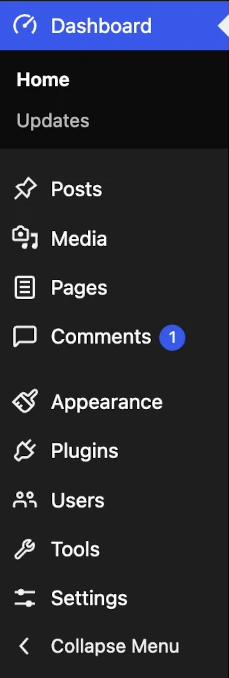
The new SVG icons in the admin bar and menu replace the ones previously made available via the Dashicons font. So if your plugins used CSS to add additional styling to those icons’ ::before content, you may want to review them. Beta 5 introduced notification emails when an application password was created. Also according to WordPress, 7.2 aims to include full support for PHP 8.6.
The preview below shows the new icons in the WordPress admin menu.
Why This Matters
Whether to keep /random/ active is probably the decision most WordPress sites will have to make by Dec. 8. Unless /random/ is turned off, all published posts without a password (including content from a custom post type that is publicly queryable with an archive) can randomly appear. Some commenters on Jorbin’s post thought that would be true for some testimonial or client page custom post types they had created, even though those are not included in the site’s navigation links. First, check which of your custom post types are publicly queryable and have an archive. Then, for any of those custom post types that shouldn’t appear, set 'randomable' => false so that they won’t show up through this method.
The noindex header isn’t applied to the posts /random/ points to, and the selection made by WordPress doesn’t automatically skip posts an SEO plugin has set to noindex. There was still no response as of Nov. 16 to a commenter who questioned that in the developer notes. Users of SEO plugins that prevent access to posts via search engines may want to determine if /random/ will still be able to reach those posts.
On sites behind a page cache or CDN, /random/ can return a 404 right after the upgrade. According to the hosting team, that lasts until rewrite rules are flushed, which core does on the first wp-admin request after the upgrade, per site on multisite. On the platform the team tested, a cached 404 stayed after the upgrade until the cache was purged. One tester using shared hosting without a page cache found the rules already in place. To help prevent a stale 404 from being served, purge the page cache after the first admin visit.
McCue raised the load that the selection’s random ordering could put on large sites, especially if bots hit /random/ repeatedly. Jorbin said on Nov. 10 that he had opened a ticket to look at performance on very large sites, and a fix landed on Nov. 17. It looks up random post IDs instead of sorting the archive at random, a method the commit says “keeps the cost of a request independent of the number of posts”. Archives whose posts are too sparse among the post IDs fall back to a cached pool of up to 1,000 randomly ordered posts. Building that pool still reads every eligible post. Sites with a persistent object cache can reuse the pool for 10 minutes. Mullenweg’s view is that searches and REST calls already offer more ways to strain a site. Teams with large archives can watch for repeated hits on /random/ in their logs after the update.
Agency managers running multiple sites will likely handle /random/ in the same way across their entire fleet using a mu-plugin with the correct spelling of the filter.
Plugin developers can opt public post types out of /random/ where a random visit makes no sense. They’ll also want to check admin CSS for the icon change and update any integration that calls the content, user, and settings abilities.
Open Questions
Mullenweg’s /random/ comment about URL structure could lead to changes to the original /random/ plan. Many commenters (on the developer note) are opposed to the default.
When the Secrets API returns, and with what design, is now open too. Sites using the AI plugin’s Key Encryption will need to see how its next release handles the revert.
Whether /random/ will honor SEO plugins’ noindex settings is still an open question. The release date itself has two values on WordPress.org. The release schedule says Dec. 8, while the roadmap still lists Dec. 10.
Looking Ahead
RC1 on Nov. 17 will include the Field Guide and the 7.2 branch. This should help identify where /random/ ended up. RC2 is set to be released Nov. 24, and RC3 Dec. 1. A dry run and code freeze for Dec. 7 precede the scheduled release on Dec. 8. Agent connection work, broader than just connecting an MCP, along with authorization work in core, is targeted for WordPress 7.3.
To test if /random/ can access your content and how this impacts caching, you’ll need to install RC1 onto a staging version of your website.
More Resources:
- WordPress 7.0 Launches With Native AI Integration
- Your CMS Is Still Failing SEO Basics – 11 Fixes To Demand
- WordPress SEO Checklist: Get Ready For (Site) Launch
Featured Image: Primakov/Shutterstock
