
Outbound links are commonly thought of as a nuisance. They supposedly drain your PageRank so some publishers minimize outbound links. Others feel it’s important to link out to an authoritative .edu and .gov resource. There is a third approach to outbound links that may be more useful.
There is a way of doing SEO that says you should link to high ranking sites from your pages. Another way of doing it is to link to a relevant .edu or .gov site. Doing things because everyone else does it is following. In my opinion, one has to ask: Do you want to be a leader in your space or are you OK with being a follower?
When you do what everyone else is doing, you’re closing yourself off to potentially better ways of doing things. You’re either a leader or a follower, you can’t be both.
Do Outbound Links Matter?
Spam sites routinely link out to other sites because they feel it will make their sites look normal. The fact is that outbound links may not be a ranking factor. They’re more like content.
Outbound links have long been a way to understand what a page or a section of a page (block-level) is about. When a page links out, where the link goes says something about what the page or the section of the page that links out is about. This goes all the way back to the original Google algorithm research paper.
“Most search engines associate the text of a link with the page that the link is on. In addition, we associate it with the page the link points to.”
There are some who have misinterpreted comments about spam sites trying to look legit through outbound links as a repudiation of the usefulness of outbound links. That’s a misunderstanding.
- Outbound links can be a reflection of what that page is about.
- Outbound links do not help a page look non-spammy.
There is value, in terms of relevance, for linking out. There is also value to users for linking out, and this may be the most important reason to consider using outbound links as an important part of your content strategy.
Even if there were no on-page relevance involved for linking out, it would still make sense to link out if it leads to users loving your web page.
Read:
Context in Outbound Links for High Ranking SEO
How Outbound Links May Affect Rankings
Link to Relevance or Rankings?
I agree that linking out to good quality relevant pages may be good for ranking if it’s good for users. But I want to take that thought and move the ball a few yards down the field.
Rather than blandly choosing a dot edu web page, dot gov web page or a high ranking web page to link to, I prefer linking to a relevant page about the topic, regardless if it ranks well or not.
Motivation for Linking Out
Perhaps more importantly is the motivation for linking out in the first place. Linking out to a dot edu or dot gov page at the end of an article makes zero sense. The motivation behind that trick is to send the message to the search algorithm that you’re linking out to good sites, that you’re a hub of authority.
The idea to linking out to dot edu and dot gov web pages originated around 2000. That’s a really old SEO motivation. I’m sure the search engines have moved on. So should you.
Imagine Your Content as Blocks of Subtopics
The motivation for linking out should be examined. When I link out, it’s so that a user can explore a subtopic of what your page is about, without taking your own web page off topic by discussing that subtopic.
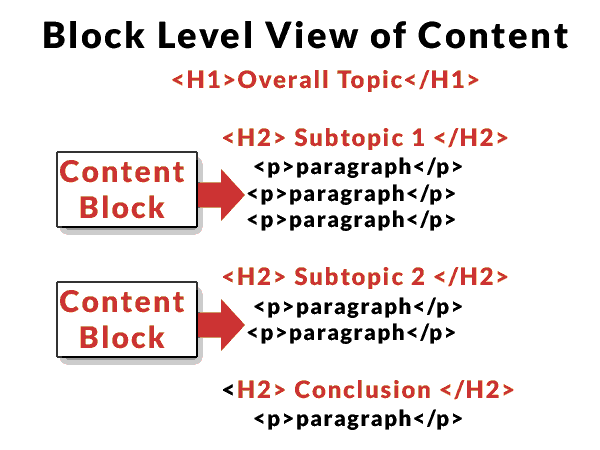
If you take a high level view of your web page, you can break it up into sections. Each section may consist of several paragraphs. Each section is a sub-topic of the overall topic of the page. So if you’re going to link out, identify the most appropriate page that sheds further light and expands upon what that section subtopic is about.
Link for Relevance
I would rather link to a site that’s relevant and on-topic to the sub-topic content block than link to a page just because it’s high ranking for my chosen keyword targets.
Once the algo/bot follows the link from your page to the page you’e linking to and checks out the content it will understand that you are linking to that page because this is what your content is about, which is the whole point of identifying relevance.
Linking out is best when the additional information provides additional context to what you are discussing. It allows you to move the content forward, without stopping to discuss a sub-topic of your sub-topic. If a reader wants to know more details, they can follow the link.
Link to High Ranking Pages?
The old advice to link to a high ranking site assumes that the high ranking page will work best for identifying what your page is relevant for. But this is essentially joining a clique, in which the act of joining is one of becoming a follower of the leader, of affirming your competitor’s relevance.
I’m not saying to automatically not link to the top ranked web page. I’m just saying to check your motivation, to be sure you’re linking out to the page that makes the most sense for the user. Otherwise you’re linking to what “some people” think Google’s algorithm wants for relevance.
The problem is that we do not know what Google’s algo wants beyond what’s good for users. So following what’s good for the user may be the best way to understand what’s best for Google and your rankings.
Outbound Links Create Awesomeness
So when you’re deciding what sites to link out to, rather than blandly linking out to a .edu or .gov site or to the top ranked site for a keyword, give it a little more thought. You may discover that users find your pages more useful than your competitors.
Being more useful and satisfying is what all that “be awesome” stuff is all about. Your rankings may improve because of that.
