

On Nov. 17, Chrome 158 rolls out to the majority of desktop and mobile users and drops support for client-side XSLT (Extensible Stylesheet Language Transformations).
For years, WordPress core and major SEO plugins, including Yoast SEO, Rank Math, and All in One SEO (AIOSEO), have referenced an .xsl stylesheet inside their XML sitemaps. When a person opened a sitemap URL in a browser, Chrome executed that XSLT file to transform the underlying XML code into a clean, clickable HTML table.
Without XSLT support, opening a WordPress sitemap in Chrome 158 displays raw, unstyled XML markup alongside a browser console and page warning.
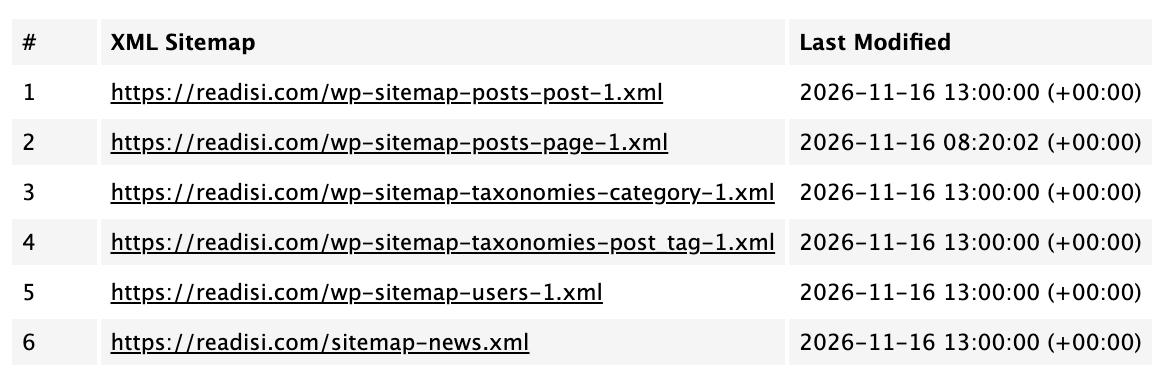
Search engines do not use XSLT. Googlebot, Bingbot, and other web crawlers fetch and parse the raw XML nodes (<loc>, <lastmod>) at the source. Crawlers avoid browser-side stylesheets, meaning indexing, crawl efficiency, and search rankings remain unaffected.
Because Chrome 158 lands while Google’s November core update, which began on Nov. 10, is still rolling, site owners and clients checking their domains during routine ranking audits may panic when they see raw XML in place of the familiar formatted table.
How To Check Which Sitemap Your Site Serves
Depending on your site configuration, WordPress serves its sitemap index from one of two primary URLs:
- WordPress Core Sitemap: yourdomain.com/wp-sitemap.xml (the default behavior when no third-party SEO plugin overrides it).
- SEO Plugin Sitemap (Yoast SEO, Rank Math, AIOSEO): yourdomain.com/sitemap_index.xml (or yourdomain.com/sitemap.xml, which redirects to sitemap_index.xml).
If you open either URL in Chrome 158 or a newer release, seeing a wall of XML tags confirms the browser skipped the XSLT stylesheet, not that the sitemap file is corrupt or broken.

Confirming Health In Google Search Console
To verify, or prove to a nervous client, that Google reads the sitemap without trouble, check Google Search Console:
- Open Google Search Console and select the property.
- Navigate to Indexing > Sitemaps in the left-hand menu.
- Inspect the Submitted sitemaps table. The Status column reads “Success” (in green), alongside the last read date and discovered URL count.
As long as Search Console reports “Success,” Google parses the XML structure without error.
WordPress Core And Plugin Status
| Provider / Plugin | Current XSLT Status & Roadmap | Operational Impact |
|---|---|---|
| WordPress Core | Includes XSLT in current releases. WordPress 7.2 (scheduled for 8 December) removes core’s XSLT stylesheet. | No SEO impact. Raw XML displays in Chrome 158 until the version 7.2 release. |
| Yoast SEO | Yoast 28.9 replaces XSLT with pure CSS styling to maintain visual rendering. As of Nov. 17, 28.9 is at RC5 and 28.8 remains the stable release and awaits general release. | No SEO impact. Styled view returns once version 28.9 reaches stable release. |
| Rank Math | Confirmed in support channels (4 November) that the change affects visual display alone. Its latest changelogs list no stylesheet replacement fix. | No SEO impact. Displays raw XML markup in Chrome 158. |
| AIOSEO | Continues serving XSLT-styled sitemaps, displaying raw XML in Chrome 158 with no announced plans for alternate visual stylesheets. | No SEO impact. Crawling and indexing proceed as usual. |
Potential Implications & Risks
Zero Ranking Or Indexing Risk
XML sitemaps exist for machine consumption, and search engine bots read the underlying <urlset> and <sitemapindex> tags. Dropping visual styling changes nothing about URL discovery, crawl budget, or search visibility.
Client Support Inquiries During The Core Update
Because Chrome 158 arrives alongside the November core update, clients or stakeholders who inspect their sitemap URLs will spot unformatted XML code and assume a site outage or plugin failure caused ranking fluctuations.
Browser Console Warnings
Chrome logs a deprecation warning in DevTools whenever a page invokes an .xsl stylesheet. Automated site-health crawlers or QA tools that monitor browser console errors may flag sitemap URLs until plugins or WordPress core drop the stylesheet reference.
Loss Of Ad-Hoc Visual Browsing
Editors and junior marketers who relied on opening /sitemap_index.xml in Chrome as a quick directory of site URLs lose that visual table unless they switch browsers (such as Firefox or Safari, which retain XSLT for the time being) or use a dedicated HTML sitemap.
Action Steps To Take
Because search crawlers ignore XSLT, you don’t need to rush to make emergency fixes. Choose from the steps below based on your role and client needs:
- Leave Production Sitemaps Alone (Recommended For Most Sites). Do nothing to your XML sitemap configuration. Wait for WordPress 7.2 on Dec. 8 (for core sitemaps) or upcoming stable releases from Yoast SEO, Rank Math, and AIOSEO to clean up the stylesheet reference.
- Brief Account Managers And Clients On Proactive Updates. Share a short note with internal teams and clients explaining that raw XML in Chrome is an expected browser change rather than a broken site. Point nervous stakeholders to the green “Success” badge in Google Search Console as proof of healthy indexing.
- Build A Human-Readable HTML Sitemap Page. If clients or human visitors rely on browsing a clean list of pages, create a dedicated page (such as /sitemap/) in the WordPress Block Editor using the Page List block, Categories block, or Latest Posts block. This gives human visitors and clients a styled directory without relying on XML stylesheets.
- Disable Core’s XSLT Stylesheet Via A Must-Use Plugin (Core Sitemaps). If you use WordPress core’s built-in /wp-sitemap.xml and want to remove the reference to the deprecated XSLT file (suppressing Chrome’s page and console warnings), add a lightweight must-use plugin at wp-content/mu-plugins/disable-sitemap-xsl.php containing the code below. The first filter covers the individual sitemaps and the second covers the sitemap index. The sitemap will still display as plain XML, but without the warning, which is the same result WordPress 7.2 delivers by default. Delete this file once the site is updated to WordPress 7.2. That release removes the stylesheet itself and deprecates both filters, so the plugin will do nothing except trigger deprecation notices.
<?php
/**
* Plugin Name: Disable Sitemap XSL
*/
add_filter( 'wp_sitemaps_stylesheet_url', '__return_false' );
add_filter( 'wp_sitemaps_stylesheet_index_url', '__return_false' );
What To Tell Clients
Note: This is only a visual change. Chrome 158’s removal of XSLT support only affects how sitemaps render in human browsers. Search engine crawlers process raw XML directly and are completely unaffected.
Organic performance, indexing, and rankings remain safe. WordPress 7.2 will remove the stylesheet reference and, with it, the Chrome warnings, leaving core sitemaps as plain XML. Yoast SEO 28.9 will restore a styled view using CSS, while Rank Math and AIOSEO have not announced a change.
More Resources:
- Ask an SEO: Is An XML Or HTML Sitemap Better For SEO?
- When The WordPress Plugin Update Is The Security Risk: Why SEOs Should Pay Attention
- All In One SEO WordPress Plugin Vulnerable To Two Exploits
Featured Image: Roman Samborskyi/Shutterstock
