

Few things waste a boardroom meeting like defending Google Analytics 4 figures that don’t align with the store-reported numbers. It erodes trust and leaves everyone with an incomplete, misleading picture, and over the past 12 months I’ve found it harder to get GA4 to do the job it’s set up for. It’s challenged me and my team to keep a much closer check, with alerts on the tracking we rely on to judge success.
So, ahead of this year’s holiday season, I audited GA4 at eight U.K. ecommerce brands, putting its Q4 numbers for 2024 and 2025 next to store orders. I expected gaps, but not ones this big, or this well hidden.
Between Christmas Day 2025 and Jan. 4, 2026, GA4 told a U.K. retailer its revenue was down 68% a day on the year before. The retailer’s own order records showed a fall of 13%.
GA4 recorded 81% of the store’s web orders in Q4 2024, 41% in Q4 2025 and just 32% over the Christmas period.
Six of the eight stores let me match GA4 to their own order records. At three, GA4 told a very different story. At two, the cookie banner had been switching itself off for days or weeks at a time, and GA4 gave no sign anything was missing. At the third, GA4 recorded no purchases for five weeks, then loaded them in late and counted hundreds twice. A fourth store’s GA4 was flooded with bots this September.
Most are setup problems that could happen at any store, including yours.

What I Compared
For six brands, I compared GA4 orders with web orders, week by week where I could. At two stores, the counts include some phone or finance orders the platform couldn’t separate out. I checked every figure against its source. Retailers A to D are the four stores with the biggest problems, and Retailer A is the one from the opening. (Disclosure: I work for a digital agency that has worked directly with all eight brands.)
See also: Why Your Search Data Doesn’t Agree (And What To Do About It)
5 Pitfalls To Look Out For In GA4
A Steady Gap
One brand’s GA4 recorded 76% of its web orders in both Q4 2024 and Q4 2025, and another’s between 72% and 84% every week of Q4 2025. That’s the shape cookie consent produces, with a similar share of shoppers declining tracking each week.
What to look for: A capture rate (GA4 orders as a share of store orders) that stays in the same band each week. Allow for it, and use GA4 for trends, not totals.
A Cookie Banner That Switched Itself Off
Retailer A’s GA4 sessions dropped out in blocks of days, and every block ended on the 14th of the month.
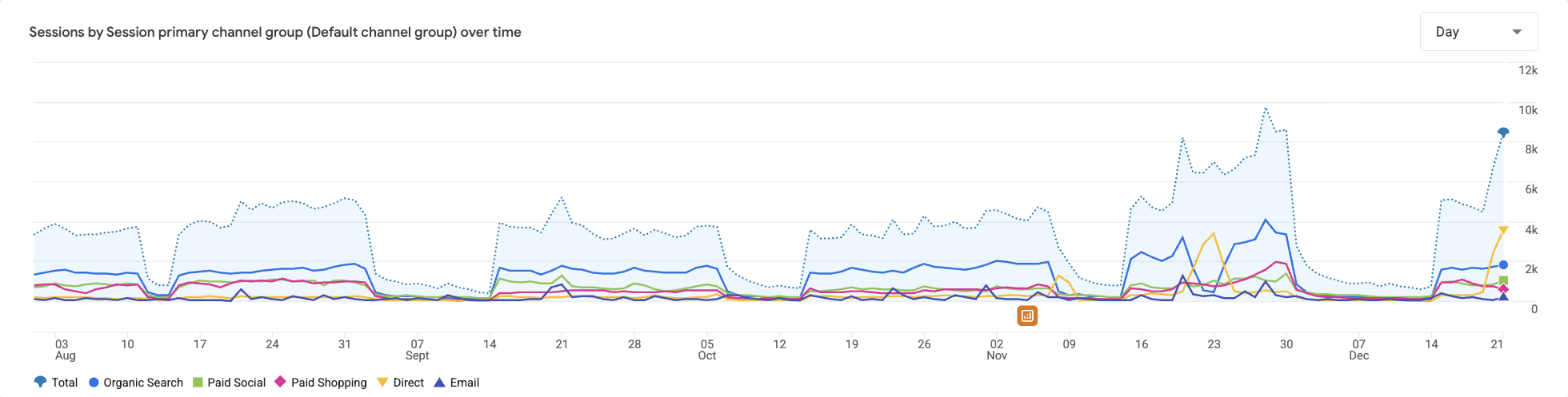
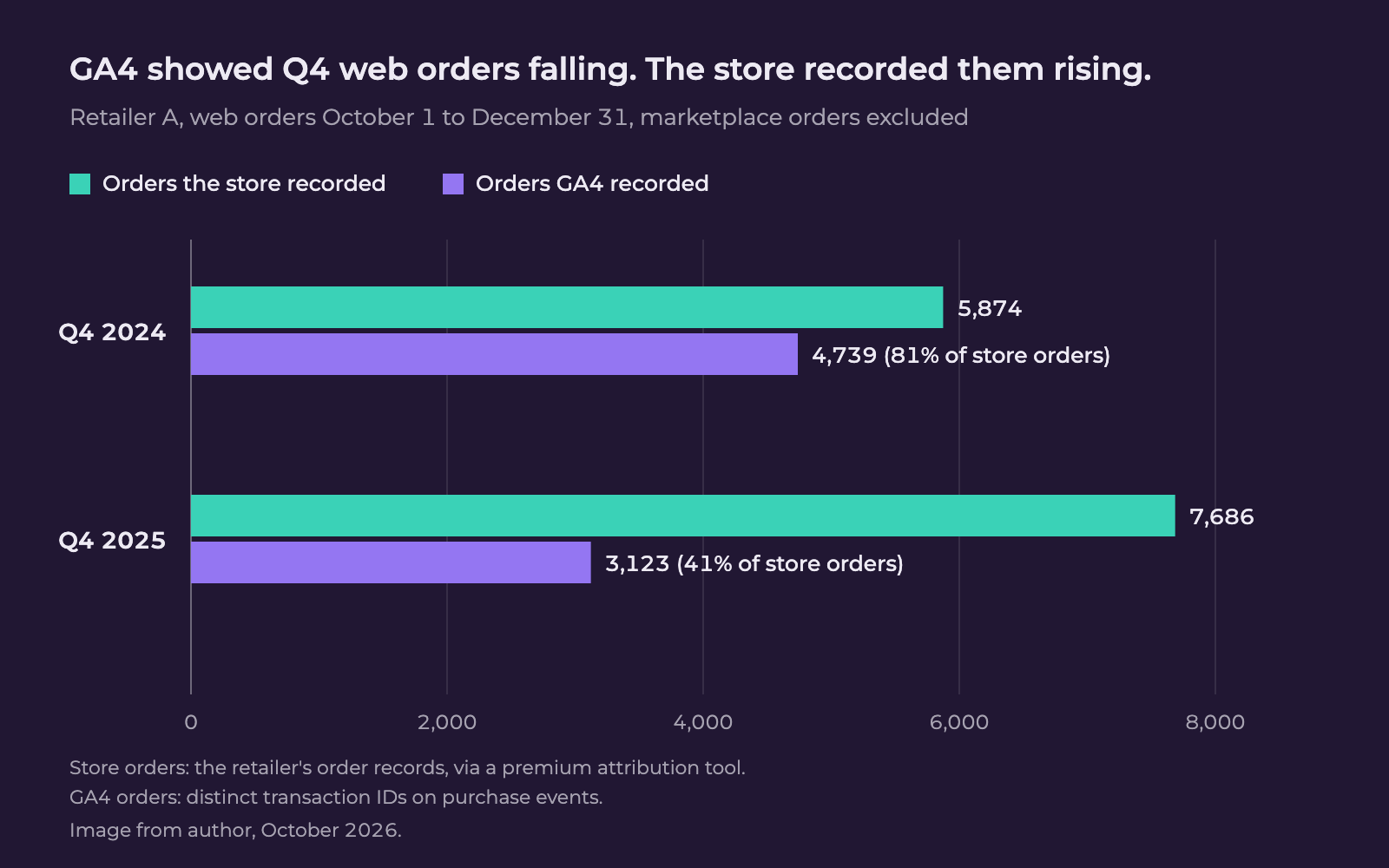
Retailer B’s blocks ended on the 20th. Its GA4 recorded 94% of the store’s orders in Q4 2024 and 36% in Q4 2025, and showed revenue down 69% while the store’s net sales rose 18.5%.
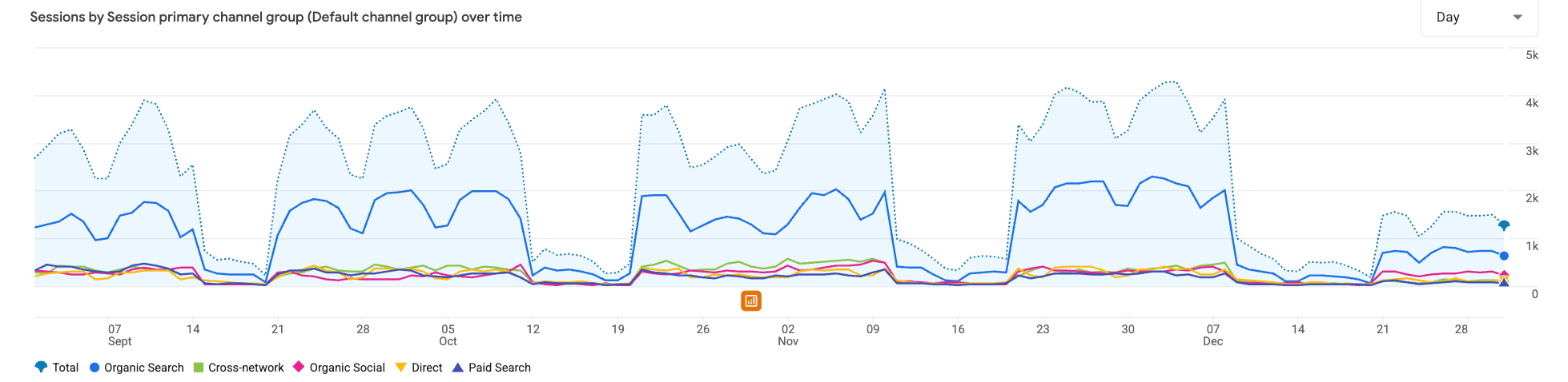
The cause was the cookie banner, twice over. Both stores moved to a new consent setup in 2025, so a share of shoppers stopped being tracked: the steady kind of gap. Each consent plan also covered a set number of page views a month, and once they ran out, the banner stopped showing until the next billing date. At Retailer B, GA4 recorded up to 68% of orders in weeks the banner stayed up and between 10% and 22% in weeks it switched off. GA4 kept receiving some data, so nothing looked broken, and the missing days read like a slump in sales.
In the Black Friday billing cycle, Retailer A’s allowance ran out on December 1, and GA4 didn’t recover until December 15.
What to look for: Sessions dropping out in blocks that start or end on the same date each month while store orders carry on. Size your consent plan for peak traffic and make sure its limit warnings reach marketing, not just developers.
A Blackout And A Late Backfill
From Oct. 28 to Dec. 4, 2025, Retailer C’s store recorded 2,215 orders, and GA4 recorded no purchases at all.
On Dec. 9, GA4 recorded 1,261 orders in one day, 1,000 of them with order numbers from inside the gap. Blackout orders were being loaded in late, and all but five went to Unassigned.
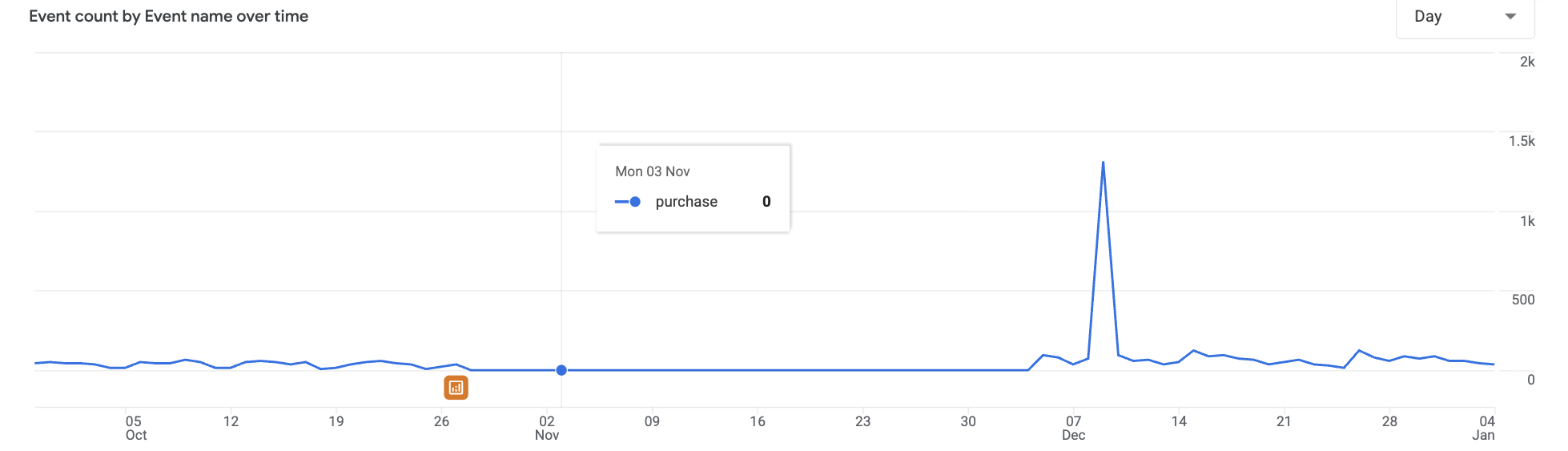
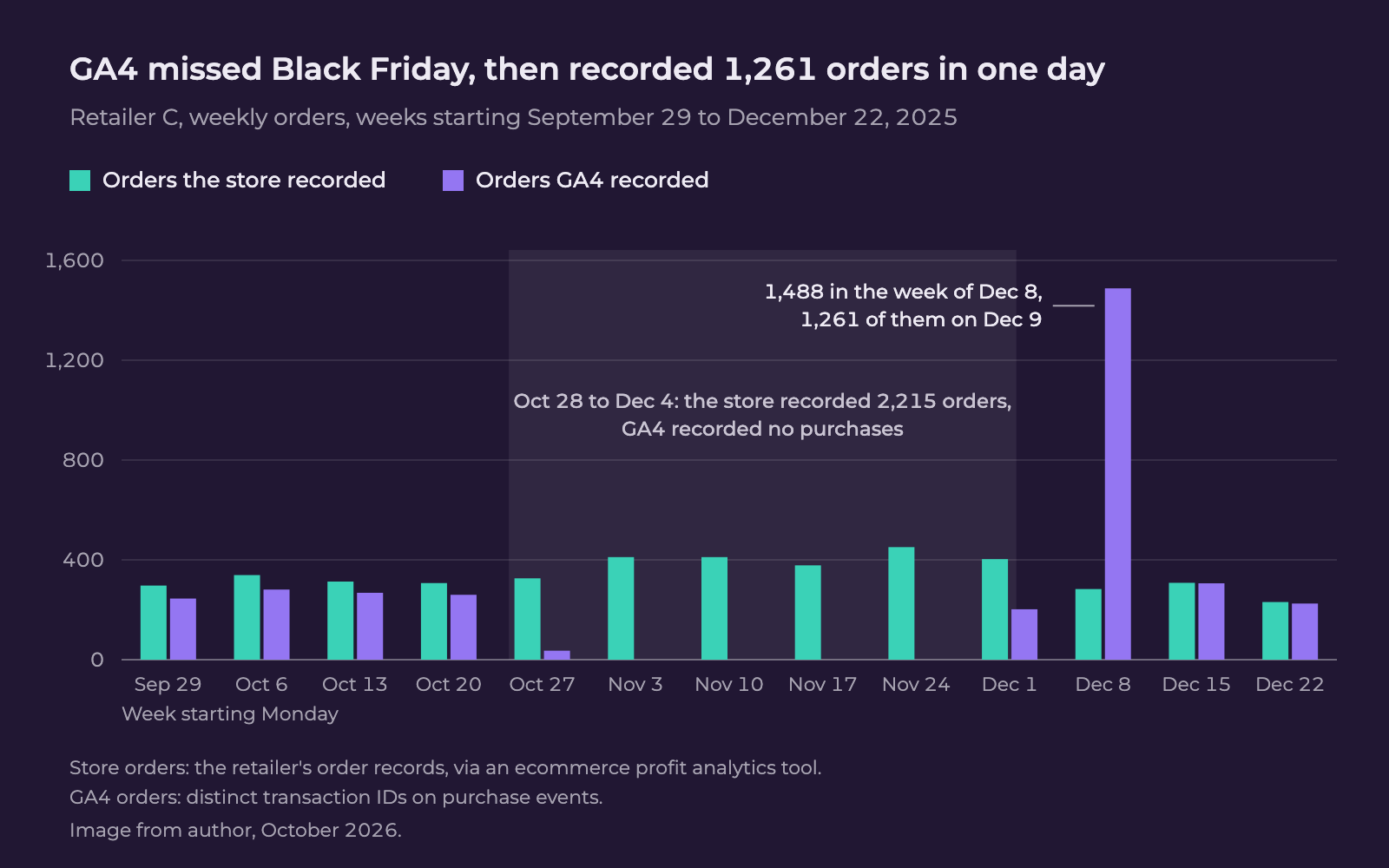
What to look for: Days with sessions but no purchases, and sudden runs of purchases in Unassigned.
The Same Order Counted Twice
Google’s guidance on transaction IDs says GA4 “deduplicates purchase events with the same transaction ID,” though only from the same user. At Retailer C, 657 of the 3,365 order numbers GA4 recorded in Q4 2025 had more than one purchase event, adding 735 purchases to its total. Across the quarter, the errors almost canceled out: GA4 recorded 4,100 purchases against 4,501 store orders. Check only the quarterly total, and it looks fine.
What to look for: In a GA4 exploration, list the purchase event count for each transaction ID. Anything above one is double counting.
Visitors Who Weren’t Shoppers
Its known bot-traffic exclusion filters out “known bots and spiders,” but other bots that run a site’s code like a browser count as visitors.
Retailer D’s GA4 recorded 23,187 sessions on September 27, 2026, and 25,622 the next day, against 300 to 900 a day in mid-September. Almost all were direct, desktop Chrome visits averaging about a second of engagement. Search Console clicks didn’t move.
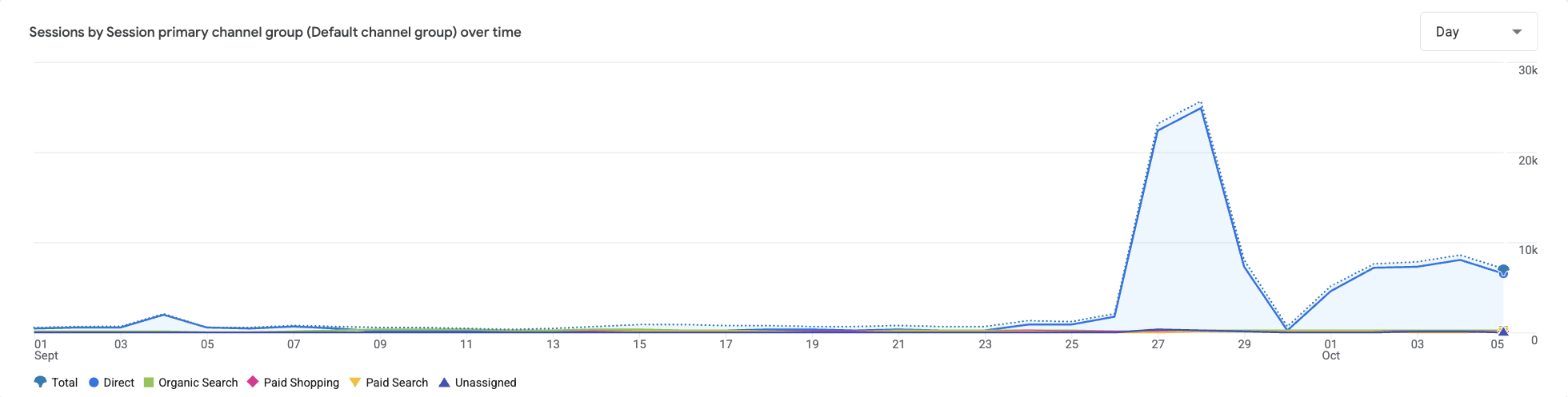
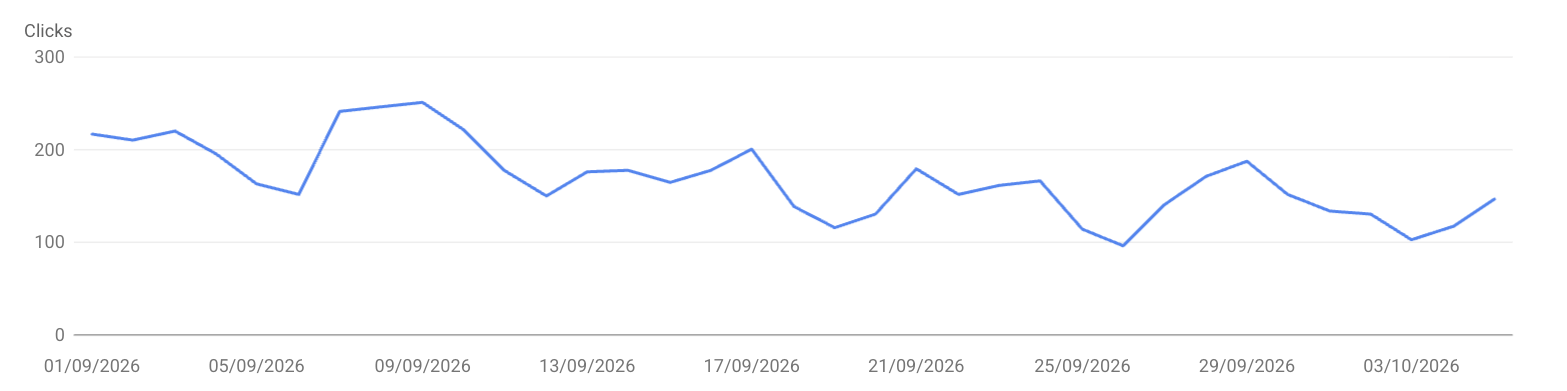
What to look for: Session spikes that orders don’t follow. Exclude them from reports and block them at your firewall, sparing verified crawlers like Googlebot.
Use Search Console As An Early Warning
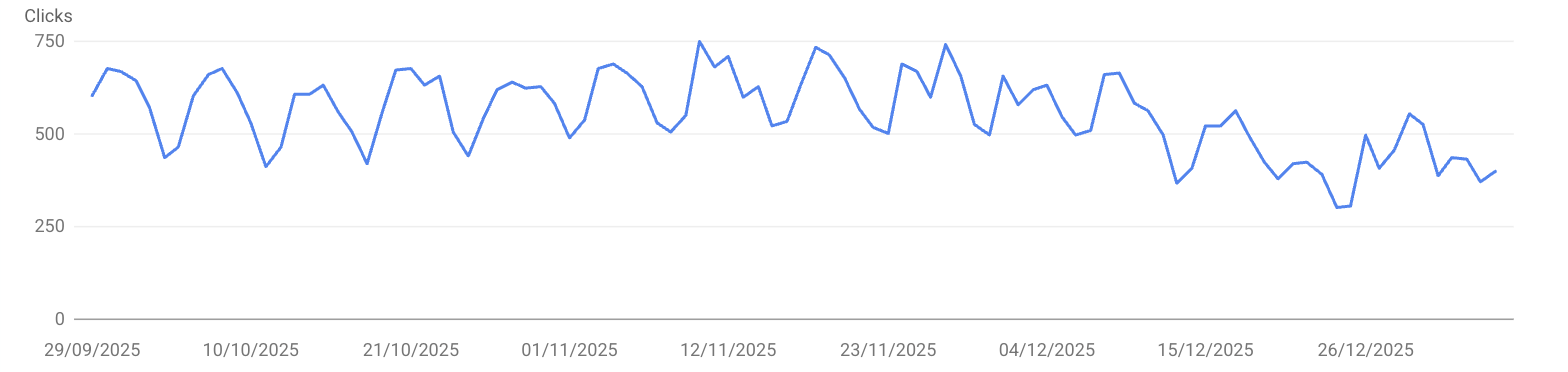
Search Console counts a click whenever a result sends someone to a page outside Google, whatever the site’s tags are doing. Divide GA4’s Google organic sessions by Search Console clicks each week, and a tracking failure shows up as a sudden drop.
In Retailer C’s blackout, Google sent 4,244 clicks in the week of November 3, and GA4 recorded 57 Google organic sessions.
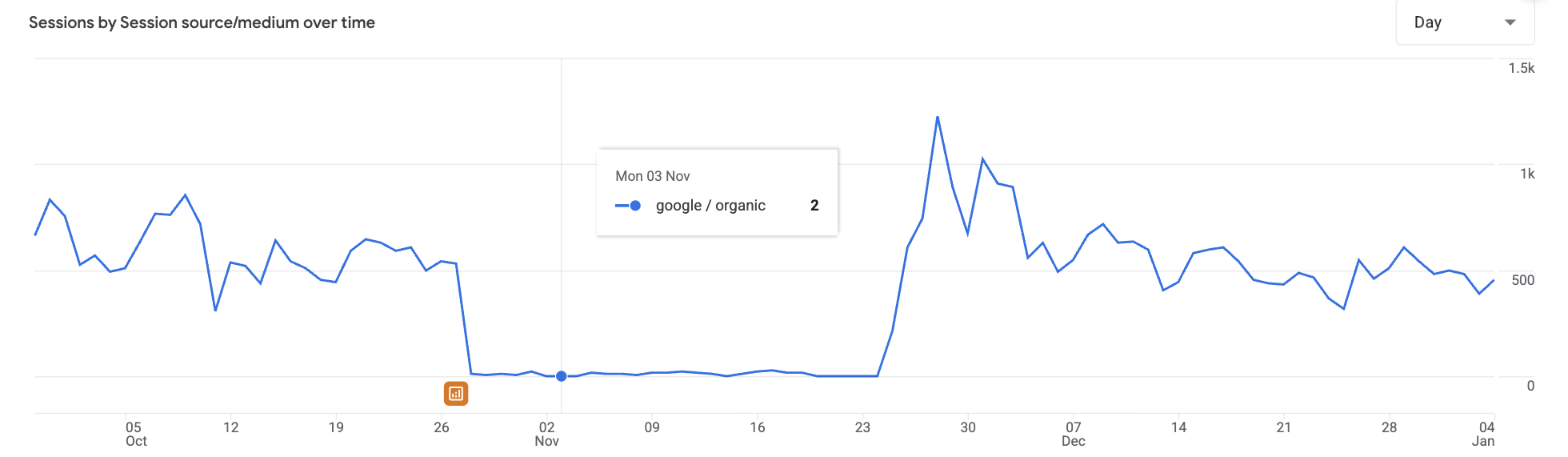
See also: Why Is Organic Traffic Down? Here’s How To Segment The Data
What It Does To Budget Decisions
Retailer A’s Q4 web orders rose from 5,874 to 7,686 while GA4 showed them falling by a third. GA4 also had Google Ads’ return on spend falling from 8.07 to 4.79 and organic search revenue nearly halving. Matched to store orders in a premium multi-touch attribution tool, Google Ads’ return rose from 4.42 to 7.93 on 20% less spend, and revenue attributed to organic and direct visits rose 58%. The attribution models differ, but they shouldn’t point in opposite directions. Cutting either channel on GA4’s numbers would have pulled budget from channels that were working, which is why I judge them together against store orders.
Retailer C’s GA4 put revenue from Google, paid and organic, down 86% while the store’s net sales rose 4.8%.
See also: Google Ads Budget Misallocation Is More Common Than You Think – And Harder To Spot
A Check To Run Before The Holidays
- Export weekly web orders for Q4 2024 and Q4 2025, without marketplace, subscription, and manual orders.
- Pull GA4 purchases for the same weeks as distinct transaction IDs on purchase events. Avoid the transactions metric, which counts refunds as well as purchases.
- Divide GA4 purchases by store orders. A step change, a near-zero week, or a week above 100% is a tracking problem.
How To Explain GA4’s Pitfalls To Stakeholders
Agree on the source of truth before the holidays. Orders and revenue come from the store; GA4 explains behavior and trends; ad platforms report what they claim.
Lead with the capture rate. “GA4 recorded 41% of our web orders this quarter, down from 81% last year” is a sentence any finance director understands.
Explain the consent gap in plain terms. In the U.K., the ICO’s guidance on consent expects a consent mechanism to make it “as easy to refuse consent as it is to accept,” so some shoppers will always decline, and GA4 will always undercount. In the U.S., opt-out signals such as California’s Global Privacy Control Act mainly affect advertising tags, while browser privacy features and ad blockers chip away at analytics.
Give marketing sight of anything that moves its figures. Consent limits, checkout updates, and tag changes often sit with developers. Put store and GA4 revenue side-by-side and date every change, so a fall in GA4 isn’t read as a fall in sales.
Move Purchase Tracking Server-Side
Most GA4 setups record a purchase in the shopper’s browser, where a checkout update, a script error, an ad blocker, or a refresh can lose it or count it twice.
Instead, send the purchase from the store’s own system when the order is created, through the Measurement Protocol or a server-side tagging container fed by the store, keyed on the order number. It no longer depends on the confirmation page; a refresh can’t duplicate it, and every event matches a store order. Moving browser tags to a server container doesn’t do this on its own, because the purchase still starts in the browser. Pass the shopper’s GA4 client ID and session ID with it, captured at checkout, so GA4 can join the order to the visit. Keep the browser tag for behavior: Google says the Measurement Protocol is meant “to augment automatic collection,” not replace it.
Server-side tracking doesn’t change your consent obligations, so the steady gap stays. If you’re starting now, I’d send it to a separate GA4 property through Q4, so nothing is counted twice, rather than switching over in November.
Count Orders Where They Happen
GA4 is still the best free tool most ecommerce teams have for understanding behavior, but it isn’t a record of sales. Before you cut or push spend this holiday season, count your orders where they happen: in the store.
More Resources:
- How To Track AI Traffic In GA4 Without Undercounting It
- Designing A Measurement Framework Before You Touch GA4
- How To Track User Journey In GA4 To Make SEO Wins More Visible
Featured Image: PeopleImages/Shutterstock
