
After my recent huge post on SEO tools was published, I promised to add the section for free online internal analytics services; but before that I decided to discuss different aspects of the topic starting with effective tracking of your backlinks and referrals. The 4 tools I’ll be reviewing here include:
| Options/ Analytics | Site Meter | Hittail | Google Analytics | Get Clicky |
| Sorting options | no | no | yes | yes |
| Filtering options | no | yes | yes | yes |
| Export results | no | yes | yes | yes |
| Traffic stats per referer | no | no | yes | yes |
| Multiple domains per account | no | yes | yes | yes |
Now a few words about each of them:

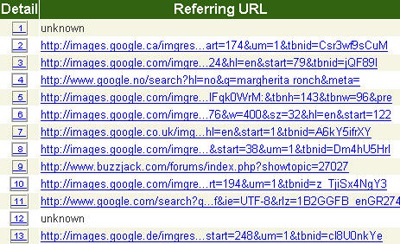
Sitemeter provides a partial report of your site recent referrals.
Benefits: the service is free and extremely easy to install and use.
Drawbacks: no sorting options; mixed up search referrals and site referrals; no export option; public stats for free users; one domain per account.
![]()
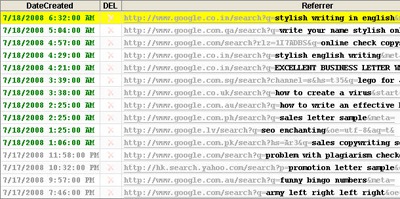
Hittail - while the service is primarily meant for long tail tracking, it does provide information on recent referrals under "Search Hits" tab.
Benefits: find the exact date and time when the link was clicked to bring a surfer to your site; export data to Excel; delete any referrals you don’t want to see; track more than one domain per account.
Drawbacks: limited sorting and filtering options; no traffic stats for each referral.
![]()
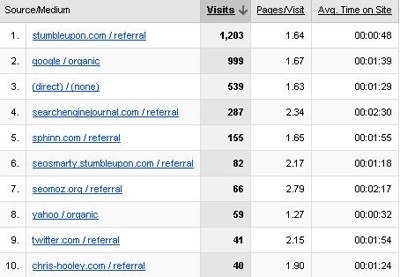
Google Analytics does have powerful features allowing you to track your visitors’ behavior but rather weak backlink-tracking options.
Benefits: see traffic stats (people count, time on site, bounce rate, pages per visit, % of new visits) for every referral; play with multiple powerful sorting options.
Drawbacks: no direct link to the referring page for less powerful referrals (I recall there’s some hack to remedy that but I can’t find the link; so if you know it, please comment).

![]()
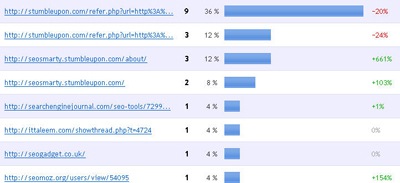
GetClicky offers a most convenient blogger-oriented solution for tracking (especially newest) backlinks.
Benefits: get updated of most recent links; newest unique links and backlinking domains; set date range and see how the links performed over time.
Drawback: 100,000 daily page views limit




Comments
16 responses so far ↓
PeterWyspianski on Jul 21, 2008 at 10:22 am
Possible you were looking for this http://www.reubenyau.com/google-analytics-hack-obtaining-full-referring-url/
p
Trezora - Fashion Glass Jewelry on Jul 21, 2008 at 10:33 am
Wow, getclicky looks great and their rates are really affordable. I feel a bit trapped since I use Webstat and have no way to transition my data from one service to another.
Cheers,
Mendy
Gidseo on Jul 21, 2008 at 10:45 am
GetClicky’s looking great - anybody know of any major drawbacks…
Gabriel Topala on Jul 21, 2008 at 4:34 pm
Using GetClickey fro the last 4 months. No major drawback…
Karuvai on Jul 21, 2008 at 5:03 pm
Hi Ann,
I read your many articles. I read and learning more knowledge. I want some information, I know google analytics because already I have been using google analytics. So, are the 4 tools only there? Is any other tools there? Really I proud of your work and I want to be more SEO knowledge from Your articles.
Karuvai on Jul 21, 2008 at 5:10 pm
What is the uses of Sitemeter for us? Because it allows one domain per account. Most people don’t want this tool.
Gidseo on Jul 21, 2008 at 5:38 pm
Thanks Gabriel.
Rich Pearson on Jul 21, 2008 at 7:50 pm
Google Analytics with the hack is working well for us and seems to improve every month.
Other than checking competitors’ backlinks, what do you use to find backlink opportunities?
Joseph@SEO on Jul 22, 2008 at 12:42 am
Thanks Ann for this post, personally I have been using Google Analytics to track my page visitors but from your comparison chat it seems Get Clicky has an added feature of tracking backlinks.
I wonder if there is any harm in using both Get Clicky and Google Analytics both at the same time?
Linda Bustos on Jul 22, 2008 at 12:48 am
Ahhh, Peter beat me to the Rueben Yau link dropping :-)
Great article Ann, it’s nice to see pros and cons for each tool
Ann Smarty on Jul 22, 2008 at 1:20 am
@Joseph@SEO : no harm at all, not that I know about.
Software Testing on Jul 22, 2008 at 6:07 am
@ Ann, what about the “external links” in Google Webmaster Tools?
Lida on Jul 24, 2008 at 8:23 pm
i think, external links menu in Google webmaster tools very usually but i need, unique domain links
Rob on Jul 26, 2008 at 9:16 pm
Thanks for the info, I’ll have to take a closer look at GetClicky…
busby seo challenge runner on Aug 5, 2008 at 12:26 am
hai great stuff this info is worth for webmasters
ravi on Sep 21, 2008 at 12:59 pm
its a great tool to your back links.keep posting more content.great stuff
Leave a Comment