

Search engine results pages, or SERPs, are an always evolving user experience.
The SERPs have changed dramatically since the early days of search.
Although many of the better-known search engines have cosmetic differences in user layout, the goals have evolved in unison to deliver more variety of content based on perceived user intent.
Universal search is how Google describes including various content-type modules within the SERP.
For many users, the featured snippet and other highlighted content, including the marked ads from paid search platforms (such as AdWords and Bing Ads), will guide the searcher to find answers efficiently and sometimes without even having to visit the publisher of the information.
As a marketer or business owner, there are some immediate tips you can learn, based on every SERP related to your industry.
Search engines have evolved to the point that almost every SERP is different, based on topic and user intent.
Let’s review seven areas of most search result pages that may help you expand your thinking when it comes to free competition and industry mining using Google, Bing, and other search engines.
I have broken these into two sections: Three from paid search and four from non-paid listings.
Looking at PPC Ads
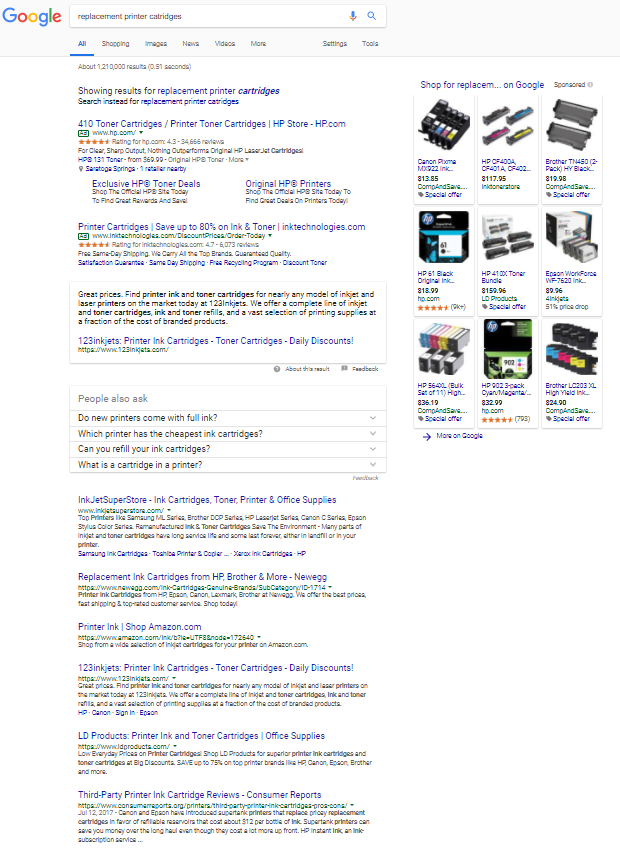
1. Does It Have Ads? If So, Mine the Information!
This leads to greatly streamlined creative for your SEO and paid search efforts and can even guide the creation of content used in social media or offline (print or outdoor) advertising.
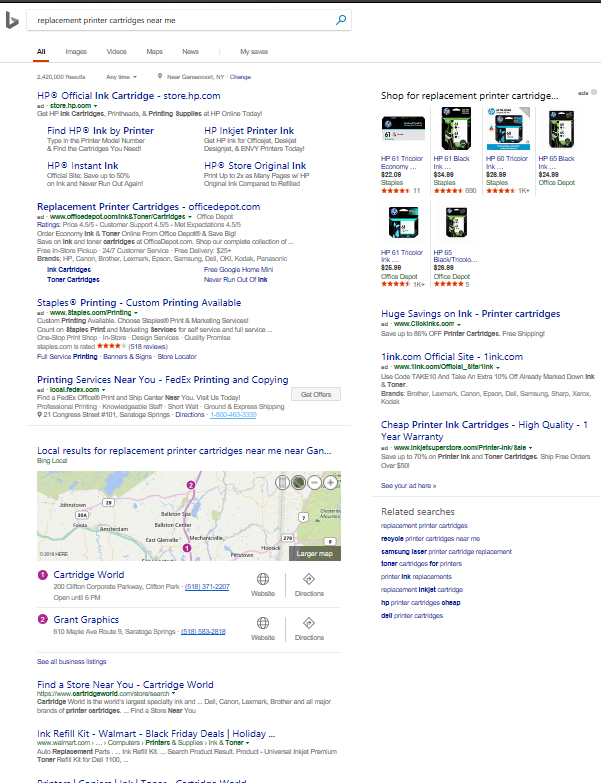
If you are in a competitive industry that is facing competition from national or aggregator type companies, using paid search listings to dominate the top of the search results page, there are a few things you can do with the ads.
Also, if your agency, consultant or in-house team is creating ads that vastly differ from those of your competitive set, it may be worth verifying they have done their research.
Efficiency suggests leveraging the content of the ads to identify likely-proven calls-to-action and value propositions for keywords related to your products or services.
Chances are if it is being used in top ads or in more than one ad (and isn’t something generic like “Free Shipping”), the content promotes conversion goals.
This also assumes that the specific competitors you are monitoring are using advanced tactics and strategies to truly monitor and make changes to campaigns and ad groups, which sadly isn’t always the case.
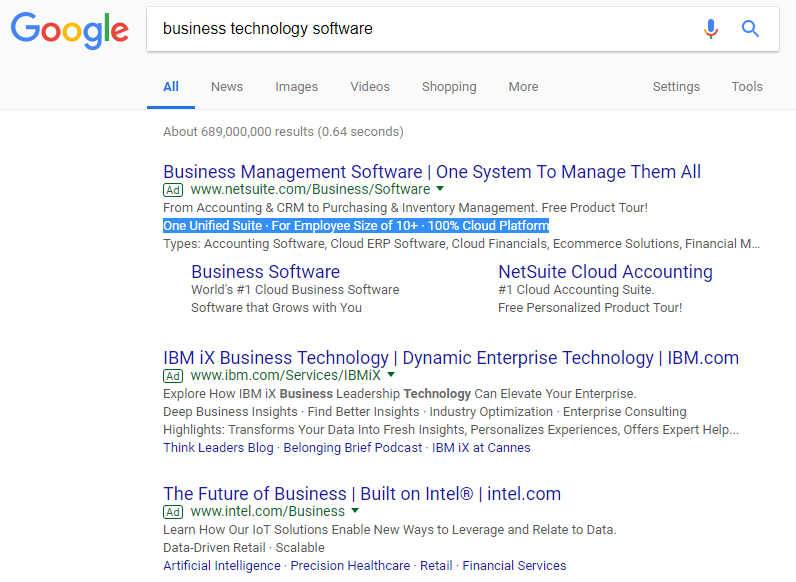
In the example below, you can see additional elements within the ad units differ, based on the sophistication of the management of the ads.
Highlighted are some easy “value propositions” and traffic pre-qualifiers (10+) that seem to be useful for the Netsuite team, used as call-out extensions within the AdWords interface:
2. Use Paid Search Data to Understand the Value of Your Keywords
Some business owners or marketers are surprised to find out how expensive (or inexpensive as often the case in B2B non-software industries, for example) paid search ads are.
Now that you’re beginning to understand the presence and sophistication of advertisers in your industry, create or attain a list of top keywords and begin to understand their values.
Often, business owners and even SEO pros are too fixated on the volume of specific keywords. We know this data is estimated and rounded by Google and should be used directionally as-such.
However, in my experience, the cost-per-click (CPC ) data is far more directional in helping understand what keywords are most important to the business.
Often, we find that lower-funnel (closer to purchase-intent) keywords cost more, but in some cases, a great variance will exist between high-volume keyword bids.
The exposure (advertising risk) for high volume + high bid keywords should be gauged to determine what queries likely provide the greatest investment and are “worth the risk” going after in paid or organic.
This type of data is available on Google AdWords or Bing Ads, but only if you are signed-in to an account.
Otherwise, third-party tools like SEMrush and SpyFu provided limited data for free, among others. Sort by CPC and get the “true story” of the valuable keywords you come across.
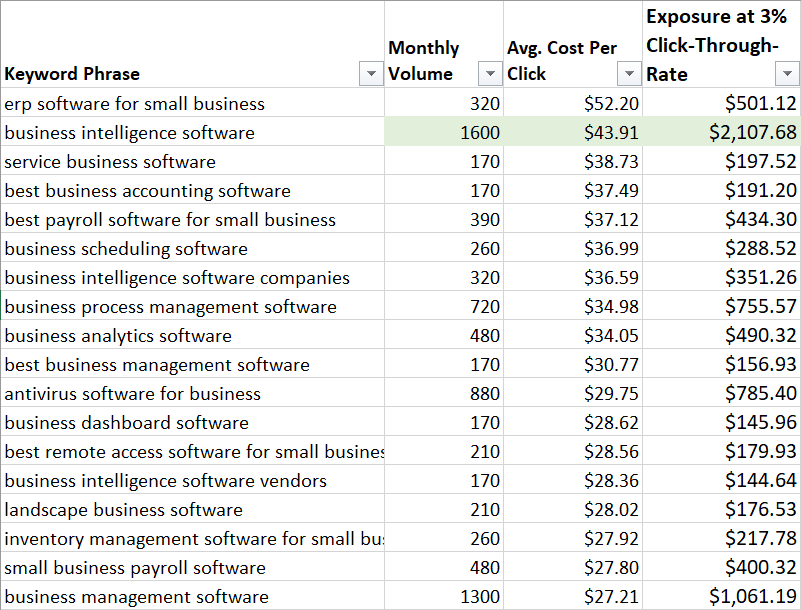
In order to get the “Exposure” column I simply take the estimated volume and multiply by the cost per click, then multiply by 3 percent which is a moderate expected click-through rate.
3. Use Paid Search to Gauge Competitor Landing Page Sophistication
This simple tip may anger some marketers because I’m advocating spying that costs money for the competitor.
Also, it does technically mean you are leaving the SERP – but don’t worry you will be right back
I can point to thousands of other dollars some campaigns have wasted that should be more bothersome than occasional competitor clicks, but that is for another article.
Visit your competitor landing pages and ask yourself:
- Are they using a “special” landing page that doesn’t seem like a part of their main site? If so, this indicates likely increased sophistication. Learn from the often-condensed content on that page to again mine information about language that works for conversion/lead capture?
- If they aren’t using a special landing page, what are they doing to ensure that the visitor has a better chance of converting? Conversion can mean anything from email signups to information requests to direct calls from the website to actual e-commerce purchases.
Learn from these landing pages not only for your paid search efforts, but again translate what you can to organic pages and other paid media, such as Facebook or LinkedIn advertising.
Looking at Organic (Mostly) Free Listings
4. Watch for News
The “News Box” that is part of the modern search results pages in both Google and Bing should be monitored not only for their presence but also position on the page.
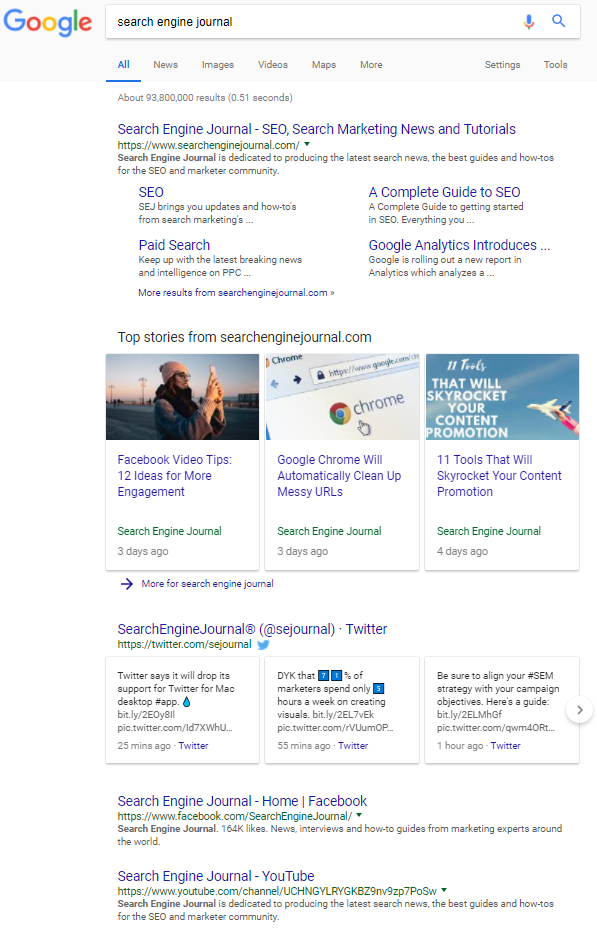
Let’s look at two types of SERPs.
One is about a news website:
And the other yields the News Box:
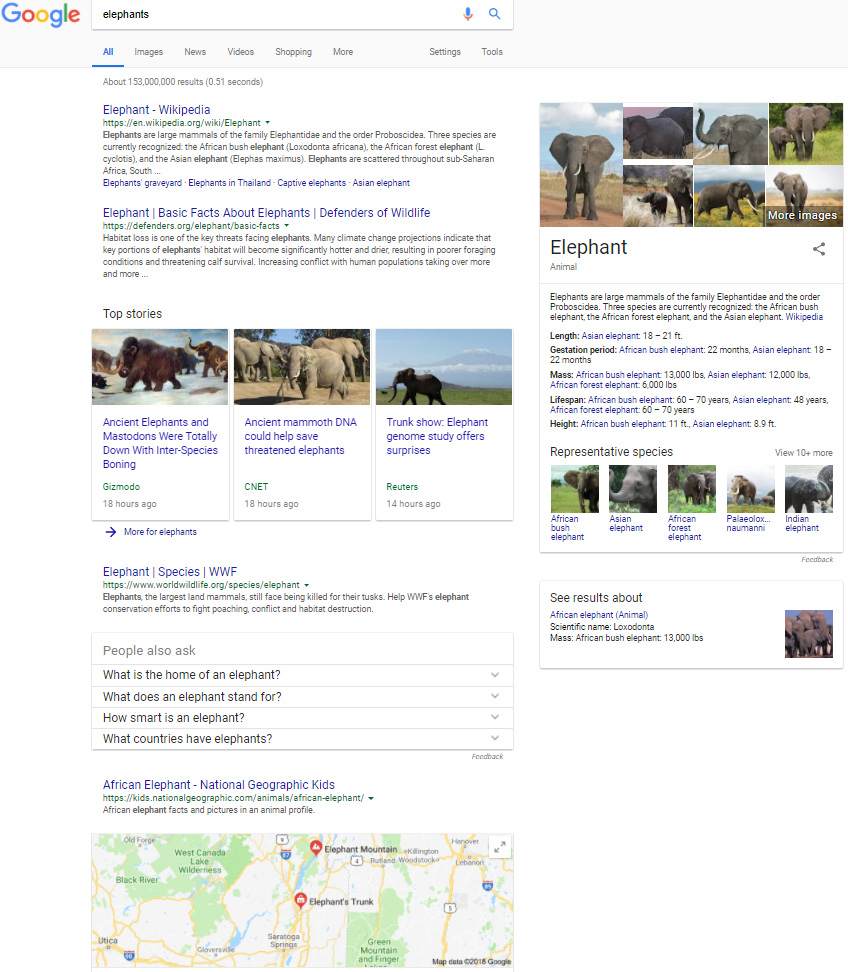
Elephants, for years, have been newsworthy animals. I have been able to use this example since the early days of Universal Search.
In this case, since there is recent news about elephants, my tip to publishers of content about elephants is to put out some fresh content.
If your keyword(s) have “fresh news,” then you should consider the same.
This SEO/content marketing-based recommendation has worked well over the years to influence further connectivity between brands and desired topics.
Another idea for someone interested in becoming more relevant and authoritative for “elephants” would be to develop content that satisfies each of the types of content referenced on this broad keyword (also known as head term) SERP.
In this case, there are two elephant-related brands in my general area, so since Google had no idea of my search intent, they gave me a local map result.
5. Plan for the Local vs. National ‘Conflict’
In the example above, Google attempted to find some elephants near me.
One area search engines seem to be gravitating toward is granting strong product verticals with a history of online purchase behavior – a lean toward non-local results.
For many, you now need to be on a mobile device or type “near me” as part of the search query to trigger a map.
Understanding whether you have reached the “near me” need to even compete with national online sellers is important when strategizing and setting expectations.
6. Get Granular with Extra Information Provided in the SERPs
Use all the things!
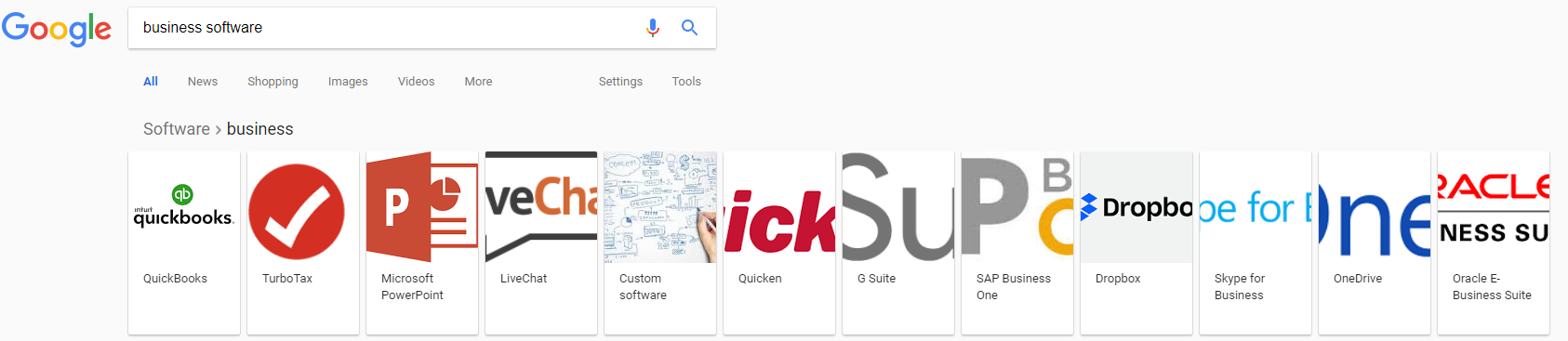
For broad searches that trigger “carousels,” mine the brands found here to understand whom Google most closely associates with the broadest themes. Then research why, and copy.
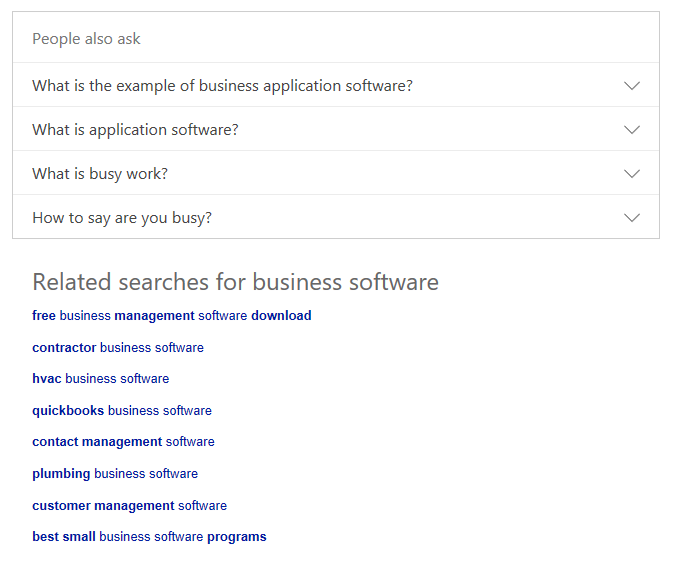
Bing and Google use “People also ask” and “Related Searches” effectively to provide closely-associated terms.
If you are a brand, make sure you keep an eye out for the words “scam” or other negatives here.

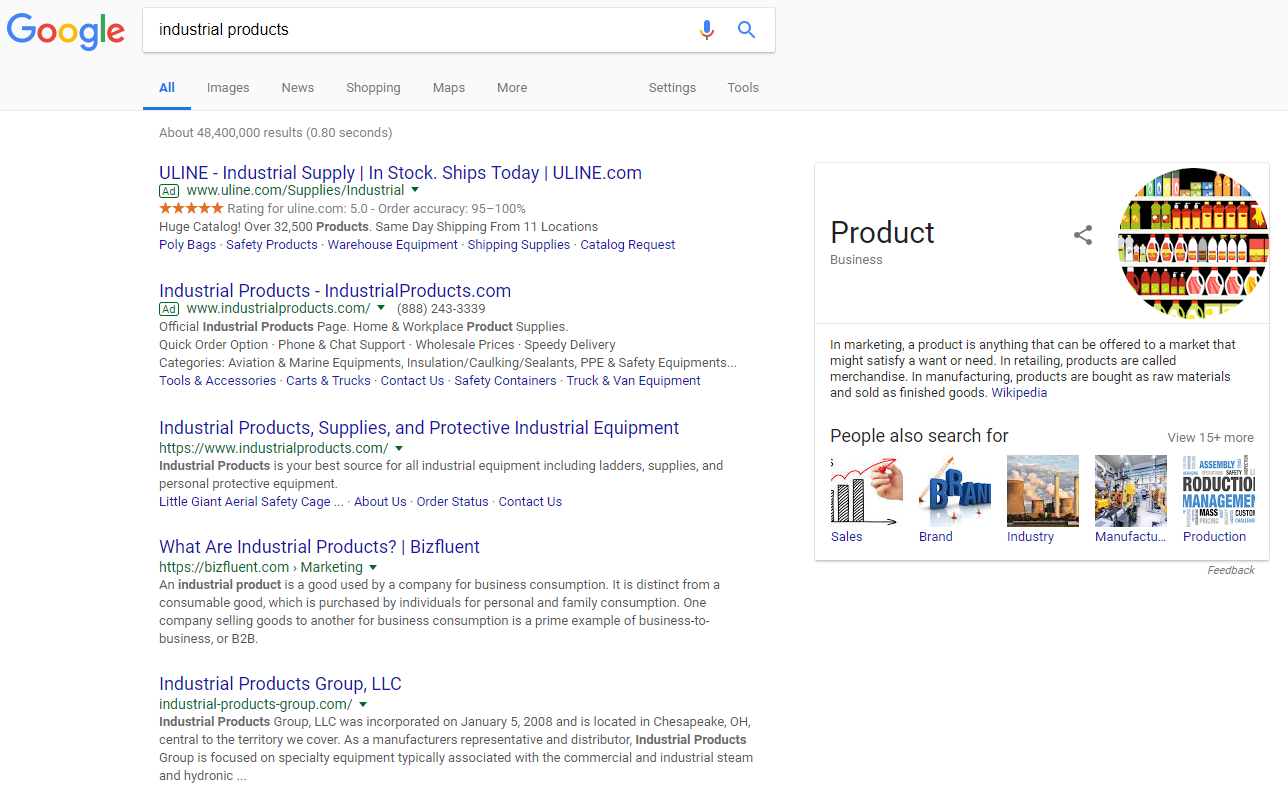
The Knowledge Graph’s existence in Google when performing a brand search is one of the more important things you can immediately notice (or notice missing – more below) on the right-side of the results when doing a search for a brand.
If you are unfortunate enough to have low authority for your brand, it can be confusing for people to find your brand even if they search it.
In the case of the company “Industrial Products,” even owning industrialproducts.com isn’t enough to fall hidden below competitors such as ULine and Google’s desire to define a seemingly educational search:
7. Brands Must Secure & Optimize the Knowledge Graph
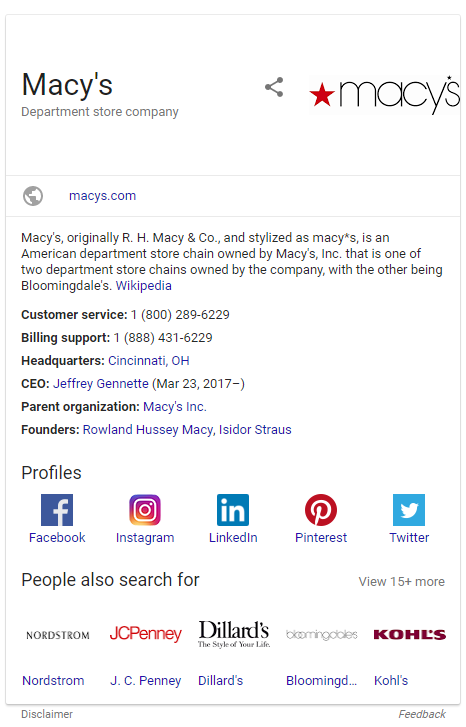
For those unfamiliar, the Knowledge Graph is partially controlled through establishing Google My Business, and partially through proving that you are an entity that deserves the right to appear due to the likelihood the user’s intent is to find you.
These obstacles make it sometimes more difficult for smaller brands but starting on the path to branded SEO will help establish a foundation to becoming the next Coca-Cola or Macy’s.
Conclusion
Two final tips for this article:
- Look closely at the “People Also Search For” functionality in the Knowledge Graph and how it differs for brand searches. If you sell insurance and the list of “also search for brands” are real estate brokers or financial advisors, there is a fundamental misunderstanding with what Google thinks you are versus what you are. I like to use this cluster of “associated brands” as a key guide to the growing (hopefully) eminence of the brand in the “right neighborhood.” Keep in mind this topic is far more technical than summarized herein, and if you wish to learn more check out Bill Slawski’s recent article describing how geography comes into play.
- Also, the inclusion of social media chiclets (icons) in the Knowledge Graph is a result of branding SEO combined with increasing the authority of your social media pages. If you want to own the whole list of (ideally) seven organic results on the first SERP for your brand, optimize all your assets. The ones that are doing it right have their social media channels show up in the SERP for their brands. Copy, rinse, and repeat.
More SERPs Resources:
- Understanding the Modern SERPs & Why There’s More to Ranking #1
- How to Hack Your Way to the Top of Competitive SERPs
- Google Introduces Breadcrumb SERPs
Image Credits
All screenshots taken by Chris Boggs, February 2018
