
YouTube has expanded the video clips tool in YouTube Studio to Shorts, so creators can turn segments of long-form videos, such as podcast episodes, into vertical Shorts. TeamYouTube announced the change Nov. 12 in a YouTube Help Community post aimed at podcast creators.
In an April post, YouTube said it would be “rolling out Video Clips to Shorts” later in the year. The tool’s help page has described the Shorts option since at least Sept. 10, according to an Internet Archive capture.
The help page explains that each Short created using this tool has the original video as its related video. A clickable link of the source video will be located underneath the channel handle. However, if the Short is either private, unlisted or Made for Kids, then the tool won’t add the link.
The automatic link gives teams with a video podcast or webinar series a way to send viewers from a Short back to the whole episode.
How The Clips Tool Turns An Episode Into A Short
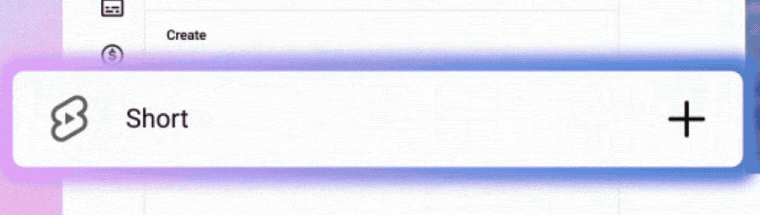
When they are in YouTube Studio, creators open one of their pre-existing long-form videos. On the left-hand side of the screen is a list of options including Clips and Shorts. If they choose Short, they have two ways to create the Short.
Here’s an example from YouTube’s demo showing the Short creation option in Studio.
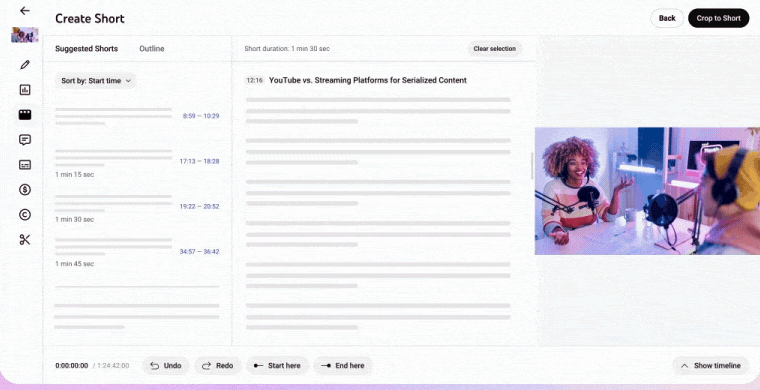
They can enter timestamps into the timeline editor. Alternatively, they may select some text in their video’s transcript to create the Short.
Where available, the left-hand panel also shows AI-powered suggestions and an outline of the transcript that AI generates. YouTube’s post says it picks “moments in your episode that can be watched independently” so creators can review and edit them.
The selection screen places suggested Shorts beside the transcript and the original video.
The post describes how a widescreen episode becomes a Short:
“For Shorts, your 16:9 podcast episode will be transformed into a verticalized video, keeping the most important parts of the video in the frame.”
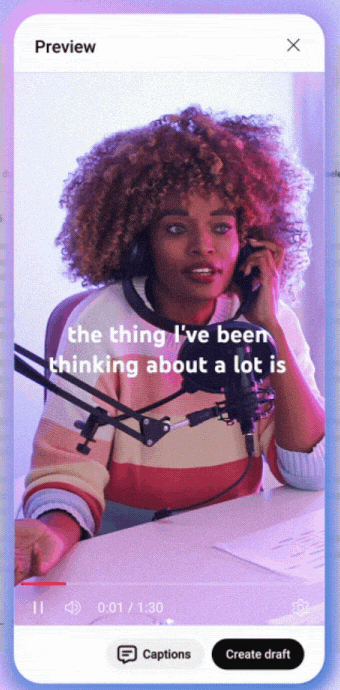
The help page says captions are added automatically where available, and creators can change their color, font, styling and position or turn them off.
Here’s the vertical preview from the same demo, with captions and a Create draft button.
For standard video clips, which the tool still makes, the help page’s tip is to add a link to the source video in the clip’s description. YouTube also recommends keeping only full episodes in podcast playlists.
Where AI Suggestions Are Available
YouTube’s help page for the clips tool lists AI-powered suggestions and outlines for creators in Brazil, Canada, France, Germany, India, Mexico, South Korea, Spain, the U.K. and the U.S. The supported languages are English, French, German, Hindi, Korean, Portuguese and Spanish.
In an April capture, the page limited suggestions to English-language videos in a podcast playlist in the U.S. and Canada. The current page doesn’t mention podcast playlists for suggestions.
What YouTube Says About Reusing Your Own Footage
The help page for the clips tool contains a statement which reads, “You won’t be penalized for using your content in a video clip or Short.” The statement’s link references YouTube’s channel monetization policies. The same language was found on Sept. 10 when the help page was captured. Earlier versions of the page also had the same response for use of a video clip under a question regarding penalties for copyright infringement.
On Oct. 1, YouTube said it would reduce the reach of channels that mainly aggregate or re-upload other creators’ clips without significant changes. In my coverage, I wrote that YouTube’s video on the change didn’t discuss creators cutting Shorts from their own long-form videos.
Why This Matters
Unless it’s private, unlisted, or Made for Kids, a Short created with the clips tool will automatically link to its full-length episode. When you create a Short on another platform and upload it yourself to YouTube, YouTube’s related video help page has you add that link manually after uploading. To do this requires advanced feature access.
Beyond stating that creators won’t be penalized for using their own content in a clip or Short, the help page’s note didn’t address recommendations, which was specifically what the Oct. 1 Shorts changes were about.
Looking Ahead
According to YouTube’s post, they are currently working to expand the AI suggestion system to more of their creators in the near future but do not include specific countries, languages, nor time frames. If you have a YouTube channel located outside of the 10-country limit or the seven-language limit included on the help page, then this will be the list to reference prior to developing a clipping routine based on suggested content.
Featured Image: Stockinq/Shutterstock
