

Personal AI agents like Meta’s Muse and OpenAI’s Dots are splitting the web into two kinds of websites: the ones the agent has a deal with, and the ones it walks into pretending to be your customer.
Muse and Dots both take a request from a person and carry it out on the web. They research a product, fill in a form, and can even add the product to cart and check out. Meta has documented how Muse does this, in detail. OpenAI has published much less about Dots, so most of this article is about Muse, with Dots wherever OpenAI has said something.
I think agents like these will increasingly be how people use the internet. Before the iPhone made mobile browsing a real thing, computers were the only way most people ever interacted with websites. Computers’ share of traffic fell from 98% of worldwide web traffic in January 2010 to under half in 2026, by StatCounter’s count. We are about to see that same thing happen to browsers used by humans, as agent-driven browsers take a share.
The comparing, booking, and reordering a person used to do across 10 tabs can now become one request. Muse is already available to anyone 18 or over in the U.S. and Canada, free for most uses. That is why this matters now, even before anyone knows how many people shop this way.
For SEO teams, the part where the AI agent searches is familiar ground, and so is most of what it reads once it arrives: headings, link text, alt text, and the facts in visible text. The part where it completes the purchase, the named buttons, labeled fields, and checkout, has always belonged to front-end teams.
An agent in a browser finds websites the way a person does, by name or by searching, so the ranking work still applies, even if neither Meta nor OpenAI says which search engine its agent uses. After the agent arrives, page structure decides whether it can read the page, interact with it, and complete the task, whether that is a booking, a form, or a purchase.
For marketers, attribution and audience data assume the visitor is the person. When an agent browses, your analytics will most likely count it as your customer. When it buys through a connector, your website analytics sees nothing, and the order appears only in your platform’s order records.
This article covers which SEO controls still apply to these agents, which ones no longer work, where agent activity shows up in reporting, and what to check on your or your clients’ pages.
Muse And Dots Reach A Business Through A Connector Or A Cloud Browser
Muse’s first tier is the connector. Meta says Muse “launched with dozens of partners along with access to the entire Shopify catalogue,” and is adding Walmart, Best Buy, Sephora, Wayfair, and others. For the connectors it launched with, Meta says it “worked closely with the service provider to integrate their API.” Dots have their own version. OpenAI says: “Through our ecosystem of plugins, they can readily connect to over 4,000 apps.” Any business can build one and submit it for OpenAI’s review.
The browser tier is everyone else. Muse runs, in Meta’s words, “a real up-to-date Chromium-based browser” on “a dedicated secure computer.” OpenAI says dots “can do nearly anything using their own cloud computer, their own browser, and the apps you’ve connected.” Meta’s documentation for businesses building connectors says: “Muse can already browse websites. Your connector should improve on what’s possible in the browser experience through better information, account access, more reliable actions, or fewer steps.” Without a connector, the agent comes to your website in its browser because a person gave it a task, such as buying a shirt from a named designer, and it works with whatever the page shows it.
If you’re on Shopify, the platform can choose your tier for you. Its default setting, “Allow Shopify to manage for me,” is found under Sales channels, then Agentic, enrolls stores in its AI shopping channels. Shopify says products are “shared with Meta by default through Shopify Catalog.” A store on a custom platform is in the browser tier unless it builds a connector.
I first described these two tiers in Meta’s Muse documents in September.
See also: Getting Your Product Into ChatGPT Isn’t The Hard Part, Getting It Through Checkout Is
Muse And Dots Give Websites No Name To Put In Robots.txt
Most of the controls SEO teams use, from robots.txt rules to crawler allowlists, were built for crawlers that announce who they are. Neither Meta nor OpenAI has published a user agent, request header or signature for the Muse or Dots’ browsers, so there’s no name to put in robots.txt. Meta’s page for website owners lists five crawlers, and Muse is not one of them. OpenAI’s page lists four, and dots are not on that list either.
Meta describes what a website sees when Muse visits it: “When Muse browses the internet, it will appear as your activity, so if you ask Muse to buy a shirt from a clothing designer’s website, that designer might use your visit to show you an ad on Instagram.”
Think of Frank Abagnale in Catch Me If You Can. He walked through airports in a pilot’s uniform, and nobody checked whether he could fly, because the uniform was right. Muse walks into your website wearing your customer’s uniform and, in Meta’s words, “your activity.” Robots.txt only ever worked with names, and this visitor doesn’t give one.
Robots.txt has always been an honor system. The standard says its rules “are not a form of access authorization,” and a crawler follows them only if its operator chooses to.
A name lets a website recognize the visitor and decide what to do with it. For example, Amazon’s robots.txt names 99 agents, and Muse and Dots are absent because there is no name to write. When Amazon blocked Muse in September, it did it through its Conditions of Use, the terms its customers agree to, as I wrote in Amazon’s block of Muse. GeekWire reported Amazon’s three reasons: Meta didn’t tell Amazon that Muse would access its store, the agent doesn’t identify itself when it browses, and it appears to capture and store customer credentials.
Dots have a second route. OpenAI’s documentation tells users: “If a website blocks the cloud browser, ask your dot to try your connected computer.” For ChatGPT’s computer use more broadly, OpenAI says websites “may treat approved clicks, form submissions, and signed-in actions as coming from your account.”
For SEO teams, the decision moves from robots.txt to bot protection, and that is usually someone else’s system. A firewall or your platform’s bot filter sees a Chromium browser on a cloud machine, and it either blocks it or lets it through as a person.
HUMAN Security, as reported by PPC Land, says its bot-detection product can identify Muse, which is a reason to ask your bot vendor whether it can tell if a Chromium browser is operated by a human or an AI agent.
See also: Everyone Is Negotiating With Google While Meta Reads The Web For Free
On-Page SEO Covers Most Of What Personal AI Agents Read
Meta says Muse’s browsing sub-agent reads a page through the accessibility tree: “The sub-agent, which drives the Browser, sees an accessibility tree snapshot of the page, not the raw DOM.” The sub-agent also “has no ability to run JavaScript in the page context.” Your page’s own scripts still run, because it is a real browser. Muse can’t add any of its own. OpenAI has not published how the dots browser reads a page. Google’s guidance for website owners says browser agents may gather what they need by “analyzing visual renderings (like screenshots), inspecting the DOM structure, and interpreting the accessibility tree.”
The accessibility tree is what screen readers use. The browser builds it from the DOM and keeps, in Chrome’s description, “only elements from the DOM tree that are relevant and useful for displaying the page’s contents in a screen reader.” Each item has a type (button, link, heading), a name, and a state. Design does not appear in it.
Most of what the agent reads is on-page SEO you already do, but the part that completes the transaction is front-end work.
| Page element | In Chrome’s accessibility tree? | What it means for the agent | The check, and who usually owns it |
|---|---|---|---|
| Headings | Yes, with their level | The heading outline is the page outline | One H1, real heading tags in order, no styled divs standing in for headings (SEO) |
| Link text | Yes, as the link’s name | “Read more” and “Click here” name nothing | Anchor text that says where the link goes (SEO) |
| Image alt text | Yes, as the image’s name | A product image with empty alt is an unnamed object | Alt text on every product image (SEO) |
| Prices, sizes, and specs | Only as text | A price in an image or a canvas has no text to read | Prices and options in HTML text (SEO, with front-end) |
| Buttons and icon controls | Yes, if they have an accessible name | An icon-only add-to-cart with no label has no name | A visible label or aria-label on every control (front-end) |
| Form fields | Yes, with their labels | Unlabeled size and color pickers are guesswork | A label on every field, including custom dropdowns (front-end) |
| Content in collapsed tabs and accordions | Depends on how it is hidden | A section collapsed by height stays readable. One hidden with display: none or a closed details element is out of reach until opened | Ask how your theme hides them, and keep key facts out of hidden sections (SEO, with front-end) |
| Structured data (JSON-LD) | No | Chrome leaves script blocks out of its accessibility tree, and Meta says Muse’s browsing agent reads that tree, not the page code | Keep it for Google, and put the same facts in visible text (SEO) |
| Content rendered by JavaScript | Yes, once the browser has rendered it | The browser runs your page’s scripts. The agent adds none of its own | Keep key facts in the raw HTML too, for crawlers that never run scripts (SEO) |
To see what Muse sees, open a page in Chrome DevTools, go to the Elements panel, then the Accessibility tab, and toggle “Show accessibility tree.”
I checked the structured-data row on a real product page from a large store on Shopify, reading the accessibility tree Chrome 154 built for it. Chrome is built on Chromium, and Meta says Muse runs “a real up-to-date Chromium-based browser.” The page’s structured data listed six of the seven sizes in one color as out of stock. A person sees those six buttons grayed out and crossed out, through styling alone. In the accessibility tree there are seven identical buttons, “Select size eight” to “Select size 14,” with nothing marked unavailable. The stock information existed for Google and for human eyes, and Chrome’s accessibility tree, the version Meta says the agent reads, had neither. The tree did catch up after a click: select size nine and an “Out of stock” note and a “Notify me” button appear. An agent learns what a person sees at a glance only by trying each size, one by one.
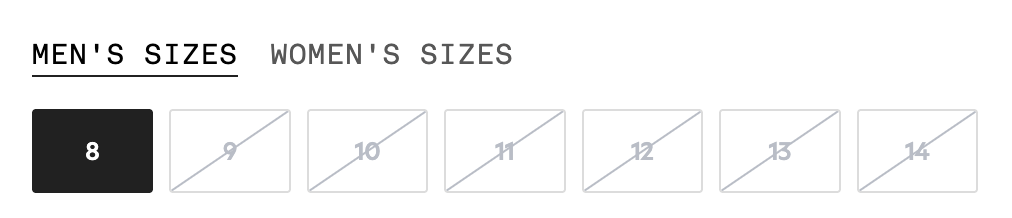
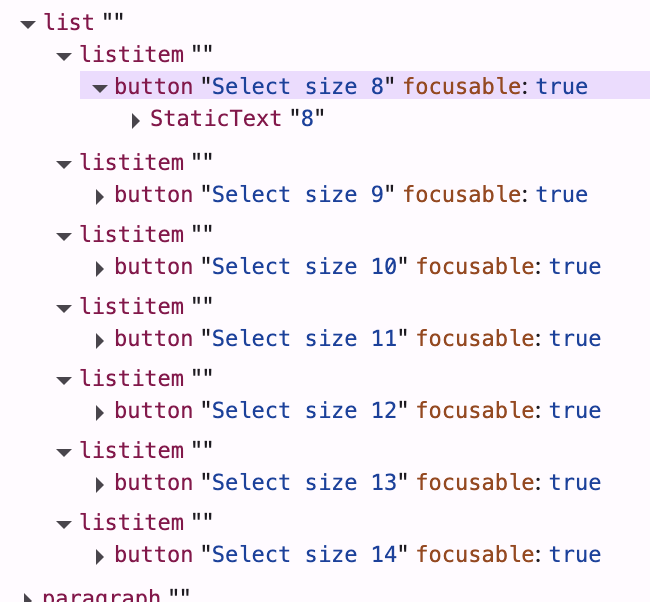
On the same page, the shipping eligibility and the free-shipping threshold appeared only after the page’s scripts ran, so a crawler reading the raw HTML would have missed them.
Meta has not said whether Muse reads structured data by another route, and businesses in the connector tier hand their data over by API without depending on the page at all.
Muse Visits Look Like Customers In Your Analytics, And Agent Checkouts Skip Them
| What the customer’s AI did | What your reports show |
|---|---|
| Bought inside an AI app (direct checkout on Meta or Google) | The order, in your platform’s records. The checkout never loads your pages, so Google Analytics and the pixels on your pages don’t run there (Shopify confirms this for its stores on Meta and Google). |
| Sent the person to your website through a link | A visit from that app, if the app passes a referrer. With no referrer and no tag on the link, a direct visit. |
| Browsed and bought on your website (Muse or a dot) | A visit from your customer. Neither Meta nor OpenAI publishes a user agent, referrer, or IP range for these browsers, so there’s nothing to filter them by. |
Google Analytics 4 added an AI Assistant channel on May 13 that sorts visits from AI assistants such as ChatGPT, Gemini, and Claude without setup. It works from the referrer, so it counts only the second row, and only when the app sends one.
Shopify says its classification of bot sessions in analytics is “designed to be conservative because it’s better to miss some bots than incorrectly label real customers as bots,” so an agent session is more likely to land in the human count. Nobody has published logs showing how GA4 or any bot filter labels these sessions.
What The Evidence Can’t Tell You Yet:
- How many people use them. In early October, The Information reported, based on internal Meta data it reviewed, that more than 3 million people prompt Muse at least once a week. OpenAI has published no numbers for dots. Neither figure counts website visits specifically.
- How many purchases happen. No vendor or third party has published how many orders these agents complete, through a browser or a connector.
- How brands get chosen. Neither company documents how its agent ranks or picks between businesses in an answer.
Muse And Dots Turn Website Structure Into A Budget, Team And Risk Decision
Search engines read your website. AI answers cite it. Agents use it. SEO gets a page found, and GEO gets it cited in an AI answer. An agent like Muse finds the page, reads it, then keeps going: It picks the size, fills in the form, and pays. GEO stops at the answer, and SEO’s job used to end at the door. Now the page SEO got found is also the page the agent has to use.
That is also why the shortcuts sold for AI visibility miss this visitor. A markdown version of a page and an llms.txt file are text prepared for a machine to read. They are the AMP page all over again, served to a visitor who came ready to check out. Both leave out the buttons, the forms, and the checkout, which is exactly what an agent came to use. I wrote about this in The Text-Only Version Of Your Website Strips Out The Wrong Layer. Muse reads the page through its accessibility tree, and neither Meta nor OpenAI says its agent reads either file. For an agent that came to buy, markdown is pointless.
I called the full picture Machine-First Architecture when I wrote about it for Search Engine Journal in May. It rests on four parts: identity, structure, content, and interaction. SEO and GEO mostly work on content, and agents need the other three as well.
For leadership, that means four decisions.
- Team: Put SEO and front-end on the pages where people act: forms, bookings, signups, and checkout. They now build one thing, a page a machine can read and act on. Give SEO a seat in the bot-protection review too, because that rule now decides whether a customer’s agent gets in.
- Risk: Decide on purpose whether agents get in. You don’t want a bot rule written for scrapers turning away a customer’s agent trying to buy from you. Amazon blocked Muse deliberately and said why. If nobody has decided, a default nobody reviewed is deciding for you.
- Budget: Pay to fix accessibility on the pages where people buy, book, or sign up. WebAIM found that 95.9% of the top million homepages had detected WCAG two failures in 2026, so for most websites this was already overdue, before any agent arrived.
- ROI And Opportunity: Nobody can measure browser-tier agent revenue yet, so the case rests on what the work pays today. That fix serves screen-reader users now, and when an agent compares ten stores, it can only buy from the ones whose pages it can interact with.
Getting cited is what pays today; I can’t argue that. But OpenAI, Google, and Meta, the companies whose AI answers cite you, are each building agents that can also use your website and even buy from you. Stop at the citation, and that agent can quote your website but can’t buy from it.
Key Takeaways For SEO And Marketing Leaders
- Find your tier before anyone asks. Shopify’s default may already have put you in Muse’s connector tier.
- Give SEO a seat in the bot-protection review. Your bot rules decide what happens to these agents.
- Audit the pages where people act as an accessibility tree. Put the facts from your structured data in visible text.
- Report in-app agent orders from your platform’s order records. Google Analytics misses them.
- Treat this as more than an SEO project. Front-end, security, and SEO each own part of it.
- Start before the usage numbers exist. The connectors, defaults, and browsers are already live.
More Resources:
- Why Google’s New “Google-Agent” Is The Biggest Mindset Shift In SEO History
- Google Tells Developers To Build For AI Agents, Not Just Humans
- Why Agentic AI May Flatten Brand Differentiators
Featured Image: New Africa/Shutterstock
