

Sometimes you look at your own website and wonder, Is this a good site?
It can help to take a step back, take a critical look at your work, and ask unbiased questions.
Things can go wrong on any site.
Problems can come up and get ignored, or not be urgent enough to deal with immediately.
Minor technical SEO issues can pile up, and new libraries can add more lag to pages, all building up until a site is unusable.
It’s essential to evaluate the quality of your website before that happens.
So what are your website’s flaws?
How can you get them fixed and working correctly?
Read on to learn 50 questions you should ask to evaluate the quality of your website.
1. Do the Webpages Contain Multiple H1 Tags?
There shouldn’t be multiple H1 tags on the page.
H1s might not be a significant issue for Google anymore but are still a problem for screen readers, and best practices is that there should only be one.
The H1 tag states the focus of the page, and thus should only occur once on the page.
If you include more than one H1 tag on the page, it dilutes the focus of the page.
The H1 is a page’s thesis statement; keeping it straightforward is essential.
2. Is the Website Easily Crawlable?
Try crawling your page with a third-party tool like Screaming Frog, check your crawl errors on Google Search Console, or plug a page into Google’s mobile-friendly test.
If you cannot crawl your site, search engines likely can’t crawl it effectively, either.
3. Are Error Pages Configured Properly?
Issues can occur when error pages are not configured correctly.
A lot of sites have discrete 404 pages, which don’t send 404 signals to Google. Instead, they say 404 to users and send 200 HTTP codes, signaling to search engines that the page is good content, and indexable.
This can introduce conflicts in crawling and indexing.
The safe solution is to ensure that all pages display status and display what that status is.
4xx pages should display 4xx errors with 4xx statuses.
5xx pages should display 5xx statuses.
Using any other configuration will add confusion and will not help when it comes to your specific issues.
Identifying issues in such a manner and correcting them will help increase the quality of your website.

4. Does Navigation Use JavaScript?
If you use navigation that uses JavaScript for its implementation, you will interfere with cross-platform and cross-browser compatibility.
Use straight-up HTML links to navigate the user if you are taken to a new URL.
Many of the same effects can be achieved through straight CSS 3 coding, which should be used for navigation instead.
If your website is using a responsive design, this should be part of it already.
Seriously, ditch the JavaScript.
5. Are URLs Resolving to a Single Case?
Like canonicalization issues above, URLs in multiple cases can cause duplicate content issues because search engines see all these instances of URLs at once.
One trick you can use to take care of multi-case URLs is adding a lower command to the website’s htaccess file.
This will cause all multi-case URLs to render as one canonical URL that you choose.
You can also check the canonical on the page to check that it matches, and see if multiple pages are depending on whether or not there’s a slash at the end of the URL.
6. Does Your Site Use a Flat Architecture?
Using a flat architecture is okay but does not lend itself well to topical focus and organization.
With a flat architecture, all your pages are typically dumped in the root directory, and there is no focus on topics or related topics.
Using a siloed architecture helps you group webpages by topics and themes and organize them with a linking structure that further reinforces topical focus.
This, in turn, helps search engines better understand what you are trying to rank for.
For sites with a narrower topical focus, a flat architecture may be a better way to go but there should still be an opportunity to silo the navigation.
7. Is Thin Content Present on the Website?
Short-form content is not necessarily an issue, so long as it is high quality enough to answer a user’s query with information for that query.
Content should not be measured by word count but quality, uniqueness, authority, relevance, and trust.
How can you tell if the content is thin? Ask yourself these questions:
- Is this high-quality content?
- Is it unique content (is it written uniquely enough that it doesn’t appear anywhere else (on Google or on-site)?
- Does the content authoritatively satisfy the user’s query?
- Is it relevant and does it engender trust when you visit the page?
8. Are You Planning on Reusing Existing Code or Creating a Site From Scratch?
Copying and pasting code is not as simple as you would expect.
Have you ever seen websites that seem to have errors in every line of code when checking with the W3C validator?
This is usually because the developer copied and pasted the code that was written for one DOCTYPE and used it for another.
If you copy and paste the code for XHTML 1.0 into an HTML 5 DOCTYPE, you can expect thousands of errors.
This is why it’s essential to consider this if you’re transferring a site to WordPress – check the DOCTYPE used.
This can interfere with cross-browser and cross-platform compatibility.
9. Does the Site Have Schema.org Structured Data Where Applicable?
Schema is key to obtaining rich snippets on Google.
Even if your site does not lend itself well to specific structured data elements, there are ways to add structured markup anyway.
First, performing an entity audit is useful for finding what your site is doing already.
If nothing, you can correct this inequity by adding schema markup to things like:
- Navigation.
- Logo.
- Phone number.
- Certain content elements that are standard on every website.
Check that you’re using only one data type of schema and that the schema works within Google’s standards.
10. Does the Site Have An XML Sitemap?
One item seldom translates to increasing the overall quality of a website, but this is one of those rare animals.
Having an XML sitemap makes ot much easier for search engines to crawl your website.
Things like 4xx and 5xx errors in the sitemap, non-canonical URLs in the sitemap, blocked pages in the sitemap, sitemaps that are too large, and other issues should be looked at to gauge how the sitemap impacts the quality of a website.
11. Are Landing Pages Not Properly Optimized?
Sometimes, having multiple landing pages optimized for the same keywords on the site does not make your site more relevant.
This can cause keyword cannibalization.
Having multiple landing pages for the same keyword can also dilute your link equity.
If other sites are interested in linking to your pages about a particular topic, Google may dilute the link equity across all those pages on that specific topic.
12. Is the Robots.txt File Free of Errors?
Robots.txt can be a major issue if the website owner has not configured it correctly.
One of the things I tend to run into in website audits is a robots.txt file that is not configured correctly.
All too often, I see sites that have indexation issues, and they have the following code added unnecessarily:
Disallow: /
This blocks all crawlers from crawling the website from the root folder on down.
Sometimes you need to disallow robots from crawling a specific portion of your site – and that’s fine.
But make sure you check your robots.txt to make sure Googlebot can crawl your most important pages.
13. Does the Website Use a Responsive Design?
Gone are the days of separate websites for mobile (you know, the sites that use subdomains for the mobile site: “mobile.example.com” or “m.example.com”).
Thanks to responsive design, this is no longer necessary.
Instead, the modern method utilizes HTML 5 and CSS 3 Media Queries to create a responsive design.
This is even more important with the arrival of Google’s mobile-first index.
14. Are CSS & JavaScript Blocked in Robots.txt?
It is crucial to go over this one, because robots.txt should not block CSS or JS resources.
Google sent out a mass warning in July 2015 about blocking CSS and JS resources.
In short, don’t do it.
You can see if this is causing problems in Google’s mobile-friendly test.
15. Are Excessive Dynamic URLs Used Throughout the Website?
Identifying the number of dynamic URLs and whether they present an issue can be a challenge.
The best way to do this is to identify whether the number of dynamic URLs outweighs the site’s static URLs.
If they do, you could have a problem with dynamic URLs impacting crawlability.
It makes it harder for the search engines to understand your site and its content.
See The Ultimate Guide to an SEO-Friendly URL Structure to learn more.
16. Is the Site Plagued by Too Many Links?
Too many links can be a problem, but not in the way you might think.
Google no longer penalizes pages for having more than 100 links on a page (John Mueller confirmed this in 2014).
However, if you do have more than that quantity—maybe significantly more—it can be considered a spam signal.
Also, after a certain point, Google will just give up looking at all those links.
17. Does the Site Have Daisy-Chain URLs, and Do These Redirects Exceed 5 or More?
While Google will follow up to five redirects, they can still present problems.
Redirects can present even more problems if they continue into the excessive territory – beyond five redirects.
Therefore, it is a good idea to ensure that your site has two redirects or less, assuming making this move does not impact prior SEO efforts on the site.
Redirects are annoying for users as well and after a certain point, people will give up.
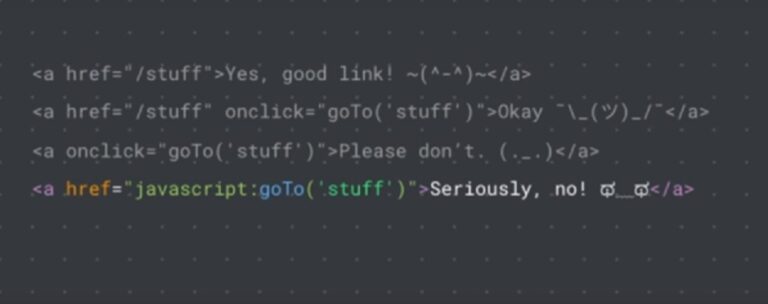
18. Are Links on the Site Served With Javascript?
Serving any navigation element with JavaScript is a bad idea because it limits cross-browser and cross-platform compatibility, interfering with the user experience.
When in doubt, do not serve links with JavaScript and use only plain HTML to help links.
19. Is the Anchor Text in the Site’s Link Profile Overly Optimized?
If your site has a link profile with overly optimized and repetitive anchor text, it can potentially lead to possible action (whether algorithmic or manual).
Ideally, your site should have a healthy mix of anchor text pointing to your sites.
The right balance is following the 20% rule: 20% branded anchors, 20% exact match, 20% topical match, and probably 20% naked URLs.
The challenge is achieving this link profile balance while also not leaving identifying footprints that you are doing anything manipulative.
20. Is Your Canonicalization Implemented Correctly on Your Website?
Canonicalization refers to making sure that Google sees the URL that you prefer them to see.
In short, using a snippet of code, you can declare that Google sees one URL as the preferred source of content for that URL.
This causes many different issues at once, including:
- The dilution of inbound link equity.
- The self-cannibalization of the SERPs (where multiple versions of that URL are competing for results).
- Inefficient crawling when search engines spend even more time crawling the same content every time.
To fix canonicalization issues, use one URL for all public-facing content on each URL on the site.
The preferred solution is to use 301 redirects to redirect all non-canonical versions of URLs to the canonical version.
Decide early on in the web development stage which URL structure and format you wish to use and use this as your canonical URL version.
21. Are the Images on the Site Too Large?
If images on your site are too large, you risk running into load time issues, especially around Core Web Vitals.
If you have a 2MB image loading on your page, this is a significant problem. It isn’t necessary, and you waste an opportunity to identify these issues in the first place.

Try running a Lighthouse report to see which images can be compressed.
22. Are Videos on the Site Missing Schema Markup?
It’s possible to add Schema.org structured data to videos, as well.
Using the video object element, you can markup all your videos with Schema.
Make sure to add transcripts for videos on the page for accessibility and content.
23. Does the Site Have All Required Page Titles?
Missing SEO titles on a website can be a problem.
If your site is missing an SEO title, Google could automatically generate one based on your content.
You never want Google to auto-generate titles and descriptions.
You don’t want to leave anything to chance when it comes to optimizing a site correctly, so all page titles should be manually written.
24. Does the Site Have All Required Meta Descriptions?
If your site does not have meta descriptions, Google could automatically generate one based on your content, and it’s not always the one you want to have added to the search results.
Err on the side of caution and make sure that you don’t have issues with this. Always make sure you write a custom meta description for each page.
You should also consider meta keywords. Google and Bing may have stated that these are not used in search ranking, but other search engines still use them. It’s a mistake to have such a narrow focus that you’re only optimizing for Google and Bing.
Also, there is the concept of linear distribution of keywords, which helps with points of relevance.
While stuffing meta keywords may not necessarily help rankings, carefully and strategically adding meta keywords can add points of relevance to the document.
This can only hurt if you are spamming, and Google decides to use it as a spam signal to nail your website.
25. Is the Page Speed of Top Landing Pages More Than 2-3 Seconds?
It’s essential to test and find out the actual page speed of your top landing pages.
This can make or break your website’s performance.
If it takes your site 15 seconds to load, that’s bad.
Always make sure your site takes less than a second to load.
While Google’s recommendation says 2-3 seconds, the name of the game is being better than their recommendations and better than your competition.
Again, this will only increase in importance with the Page Experience update and Core Web Vitals.
26. Does the Website Leverage Browser Caching?
It’s vital to leverage browser caching because this is a component of faster site speed.
To leverage browser caching, you can simply add the following line of code to your htaccess file. Please be sure to read the documentation on how to use it.
PLEASE NOTE: Use this code at your own risk and only after studying the documentation on how it is used. The author does not accept liability for this code not working for your website.
## EXPIRES CACHING ##
<IfModule mod_expires.c>
ExpiresActive On
ExpiresByType image/jpg “access 1 year”
ExpiresByType image/jpeg “access 1 year”
ExpiresByType image/gif “access 1 year”
ExpiresByType image/png “access 1 year”
ExpiresByType text/css “access 1 month”
ExpiresByType text/html “access 1 month”
ExpiresByType application/pdf “access 1 month”
ExpiresByType text/x-javascript “access 1 month”
ExpiresByType application/x-shockwave-flash “access 1 month”
ExpiresByType image/x-icon “access 1 year”
ExpiresDefault “access 1 month”
</IfModule>
## EXPIRES CACHING ##
27. Does the Website Leverage the Use of a Content Delivery Network?
Using a content delivery network can make site speed faster because it decreases the distance between servers and customers – thereby decreasing the time it takes to load the site to people in those locations.
Depending on your site’s size, using a content delivery network can help increase performance significantly.
28. Has Content on the Site Been Optimized for Targeted Keyword Phrases?
It is usually easy to identify when a site has been properly optimized for targeted keyword phrases.
Keywords tend to stick out like a sore thumb if they are not used naturally.
You know how it is. Spammy text reads similar to the following if it’s optimized for widgets: “These widgets are the most awesome widgets in the history of widgetized widgets. We promise these widgets will rock your world.”
Well-optimized keywords read well with surrounding text, and if you are on the inside of the optimizations, you will likely be able to identify them easier.
On the flip side, if there is so much spammy text that it negatively impacts the reader’s experience, it may be time to junk some of the content and rewrite it entirely.
29. How Deeply Has Content on the Site Been Optimized?
Just as there are different levels of link acquisition, there are different levels of content optimization.
Some optimization is surface-level, depending on the initial scope of the content execution mandate.
Other optimizations are more in-depth with images, links, and keywords being fully optimized.
Questions you may want to ask to ensure that content on your site is optimized correctly include:
- Does my content include targeted keywords throughout the body copy?
- Does my content include headings optimized with keyword variations?
- Does my content include lists, images, and quotes where needed? Don’t just add these things randomly throughout your content. They should be contextually relevant and support the content.
- Does my content include bold and italicized text for emphasis where needed?
- Does my content read well?
30. Have You Performed Keyword Research on the Site?
Just adding keywords everywhere without a strategy doesn’t work well. It feels unnatural and strange to read.
You have to know things like search volume, how to target those words accordingly with your audience, and how to identify what to do next.
This is where keyword research comes in.
You wouldn’t build a site without first researching your target market, would you?
In the same vein, you wouldn’t write content without performing targeted keyword research.
31. Has Content on the Site Been Proofread?
Have you performed any proofreading on the content on your site before posting?

I can’t tell you how many times I have performed an audit and found silly errors like grammatical errors, spelling errors, and other significant issues.
Be sure to proofread your content before posting. This will save a lot of editing work in the future when you have situations that result in the SEO professional having to perform a lot of the editing.
32. Have Images on the Site Been Optimized?
Image optimizations include keyword phrases in the file name, image size, image load time, and making sure that images are optimized for Google image search.
Image size should match or otherwise appear to complement the design of your site.
You wouldn’t include images that are entirely irrelevant if you were doing marketing correctly, right?
Similarly, don’t include images that appear to be completely spamming your audience.
33. Does the Site Follow Web Development Best Practices?
This is a big one.
Sites violate even the basics of web development best practices in so many ways – from polyglot documents to invalidated code as tested on the W3C, to excessive load times.
Now, I know I’m going to get plenty of flack from developers about how some of my usual requirements are “unrealistic.”
Still, when you have been practicing these development techniques for years, they are not all that difficult.
It just takes a slightly different mindset than what you are used to: you know, the mentality of always building and going after the biggest, best, and therefore most awesome website you can create.
Instead of that, the mindset should be about creating the lightest-weight, least resource-intensive site.
Yes, I know many websites out there don’t follow the W3C. When your client is paying you and the client requests this, you need to know your stuff and know how to make sure that your site validates in the validator.
Coming up with excuses will only make you look unprofessional.
- Are things like 1-2 second load times unrealistic? Not when you use CSS Sprites and lossless compression in Adobe Photoshop properly.
- Are less than 2-3 HTTP requests unrealistic? Not when you properly structure the site, and you get rid of unnecessary WordPress scripts that are taking up valuable code real estate.
- Want to get some quick page loading times? Get rid of WordPress entirely and code the site yourself. You’ll remove at least 1.5 seconds of load time just due to WordPress.
Stop being an armchair developer and become a professional web developer. Expand those horizons!
Think outside the box.
Be different. Be real. Be the best.
Stop thinking web development best practices are unrealistic – because the only unrealistic thing is your attitude and how much you don’t want to work hard.
Or, learn something new instead of machine-gunning your website development work in the name of profits.
34. Has an HTTPS Migration Been Performed Correctly?
When you set up your site for proper HTTPS migrations, you have to purchase a website security certificate.
One of the first steps is to perform the purchase of this certificate. If you don’t do this step correctly, you can completely screw up your HTTPS migration later.
Say you purchased an SSL certificate for this reason. You selected one option, which is just for one subdomain. By doing it this way, you have inadvertently created potentially more than 100 errors simply by choosing the wrong option during the purchase process.
For this reason, it is best to always consider, at the very least, a wildcard SSL certificate for all domain variations.
While this is usually a little more costly, it will prevent these types of errors.
35. Was a New Disavow File Submitted to the Correct Google Search Console Profile?
You would be surprised how often this comes up in website audits. Sometimes, a disavow file was never submitted to the new Google Search Console (GSC) HTTPS profile.
A GSC HTTPS profile was never created, and the current GSC profile is either under-reporting or over-reporting on data, depending on how the implementation was handled.
Thankfully, the fix is pretty simple – just make sure you transfer the old HTTP Disavow file to the new HTTPS profile and update it regularly.
36. Were GSC Settings Carried Over to The New Account?
Settings can also cause issues with an HTTPS migration.
Say you had the HTTP domain setup as www. But then you set the domain in the new GSC to non-www (or something else other than that in the original profile).
This is one example where errant GSC settings can cause issues with an HTTPS migration.
37. Did You Make Sure to Notate the Migration in Google Analytics?
Failing to notate major website changes, overhauls, or otherwise can hurt your decision-making later.
If precise details are not kept by notating them in Google Analytics (GA), you could be flying blind when making website changes that depend on these details.
Here’s an example: say that a major content overhaul took place. You got a penalty later. A change in department heads took place, as did SEOs.
Notating this change in Google Analytics will help future SEO folks understand what happened before that has impacted the site in the here and now.
38. Is the Social Media Implementation on the Site Done Correctly?
This comes up often in audits.
I see where social media links were not quite removed when things changed (like where a social media effort on a particular platform was unnecessarily hyper-focused) or where smaller things like potential customer interactions were not strictly kosher.
These things will impact the quality of your site.
If you are continually machine-gunning your social posts and not interacting with customers properly, you are doing it wrong.
39. Are Lead Submission Forms Properly Working?
If a lead generation form is not correctly working, you may not be getting all possible leads.
If there’s a typo in an email address or a typo in a line of code that is breaking the form, these need to be fixed.
Make it a high priority to perform regular maintenance on lead generation forms. This helps to prevent things like under-reporting of leads and errant information from being submitted.
Nothing is worse than getting information from a form and finding that that phone number is one digit off or the email address is wrong due to a programming error, and not necessarily due to submission error.
40. Are Any Lead Tracking Scripts Working Correctly?
Performing ongoing testing on lead tracking scripts is crucial to ensure the proper functioning of your site.
If your lead tracking scripts ever end up breaking and you get errant submissions on the weekend, it can wreak havoc on your customer acquisition nightmares.
41. Is Call Tracking Properly Setup?
I remember working with a client at an agency, and they had call tracking set up on their website.
Everything appeared to be working correctly.
When I called the client and discussed the matter, everything appeared correct.
We discussed the phone number, and the client mentioned that they had changed that phone number a while back.
It was one digit off.
You can imagine the client’s reaction when I informed them what the site’s phone number was.
It is easy to forget to audit something as simple as the phone number amid increasingly complex website optimizations.
That’s why it is essential always to take a step back, test things, and talk to your client to make sure that your implementations are working correctly everywhere.
42. Is the Site Using Excessive Inline CSS and JavaScript?
To touch on an earlier topic, inline CSS and JavaScript is terrible when it turns excessive.
This leads to excessive browser rendering times and can potentially ruin cross-browser and cross-platform functionality by relying on inline implementations of CSS and JavaScript.
It is best to avoid these at all in your web development and make sure that you always add any new styles to the CSS style sheet, and any new JavaScript is created correctly and accounted for, rather than inline.
43. Are the Right GSC/GA Accounts Linked? Are they Linked Correctly?
You wouldn’t believe how often this had come up when I took over a website. I looked at their GSC or GA accounts, and they were not correctly reporting or otherwise working.
It turns out that the GA or GSC account had been switched to another account at some point, and no one bothered to update the website accordingly. Or some other strange scenario.
This is why it is doubly vital to always check on the GSC and GA accounts. Make sure that the site has the proper profiles implemented.
44. Are Your URLs Too Long?
By making sure that URLs are reasonably short and not having URLs that are extra long (over 100 characters), it is possible to avoid user experience issues.
It is important to note that much longer URLs can lead to user experience issues.

When in doubt, if you have two URLs you want to use in a redirect scenario, and one is shorter than the other one, use the shorter version.
It is also considered a standard SEO best practice to limit URLs to less than 100 characters – the reason why comes down to usability and user experience.
Google can process longer URLs. But, shorter URLs are much easier to parse, copy and paste, and share on social.
This can also get pretty messy. Longer URLs, especially dynamic ones, can wreak havoc on your analytics data.
Say you have a dynamic URL with parameters.
This URL gets updated for whatever reason multiple times a month and generates new variations of this same URL with the same content and updates the parameters.
When URLs are super long in this situation, it can be challenging to sift through all the analytics data and identify what is what.
This is where shorter URLs come in. They can make such a process more manageable, can ensure one page URL for each piece of unique content, and you do not run the risk of negatively damaging the site’s reporting data.
It all comes down to your industry and what you do. This advice might not make as much sense for an ecommerce site that may have just as many URLs with such parameters.
In such a situation, a different method of handling such URLs may be desired.
45. How Targeted Are Keywords on the Site?
You can have the best content in the world.
Your technical SEO can exceed 100 percent and be the best, fastest-loading website ever. But, in the end, keywords are the name of the game.
Keyword queries are how Google understands what people are searching for.
The more targeted your keywords are, the easier it is for Google to discern where to place your site in the search results.
What exactly is meant by targeted keywords? These are any words that users use to find your site that are mapped to queries from Google.
And what is the best, most awesome method to use to optimize these keywords?
The keyword optimization concept of linear distribution applies. It’s not about how many keywords you can add to the page, but more about what linear distribution tells the search engines.
It is better to have keywords sprinkled throughout the text evenly (from the title tag, description, and meta keywords down to the bottom of the page) than stuff everything up the wazoo with keywords.
I don’t think you can randomly stuff keywords into a page with high keyword density and make it work for long. That’s just random keyword spamming, and the search engines don’t like that.
There is a significant difference between spamming the search engines and keyword targeting. Just make sure your site adheres to proper keyword targeting for the latter and that you are not seen as a spammer.
46. Is Google Analytics Even Setup Properly on the Site?
Expanding on our earlier discussions about the right accounts being linked, even just setting up Google Analytics can be overlooked by even the most experienced SEO professionals.
While not always identified during an audit, it is a detail that can wreak havoc on reporting data later.
During a site migration or design, it can be easy to miss an errant Google Analytics installation or otherwise think the current implementation is working correctly.
Even during domain changes, overall technical domain implementations, and other site-wide changes, always ensure the proper Google Analytics and GSC implementations are working and set up properly on-site.
You do not want to run into the situation later where an implementation went wrong, and you don’t know why content was not correctly performing when it was posted.
47. Is Google Tag Manager Working Properly?
If you use Google Tag Manager (GTM) for your reporting, it is also important to test to ensure it is working correctly.
If your reporting implementations are not working, they can end up underreporting or over-reporting, and you can make decisions based on false positives being presented by errant data.
Using preview and debug modes, Google Tag Assistant, and using Screaming Frog can be excellent means to that end.
For example, identifying pages that don’t have Google Tag Manager code added is easy with Screaming Frog.
Using custom search and extraction can help you do this. This method can find pages that, quite simply, just do not have GTM installed.
Using Google Tag Assistant, a Chrome Extension for Google Tag Manager can help you troubleshoot GTM, Google Analytics, and AdWords.
It works with recordings by recording a browsing session. This session will then report on anything happening and how the data interactions will show up in GA.
48. Does the Site Otherwise Have Any Other Major Quality Issues?
Other quality issues that can impact your site include lousy design.
Be honest.
Look at your site and other competitors in the space.
How much do you like your site in comparison to those competitors? This is one of those things that you just can’t put a finger on.
It must be felt out or otherwise navigated through intangibles like a gut instinct. If you don’t like what your design is doing, it may be time to go back to the drawing board and start again from scratch.
Other issues to keep an eye out for include errors within the content, grainy images, plug-ins that aren’t working, or anything that negatively impacts your site from a reporting point of view.
It may not even be a penalty either. It may merely be errant reporting due to a plug-in implementation that went wrong.
49. Is Your Reporting Data Accurate?
A consistent theme I wanted to include throughout this article contains inaccuracies in reporting.
Often we use GSC and GA reporting data when it comes to making decisions. So it is so essential to make sure that your GSC and GA implementations are all 100 percent correct.
Dark traffic, or hidden traffic, can be a problem if not dealt with properly.
This can skew a massive chunk of what you think you know about your visitor traffic statistics.
That can be a major problem!
Analytics platforms, including Google, have a hard time tracking every single kind of traffic source.
50. Is My Website Actually Done?
A website is never done!
Evaluating the quality of a website is an ongoing process that is never truly finished. It’s important to stick to a regular schedule.
Perhaps schedule website audits to occur every year or so.
That way, you can continue an evaluation process that identifies issues and gets them in the development queue before they become problems.
More Website Audit Resources:
