

What is the O in SEO for?
Optimization, of course!
But what does an SEO professional optimize?
For much of the history of SEO, it’s been for ranking positions for important keywords.
It isn’t hard to understand why.
When Google created it’s first search results page with its characteristic “10 blue links,” it automatically created a hierarchy of click probability.
SEO pros quickly noticed that people tended to click on the #1 position the most, and the number of clicks went down sharply from there.
Here’s a typical charting of CTR by rank position from 2016:
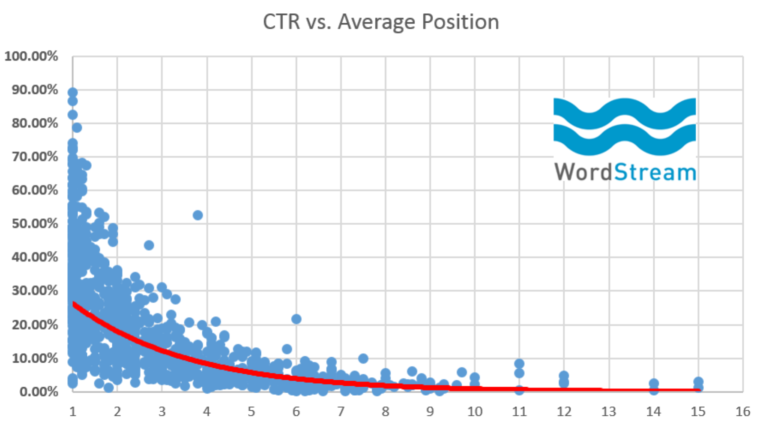
So a primary task of search engine optimization became attempting to move results for your keywords higher in ranking on SERPs where they appeared.
While the details of what to do to accomplish that goal are complex, its measurement was simple.
Move up the ranking ladder from 10 to 5 to 3….and hopefully to the Holy Grail of position 1.
Of course, nothing is that simple anymore.
Note: Throughout this article, I will refer to the “traditional” blue links of Google search as web listings rather than organic listings.
As Google’s Danny Sullivan reminded us, many things that appear now above those listings are also organic, meaning that they are references to web content that earned a spot in a search feature by being recognized by an algorithm as the best content for that feature.
Position 1, Where Are You?
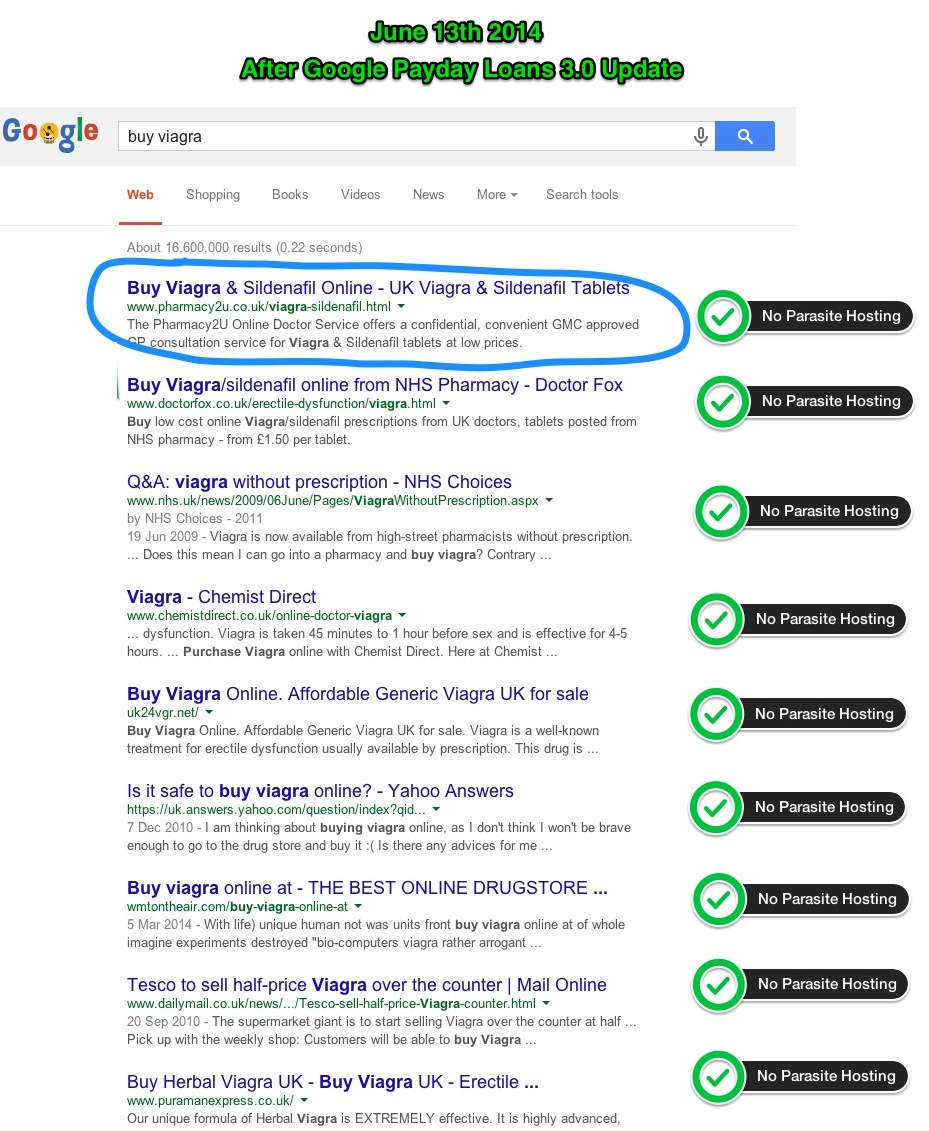
For many years SERP Position 1 ruled supreme.
It sat comfortably at the very top of results pages with few challengers in sight.
This example from a 2014 Search Engine Journal post seems almost quaint now:
Ads: A Movable Feast
The first major challenge to the organic position 1 hegemony was Google search ads.
Originally, only one or two ads appeared above the web results, with most ads relegated to the right sidebar.
The ads above web results spanned the width of the page and were clearly set off from everything else on the page.
It was obvious to most users where the “real” search results began.

Google continued to experiment with ad positioning, with various mixtures of ads above, below, and to the side of the organic results.
But in February 2016, the sidebar ads were eliminated forever, and now web results compete with ads for above-the-fold space for many queries.
Multiplying Search Features
Ads moving into the main SERP column are only one challenge to visibility for organic web results.
- 2012: Google began displaying some of its Knowledge Graph database on search result pages in what was commonly known as Knowledge Panels.
- 2013: In-Depth Articles first appear, a box displaying long-form articles from well-known publications.
- 2014: Featured Snippets (then known as Answer Boxes) are introduced. A Featured Snippet is a box, typically at the top of a search results page, that displays a snippet of information taken from a web site and displayed directly in the box.
Today we have so many features potentially appearing in search results it would be difficult to list them all.
In fact, in an internal study at seoClarity, we discovered 810 unique features in search results.
Granted, many of those appear within the snippets of web results, but even those take up space on the page, pushing other web results further down.
Here’s how rich snippets increased the pixel height of one result over time:
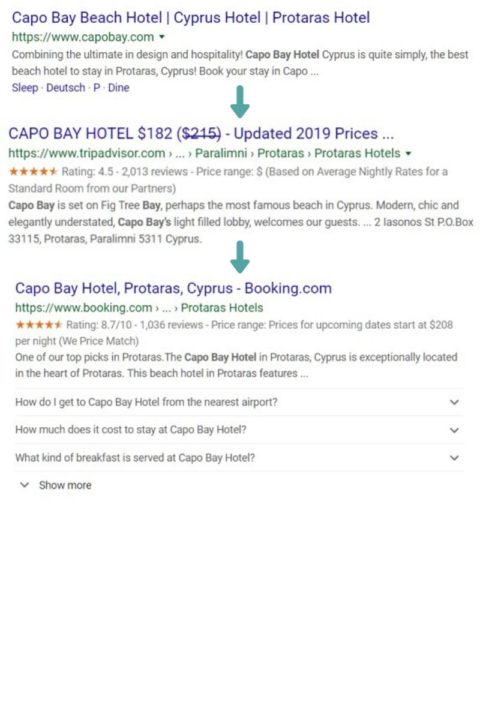
In addition, some of the more common search features that have been around for a while have become “richer,” showing more information and/or bigger images, which means they also take up more space in the SERP.
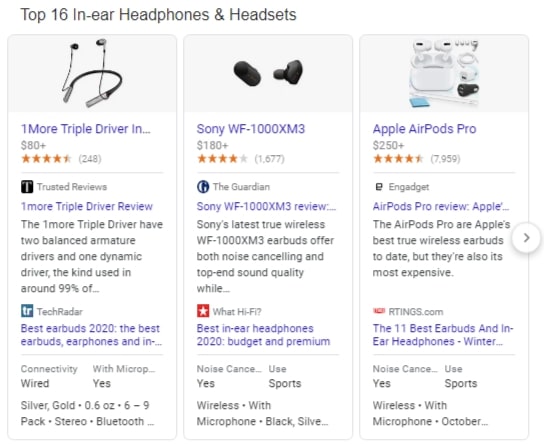
All of this means that in a great many cases, being number one (in organic web listings) isn’t what it used to be.
But it gets worse.
Over the past couple of years, we’re seeing a decline in correlation between traditional ranking positions and traffic to sites.
The combination of more ads and SERP features have pushed organic web results down the page, thus lowering the CTR for top web listings.
In addition, traffic that would previously have gone to “10 blue links” results is getting cannibalized by Google’s own specialized features.
That means many traditional metrics such as search volume, share of voice, and estimated traffic may be increasingly inaccurate, making it more difficult to assess the true value of ranking for a keyword.
From Search Ranking to Search Visibility
Traditional web rank tracking will continue to have value.
It still serves as a good top-level overview of the performance of your keywords over time and relative to your competitors.
But it has become obvious relying on traditional rank tracking alone not only obscures the whole story, but it can also result in misperceptions and missed opportunities.
This is especially true when your web result is on page one, as that’s where almost all of the changes to the SERPs have happened.
What’s needed is a whole new way to think about ranking in search.
With all the changes to the appearance of search results over the years, one thing has remained constant:
The farther down the page your result is, the less likely it is to be seen by searchers, and the fewer clicks it will get.
So now it is important to know at least two things about results for your keywords that traditional rank tracking doesn’t show:
- How far down the page a result is.
- What search features appear above the web results.
Ultimately, such knowledge could be weighted with other factors to produce a new metric, a score of the true “search visibility” or “share of visibility” of a given web result.
This score would allow more accurate estimates of the traffic value of a keyword as well as more accurate comparisons with competition.
There are various possible approaches to solving the modern ranking conundrum and accounting for the true visibility of a web listing in search.
Here are five ways to measure search visibility.
1. Eyes on the SERP
The most rudimentary way of assessing search visibility, and the one I suspect is employed by SEO professionals who have come to realize all I’ve outlined above, is simply looking at the actual search results for a keyword.
Obviously, though, that’s not a scalable activity if you’re managing thousands or even millions of keywords.
But at least doing it regularly makes you more aware of how visible (or invisible!) your ranking results are
2. Above/Below the Fold
The simplest way to assess search visibility is to show whether or not a web result appears above or below the “fold.”
The term comes from the world of traditional print newspapers, which are often displayed on newsstands folded in half, with only the top half of the front page showing.
Newspapers make sure the stories most likely to attract the attention of readers appeared above the fold.
In a similar fashion, web pages in a browser have a “fold.”
In this case, “above the fold” means the part of a web page that is visible in a typical browser window upon loading.
So for search results, your result is above the fold if the searcher can see it without scrolling.
This approach can be automated by ranking tools, as long as they can measure the pixel depth of a given result from the top of a page and compare that to whatever they decide is the most typical browser depth on user’s machines.
A couple of the major rank tracking tools have talked about some form of an above/below the fold metric, but I’ve only seen evidence of one actually implemented so far.
3. Pixel Depth
Pixel depth is a count of the number of pixels a given result is from the top of a search results page.
It’s the first step toward developing an actual metric that can be compared between keywords and competitors.
There is also a slightly more sophisticated way of doing this, which involves also measuring and recording:
- The pixel height of each individual feature and result on a SERP.
- What each feature is.
This could be used by a rank tracking tool to alert users to what is occupying the most space above a result.
Why is that valuable?
Users of the tool could then begin to assess and prioritize opportunities to try to seize one of those features when ranking high for a web result isn’t generating sufficient traffic.
However, this number alone is hard to scale and report on as it:
- Doesn’t provide context. (What is in all those pixels above my result?)
- Is difficult to communicate. (Will anyone outside the SEO department be able to understand what this number means?)
4. Actual Rank
Actual rank would be the numeric position of a web result counting everything in a SERP, not just the web results.
So let’s say I have a keyword that ranks in the third position of traditional web results, but there is also a featured snippet, a video carousel, and a People Also Ask (PAA) feature above the web results.
The actual rank of my result would be six (three distinct features plus two web results above mine).
While all traditional rank trackers report the rank of web results (the traditional blue links), some include some sort of blended or universal rank that includes some of the most popular results in universal search.
But to our knowledge, none so far account for everything on the page, including PAAs, ads, shopping results, and the hundreds of other specialized SERP features that Google shows.
In reality, a tool would probably want to present both actual rank and pixel depth, as neither gives a complete picture of visibility on its own.
5. Search Visibility Score
The most sophisticated and useful metric would be a score that incorporated all of the above along with some weighting to arrive at a sort of One Metric to Rule Them All.
The score would take into account every feature on the SERP and the actual positions they occupy on the page along with the search volume of keywords that rank there.
The value of such a score is that it would allow for truly balanced comparisons across keywords and competitors.
In many cases, an SEO might discover that some of their highest ranking keywords are not as valuable as they thought, or that a keyword in, say, Position 3 is more valuable than another in Position 1 if the former appears higher on its SERP.
But there’s more.
Such a metric could replace the traditional “share of voice.”
The true share of voice in organic search is now your share of visibility.
Another value-add would be for a tool to show exactly what features are in a given SERP.
Knowing that would enable intelligent assessment of opportunities to optimize for one of those features for valuable keywords.
Adapting to Reality
We like to think of reality as a fixed thing.
In reality (see what I did there?), reality changes all the time, because it exists as it’s mediated through our perceptions.
In the Google universe, however, the fundamental elements of reality have actually changed over time.
However, our perception of those realities has not changed accordingly, in terms of the metrics and tools we use.
It’s time for us to accept the new reality.
In fact, it’s time for us to go past acceptance to embracing and making use of the new reality.
To do that our metrics, tools, evaluations, and reporting will have to change also.
More Resources:
- A New Era of Google Search: What It Means for SEO
- How to Dominate SERPS by Focusing on Topics Instead of Keywords
- The Changing Landscape of Google’s SERPs with Peter Leshaw [PODCAST]
Image Credits
In-Post Image #1: Larry Kim via Moz
In-Post Image #2: Razvan Gavrilas, Search Engine Journal
In-Post Image #3: Advia
Screenshots taken by author, April 2020
