


All successful SEO campaigns rely on accurate, comprehensive data. And that process starts with the right keyword research tools.
Sure, you can get away with collecting keyword data manually on your own. But while you may be saving the cost of a premium tool, manual keyword research costs you in ot
her ways:
- Efficiency. Doing keyword research manually is time intensive. How much is an hour of your time worth?
- Comprehensiveness. Historical and comprehensive data isn’t easy to get on your own. It’s too easy to miss out on vital information that will make your SEO strategy a success.
- Competition. Keyword research tools allow you to understand not only what users are searching for but also what your competition focuses on. You can quickly identify gaps and find the best path to profitability and success.
- Knowledge. Long-time SEO experts can craft their own keyword strategies with a careful analysis of the SERPs, but that requires years of practice, trial, and costly errors. Not everyone has that experience. And not everyone has made enough mistakes to avoid the pitfalls.
A good SEO keyword research tool eliminates much of the guesswork. Here are seven well-known and time-tested tools for SEO that will get you well on the way to dominating your market.
[Agency SEO Tools] Download the free guide →
1. Google Keyword Planner
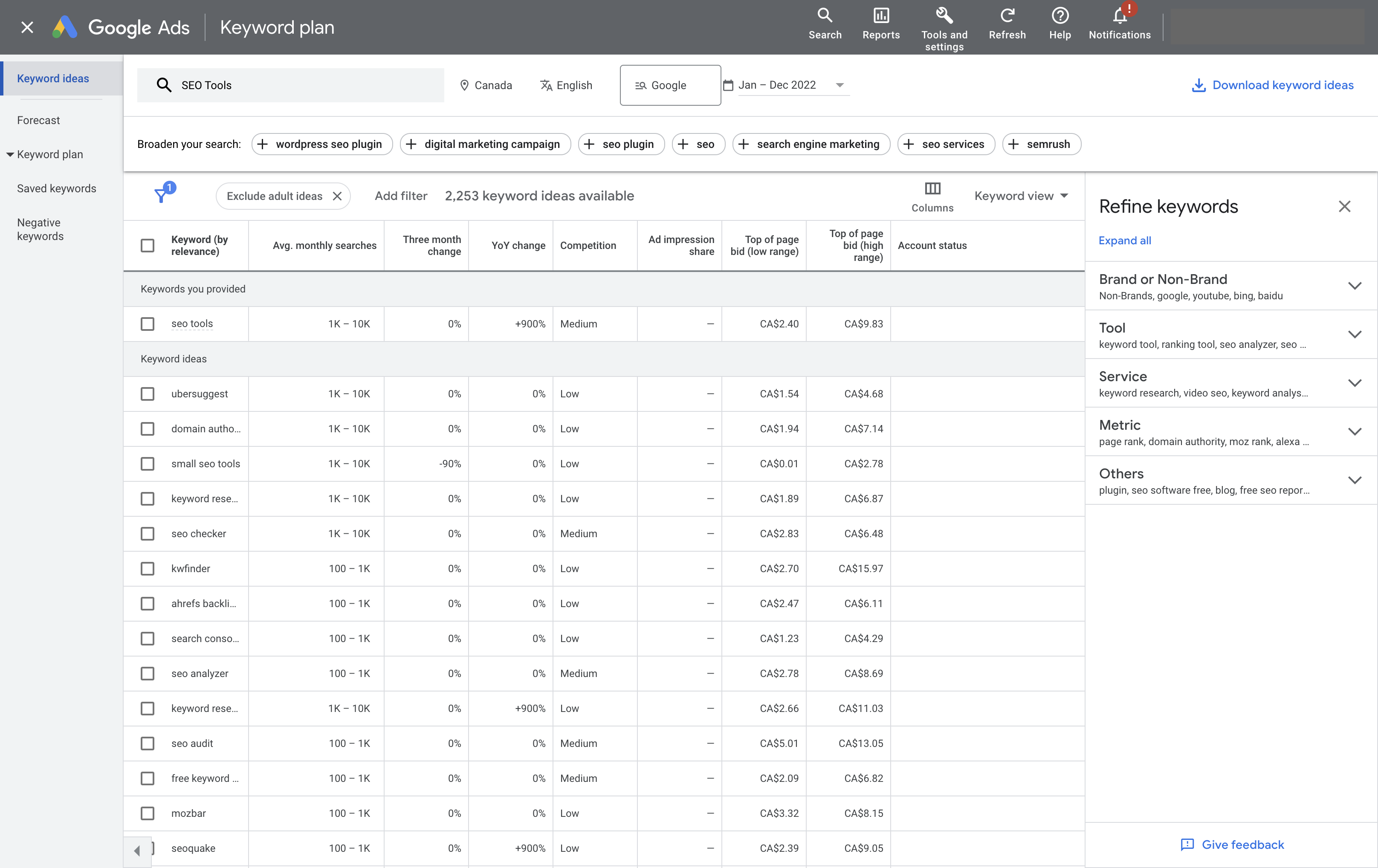 Screenshot from Google Keyword Planner, January 2023
Cost: Free.
Google Keyword Planner is a classic favorite.
It’s free, but because the information comes directly from the search engine, it’s reliable and trustworthy. It’s also flexible, allowing you to:
- Identify new keywords.
- Find related keywords.
- Estimate the number of searches for each variation.
- Estimate competition levels.
The tool is easy to access and available as a web application and via API, and it costs nothing; it just requires a Google Ads account.
You must also be aware of a few things when using this tool.
First, these are estimates based on historical data. That means if trends change, it won’t necessarily be reflected here.
Google Keyword Planner also can’t tell you much about the SERP itself, such as what features you can capitalize on and how the feature converts.
Because it’s part of Google Ads, PPC experience can help you gain more insights. You’ll find trends broadly across a demographic or granular level, like a city, region, or major city.
Google Keyword Planner also tends to combine data for similar keywords. So, if you want to know if [keyword near me] is better than [keywords near me], you’ll need a different tool.
Lastly, the tool uses broad definitions of words like “competition,” which doesn’t tell you who is ranking for the term, how much they’re investing to hold that ranking, or how likely you are to unseat them from their coveted top 10 rankings.
That being said, it’s an excellent tool if you just want to get a quick look or fresh ideas, if you’d like to use an API and create your own tools, or simply prefer to do the other tasks yourself.
2. Keyword.io
Cost: Free, $29 per month, and $49 per month.
If Google’s Keyword Planner isn’t quite enough, but you’re on a tight budget, Keyword.io may be the alternative you need. It also has different features.
Keyword.io uses autocomplete APIs to pull basic data for several sites and search engines, including Google, Amazon, eBay, Bing, Wikipedia, Alibaba, YouTube, Yandex, Fiverr, and Fotolia. This is perfect for niche clients and meeting specific needs.
It also has a Question/Intent Generator, an interactive topic explorer, and a topical overview tool.
In its user interface (UI), you’ll find an easy-to-use filter system and a chart that includes the competition, search volume, CPC, and a few other details about your chosen keywords.
It does have some limits, however.
You can run up to 20,000 keywords per seed with a limit of 100 requests per day (five per minute) or 1,000 requests per day (10 per minute) on its paid plans.
Its API access, related keywords tool, Google Ad data, and other features are also limited to paid accounts.
3. Semrush
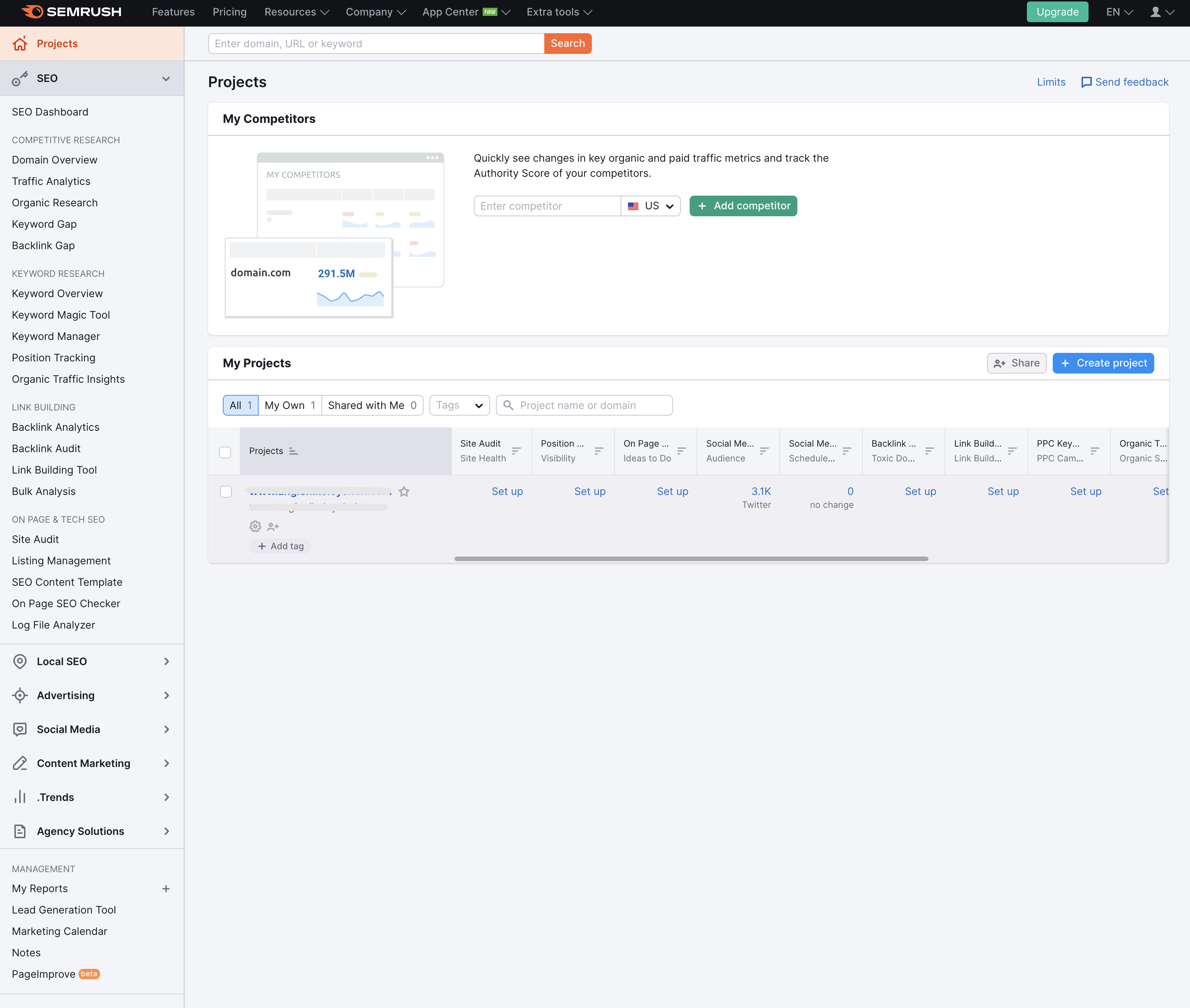 Screenshot from Semrush
Cost: $119.95 to $449.95 per month.
In its digital marketing suite, Semrush offers a collection of six keyword tools and four competitive analysis tools with a database of more than 21 billion keywords.
You can get a full overview of the keywords you’re watching, including paid and organic search volume, intent, competition, CPC, historical data, SERP analysis, and more.
You’ll get related keywords and questions, as well as a ton of guidance, ideas, and suggestions from the Semrush Magic, Position Tracking, and Organic Traffic Insights tools.
The Keyword Planner, however, is where much of the magic happens.
The organic competitor tab makes it easy to spot content and keyword gaps. Expand them and develop clusters that will help you grab traffic and conversions.
You can also see long-tail keyword data and other data to see what Page 1 holds regarding competition, difficulty, and opportunities at a broad or hyperlocal level.
The full suite of tools is a huge benefit. Teams can collaborate, share insights, and plan.
The seamless integration allows you to integrate your data, meaning teams can easily collaborate, share insights, and strategize.
And when you’re done, it can track everything you need for a successful digital marketing strategy.
Some of the tools they offer include:
- On-page SEO tools.
- Competitive analysis suite.
- Log file analysis.
- Site auditing.
- Content marketing tools.
- Marketing analysis.
- Paid advertising tools.
- Local SEO tools.
- Rank tracking.
- Social media management.
- Link-building tools.
- Amazon marketing tools.
- Website monetization tools.
Semrush’s best features when it comes to keyword research are its historical information and PPC metrics.
You can deep dive into campaigns and keywords to unlock the secrets of the SERPs and provide agency or in-house teams with priceless information they don’t usually access.
4. Moz Keyword Explorer
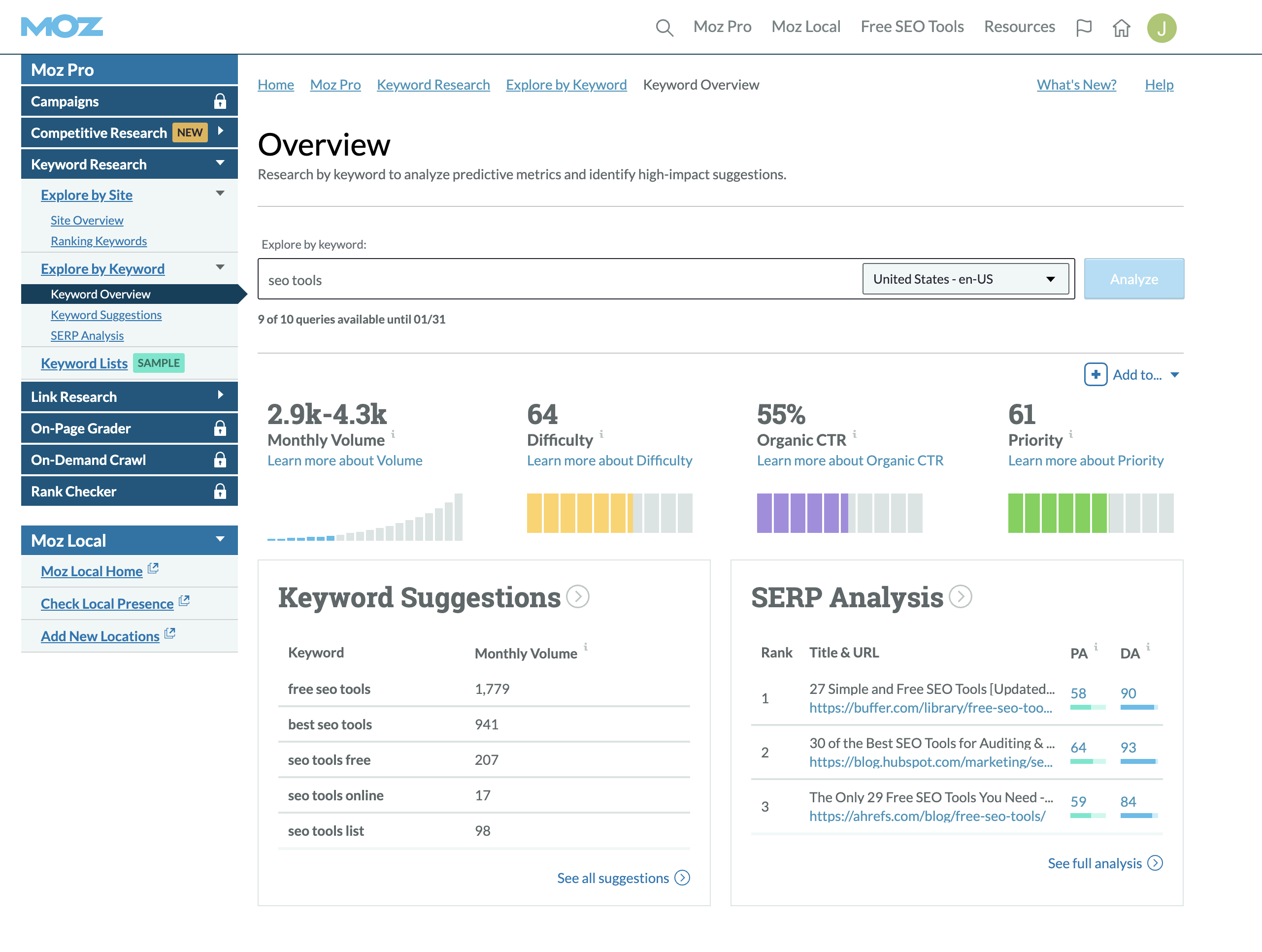 Screenshot from Moz, January 2023
Cost: Free for 10 queries per month. $99-$599 per month.
With a database of more than 500 million keywords, Moz Keyword Explorer may be a great option if you’re looking to build a strategy rather than get a quick view of the data for a few keywords.
Moz has long been a leader in the SEO space.
Constantly updating and improving its Keyword Explorer Tool and its other core services, Moz keeps up with the trends and is well known for providing SEO professionals with the latest tools. And it has done so for more than a decade.
Like the Google Keyword Tool, Moz’s keyword planning tool provides information on the difficulty and monthly search volume for terms. It also lets you drill down geographically.
When you start, you’ll find the Keyword Overview, which provides monthly search volumes, ranking difficulty, organic click-through opportunities, and an estimated priority level.
You can also:
- Find new relevant keywords you should be targeting but aren’t.
- Learn how your site performs for keywords.
- Find areas where you can improve your SEO (including quick wins and larger investments).
- Prioritize keywords for efficient strategy creation.
- Top SERP analysis and features.
- Competitor analysis.
- Organic click-through rates.
Unlike the Google Keyword Tool, however, Moz supplies you with data beyond the basics. Think of it like keyword research and SERP analysis.
Moz does tend to have fewer keyword suggestions. And like Google’s Keyword Planner, it provides range estimates for search data rather than a specific number.
However, the database is updated frequently, so you can feel confident that you’re keeping up with the constant change in consumer search habits and rankings.
Plus, it’s easy to use, so teams can quickly take care of marketing tasks like finding opportunities, tracking performance, identifying problem areas, and gathering page-level details.
Moz also offers several other tools to help you get your site on track and ahead of the competition, but we really like it for its keyword research and flexibility.
5. Ahrefs Keyword Explorer
Cost: $99-$999 per month.
If I had to describe Ahrefs in one word, it would be power.
Enter a word into the search box, and you’re presented with multiple panels that can tell you everything you want to know about that keyword.
Total search volume, clicks, difficulty, the SERP features, and even a volume-difficulty distribution. And while it may look like a lot, all the information is well-organized and clearly presented.
Ahrefs provides terms in a parent-child topic format, providing the terms with context, so you can easily learn more about the terms, such as intent, while identifying overlap and keeping it all easy to find and understand.
These topics appear when you search for a related term, including the term’s ranking on the SERP, SERP result type, first-page ranking difficulty scores, and a snapshot of the user-delivered SERP. You can stay broad or narrow it all down by city or language.
Ahrefs can get a bit expensive. Agencies may find it difficult to scale if they prefer several user or client accounts, but it’s still one of the best and most reliable keyword research tools on the market.
What I really like about Ahrefs is that it’s thorough. It has one of the largest databases of all the tools available (19.2 billion keywords, 10 search engines, and 242 countries at the time of writing), and it’s regularly updated.
It makes international SEO strategies a breeze and includes data for everything from Google and Bing to YouTube and Amazon.
Plus, they clearly explain their metrics and database. And that level of transparency means trust.
Other tools in the suite include:
- Site Explorer.
- Site auditing.
- Rank tracking.
- Content Explorer.
6. SERanking
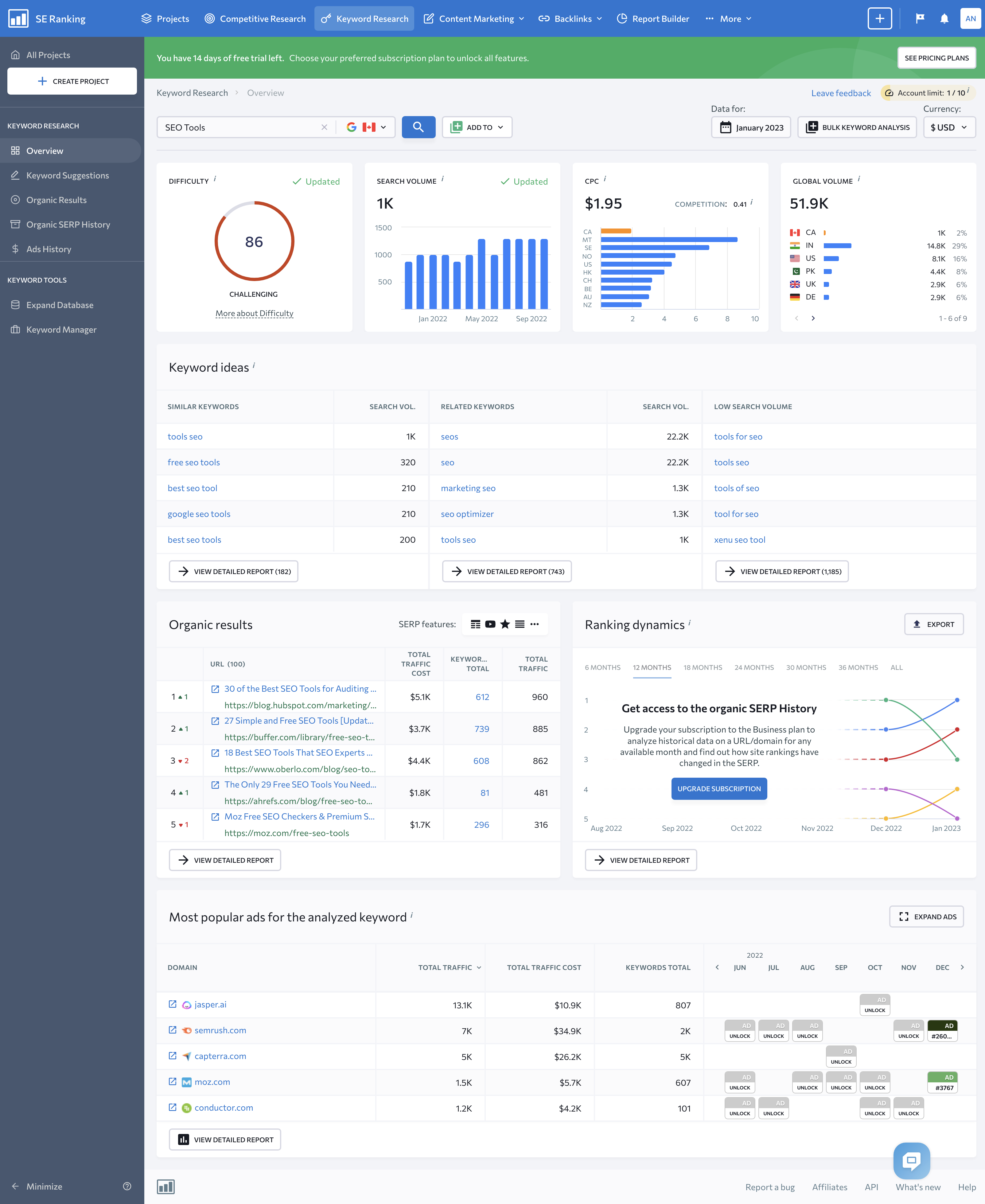 Screenshot from SERanking, November 2022.
Cost: $23.52-$239 per month, depending on the ranking check and payment frequency.
SERanking shines as a keyword research tool within an all-around SEO toolkit. SERanking helps you keep costs down while offering features that allow agencies to meet clients’ unique needs.
One of the first things you’ll notice when you log in is its intuitive user interface. But this tool isn’t just another pretty online tool.
Its database is robust.
SERanking’s U.S. database includes 887 million keywords, 327 million U.S. domains, and 3 trillion indexed backlinks. And this doesn’t include its expansive European and Asian databases.
The overview page provides a solid look at the data, which includes search volume, the CPC, and a difficulty score.
SERanking also provides lists of related and low-volume keywords if you need inspiration or suggestions, as well as long-tail keyword suggestions with information about SERP features, competition levels, search volume, and other details you need to know to identify new opportunities.
Of course, identifying keywords is only the start of the mystery. How do you turn keywords into conversions? SERanking provides keyword tools that help you answer this question.
You can find out who the competition is in the organic results and see who is buying search ads, as well as details like estimated traffic levels and copies of the ads they’re using.
This allows you to see what’s working, gain insights into the users searching for those terms, and generate new ideas to try.
SERanking offers agency features, such as white labeling, report builders, lead generator, and other features you’ll find helpful.
However, one of the features agencies might find most helpful in keyword research is SERanking’s bulk keyword analysis, which lets you run thousands of keywords and download full reports for all the terms that matter.
Other tools in the SERanking Suite include:
- Keyword Rank Tracker.
- Keyword Grouper.
- Keyword Suggestions and Search Volume Checker.
- Index Status checker.
- Backlink Checker.
- Backlink monitoring.
- Competitive research tool.
- Website auditing tool.
- On-page SEO Checker.
- Page Changes Monitor.
- Social media analytics.
- Traffic analysis.
SERanking is more affordable than some of the other tools out there, but it does come at a cost.
It isn’t as robust as some of its competitors and doesn’t get as granular in the same way, but it still provides the features and data you need to create a successful SEO strategy.
And with its flexible pricing, this tool is well worth considering.
7. BrightEdge Data Cube
Cost: Custom pricing model.
If you’re looking for an AI-powered digital marketing tool suite that includes a quality research tool, BrightEdge may be the right option for you.
Unlike other tools that focus on supplying you with data and ways to analyze that data, BrightEdge looks to do much of the time-consuming analysis for you.
Among its search, content, social, local, and mobile solutions, you’ll find Data Cube – an AI-backed content and keyword tool that uses natural language processing to find related topics and keywords.
You’ll also encounter DataMind, an AI that helps you find search trends, changes in consumer behaviors, and important competitor movements you need to know about.
The two together make it quick and easy to perform keyword research, build out topics, create content strategies, and strengthen your SEO plans.
Once you enter a topic or broad keyword, the tool will provide you with relevant keywords, the search volume, competition levels, keyword value, it’s universal listing, and the number of words in the phrase.
Filter the results by a custom set of criteria to narrow the list down and get the necessary information.
Once you have a list, select the ones you want to keep and download them or use them with BrightEdge’s other tools to create full strategies and gain more insights.
This could include competitor analysis, analyzing SERP features, intent, or other tasks.
For agencies that provide local SEO, BrightEdge also offers HyperLocal, which helps you find and track keywords and keyword performance at the local level.
When you’re done, give the Opportunity Forecasting and tracking tools a try to monitor your progress and provide clients with the information they care about.
Perhaps the nicest feature for agencies is its Storybuilder – a reporting tool that allows you to create rich client reports that provide clients with targeted overviews and the data they’re most interested in.
If this sounds like the right tool for you, the company gives demos, but there are a few things you should consider.
First, it only updates once per month. And while the company keeps its pricing close to the chest, this digital marketing tool suite is a significant investment. It may not be the best choice if keyword research is the only thing you need.
Secondly, while the tools are highly sophisticated and refined, there is a learning curve to get started.
You’ll also discover that there are limits on features like keyword tracking, and it can be time-consuming to set up, with some adjustments requiring technical support.
Lastly, BrightEdge’s keyword research tool doesn’t let you get too far into the weeds and doesn’t include PPC traffic.
That aside, agencies and larger brands will find that it scales easily, has a beautifully designed UI, and makes you look great to clients.
The Best Agency SEO Keyword Research Tools
This list only contains seven of the many tools available today to help you get your keyword research done to an expert degree.
But no matter how many of the tools we share with you or which ones, it’s important to understand that none are flawless.
Each tool has its own unique strengths and weaknesses, so selecting a platform is very much dependent on the types of clients that you typically work with and personal preference.
In reality, you’ll likely find that you prefer to work between a few tools to accomplish everything you’d like.
Google Keyword Planner and Keyword.io are top choices when you want a quick look at the data, or you’d like to export the data to work on elsewhere. You may even want to use this data with the other tools mentioned in this chapter.
Ahrefs, Moz, Semrush, and BrightEdge are far more robust and are better suited to agency SEO tasks.
While not free (although they offer free plans or a trial period except BrightEdge), they allow you to really dig into the search space, ultimately resulting in higher traffic, more conversions, and stronger SEO strategies. These benefits require more time and often come with a learning curve.
By far, the most important keyword research tool you have access to is you.
Keyword research is more than simply choosing the keywords with the biggest search volume or the phrase with the lowest Cost Per Click (CPC).
It’s your expertise, experience, knowledge, and insights that transform data into digital marketing you can be proud of.
Featured Image: Paulo Bobita/Search Engine Journal
