
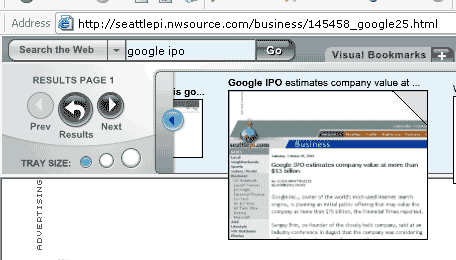
There are search toolbars and then there is Viewpoint Toolbar. It does what an average search toolbar does and takes it one step ahead. It uses Yahoo! search engine technology to display results but the difference is the visual representation of the search results. The toolbar shows the usual search result as a web page but in addition to it, it fetches thumbnails of the shown search results in a very Mac OS X style with zooming in and zooming out on mouse hovers. Very yummy indeed.
The good thing about the thumbnails is that you can make out if it’s a content rich site or just another keyword spammed site filled with advertisements. Since the generation of thumbnails is done in real time, the process can be quiet painful on a normal dial up connection so they do let you disable the thumbnail display and use the toolbar as a regular search toolbar.
|
| Click the image for big picture |
And it does the other functions of a search toolbar pretty well too. There is the usual popup blocker with one interesting extra option (allow non ads popups) which sounds pretty ambitious. Would need some more tests before I can actually fall for that claim. Then there is a search saves features as visual bookmarks, where your searches are saved as clickable thumbnails! Very interesting indeed.
Shortcomings? Pretty apparent. It is supported only on Internet Explorer. Not surprising considering all the popular ones out there are IE only. It needs a good fast connection to properly exploit the features. Should not be a big problem now considering broadband is cheap. And it eats a big chunk of your browser window while displaying the thumbnails. Though it offers you three sizes to choose from.
Is the technology revolutionary? I beg to differ. I don’t know how old this toolbar originally is, but I remember using an Internet Explorer utility way back in 1999 called girafa. It showed you the thumbnails in the sidebar. The website still exists so does the tool and the technology is apparently used by MSN to show search previews. So, it’s a good idea implemented well which works fine for people like you and me who want more than just results as links!
Download: Viewpoint Toolbar
Sushubh Mittal is the Tech Columnist at Search Engine Journal and also the publisher of TechWhack, an upcoming Blog Portal on technology.
Vote for this post : 0
or Buzz it at Yahoo :


Comments
20 responses so far ↓
Jon on Apr 30, 2004 at 6:28 pm
The article didn’t mention the SKINS!
“We want you to be comfortable in your own skin. Now you can choose a new look and feel for your Viewpoint Toolbar that fits with your own personal mood and style. Download skins from the list below to give your toolbar an infusion of personality. The skins, like the toolbar, are absolutely free to download and to use. Download as many skins as you like and change them as often as you like. And stay tuned for lots of fun skins coming soon!
http://www.viewpoint.com/pub/downloads/toolbar_skins.html
Great toolbar!
thanks
Sushubh on Apr 30, 2004 at 6:45 pm
gee… thanks!
i saw the 4 bundled skins, but the other downloadable skins are adorable!
Sri on May 2, 2004 at 10:29 am
Is there one such visual toolbar that uses google search?
Gail on May 4, 2004 at 7:32 am
I have had Viewpoint toolbar since March 17 and love it!We do have dial-up, but I do not disable the Search Thumbnail previews and the pictures come out fine. They do come in 3 different sizes so they are easier to see.Their is a preview of upcoming skins due out May 26 at www.search.viewpoin.com/help/skins.html. I really love it!
Gail on May 4, 2004 at 12:23 pm
Re: the above comment: the correct link is http://search.viewpoint.com/help/skins.html .
This is the correct link for a sneak peek at the new skins coming out on May 26th.
Trent Romero on May 25, 2004 at 1:54 pm
Very cool and ya gotta love the Yahoo SE! When does the full version release? I love the pop up blocker and graphics as well. This should change the way we “see” the web.
Michael Tzez on May 31, 2004 at 6:37 pm
I use it I love it and just can not believe that it took the internet this many years to reach this point! It really is an amazing tool and anyone who does not have it is really missing out on the most useful tool that they will ever come across. Plus it is FREE! Love IT! I have never been so blown away by an innovation.
Andrew Graber on Jun 1, 2004 at 12:48 am
I use this tool bar extensively at work. It reduces the number of keystroke for my common website I visit. The visual nature of the tool bar is very intuitive and more natural to me than the text book marks. I am absolutely amazed at the the features. I never liked tool bars till I found this one.
James dillow on Jun 1, 2004 at 10:39 pm
I have disabled all my other toolbars…. this is a must…great popup blocker and really cool visual search results…no opening and closing sites to locate your information
Gail on Jun 7, 2004 at 7:50 pm
Version 2 of the toolbar is now available. It came out May 26; however, there is only one blue skin available. Within the next 3 weeks, by the end of June, everyone who has version 1 will automatically receive version 2. Whether or not they can keep version 1 or not I am not sure. However, shortly after they receive Version 2 which has a lot of new features, skins will be released for Version 2. You can find Version 2 at www.viewpoint.com, and click downloads. I am going to wait until they change over to Version 2 as I like my skins too much for Version 1.
Gail C. on Jun 13, 2004 at 8:38 am
All improments on Version 2 of the toolbar will be made by June 30. Version 2 will be able to use the skins that were made for Version 1, and will have all of the Version 2 features. New skins will be released all summer long. Version 2 will be much improvded for Dial-up users.
Fazal Qadeer on Jul 5, 2004 at 12:36 pm
I am using Viewpoint Toolbar since from its launch and I love it. It really an impressive and amazing search toolbar. Thanks Viewpoint and Thanks to Viewpoint Experience Technology.
Gino on Jul 11, 2004 at 10:21 am
Its a nice toolbar but the Girafa visual toolbar is a better one.
Sushubh on Jul 28, 2004 at 7:00 am
This is my 2 cents. I have heard a lot about the inability of users to uninstall this particular toolbar. I am not a paid employee of the concerned company, but I tried it again today and was able to successfully uninstall the toolbar from my computer. Now if you cannot accomplish that, maybe you can ask for help from the viewpoint forums. for me it was as simple as choosing uninstall from the toolbar menu.
KittenKaboodle on Jul 29, 2004 at 7:14 pm
The Viewpoint toolbar is amazing! It is so easy to use and a great addition to my computer. Whoever designed it is brilliant! The staff at Viewpoint should be proud of creating this feature and I just hope they keep em coming!
Trent Romero on Aug 4, 2004 at 2:47 pm
Very good!! I just downloaded it today–how did you all hear about it so long ago? It seems like top secret. Why dont they advertise it?
Abby on Nov 4, 2004 at 4:16 pm
I think its really annoying and I don’t know how it got on my computer. I would really like to uninstall it but it will not let me because it does not show that option in the tool bar..nor can I move the toolbar. HELP
Pua on Jan 4, 2005 at 5:01 pm
I did not request viewpoint and it was loaded on my machine with a message that nothing had to be done and it was already loaded. What gave you the right to do this? Did Yahoo allow you to do this? How do I unload your software so it does not damage any other s/w?
calvin on Jan 13, 2005 at 4:57 pm
I HAVE TRYED TO DOWNLOAD THE TOOL BAR 6 OR 7 TIMES.. IT SAYS I HAVE , BUT IT ISISENT THERE. I NEED HELP. THANKS CALVIN
Trueblue on Apr 5, 2006 at 9:16 pm
Michael Tzez is a manwhore for someone at viewpoint for sure I’m telling you. That bj is going around screaming about viewpoint/viewmgr is everyone’s wet dream. Reading his posts is like listening to a late-night infomercial. Viewpoint/viewmgr is spyware/adware plain and simple AND it’s unwanted!!!!!!!!
Leave a Comment
