


I am a strong believer that a successful keyword strategy is tightly connected to an effective keyword organizing. When you are playing with your keyword lists back and forth, you generate new great ideas and come to important conclusions.
Today I am offering a quick tip on organizing your keywords with a free open-source utility – WikidPad.
WikidPad is a handy desk-top application that helps you organize all your notes in a wiki-type format.
Now let’s see how it can help us sort our huge keyword lists out.
Step 1: Get your keyword list: use a keyword suggestion tool or just download the list from your internal analytics. Here is a short list I got from Google Analytics (the core term is dog training):
Step 2: Create a new wiki in your WikidPad and name it for your core term (DogTraining in my case).
Note: WikidPad uses “CamelCase” words for wiki names: words that start with an uppercase letter and where at least one uppercase letter follows a lowercase letter (e.g. WikidPad).
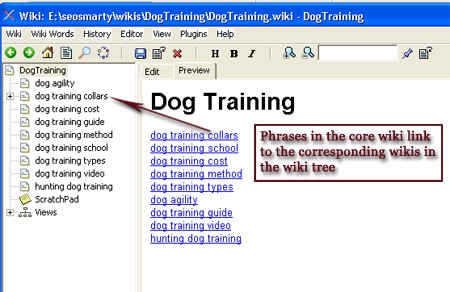
Step 3: Go through your keyword list and copy-paste all top-level (two- and /or three-word) combinations to the core wiki (this will be your main list).
Note: you should use brackets [] for each phrase to create a separate page for it and also to turn it into a link. Thus in the end you will get an interlinked keyword tree:
Step 4: Create a keyword “sub-tree” for each main term: see the previous step.
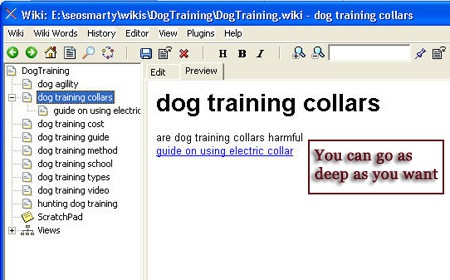
What you get in the end:
- Easily manage and grow your interlinked multi-level keyword tree;
- Grow your keyword lists back and forth,
e.g. dog training video systems <=> dog training video; - Structure your keyword list graphically for easier website content organization.
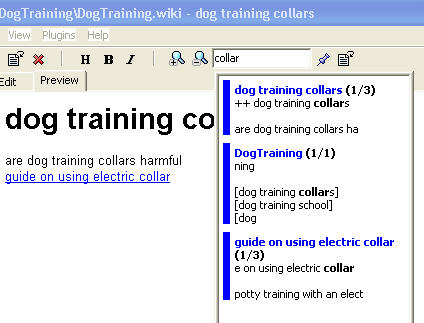
- Search (!) your keyword database:
Of course, WikidPad is much stronger than just that. You can use it to organize all your daily tasks (with to-do list feature), brainstorm new articles, store and organize your ideas, etc. So check it out and huge thanks for the tool idea to MakeUseOf.

