



The Boolean search comprises a specific group of search operators that relate to the logic inherent in the words And, Or, and Not.
Although they are three simple words, their effect on search results – and the usefulness of Boolean SEO-related searches – cannot be overstated.
These search operators are used as conjunctions that allow one to combine words for searching (And), widen a search (Or), or narrow the search to make it more specific (Not).
Boolean search forms the core method of searching to obtain SEO-related data.
Once Boolean searches are fully explored and understood, one can learn other search operators beyond those of Boolean logic, which And, Or, and Not are a part of.
Because Boolean searches are capable of so much, it’s easy to find oneself returning to them repeatedly because they are so useful.
This is why it’s important to understand and master these search operators.
Why It’s Called Boolean
Boolean refers to George Boole, a 19th-century mathematician who invented Boolean logic.
Though George Boole lived in the early to mid-1800s, his contributions to logic and mathematics are considered an essential forbear of modern computer science.
Stanford University’s Encyclopedia of Philosophy writes of him:
“He revolutionized logic by applying methods from the then-emerging field of symbolic algebra to logic… Boole’s method provided general algorithms in an algebraic language which applied to an infinite variety of arguments of arbitrary complexity.
…Boole mentioned the theoretical possibility of using probability theory, enhanced by his algebra of logic, to uncover fundamental laws governing society by analyzing large quantities of social data by large numbers of (human) computers.”
Don’t underestimate the power of And, Or, and Not.
They are a powerful way to extract useful SEO-related data from Google searches.
Why Boolean Search Operators Are Important
Boolean search operators are useful because they can make a search granular and specific. But the Boolean search can also broaden a search to find even more data.
Ultimately, Boolean search operators are important because they are powerful methods for controlling what Google shows in the search results.
Boolean logic helps the searcher sidestep Google’s regular algorithm to produce more precise search results.
1. The Concept Of AND In Search
Every word used in a search is considered together by default.
Modern search engines will also expand a query and begin using synonyms, which can sometimes change the results in unwanted ways.
The problem with using synonyms is that sometimes we want specific words in the search results, and so we have to use the “AND” boolean logic to force the search engines to return the search results that contain the specific words that we want.
There is no “AND” search operator in Google search. So, a way to get the “And” logic into the search query is to require the specific words by the use of quotation marks (” “).
Quotation marks force the search engine to provide search results that contain the exact keywords within the ranked webpages.
The quotation mark search operators are not explicitly “AND” search operators. They are exact match search operators.
This is an exact match search, not an “AND” boolean search.
However, with an exact match search operator, you can force the search engines to return results using the “AND” logic, such as webpages that contain [keyword 1] AND [keyword 2].
When you search in Google like this (without an exact match):
pie recipe apple turmeric
The search results may not contain the word “turmeric” in them, as is the case at this time where the first search result is a webpage for [apple ginger pie] that doesn’t contain turmeric as an ingredient.
Using the quotation marks forces Google to return the desired search results:
pie recipe "apple" "turmeric"
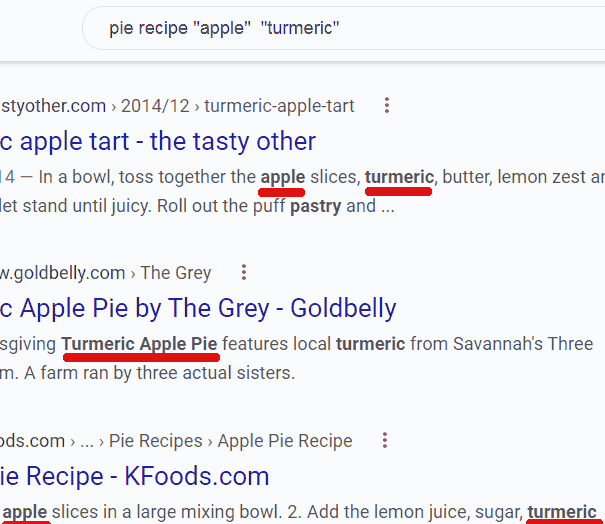 Screenshot from search for [pie recipe “apple” “turmeric, ” Google, July 2022
For example, one can use the AND logic to find link pages of sites that link out to personal injury lawyers.
"favorite links" "personal injury"
The above search forces Google to find webpages that contain the two phrases, “favorite links” and “personal injury.”
The “And” search logic is very powerful and useful because it opens the door to a wider range of search results that are useful for SEO purposes.
2. How To Use The “OR” Search Operator
The “OR” search operator function can be thought of as combining keywords, such as give me this OR give me that.
But what’s happening is that the “OR” search operator allows one to do multiple searches with one search.
Another way to think of the “OR” search operator is to force Google to show search results with specific synonyms or related words (if you want to see those specific words in the search results but not necessarily on the same page).
Searches with the “OR” search operator can be thought of as “give me this and give me that within the same set of search results but not necessarily on the same webpages.”
The “OR” search operator can be conceptualized as a refinement of the “AND” search operator.
While the “AND” types of searches (using quotation marks) return websites that contain all keywords phrases in each of the websites shown in the SERPs, the “OR” search operator results in websites that contain either keyword.
If one is looking for personal injury lawyer links, one can do two simultaneous searches with one search query like this:
"favorite links" OR "Link Resources" "personal injury"
Important: Take note that the “OR” search operator only works when it is used in capitalized letters like this: “OR” and not like this “Or” or this “or.”
3. Concept Of Not: Exclude Words From Search Results
Excluding keywords from a search is a powerful way to search for SEO-related data.
There is no “NOT” search operator, but there is a minus sign (-) that accomplishes the NOT search operations.
The NOT searches (with the minus sign) find sites with the desired keyword phrases except for the keyword phrase that is prefaced by the minus sign.
In other words, every word that has a minus sign next to it will be excluded.
How To Use The Minus Sign Searches For SEO
In 2009, then-Google search engineer Matt Cutts (no longer at Google) explained how the minus sign worked.
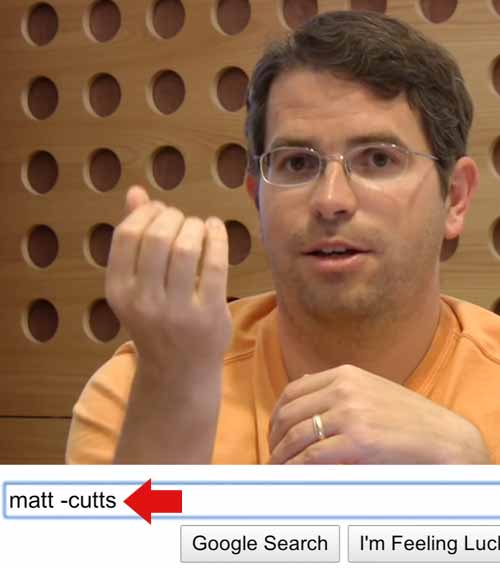 Google Search Tips, Google Search Central, July 2022
In a YouTube Video titled, Google Search Tips, he explained:
“Now, suppose you’re interested in Matt, but not me.
You might do:
Matt (space) -Cutts.
And that will … only show pages that have Matt but don’t have the word Cutts.”
The minus sign is great for researching backlinks.
While many tools can do the same thing, searching Google itself is a good way to surface webpages that Google has indexed.
The minus sign is a way to find all the sites that link to a domain. The way to do it is to search for the domain but exclude the domain itself.
How To Find Competitor Backlinks With Minus Sign Example:
example.com -site:example.com
If the website has a unique brand name, then you can do a similar search using the brand name.
Brand Name Backlink Search
example -site:example.com "links"
If you’re having trouble with that, you can segment the links by Top Level Domain (TLD).
Segmenting Searches With Minus Sign Search Operator:
example -site:example.com “links” site:.edu
example -site:example.com “links” site:.net
example -site:example.com “links” site:.com
Boolean Logic For SEO Searches
Understanding what Boolean means and where it comes from helps to understand how important it is for SEO purposes.
These examples are only a starting point for a near limitless way of extracting meaningful SEO data using Google and Boolean searches.
More Resources:
- An SEO Guide To Google Advanced Search Operators
- Get To Know Google’s Before: And After: Search Operators
- SEO For Beginners: An Introduction To SEO Basics
Featured Image: Master1305/Shutterstock

