

Whether you are an SEO pro, marketer, or web developer, you might often need to change your browser’s user-agent to test different things.
For example, imagine you’re running a MAC-OS-specific campaign. To find out if your campaign is running properly and not targeting Linux users, changing the user-agent of your browser can help you test.
Changing user-agents is almost a daily task for web developers, as they need to test how websites behave in different browsers and devices.
What Is A User-Agent?
A user-agent is an HTTP request header string identifying browsers, applications, or operating systems that connect to the server.
Browsers have user-agents, and so do bots and crawlers such as search engines Googlebot, Google AdSense, etc.

Here, we will learn how to change your browser’s user-agent.
The process is called user-agent spoofing.
Spoofing occurs when a browser or client sends a different user-agent HTTP header from what it is and fakes it.
While the term may be alarming, this is not a dangerous activity and will not cause you any problems. (Feel free to spoof your user-agent as much as you want.)
How To Change Your User-Agent On Chrome & Edge
Since Microsoft Edge is now using Chromium, the settings for both Chrome and Edge are the same.
1. Right Click Anywhere On Webpage > Inspect
Alternatively, you can use CTR+Shift+I on Windows and Cmd + Opt +J on Mac.

2. Choose More Tools > Network Conditions
Screen new.
Click on the three vertical dots in the upper right corner.

3. Uncheck Select Automatically Checkbox

4. Choose One Among The Built-In User-Agents List

If the user-agent you want doesn’t exist, you can enter any string you want on the field below the list.
For example, you can enter the following (Googlebot’s user-agent) into the custom field:
Mozilla/5.0 (compatible; Googlebot/2.1; +http://www.google.com/bot.html)
This may be useful for SEO professionals to identify if there is a cloaking on the website where the webpage shows specific content to Googlebot and different content to website visitors.
Alternatively, you can use the Chrome extension User-Agent Switcher and Manager.
That said, I try not to use browser extensions when the browser can perform the action I want. This is to avoid overloading the browser with add-ons.
Also, extensions have a habit of breaking websites unexpectedly sometimes.
While you might think the website you visited has an issue, the root cause can be one of the add-ons you’re using.
How To Change User-Agent On Safari
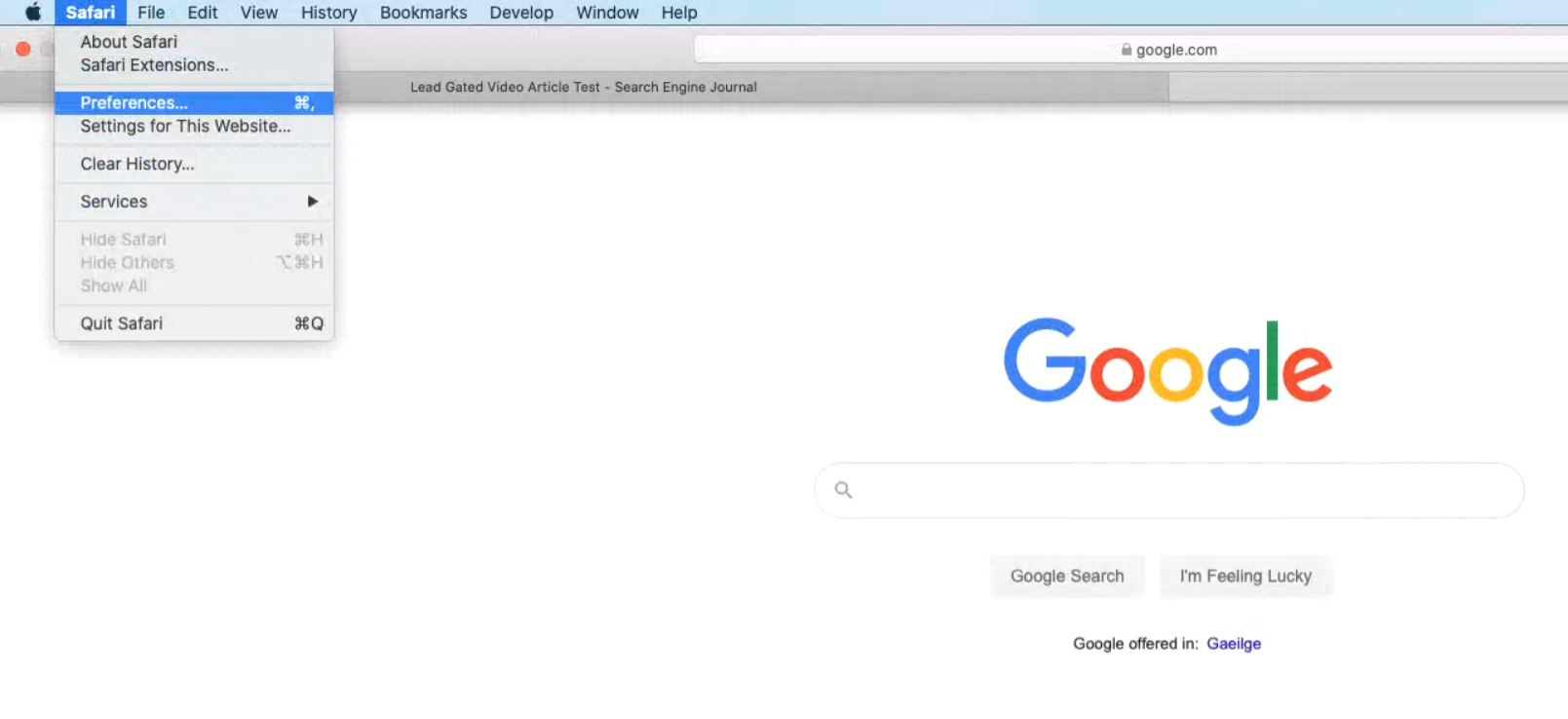
1. Go To Preferences
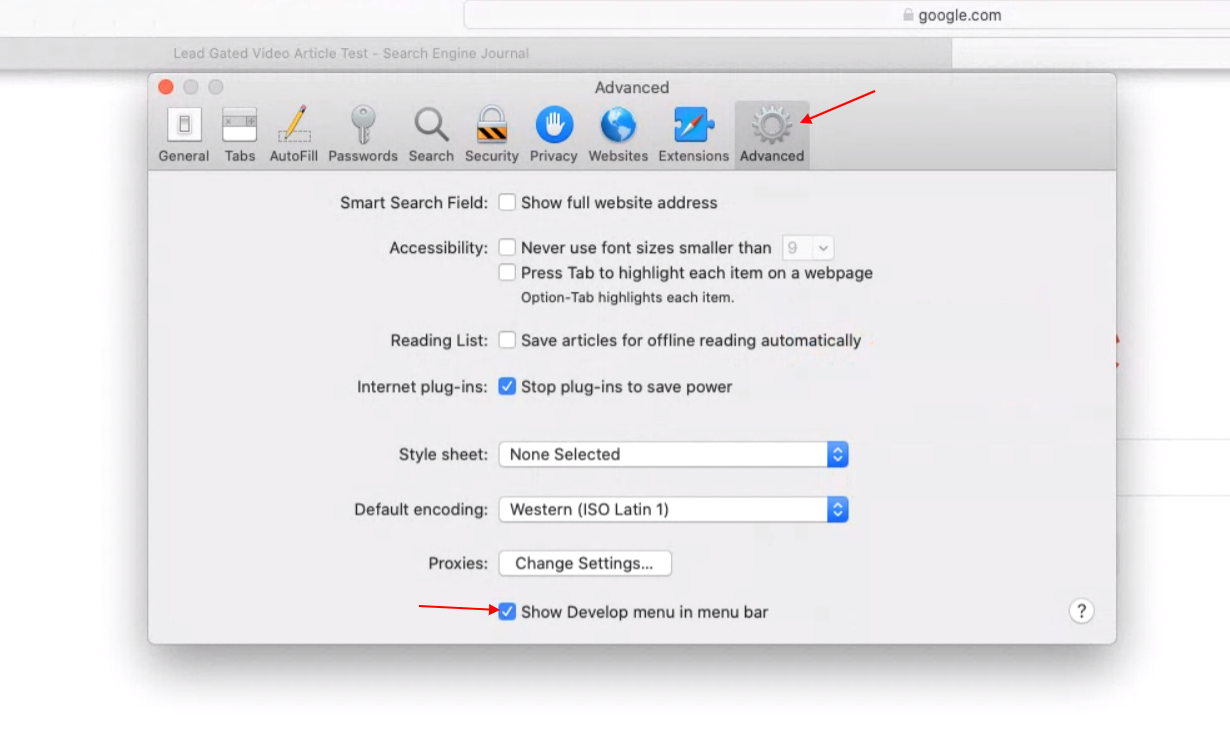
2. Enable Develop Menu Bar
Go to Advanced and check Show Develop menu in menu bar.
3. Navigate To Develop > User-Agent
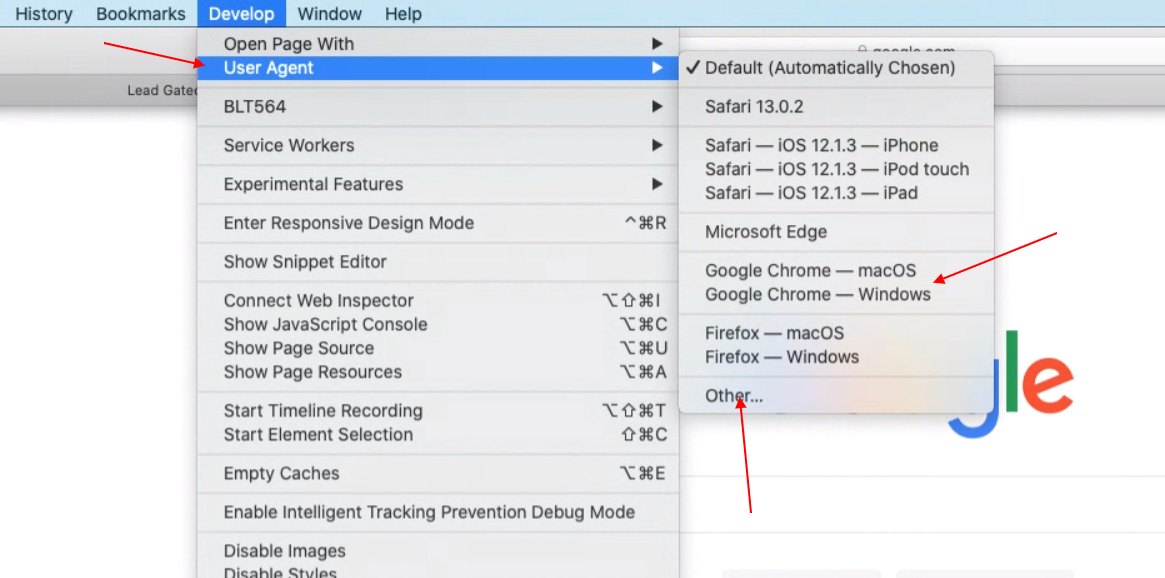
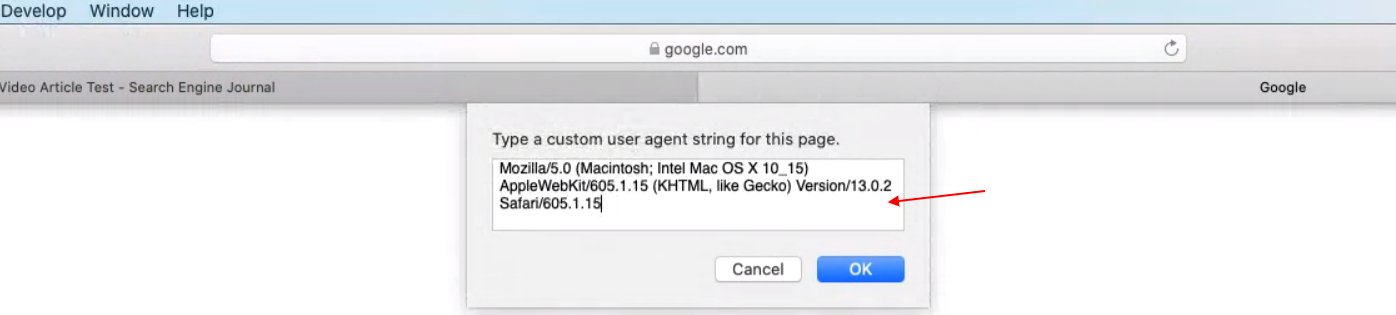
You can again select from a predefined list or enter a custom user-agent string by choosing “Other…”
How To Change User-Agent In Firefox
In Firefox, it is possible to change user-agents via the browser’s built-in settings.
However, it is not as user-friendly as on Chrome or Safari.
It is a real pain to use the browser’s built-in feature.
Instead, we will use a Firefox add-on called User-Agent Switcher.
After installing the add-on, you will see an icon in the upper right corner.
You can select one of the predefined user-agents or enter a custom user-agent by clicking on the pen icon below.

Another extension you can use is User-Agent Switcher and Manager.

User-Agents Are Easy To Spoof
The user-agents are easy to spoof, and anyone can use these easy tricks to alter them.
This feature is useful for testing web apps against various devices, especially when the HTML is different for mobile or tablet devices.
It is a cost-efficient way to test websites as one doesn’t need to have many physical devices to be able to test.
However, certain issues may appear on the real device but not when testing by changing the user agent and using a browser emulator.
In that case, if you want to test on multiple real devices, I suggest using Browserstack, which offers testing opportunities on almost all devices.
FAQ
What is a user agent?
User agent is a HTTP request header string identifying browser, application, operating system which connects to the server. Not only browsers have user agent but also bots, search engines crawlers such as Googlebot, Google Adsense etc. which are not browsers.
What is user-agent spoofing?
When browser or any client sends different user-agent HTTP header from what they are and fakes it that is called spoofing.
How does changing the user-agent help SEO professionals?
SEO professionals may find changing the user-agent to be a critical part of their audit process. It is beneficial for several reasons:
- Identifying cloaking issues: By mimicking different user-agents, such as Googlebot, SEO experts can uncover whether a website presents different content to search engines than users, which violates search engine guidelines.
- Compatibility: It ensures web applications are compatible across various browsers and devices.
- User Experience: Developers can optimize the user experience by understanding how content is rendered on different systems.
- Debugging: Changing the user-agent can help pinpoint browser-specific issues.
- Quality Assurance: It’s an essential step in quality assurance and helps maintain the integrity and performance of a website.
Can changing your browser’s user-agent pose a security risk?
No, changing your browser’s user-agent, commonly called user-agent spoofing, does not inherently pose a security risk. While the term “spoofing” might suggest malicious intent, this practice in the context of user-agents is harmless. It is a tool for developers and marketers to test how websites and applications interact with various devices and browsers.
More resources:
- An Introduction to Rendering For SEO
- Using Chrome DevTools To Diagnose Site Issues In An Audit
- 7 Essential SEO Browser Extensions & Plugins
Featured Image: /Shutterstock
All screenshots taken by author, May 2024
