

Twitter continues to exhibit dogged persistence in terms of user growth and preference, no doubt aided by some of its essential features – like the basic Twitter search and advanced search.
And while many still view Twitter as a mere social media platform for following friends and being followed, a significant number are exploiting its immense potential as a business marketing platform, specifically for lead generation.
In fact, 82% of B2B marketers preferred using Twitter in 2020, which makes it second only to Linkedin for that audience.

Who Will Marketers Find With Twitter Search?
Contrary to earlier expectations – that Twitter growth would decline or flatten out – statistics show that Twitter growth is anything but stagnant.
Based on Twitter’s most recent quarterly filing, usage data shows that the platform grew by 24% relative to the preceding quarter, representing an additional 14 million users.
With an average global audience of 192 million that can be reached with adverts, no business marketing strategy worth the paper it’s written on can safely ignore Twitter.
In the US, as of September 2020, 52% of Twitter users reported accessing (and probably using) the social media platform every, single, day.
And the Twitter Search function— specifically its Advanced Search feature— has huge business potential, through lead generation, for changing the marketing landscape.
Thanks to Twitter’s Advanced Search feature, you can now customize your search based on several details. These include a range of dates, Twitter accounts, hashtags, and particular wordings.
In this column, you’ll learn what the Twitter Advanced Search feature really is and how to use it to your digital marketing advantage.
What Exactly Is the Twitter Advanced Search Feature?
There are two Search features: the general Search feature (that you’ve most likely used) and the Advanced Search feature.
Let’s first explain the general Search feature.
The general Search feature is on the right-hand side of your laptop.

If you’re using a smartphone, however, the general Search is represented by the magnifying icon at the bottom of your mobile phone screen.
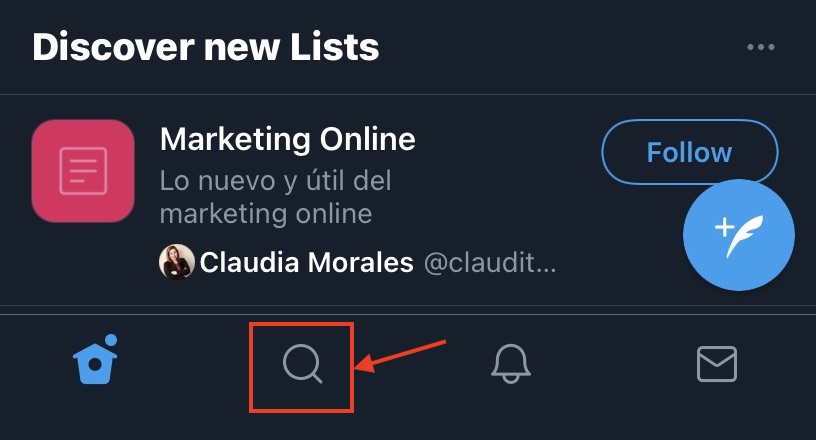
You can’t glean much from these general searches because your search range is limited.
That’s where the Advanced Search feature comes in.
How to Access Twitter’s Advanced Search Feature
You can access the Twitter Advanced Search by first using the general Search feature referenced above.
On your laptop, key in your search phrase. Let’s choose [Tesla], the company associated with Elon Musk.
After typing [Tesla] in the general search field, you’ll spot some three straight dots on the right-hand side of the screen.
If you point your cursor at the three dots, the word “more” will pop up.
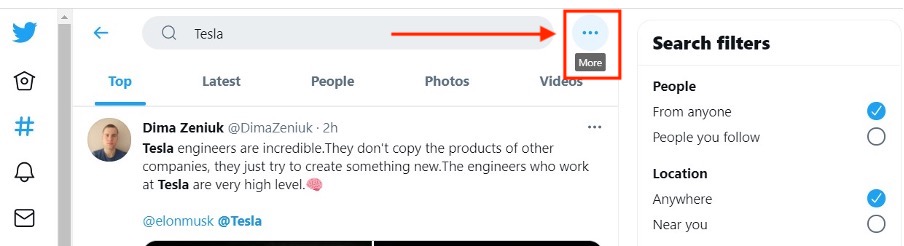
If you click those three straight dots, you’ll find the option of Advanced Search.

When you click the Advanced Search option icon, the following search fields will appear on your screen:

By now, you’re probably saying to yourself, “That’s great for desktop users. But what about mobile?”
Unfortunately, Twitter’s advanced search functionality is only available when you’re logged in to twitter.com.
Note: You can also just navigate directly to twitter.com/search-advanced.
Advanced Search Fields
You’re going to get a pretty long list of search fields to choose from, which can be a little overwhelming. For example, under the heading “Words,” this list appears:
- All of these words.
- This exact phrase.
- Any of these words.
- None of these words.
- These hashtags.
- Written in (language).
Other headings include:
- People.
- Places.
- Dates.
- Other.
What’s cool about these fields is that you aren’t limited to choosing just one. So, for example, you could perform a search that combined an exact phrase, from specific accounts, during a specific date range.
Before moving on to what happens after you hit Search, let’s explore some of the common search queries and how you can use them to refine your searches.
How to Use the “Words” Field in Advanced Search
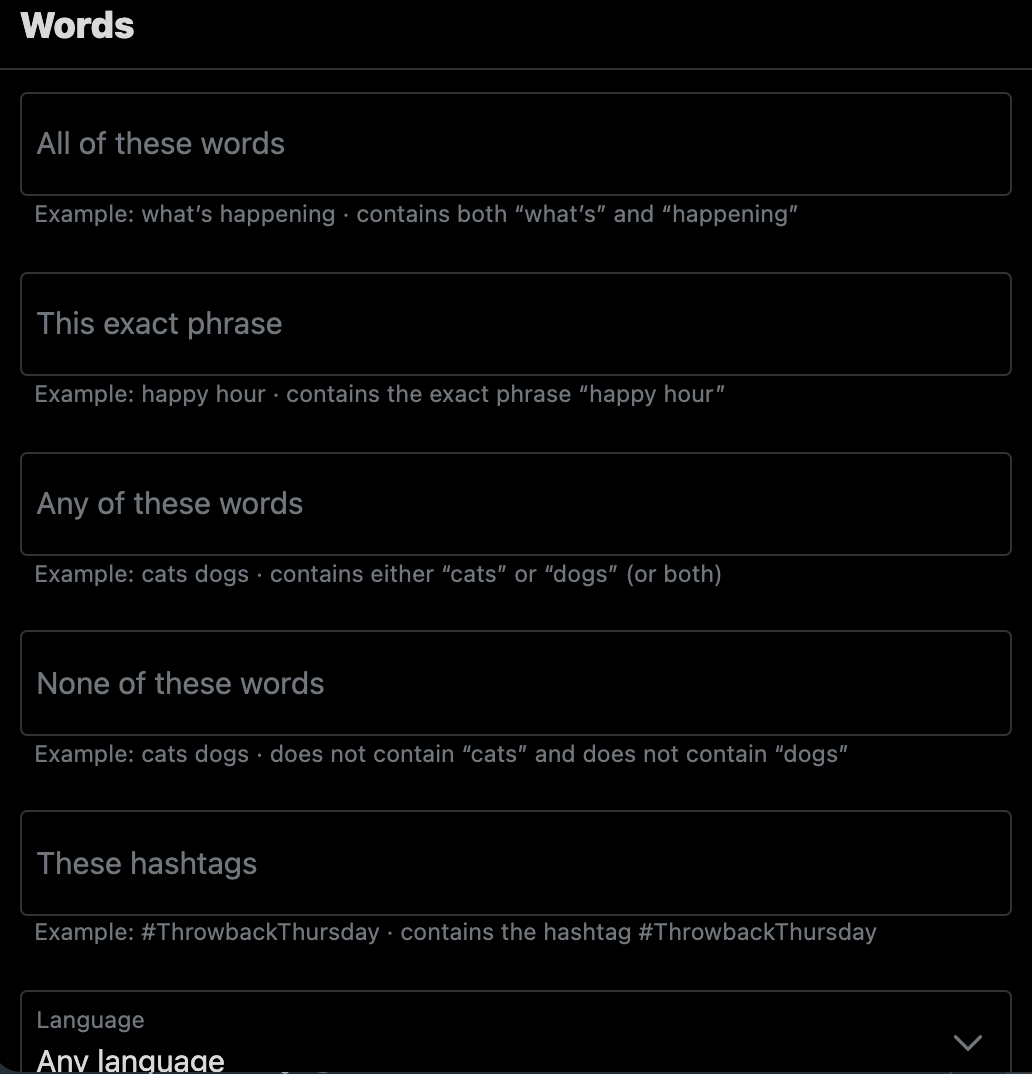
Perhaps the most commonly used search feature, there are six fields under the “Words” Search category on Twitter’s Advanced Search.
Let’s take a look at each so you understand what they mean.
All of These Words
Use this field to find tweets that include the words or phrase you type. To ensure the best search results, use quotation marks.
If you’re searching for tweets and you aren’t sure of the exact phrase, you can query some relevant and specific words — whatever you think the original tweet or tweets must have contained.
This Exact Phrase
Use this field to enter a very specific phrase.
So if you were searching for tweets about Heisman Trophy winners that attended USC, for example, you would enter [USC Heisman Trophy Winners] instead of just [Heisman Trophy Winners].
One cool thing is that quotes are automatically added in this field.
Any of These Words
Use this field to search for a group of related words.
For example, if you’re looking for USC football mentions, you could type [#USC football], [USC football], [@USC football], and [USCfootball.com].
The search field would add the word “or” between each word or phrase you typed to trigger the most specific results.
None of These Words
If you want to search Twitter but omit certain words or phrases, this is your search option. Using this field will eliminate any tweets that contain words or phrases you don’t want to be included in a search result.
For example, you may want results for [USC] but exclude any mention of [USC football].
This is an effective way for businesses to exclude search results for the names of other companies in the same industry.
These Hashtags
If you want to search for a hashtag, whether it’s a hashtag of your brand or the hashtag of a competitor, this is the relevant search option. For example, if you’re a sneaker company and you want to check out what people are tweeting about regarding a big brand, you could type [#Nike] to get results.
Any Language
Use this field if you want to get information about tweets written in one of the more than 50 foreign languages listed.
This may help if you are analyzing the foreign market in your industry or have a brand that operates in multiple countries.
How to Use The “Account” Field When Doing Advanced Search
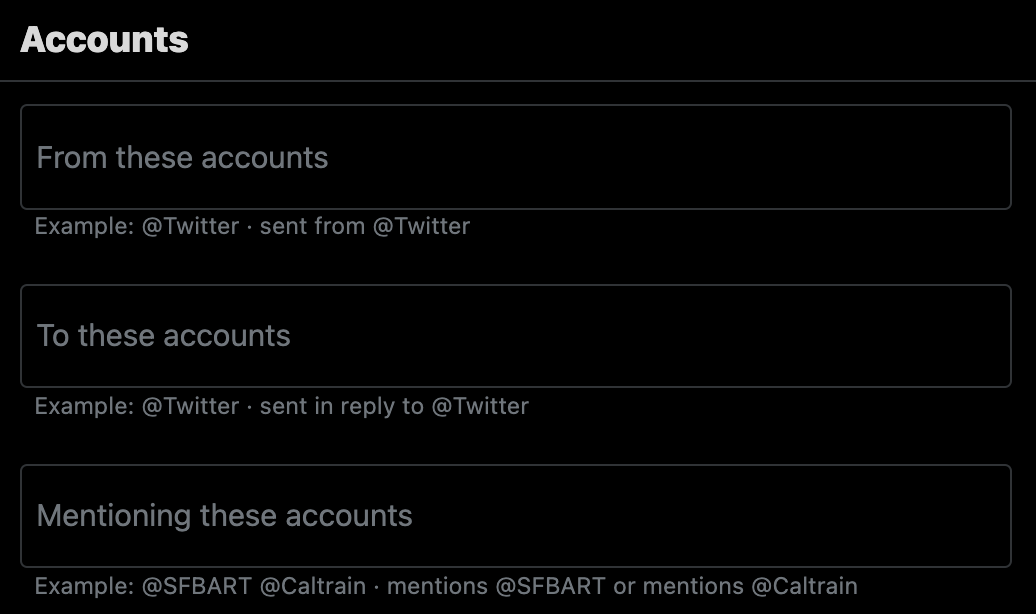
Formerly named “People,” under “Accounts,” there are three different fields that can alter your search results depending on what you type.
Just type the username of a person with a Twitter account, or several usernames separated by a comma.
Then choose whether you want results exclusively sent by that account, to that account, or that mentioned that account.
Just remember to use proper Twitter accounts that begin with @.
How to Use The “Engagement” Field When Doing Advanced Twitter Search
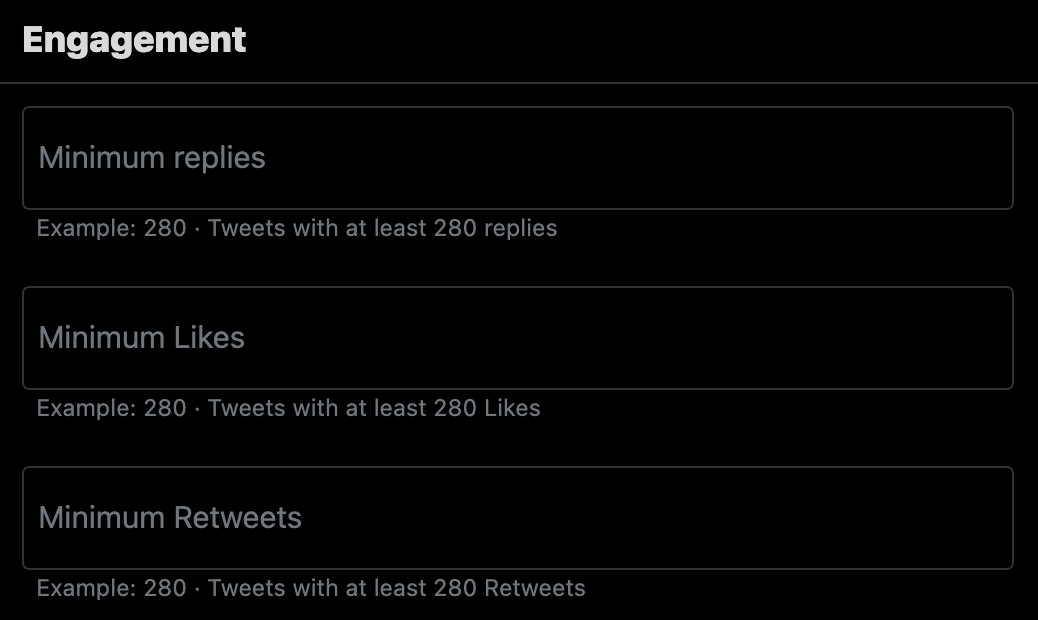
The depth of engagement is measured by the number of retweets, replies, and likes a tweet receives. A tweet that generates thousands of retweets is doubtless an engaging tweet.
When you are doing an advanced Twitter search, maybe for your competitor’s brand, you can filter the search results by level of engagement.
The way to do this is to specify the minimum number of retweets, likes, or replies in the search field or any combination of those three.
By doing this, you will absolutely weed out posts that add more noise and don’t add value to your search.
How to Use The “Dates” Field When Doing Advanced Twitter Search
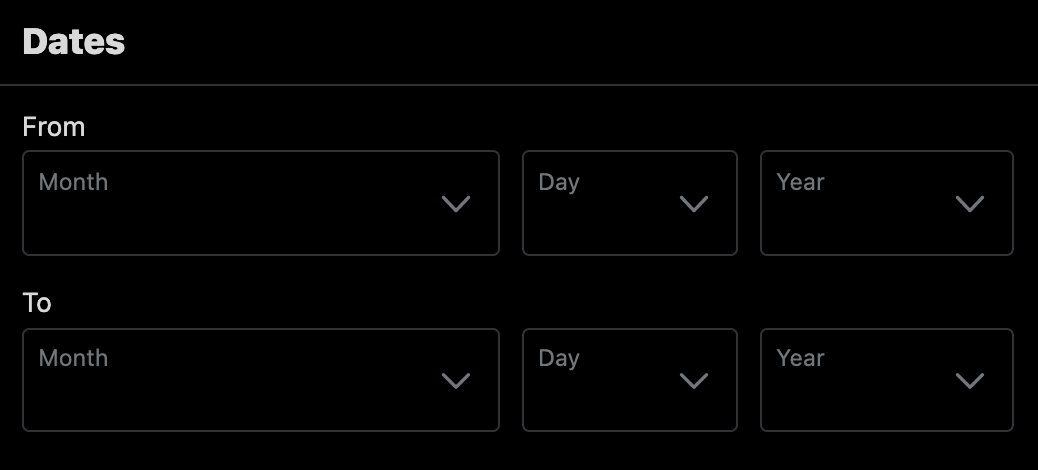
If you remember a tweet but you can’t remember the exact date it was tweeted, the “Date” option has you covered, that is if you can remember the period within which the tweet was sent out.
Under the heading ‘Dates,’ you can select a specific date range and only receive search results from that time.
You’ll simply enter the date ranges, and the relevant tweet will be displayed, regardless of how long ago the phrase was tweeted.
One thing to note is that the first tweet was sent on March 21, 2006, so the system would default to that date if you entered a date earlier than that one.
Don’t Forget the Search Operators
Similar to the advanced search operators available for Google, Twitter also provides for a wide range of search “tricks” to help narrow in on your target from any of Twitter’s search boxes.
These will help you weed out the useful tweets from the pics of what users had for dinner.

How to Understand Advanced Twitter Search Results
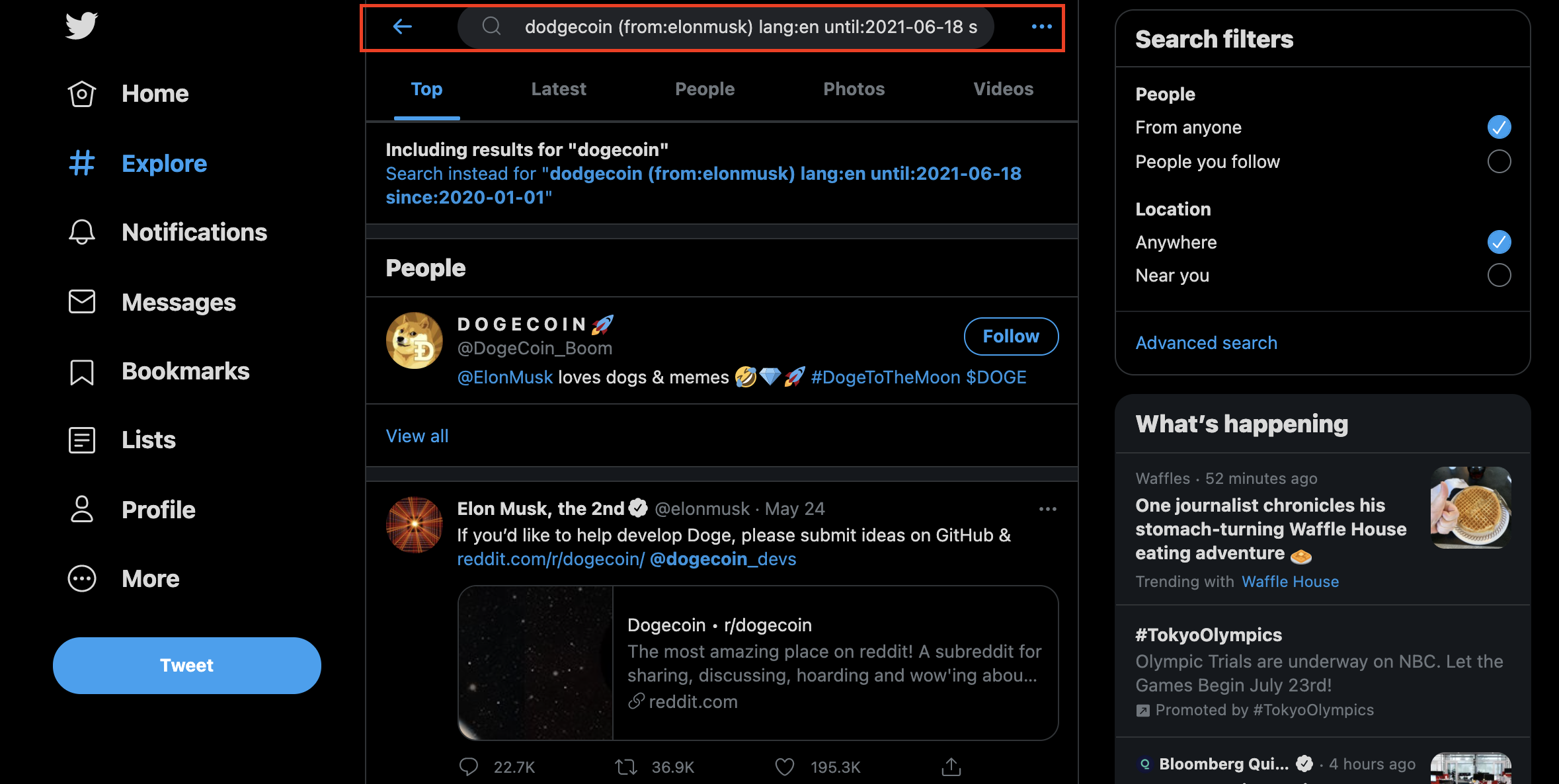
Twitter has an algorithm that will determine how you get the search results and in which order.
While what drives the nature and order of Twitter’s Advanced Search results isn’t known with certainty, several metrics may play a role.
These may include tweets that have elicited a certain level of reaction, relevance, time-lapse of the tweet, and location, among others.
After you have typed in all the information to generate a search, the results page will include the headings:
- Top: This is a list of what Twitter considers the tweets that are triggering the most reaction.
- Latest: These are tweets that were recently posted.
- People: These are the accounts of users based on your search criteria.
- Photos: These are tweets that include user-posted images.
- Videos: These are tweets with links to videos on other websites.
After reviewing the results, you may realize that you need to refine or broaden your search. You can do that by simply going back to the Advanced Search page.
Depending on the level of analysis needed, there are also paid programs that can email alerts based on hashtags, business name, etc. An example of this is Twilert, which is basically a Google Alerts for Twitter.
How Can You Use Advanced Twitter Search to Generate Leads?
There are several ways to use this Twitter search feature to drive revenue through lead generation.
One way to do this is to assess what customers complain about regarding your competitors’ products. Then you can use this information to improve your product.
The Advanced Search feature can provide your business with valuable demographic information, information about prospects in your local area, and lead generation opportunities.
When your goal is lead generation, you will want to focus on these areas:
- People.
- Places.
- Dates.
- Other.
There are many ways for you to generate leads using these fields, but two of the most common methods include the below.
1. Competitor mentions
Type in the name of a major competitor under the exact phrase field in Words, and under the “Mentioning these accounts” field under People. Then click the “Negative” box under Other and analyze the results.
Make a spreadsheet of all the users who have negative comments about your competitor, and reach out to them with promo codes and discounts, knowing that they are dissatisfied with the product or service they received.
In the example below, a brand competitive with GoDaddy searched for negative tweets about the company, hoping to take advantage of customer dissatisfaction.

2. Product or service mentions
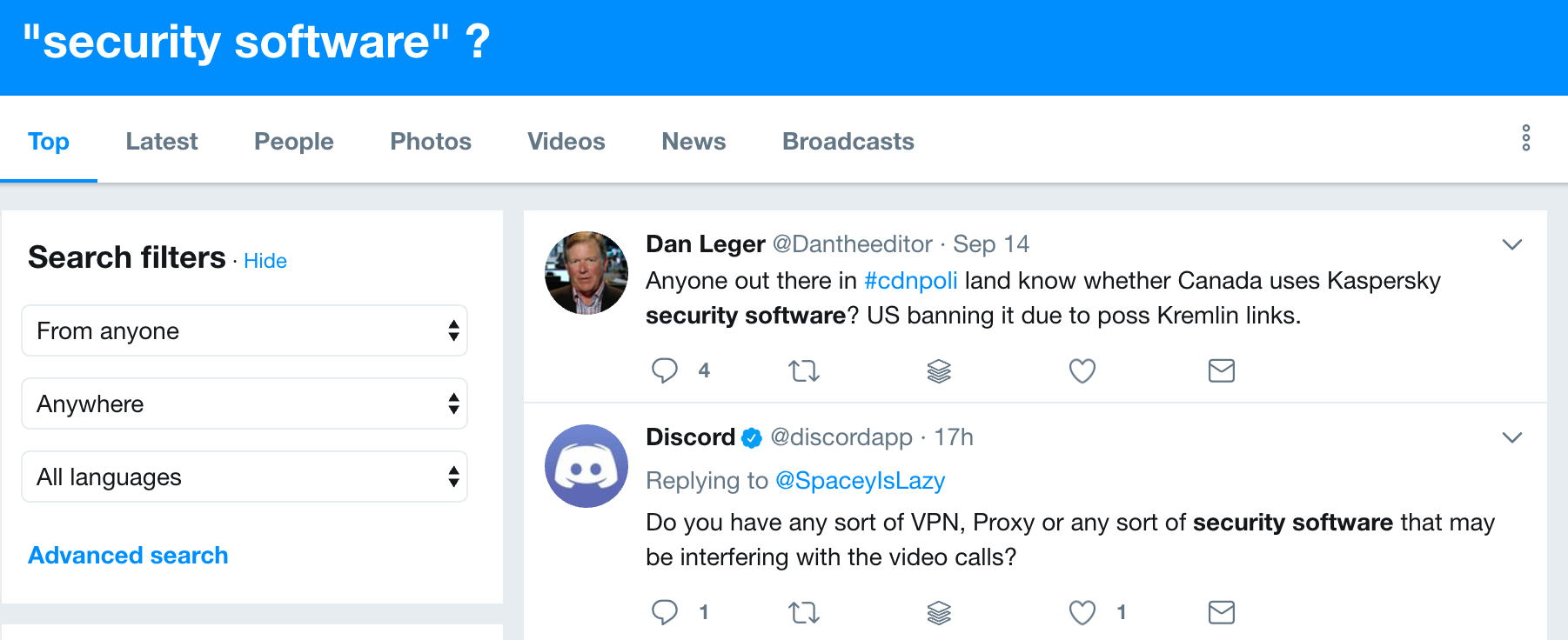
Type in the name of a product or service you offer under Words. If you sell computer security software, you would type that phrase + a “?”.
You can use the results to create a database of people who have made inquiries about products or services you sell and reach out to them about what you can offer.
These are only two of the ways you can generate leads from Twitter Advanced Search.
But they are effective because they identify people who are unhappy with products or services they purchased or people who have expressed interest in those products and services but may have not yet engaged with a seller.
This is how to use Twitter, specifically the search function – to drive business growth and generate leads.
But there are other ways.
Check out these 8 Terrific Tips to Optimize a Twitter Business or Brand Profile.
Another Tool in the Your Marketing Tool Chest
Twitter Advanced Search helps you to analyze your market, judge how your competitors are doing based on positive or negative sentiment, and improve your geotargeting based on the number of tweets in specific locations.
It may take a few searches before you understand all the ways you can manipulate the results.
But once you do, you can hone in on the information you need to help boost your Twitter marketing efforts.
More Resources:
- 20 Amazingly Cool Twitter Tricks & Tips
- 6 Great Examples of Brands Using Twitter Effectively
- Social Media Marketing: A Complete Strategy Guide
Image Credits
In-post Photos # 1: Content Marketing Institute
All Screenshots taken by author, July 2021
