

In the SEO arena of website architecture, there is little doubt that eliminating duplicate content can be one of the hardest fought battles.
Too many content management systems and piss-poor developers build sites that work great for displaying content but have little consideration for how that content functions from a search-engine-friendly perspective.
And that often leaves damaging duplicate content dilemmas for the SEO to deal with.
There are two kinds of duplicate content, and both can be a problem:
- Onsite duplication is when the same content is duplicated on two or more unique URLs of your site. Typically, this is something that can be controlled by the site admin and web development team.
- Offsite duplication is when two or more websites publish the exact same pieces of content. This is something that often cannot be controlled directly but relies on working with third-parties and the owners of the offending websites.
Why Is Duplicate Content a Problem?
The best way to explain why duplicate content is bad is to first tell you why unique content is good.
Unique content is one of the best ways to set yourself apart from other websites. When the content on your website is yours and yours alone, you stand out. You have something no one else has.
On the other hand, when you use the same content to describe your products or services or have content republished on other sites, you lose the advantage of being unique.
Or, in the case of onsite duplicate content, individual pages lose the advantage of being unique.
Look at the illustration below. If A represents content that is duplicated on two pages, and B through Q represents pages linking to that content, the duplication causes a split the link value being passed.
Now imagine if pages B-Q all linked to only on page A. Instead of splitting the value each link provides, all the value would go to a single URL instead, which increases the chances of that content ranking in search.
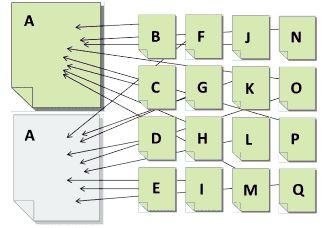
Whether onsite or offsite, all duplicate content competes against itself. Each version may attract eyeballs and links, but none will receive the full value it would get if it were the sole and unique version.
However, when valuable and unique content can be found on no more than a single URL anywhere on the web, that URL has the best chance of being found based on it being the sole collector of authority signals for that content.
Now, having that understanding, let’s look at the problems and solutions for duplicate content.
Offsite Duplicate Content
Offsite duplication has three primary sources:
- Third-party content you have republished on your own site. Typically, this is in the form of generic product descriptions provided by the manufacturer.
- Your content that has been republished on third-party sites with your approval. This is usually in the form of article distribution or perhaps reverse article distribution.
- Content that someone has stolen from your site and republished without your approval. This is where the content scrapers and thieves become a nuisance.
Let’s look at each.
Content Scrapers & Thieves
Content scrapers are one of the biggest offenders in duplicate content creation. Spammers and other nefarious perpetrators build tools that grab content from other websites and then publish it on their own.
For the most part, these sites are trying to use your content to generate traffic to their own site in order to get people to click their ads. (Yeah, I’m looking at you, Google!)
Unfortunately, there isn’t much you can do about this other than to submit a copyright infringement report to Google in hopes that it will be removed from their search index. Though, in some cases, submitting these reports can be a full-time job.
Another way of dealing with this content is to ignore it, hoping Google can tell the difference between a quality site (yours) and the site the scraped content is on. This is hit and miss as I’ve seen scraped content rank higher than the originating source.
What you can do to combat the effects of scraped content is to utilize absolute links (full URL) within the content for any links pointing back to your site. Those stealing content generally aren’t in the business of cleaning it up so, at the very least, visitors can follow that back to you.
You can also try adding a canonical tag back to the source page (a good practice regardless). If the scrapers grab any of this code, the canonical tag will at least provide a signal for Google to recognize you as the originator.
Article Distribution
Several years ago, it seemed like every SEO was republishing their content on “ezines” as a link building tactic. When Google cracked down on content quality and link schemes, republishing fell by the wayside.
But with the right focus, it can be a solid marketing strategy. Notice, I said “marketing” rather than “SEO” strategy.
For the most part, any time you’re publishing content on other websites, they want the unique rights to that content.
Why? Because they don’t want multiple versions of that content on the web devaluing what the publisher has to offer.
But as Google has gotten better about assigning rights to the content originator (better, but not perfect), many publishers are allowing content to be reused on the author’s personal sites as well.
Does this create a duplicate content problem? In a small way, it can, because there are still two versions of the content out there, each potentially generating links.
But in the end, if the number of duplicate versions is limited and controlled, the impact will be limited as well. In fact, the primary downside lands on the author rather than the secondary publisher.
The first published version of the content will generally be credited as the canonical version. In all but a few cases, these publishers will get more value from the content over the author’s website that republishes it.
Generic Product Descriptions
Some of the most common forms of duplicated content come from product descriptions that are reused by each (and almost every) seller.
A lot of online retailers sell the exact same products as thousands of other stores. In most cases, the product descriptions are provided by the manufacturer, which is then uploaded into each site’s database and presented on their product pages.
While the layout of the pages will be different, the bulk of the product page content (product descriptions) will be identical.
Now multiply that across millions of different products and hundreds of thousands of websites selling those products, and you can wind up with a lot of content that is, to put it mildly, not unique.
How does a search engine differentiate between one or another when a search is performed?
On a purely content-analysis level, it can’t. Which means the search engine must look at other signals to decide which one should rank.
One of these signals is links. Get more links and you can win the bland content sweepstakes.
But if you’re up against a more powerful competitor, you may have a long battle to fight before you can catch them in the link building department. Which brings you back to looking for another competitive advantage.
The best way to achieve that is by taking the extra effort to write unique descriptions for each product. Depending on the number of products you offer, this could end up being quite a challenge, but in the end, it’ll be well worth it.
Take a look at the illustration below. If all the gray pages represent the same product with the same product descriptions, the yellow represents the same product with a unique description.
If you were Google, which one would you want to rank higher?

Any page with unique content is going to automatically have an inherent advantage over similar but duplicate content. That may or may not be enough to outrank your competition, but it surely is the baseline for standing out to not just Google, but your customers as well.
Onsite Duplicate Content
Technically, Google treats all duplicate content the same, so onsite duplicate content is really no different than offsite.
But onsite is less forgivable because this is one type of duplication that you can actually control. It’s shooting your SEO efforts in the proverbial foot.
Onsite duplicate content generally stems from bad site architecture. Or, more likely, bad website development!
A strong site architecture is the foundation for a strong website.
When developers don’t follow search-friendly best practices, you can wind up losing valuable opportunity to get your content to rank due to this self-competition.
There are some who argue against the need for good architecture, citing Google propaganda about how Google can “figure it out.” The problem with that is that it relies on Google figuring things out.
Yes, Google can determine that some duplicate content should be considered one and the same, and the algorithms can take this into account when analyzing your site, but that’s no guarantee they will.
Or another way to look at it is that just because you know someone smart doesn’t necessarily mean they’ll be able to protect you from your own stupidity! If you leave things to Google and Google fails, you’re screwed.
Now, let’s dive into some common onsite duplicate content problems and solutions.
The Problem: Product Categorization Duplication
Far too many ecommerce sites suffer from this kind of duplication. This is frequently caused by content management systems that allow you to organize products by category, where a single product can be tagged in multiple categories.
That in itself isn’t bad (and can be great for the visitor), however in doing so, the system generates a unique URL for each category in which a single product shows up in.
Let’s say you’re on a home repair site and you’re looking for a book on installing bathroom flooring. You might find the book you’re looking for by following any of these navigation paths:
- Home > flooring > bathroom > books
- Home > bathroom > books > flooring
- Home > books > flooring > bathroom
Each of these is a viable navigation path, but the problem arises when a unique URL is generated for each path:
- https://www.myfakesite.com/flooring/bathroom/books/fake-book-by-fake-author
- https://www.myfakesite.com/bathroom/books/flooring/fake-book-by-fake-author
- https://www.myfakesite.com/books/flooring/bathroom/fake-book-by-fake-author
I’ve seen sites like this create up to ten URLs for every single product turning a 5k product website into a site with 45k duplicate pages. That is a problem.
If our example product above generated ten links, those links would end up being split three ways.
Whereas, if a competitor’s page for the same product got the same ten links, but to only a single URL, which URL is likely to perform better in search?
The competitor’s!
Not only that, but search engines limit their crawl bandwidth so they can spend it on indexing unique and valuable content.
When your site has that many duplicate pages, there is a strong chance the engine will stop crawling before it even gets a fraction of your unique content indexed.
This means hundreds of valuable pages won’t be available in search results and those that are indexed are duplicates competing against each other.
The Solution: Master URL Categorizations
One fix to this problem is to only tag products for a single category rather than multiples. That solves the duplication issue, but it’s not necessarily the best solution for the shoppers since it eliminates the other navigation options for finding the product(s) they want. So, scratch that one off the list.
Another option is to remove any type of categorization from the URLs altogether. This way, no matter the navigation path used to find the product, the product URL itself is always the same, and might look something like this:
- https://www.myfakesite.com/products/fake-book-by-fake-author
This fixes the duplication without changing how the visitor is able to navigate to the products. The downside to this method is that you lose the category keywords in the URL. While this provides a small benefit to the totality of SEO, every little bit can help.
If you want to take your solution to the next level, getting the most optimization value possible while keeping the user experience at the same time, build an option that allows each product to be assigned to a “master” category, in addition to others.
When a master category is in play, the product can continue to be found through the multiple navigation paths, but the product page is accessed by a single URL that utilizes the master category.
That might make the URL look something like this:
- https://www.myfakesite.com/flooring/fake-book-by-fake-authorOR
- https://www.myfakesite.com/bathroom/fake-book-by-fake-authorOR
- https://www.myfakesite.com/books/fake-book-by-fake-author
This latter solution is the best overall, though it does take some additional programming. However, there is one more relatively easy “solution” to implement, but I only consider it a band-aid until a real solution can be implemented.
Band-Aid Solution: Canonical Tags
Because the master-categorization option isn’t always available to out of the box CMS or ecommerce solutions, there is an alternative option that will “help” solve the duplicate content problem.
This involves preventing search engines from indexing all non-canonical URLs. While this can keep duplicate pages out of the search index, it doesn’t fix the issue of splitting the page’s authority. Any link value sent to a non-indexable URL will be lost.
The better band-aid solution is to utilize canonical tags. This is similar to selecting a master category but generally requires little, if any, additional programming.
You simply add a field for each product that allows you to assign a canonical URL, which is just a fancy way of saying, “the URL you want to show up in search.”
The canonical tag looks like this:
- <link rel=“canonical” href=“https://www.myfakesite.com/books/fake-book-by-fake-author” />
Despite the URL the visitor is on, the behind-the-scenes canonical tag on each duplicate URL would point to a single URL.
In theory, this tells the search engines not to index the non-canonical URLs and to assign all other value metrics over to the canonical version.
This works most of the time, but in reality, the search engines only use the canonical tag as a “signal.” They will then choose to apply or ignore it as they see fit.
You may or may not get all link authority passed to the correct page, and you may or may not keep non-canonical pages out of the index.
I always recommend implementing a canonical tag, but because it’s unreliable, consider it a placeholder until a more official solution can be implemented.
The Problem: Redundant URL Duplication
One of the most basic website architectural issues revolves around how pages are accessed in the browser.
By default, almost every page of your site can be accessed using a slightly different URL. If left unchecked, each URL leads to the exact same page with the exact same content.
Considering the home page alone, it can likely be accessed using four different URLs:
- http://site.com
- http://www.site.com
- https://site.com
- https://www.site.com
And when dealing with internal pages, you can get an additional version of each URL by adding a trailing slash:
- http://site.com/page
- http://site.com/page/
- http://www.site.com/page
- http://www.site.com/page/
- Etc.
That’s up to eight alternate URLs for each page! Of course, Google should know that all these URLs should be treated as one, but which one?
The Solution: 301 Redirects & Internal Link Consistency
Aside from the canonical tag, which I addressed above, the solution here is to ensure you have all alternate versions of the URLs redirecting to the canonical URL.
Keep in mind, this isn’t just a home page issue. The same issue applies to every one of your site URLs. Therefore, the redirects implemented should be global.
Be sure to force each redirect to the canonical version. For instance, if the canonical URL is https://www.site.com, each redirect should point there. Many make the mistake of adding additional redirect hops that might look like this:
- Site.com > https://site.com > https://www.site.com
- Site.com > www.site.com > https://www.site.com
Instead, the redirects should look like this:
- http://site.com > https://www.site.com/
- http://www.site.com > https://www.site.com/
- https://site.com > https://www.site.com/
- https://www.site.com > https://www.site.com/
- http://site.com/ > https://www.site.com/
- http://www.site.com/ > https://www.site.com/
- https://site.com/ > https://www.site.com/
By reducing the number of redirect hops you speed up page load, reduce server bandwidth, and have less that can go wrong along the way.
Finally, you’ll need to make sure all internal links in the site point to the canonical version as well.
While the redirect should solve the duplicate problem, redirects can fail if something goes wrong on the server or implementation side of things.
If that happens, even temporarily, having only the canonical pages linked internally can help prevent a sudden surge of duplicate content issues from popping up.
The Problem: URL Parameters & Query Strings
Years ago, the usage of session IDs created a major duplicate content problem for SEOs.
Today’s technology, however, has made session IDs all but obsolete, but another problem has arisen that is just as bad, if not worse: URL parameters.
Parameters are used to pull fresh content from the server, usually based on one or more filter or selections being made.
The two examples below show alternate URLs for a single URL: site.com/shirts/.
The first shows the shirts filtered by color, size, and style, the second URL shows shirts sorted by price, then a certain number of products to show per page,
- Site.com/shirts/?color=red&size=small&style=long_sleeve
- Site.com/shirts/?sort=price&display=12
Based on these filters alone, there are three viable URLs that search engines can find. But the order of these parameters can change based on the order in which they were chosen, which means you might get several more accessible URLs like this:
- Site.com/shirts/?size=small&color=red&style=long_sleeve
- Site.com/shirts/?size=small&style=long_sleeve&color=red
- Site.com/shirts/?display=12&sort=price
And this:
- Site.com/shirts/?size=small&color=red&style=long_sleeve&display=12&sort=price
- Site.com/shirts/?display=12&size=small&color=red&sort=price
- Site.com/shirts/?size=small&display=12&sort=price&color=red&style=long_sleeve
- Etc.
You can see that this can produce a lot of URLs, most of which will not pull any type of unique content.
Of the parameters above, the only one you might want to write sales content for is the style. The rest, not so much.
The Solution: Parameters for Filters, Not Legitimate Landing Pages
Strategically planning your navigation and URL structure is critical for getting out ahead of the duplicate content problems.
Part of that process includes understanding the difference between having a legitimate landing page and a page that allows visitors to filter results.
And then be sure to treat these accordingly when developing the URLs for them.
Landing page (and canonical) URLs should look like this:
- Site.com/shirts/long-sleeve/
- Site.com/shirts/v-neck/
- Site.com/shirts/collared/
And the filtered results URLs would look something like this:
- Site.com/shirts/long-sleeve/?size=small&color=red&display=12&sort=price
- Site.com/shirts/v-neck/?color=red
- Site.com/shirts/collared/?size=small&display=12&sort=price&color=red
With your URLs built correctly, you can do two things:
- Add the correct canonical tag (everything before the “?” in the URL).
- Go into Google Search Console and tell Google to ignore all such parameters.
If you consistently use parameters only for filtering and sorting content, you won’t have to worry about accidentally telling Google not to crawl a valuable parameter… because none of them are.
But because the canonical tag is only a signal, you must complete step two for best results. And remember this only affects Google. You have to do the same with Bing.
Pro Developer Tip: Search engines typically ignore everything to the right of a pound “#” symbol in the URL.
If you program that into every URL prior to any parameter, you won’t have to worry about the canonical being only a band-aid solution:
- Site.com/shirts/long-sleeve/#?size=small&color=red&display=12&sort=price
- Site.com/shirts/v-neck/#?color=red
- Site.com/shirts/collared/#?size=small&display=12&sort=price&color=red
If any search engine were to access the URLs above, they would only index the canonical part of the URL and ignore the rest.
The Problem: Ad Landing Page & A/B Test Duplication
It’s not uncommon for marketers to develop numerous versions of similar content, either as a landing page for ads, or A/B/multivariate testing purposes.
This can often get you some great data and feedback, but if those pages are open for search engines to spider and index, it can create duplicate content problems.
The Solution: NoIndex
Rather than use a canonical tag to point back to the master page, the better solution here is to add a noindex meta tag to each page to keep them out of the search engines’ index altogether.
Generally, these pages tend to be orphans, not having any direct links to them from inside the site. But that won’t always keep search engines from finding them.
The canonical tag is designed to transfer page value and authority to the primary page, but since these pages should not be collecting any value, keeping them out of the index is preferred.
When Duplicate Content Isn’t (Much of) a Problem
One of the most common SEO myths is that there is a duplicate content penalty.
There isn’t.
At least no more than there is a penalty for not putting gas in your car and letting it run empty.
Google may not be actively penalizing duplicate content, but that doesn’t mean there are not natural consequences that occur because of it.
Without the threat of penalty, that gives marketers a little more flexibility in deciding which consequences they are willing to live with.
While I would argue that you should aggressively eliminate (not just band-aid over) all on-site duplicate content, offsite duplication may actually create more value than consequences.
Getting valuable content republished off-site can help you build brand recognition in a way that publishing it on your own can’t. That’s because many offsite publishers have a bigger audience and a vastly larger social reach.
Your content, published on your own site may reach thousands of eyeballs, but published offsite it might reach hundreds of thousands.
Many publishers do expect to maintain exclusive rights to the content they publish, but some allow you to repurpose it on your own site after a short waiting period. This allows you to get the additional exposure while also having the opportunity to build up your own audience by republishing your content on your site at a later date.
But this type of article distribution needs to be limited in order to be effective for anyone. If you’re shooting your content out to hundreds of other sites to be republished, the value of that content diminishes exponentially.
And typically, it does little to reinforce your brand because the sites willing to publish mass duplicated content are of little value to begin with.
In any case, weigh the pros and cons of your content being published in multiple places.
If duplication with a lot of branding outweighs the smaller authority value you’d get with unique content on your own site, then, by all means, pursue a measured republishing strategy.
But the keyword there is measured.
What you don’t want to be is the site that only has duplicate content.
At that point, you begin to undercut the value you’re trying to create for your brand.
By understanding the problems, solutions and, in some cases, value, of duplicate content, you can begin the process of eliminating the duplication you don’t want and pursuing the duplication you do.
In the end, you want to build a site that is known for strong, unique content, and then use that content to get the highest value possible.
Image Credits
Featured Image: Paulo Bobita
In-Post Images: Provided by author
