


Google Launches Beta Version of GMail Notifier
So, there are already a thousand applications out there which notify you of a new email on your GMail account… but may be like me you too avoided all of them for fear of them getting redundant with time. Google thought so and released its own version. No it is not powered enough to let you use GMail with your pop/imap/smtp client. So, you will still have to use a web browser to access the mails. But it does what it is supposed to do (that is notify you of any new mail) very well.
It is a small free downloadable application 281 KB in size available from GMail Notifier website. As always it is a Windows OS only application thus limiting the usage to only 95% of the web users. 😆 OK. The installer let you set the application to boot at startup and also make GMail your default mail client. Which means if you click on any mail id, the system tries to log you into GMail and present a compose window with the mail id already prefilled. Very much on the same lines as Yahoo! Desktop Mail does.
The software is simple. It resides in the system tray. If you are already logged into GMail at the time of its startup, it won’t even require a manual login as it picks up the settings. I guess that is because I was using Internet Explorer for my GMail. I tried logging out, the application than required me to enter the details in a popup box. Tested with Firefox and Netscape 7.2 but the GMail Notifier just picked up the settings from Internet Explorer. Pretty much again on the expected lines. It picks up settings automatically if you are already logged in GMail in Internet Explorer. No luck with other browsers.
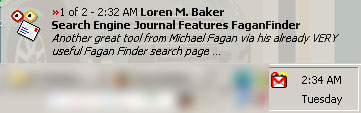
So, what does it exactly do? It resides in the system tray. Ask minimal settings at the moment (it does not even let you configure time duration between 2 checks) and shows a small alert window (very much like thunderbird with the much popular excerpts from the mail itself. Really cool stuff. Click on the tray icon and it opens up the mail in the browser. No needs to keep a browser window open all the time just to keep updated on the mails. You can also tell the client to check the mail manually if you do not want to wait till the next auto-update.
One issue with GMail Notifier. I have my default browser set to Opera which unfortunately is not supported by GMail yet. And the GMail Notifier insists on opening the mails in the default client. So, if I click on the icon to check my GMail it takes me to the GMail homepage where I get the routine browser not supported message. Maybe the developers of the application can add an option where the user can manually set the path to the choice of browser he would prefer the client to open to show the mails. Apart from that it works fine. Of course you cannot download mails or send mails using this utility unlike many other utilities out there but that are pretty much expected considering GMail’s only source of any revenues from this service is from the adsense ads that comes on the side of the displayed mails. I think we can forgive Google for not letting us ignore them… They are not as bad as the ones that come on Yahoo! Mail and Hotmail.
Sushubh Mittal is the Tech Columnist at Search Engine Journal and also the publisher of Software Journal.

