Loren Baker, Editor

New Gmail Shortcut : Delete Email Messages

March 26th, 2007 by Loren Baker, Editor | 5 Comments

Amit Agarwal has unearthed a new shortcut for Google’s Gmail which lets users instantly Trash a mail by hitting the “#” button (shift-3).

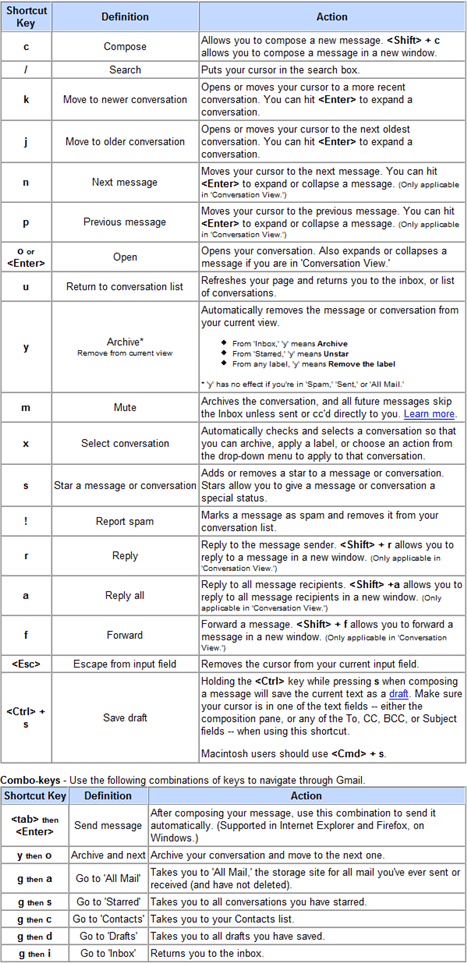
The user can also select multiple emails and do a mass delete by using this shortcut. For some reason, the GMail delete shortcut is not listed on the GMail Shortcuts page:
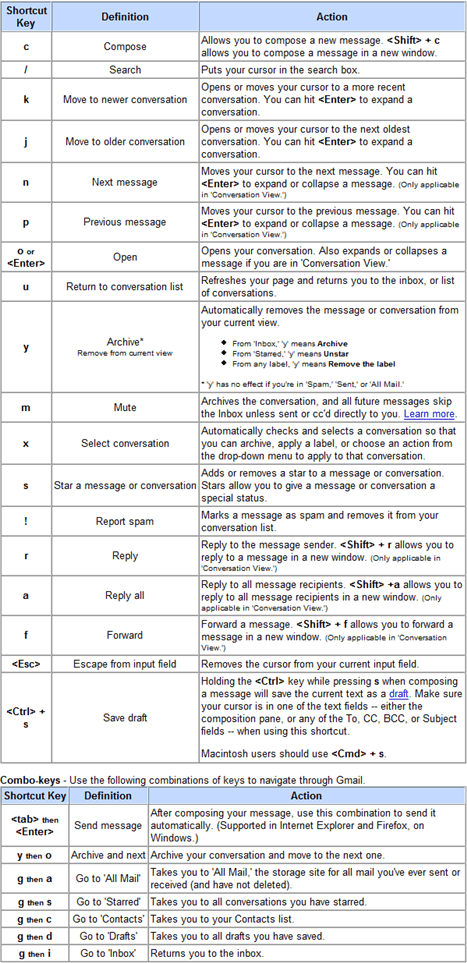
Google GMail Shortcuts


Comments

5 responses so far ↓

  • Bashar on Mar 26, 2007 at 12:16 pm

    Remember when Gmail launched, the delete button was only accessible through drop down menu. Firefox extension was made to add Delete button. Soon after Gmail added their own.

  • Vinay on Mar 28, 2007 at 9:13 am

    Nice ones !!!

  • pinger on Nov 26, 2007 at 6:50 am

    as always everybody forgot about opera and command..

  • pinger on Nov 26, 2007 at 6:51 am

    as always everybody forgot about opera ‘tab’ and ‘enter’ command..

  • alex guzman on Jul 25, 2008 at 8:49 pm

    When i click on the username box, i have a bunch of email addresses and usernames. How can i clear all my gmail addresses from the logon box?

Leave a Comment