


History Tree is a new FireFox addon that allows to effectively visualize your browsing history. It shows your browsing history as a tree of tabs, with thumbnail screenshots of the web-pages in every tab you have opened.
Its main and most useful features include:
- Visualize your browsing history in the form of a tree;
- Use the search options to quickly find and re-open any page you have visited;
- View history page screenshots in a grid layout, using the set screenshot size.
After installing the tool, go: Tools > History Tree and here you can choose to:
- Either view all open tabs;
- Or view all open pages;
- Or view only selected tab;
- Or view all closed tab.
Let’s see how it works on an example. Choose to view a history tree for the selected tab, click through the list of pages in a small window on top and watch the tool build the history tree for each one:
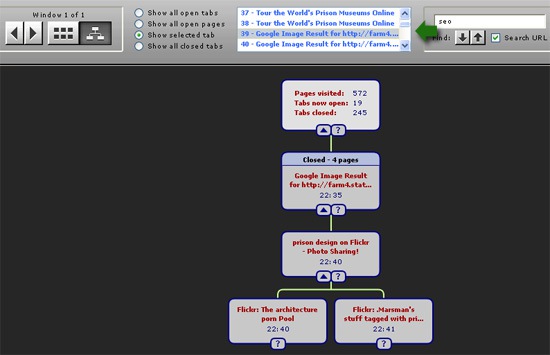
Each of the other boxes represents one of the pages you have visited. The page description and the time that the page was first accessed.
The box with a pink background represents the page that is currently open in Firefox. Boxes with blue background represent currently closed tabs. Boxes with a white background represent pages that can be accessed by clicking on the Firefox history ‘Back’ and ‘Forward’ buttons. Boxes with a grey background represent pages that cannot be accessed using the ‘Back’ and ‘Forward’ buttons. These pages are referred to below as ‘closed’ pages.
Clicking on a ? button shows a large screenshot of the associated history page.
You can also use search option to search through browsing history. Besides, you can view the history in grid mode.

