

One of the most important assessments in any SEO audit is determining what hypertext transfer protocol status codes (or HTTP Status Codes) exist on a website.
These codes can become complex, often becoming a hard puzzle that must be solved before completing other tasks.
For instance, if you put up a page that suddenly disappears with a 404 not found status code, you would check server logs for errors and assess what exactly happened to that page.
If you are working on an audit, other status codes can be a mystery, and further digging may be required.
These codes are segmented into different types:
- 1xx status codes are informational codes.
- 2xx codes are success codes.
- 3xx redirection codes are redirects.
- 4xx are any codes that fail to load on the client side or client error codes.
- 5xx are any codes that fail to load due to a server error.
1xx Informational Status Codes
These codes are informational in nature and usually have no real-world impact on SEO.
100 – Continue
Definition: In general, this protocol designates that the initial serving of a request was received and not yet otherwise rejected by the server.
- SEO Implications: None.
- Real World SEO Application: None.
101 – Switching Protocols
Definition: The originating server of the site understands, is willing, and able to fulfill the request of the client via the Upgrade header field. This is especially true when the application protocol on the same connection is being used.
- SEO Implications: None.
- Real World SEO Application: None.
102 – Processing
Definition: This is a response code between the server and the client that is used to inform the client side that the request to the server was accepted, although the server has not yet completed the request.
- SEO Implications: None.
- Real World SEO Application: None.
103 – Early Hints
Definition: This is a status code designed to improve webpage load performance by allowing the server to send preliminary information to the browser before the final response is ready. This early hint helps the browser start fetching and processing resources sooner, reducing overall page load time.
Unlike 2xx, 3xx, or 4xx codes you can’t see 103 code in your browser. You can make sure it is working by running this command in Linux Ubuntu. (You can install Ubuntu under Windows.)
curl -X HEAD -I https://example.comAnd it will return HTTP/2 103 with resources listed, followed by HTTP 200. It instructs the browser to load resources until the browser waits for the 200 OK status code.

However, it requires installation on the server.
- SEO Implications: Has a significant impact on CWV metrics.
- Real World SEO Application: Cloudflare.
2xx Client Success Status Codes
This status code tells you that a request to the server was successful. This is mostly only visible server-side. In the real world, visitors will never see this status code.
- SEO Implications: A page is loading perfectly fine, and no action should be taken unless there are other considerations (such as during the execution of a content audit, for example).
- Real-World SEO Application: If a page has a status code of 200 OK, you don’t really need to do much to it if this is the only thing you are looking at. There are other applications involved if you are doing a content audit, for example.
However, that is beyond the scope of this article, and you should already know whether or not you will need a content audit based on an initial examination of your site.
How To Find All 2xx Success Codes On A Website Via Screaming Frog
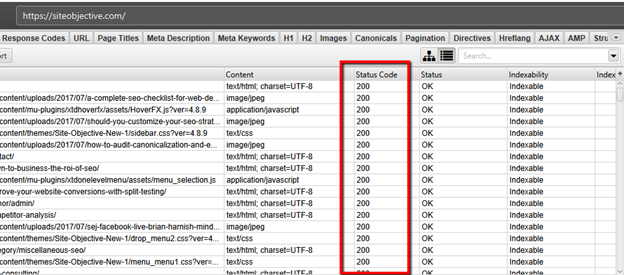
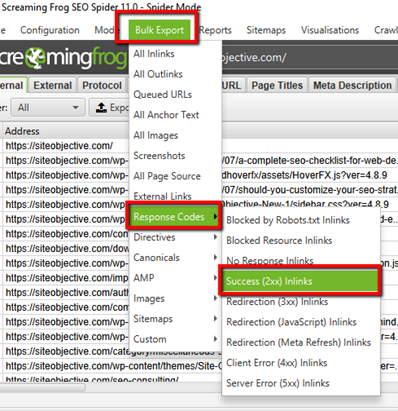
In Screaming Frog, you can find 2xx HTTP success codes in two ways: through the GUI and through the bulk export option.
Method 1: Through the GUI
- Crawl your site using the settings that you are comfortable with.
- All your site URLs will show up at the end of the crawl.
- Look for the Status Code column. Here, you will see all 200 OK, 2xx-based URLs.
Method 2: The Bulk Export Option
- Crawl your site using the settings that you are comfortable with.
- Click on Bulk Export.
- Click on Response Codes.
- Click on 2xx Success Inlinks.
201 – Created
This status code will tell you that the server request has been satisfied and that the end result was that one or multiple resources were created.
202 – Accepted
This status means that the server request was accepted for processing, but the processing has not yet been finished.
203 – Non-Authoritative Information
A transforming proxy modified a successful payload from the origin server’s 200 OK response.
204 – No Content
After fulfilling the request successfully, no more content can be sent in the response payload body.
205 – Reset Content
This is similar to the 204 response code, except the response requires the client to send the request to reset the document view.
206 – Partial Content
Transfers of one or more components of the selected page that correspond to satisfiable ranges found in the range header field of the request. The server successfully fulfilled the range request for said target resource.
207 – Multi-Status
In situations where multiple status codes may be the right thing, this multi-status response displays information regarding more than one resource in these situations.
3xx Redirection Status Codes
3xx Redirect codes mostly denote redirects from temporary to permanent. 3xx redirects are an important part of preserving SEO value.
That’s not their only use, however. They can explain to Google whether or not a page redirect is permanent, temporary, or otherwise.
In addition, the redirect can be used to denote pages of content that are no longer needed.
301 – Moved Permanently
These are permanent redirects. For any site migrations or other situations where you have to transfer SEO value (PageRank) from one URL to another on a permanent basis, these are the status codes for the job.
How Can 301 Redirects Impact SEO?
Google has said several things about the use of 301 redirects and their impact. John Mueller has cautioned about their use.
“So for example, when it comes to links, we will say well, it’s this link between this canonical URL and that canonical URL- and that’s how we treat that individual URL.
In that sense it’s not a matter of link equity loss across redirect chains, but more a matter of almost usability and crawlability. Like, how can you make it so that Google can find the final destination as quickly as possible? How can you make it so that users don’t have to jump through all of these different redirect chains. Because, especially on mobile, chain redirects, they cause things to be really slow.
If we have to do a DNS lookup between individual redirects, kind of moving between hosts, then on mobile that really slows things down. So that’s kind of what I would focus on there.
Not so much like is there any PageRank being dropped here. But really, how can I make it so that it’s really clear to Google and to users which URLs that I want to have indexed. And by doing that you’re automatically reducing the number of chain redirects.”
It is also important to note here that not all 301 redirects will pass 100% link equity. From Roger Montti’s reporting:
“A redirect from one page to an entirely different page will result in no PageRank being passed and will be considered a soft 404.”
John Mueller also mentioned previously:
“301-redirecting for 404s makes sense if you have 1:1 replacement URLs, otherwise we’ll probably see it as soft-404s and treat like a 404.”
The matching of the topic of the page in this instance is what’s important. “The 301 redirect will pass 100% PageRank only if the redirect was a redirect to a new page that closely matched the topic of the old page.”
302 – Found
This is also known as a temporary redirect, as opposed to a permanent redirect. It performs the same basic function as a 301 with small differences based on its temporary use case.
You may find 302s implemented during website migrations from one domain to another. Because Google doesn’t change URLs in SERPs with 302s, they allow you to check that everything functions correctly before committing to the change.
Afterward, the best practice is to swap the 302 redirects to 301 redirects to tell Google the change is permanent. This allows URL changes in the SERPs and passes page rank to new URLs.
300 – Multiple Choices
This redirect involves multiple documents with more than one version, each having its own identification. Information about these documents is provided in a way that allows the user to select the version they want.
303 – See Other
A URL, usually defined in the location header field, redirects the user agent to another resource. The intention behind this redirect is to provide an indirect response to said initial request.
304 – Not Modified
The true condition, which was evaluated false, would normally have resulted in a 200 OK response should it have been evaluated as true. It applies to GET or HEAD requests mostly.
305 – Use Proxy
This is now deprecated and has no SEO impact.
307 – Temporary Redirect
This is a temporary redirection status code that explains that the targeted page is temporarily residing on a different URL. It lets the user agent know that it must NOT make any changes to the method of request if an auto-redirect is done to that URL.
308 – Permanent Redirect
It’s mostly the same as a 301 permanent redirect.
4xx Client Error Status Codes
4xx client error status codes are those status codes that tell us that something is not loading – at all – and why.
While the error message is a subtle difference between each code, the end result is the same. These errors are worth fixing and should be one of the first things assessed as part of any website audit.
- Error 400 Bad Request.
- 403 Forbidden.
- 404 Not Found.
- 410 Permanently Gone.
These statuses are the most common requests an SEO will encounter – the 400, 403, and 404 errors. These errors simply mean that the resource is unavailable and unable to load.
Read more on SEJ: 404 vs 410
Whether the error is due to a temporary server outage or other reasons, it doesn’t matter. What matters is the end result of the bad request – your pages are not being served by the server.
How To Find 4xx Errors On A Website Via Screaming Frog
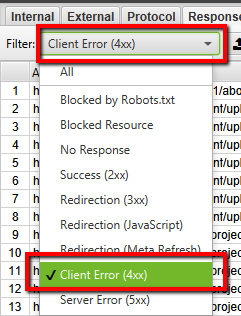
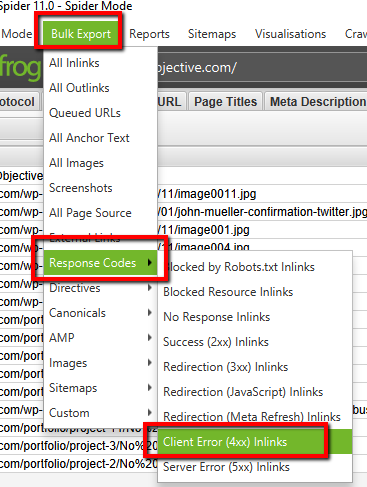
There are two ways to find 4xx errors plaguing a site in Screaming Frog: through the GUI and through bulk export.
Screaming Frog GUI Method
- Crawl your site using the settings that you are comfortable with.
- Click on the down arrow to the right.
- Click on response codes.
- Filter by Client Error (4xx).
 Screaming Frog Bulk Export Method
- Crawl your site using the settings you are familiar with.
- Click on Bulk Export.
- Click on Response Codes.
- Click on Client error (4xx) Inlinks.
These are other 4xx errors that you may come across:
- 401 – Unauthorized.
- 402 – Payment Required.
- 405 – Method Not Allowed.
- 406 – Not Acceptable.
- 407 – Proxy Authentication Required.
- 408 – Request Timeout.
- 409 – Conflict.
- 410 – Gone.
- 411 – Length Required.
- 412 – Precondition Failed.
- 413 – Payload Too Large.
- 414 – Request-URI Too Long.
- 415 – Unsupported Media Type.
- 416 – Requested Range Not Satisfiable.
- 417 – Expectation Failed.
- 418 – I’m a teapot.
- 421 – Misdirected Request.
- 422 – Unprocessable Entity.
- 423 – Locked.
- 424 – Failed Dependency.
- 426 – Upgrade Required.
- 428 – Precondition Required.
- 429 – Too Many Requests.
- 431 – Request Header Fields Too Large.
- 444 – Connection Closed Without Response.
- 451 – Unavailable For Legal Reasons.
- 499 – Client Closed Request.
5xx Server Error Status Codes
All these errors imply that something is wrong at the server level, preventing the full processing of the request.
The end result will be that the page does not load and will not be available to the client-side user agent viewing it.
This can be a big problem for SEO professionals because when Googlebot sees 5xx codes, it reduces the crawl rate to avoid overloading your server.
Read: Optimize Crawl Budget for SEO
How to Find 5xx Errors On A Website Via Screaming Frog
Again, using Screaming Frog, there are two methods you can use to get to the root of the problems caused by 5xx errors on a website: A GUI method, and a Bulk Export method.
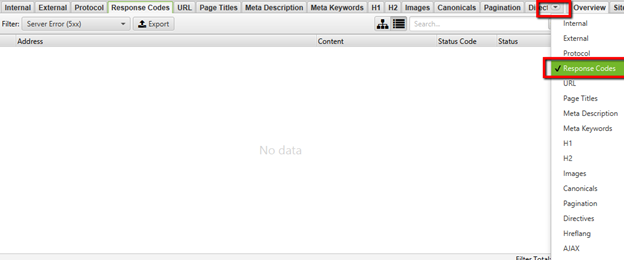
Screaming Frog GUI Method For Unearthing 5xx Errors
- Crawl your site using the settings that you are comfortable with.
- Click on the dropdown arrow on the far right.
- Click on response codes.
- Click on Filter > Server Error (5xx).
- Select Server Error (5xx).
- Click on Export.
-
Screenshots from Screaming Frog, June 2024
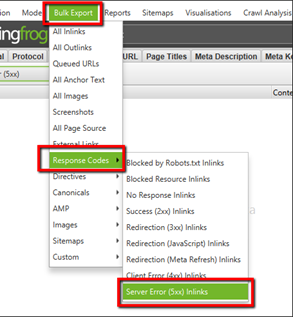
Screaming Frog Bulk Export Method For Unearthing 5xx Errors
- Crawl your site using the settings you are comfortable with.
- Click on Bulk Export.
- Click on Response Codes.
- Click on Server Error (5xx) Inlinks.
This will give you all of the 5xx errors present on your site.
There are other 5xx HTTP status codes that you may come across, including the following:
- 500 – Internal Server Error.
- 501 – Not Implemented.
- 502 – Bad Gateway.
- 503 – Service Unavailable.
- 504 – Gateway Timeout.
- 505 – HTTP Version Not Supported.
- 506 – Variant Also Negotiates.
- 507 – Insufficient Storage.
- 508 – Loop Detected.
- 510 – Not Extended.
- 511 – Network Authentication Required.
- 599 – Network Connect Timeout Error.
Making Sure That HTTP Status Codes Are Corrected On Your Site Is A Good First Step
When it comes to making a site that is 100% crawlable, one of the first priorities is making sure that all content pages you want the search engines to know about are 100% crawlable. This means making sure that all pages have a 200 OK status code.
Once that is complete, you will be able to move forward with more SEO audit improvements as you assess priorities and additional areas that need to be improved.
“A website’s work is never done” should be an SEO pro’s mantra. There is always something that can be improved on a website that will result in improved search engine rankings.
If someone says that their site is perfect and that they need no further changes, then I have a $1 million dollar bridge to sell you in Florida.
More resources:
- URL Redirects For SEO: A Technical Guide
- A Guide To 301 vs 302 Redirects For SEO
- Advanced Technical SEO: A Complete Guide
Featured Image: BestForBest/Shutterstock
