You might have noticed that I love tables in general and Excel in particular. Once you view any data in Excel, you notice things you wouldn’t have seen otherwise. The greatest benefits allowing to effectively process huge volumes of information are:
- Sorting function;
- Pivot tables;
- Find / Replace option, etc.
Thus today I am listing 6 ways to export your backlink information to Excel to further work with it:
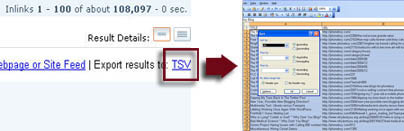
1. With Yahoo! SiteExplorer you can export results to TSV file and open it as Excel:
2. Some free internal analytics tools that track referrals offer an export feature.
- With Google Analytics you can save the report of referring domains (enhanced with plenty of browsing data per each linking domain: bounce rate, time spent on site; pages per visit, etc).
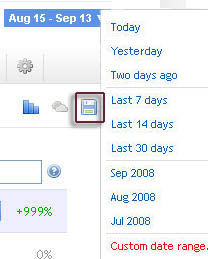
- GetClicky also allows to export referral information (by playing with”date range” drop-down, you can effectively set the quantity of the links you want to export):
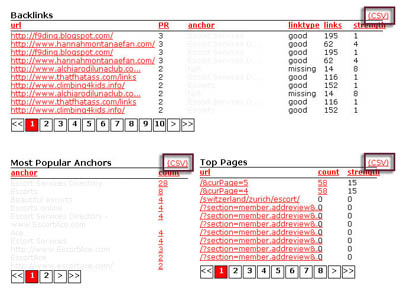
3. Link Diagnosis tool (based on Yahoo API) offers a very handy export feature for the wide range of available reports:
4. Majestic SEO (reviewed previously) that rely on its own search engine and index offers an export feature for all the reports:
- Linking domain overview;
- External anchor text report;
- Linking TLDs overview.
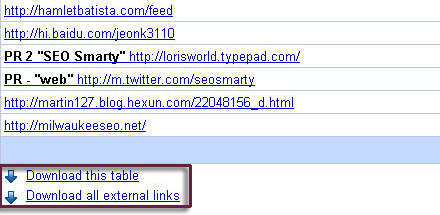
5. Google Webmaster Tools offer an export feature under “Pages with External Links” section:
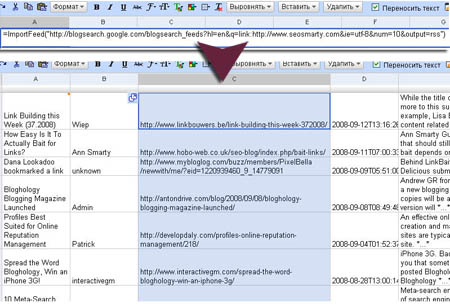
6. You can export any search results that provide RSS feed to Google Spreadsheets (and then save as Excel): just take the following steps (thanks Distilled for the tip):
- search Google BlogSearch [link:http://www.yoursite.com];
- copy the feed URL of the results (left column);
- create a new spreadsheet in Google Docs;
- paste the following in the very first cell:
=ImportFeed(“feed URL”)


You don’t look very happy in that picture. You look irritated – I am too, but it’s not the first thing a person who’s stumbling would like to be greeted with.
I think you’re a pretty, and (clearly), a very intelligent person. You deserve a better picture of yourself.
I hope this doesn’t offend. It’s meant in kindness.
I liked your tip#6 very much, because it would be very useful to track our blog subscribers information and to get the report instantly for analysing. Rest of tips don’t work for me because I know them already. Thanks!:D
I’ve been using the export feature on Link Diagnosis lately for website audits and absolutely love it!
I’ve never tried exporting from YSE, that could definitely come in handy.
Thanks!
Ann, the menus in Excel on the last image are in Russian. Are you Russian? (Just curious :) )
Lol, yep, I come from Ukraine actually…
thanx for the article
Bit late heading past here, but sphunn, and thanks for the link :)
Thanks for Article……
Good Article Writing
Software Testing Training
http://www.qacampus.com
Our Software Testing Partner
http://www.cresech.in
Thanks!
Thanks!
Thanks for Article……
Good Article Writing
Is there a way to export the data to Excel from Google WebMaster Tools – and perhaps creat charts displaying keywords performance in time?
Or am I just asking too much?! :)
Ivan
@Ivan, actually Google Webmaster Tools do have the option to download each table listing external links (bottom of the page). But no charts, unfortunately.
ok what sucks about #6 and maybe u have a solution, but theres a limit of 20 rows when u do rss feeds through google docs. Is there a workaround for that? I want like 1500 rows+ to populate! not 20 only LOL..
@flyinghigh, I am sure the OutWit addon may be a good way out for you: http://www.marketing2oh.com/scrape-serps-for-seo-analysis/
ann you very pretty. me want ukrain wife so may you can halp me?