

Optimized image alt text (also referred to as alternative text), image title text, and image file names are all part of good image optimization.
But what is the difference between the image alt text and title?
Do you keep them the same? Do you make them all different?
In this post, you’ll learn about the differences between the image alt attribute, image title text, and image file name, and find recommendations on how to better optimize them for search.
Alt Text vs. Alt Tag: Which Is Correct?
When you think of image alt text, the term that may immediately come to mind is “alt tag.”
Well, the alt tag is really a misnomer and doesn’t exist at all. Alt text, or alternative text, is the alternate text attribute of the image tag.
What is Image Alt Text?
Alt text, or alternative text, is used to display text that describes an image to “alternative” sources.
Primarily, its goal is to make images more accessible to the blind who use screen readers, to make the web much more accessible per W3C accessibility guidelines.
It lets you specify an image description that is fed through an audio-based prompter, which tells people with low or no vision what is currently on the page.
The secondary goal for alt text is to describe the image for people who have decided, for whatever reason, to turn off images in their web browser application.
In addition, it satisfies those user agents who are also unable to “see” the images.
As a rule, alternative text should include targeted keyword optimization in a context that describes what the image is about. If no alternative text exists for the image, it will be displayed as an empty image.
Because Google cannot exactly crawl images in-depth, Google uses alternative text as a focus when they are trying to understand what the image is about.
It is important to note the W3C’s Accessibility Guidelines for Alternative Text:
When using the img element, specify a short text alternative with the alt attribute. Note. The value of this attribute is referred to as “alt text.”
When an image contains words that are important to understanding the content, the alt text should include those words. This will allow the alt text to play the same function on the page as the image. Note that it does not necessarily describe the visual characteristics of the image itself but must convey the same meaning as the image.
What is Image Title Text?
Image title text is an attribute used to provide additional information about the image. That being said, the image title is not used for search ranking, so it is not quite as important to optimize for.
But if you’re an obsessive SEO completionist and want to optimize everything for the best in W3C optimization, by all means, do include both the alt text and title text for your image.
You don’t have to do anything super insane for title text optimization, however.
Just use a quick, short, catchy title that complements what you optimized for the alt text, and you will be good to go.
User Intent & User Experience Should Be the Main Focus of Your Optimizations
Not much has changed in the past 10 years when it comes to optimizing for alt text and title attributes.
While optimizing both of these attributes, you should be focusing on not only keyword targeting, but also user intent.
Don’t keyword stuff, and of course, do switch out your keywords when appropriate.
When you optimize the alt text and titles in images, it is important to make sure that you focus on the following:
- Will this alt text and title text help my users?
- Will this alt text and title text satisfy user intent?
- Will this improve the user experience?
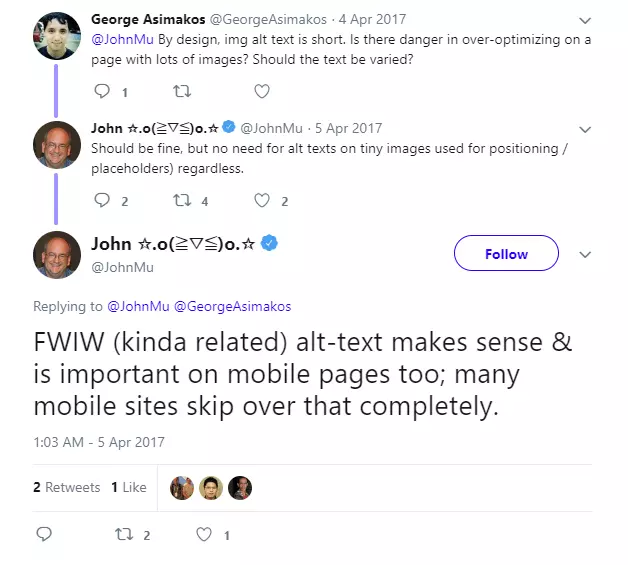
John Mueller from Google has also confirmed in a 2017 tweet that images that are used for design/positioning purposes do not have to have alt text, so blank alt text like this (alt=””) is fine.
More Clarification on How Google Handles Alt Text
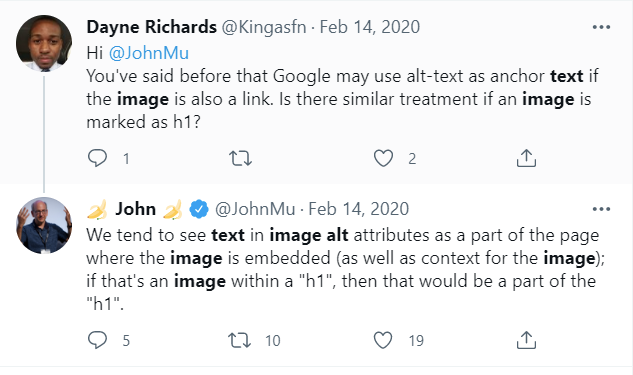
John has mentioned before that Google could use alt text as anchor text if the image is also a link.
In addition, John has also stated that Google may see text in image alt attributes as being part of the page where the image is embedded.
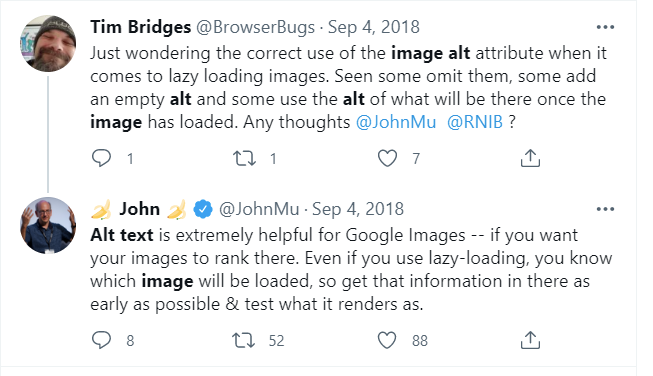
It’s worth noting as well that Mueller has explained how helpful alt text is for Google images, especially if you want them to rank there.
He also recommends if lazy-loading is enabled, to make sure the image has that alt text as early as possible.
Depending on your lazy-loading implementation, it may render differently, so be sure to test your configuration and make sure Google can crawl and index.
Google’s Image Recommendations
Here are Google’s suggestions for improving the user experience of alt text, direct from their Image Publishing Guidelines:
Create a Great User Experience
To boost your content’s visibility in Google Images, focus on the user by providing a great user experience: make pages primarily for users, not for search engines. Here are some tips:
- Provide good context: Make sure that your visual content is relevant to the topic of the page. We suggest that you display images only where they add original value to the page. We particularly discourage pages where neither the images or the text are original content.
- Optimize placement: Whenever possible, place images near relevant text. When it makes sense, consider placing the most important image near the top of the page.
- Don’t embed important text inside images: Avoid embedding text in images, especially important text elements like page headings and menu items, because not all users can access them (and page translation tools won’t work on images). To ensure maximum accessibility of your content, keep text in HTML, provide alt text for images.
- Create informative and high quality sites: Good content on your webpage is just as important as visual content for Google Images – it provides context and makes the result more actionable. Page content may be used to generate a text snippet for the image, and Google considers the page content quality when ranking images.
- Create device-friendly sites: Users search on Google Images more from mobile than on desktop. For this reason, it is important that you design your site for all device types and sizes. Use the mobile friendly testing tool to test how well your pages work on mobile devices, and get feedback on what needs to be fixed.
- Create good URL structure for your images: Google uses the URL path as well as the file name to help it understand your images. Consider organizing your image content so that URLs are constructed logically.
Optimizing File Names

Google uses the file names of images to gauge exactly what the subject of an image is.
By optimizing file names in accordance with optimizations of alt text and title text, it is possible to provide an increased understanding that will help your images rank in image search.
For the most part, you don’t need long file names with long descriptive text.
The keyword phrase that mostly describes the image is fine.
Just make sure that your file name text also accurately reflects what the image is about.
Yes! Optimize Your Images. But Don’t Overdo It
While it is important to optimize images properly, it is not necessary to spend so much time on them that you lose sight of the bigger picture.
Make sure that you spend only what is necessary to get your images to rank and supplement your online marketing efforts.
But don’t lose sight of the ultimate goal by doing so — to improve the user’s experience.
More Image Optimization Resources:
- Is Google Image SEO Relevant Again? What New Data Tells Us
- 14 Important Image SEO Tips You Need to Know
- Google Publishes Image Search SEO Tips
Image Credits
Image 1: metamorworks/Shutterstock.com
Image 2: Piscine26/Shutterstock.com
Image 3: GaudiLab/Shutterstock.com
All screenshots taken by author
