WordPress plugins to Automatically Watermark Your Images

It’s been a while since I published my post on why and how you can watermark the images you publish on the web (this helps both for copyright protection and brand awareness).

One of my sites relies on images heavily and I decided to automate watermarking. So in this post I am sharing two WordPress plugins that automatically watermark the images you upload and publish.

Watermark Reloaded

Watermark Reloaded is going to be my favorite plugin when it comes to watermarking images in WordPress. It has plenty of options allowing to customize the watermark text and position:

  • Specify the type of an image to apply the watermark to (thumbnail, medium, large, full size);
  • Specify the watermark alignment and offset;
  • Specify the watermark text;
  • Specify the watermark text font size and color:
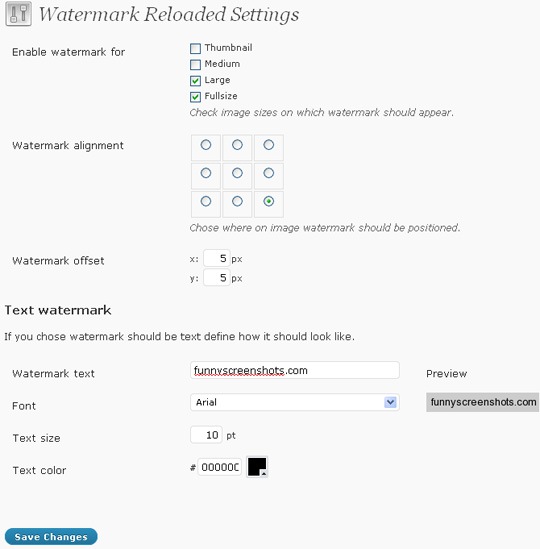
Watermark Reloaded

After that, the watermarked image is going to look like this:

Watermark reloaded

Image Optimizer

While the above one is great if you want to watermark ALL images of the same type, this one can be used if you need to watermark selected / random images.

Image Optimizer: While you are not going to see all the listed features after you install this one, the watermarking ability is still there and working.

Just have the plugin installed and activated. Then go to “Settings” and provide the text you want to appear as a watermark:

Image Optimizer

After that (in the image uploading window) you will need to specify if you want the image and the thumbnail to be watermarked. The result looks like this:

Image Optimizer

Written By:
PG

| My Blog Guest | @seosmarty

Ann Smarty is the blogger and marketer specializing in SEO consulting and guest blogging. Ann's expertise in blogging and tools serve as a base for her writing, tutorials and her guest blogging project, MyBlogGuest.com.

More Posts By

Comments

  1. Kaye says:

    ok thanks for sharing ! :) I need that :)

  2. Quentin Fadt says:

    Thanks you for the information. That could be fine if is include in the coming WP 3.0. Too many pictures are stolen, but for professional blog, take pictures is very expensive.

  3. My boss at G3 Creative Scotland says that this is long overdue.

  4. I am looking for this one. Thanks for sharing this. Here after I will use this plugins for all of my images. I have lot of wallpapers sites so I will use this plugins.

  5. PsdDude says:

    A site took one of my tutorials and posted as if it was its own….not only the images the hole content and this site is on 84 000 on alexa and i am on 400 000 ….cool!
    So it is a good idea with the watermark!

  6. I am looking for this one. Thanks for sharing this. Here after I will use this plugins for all of my images. I have lot of wallpapers sites so I will use this plugins.

  7. PsdDude says:

    A site took one of my tutorials and posted as if it was its own….not only the images the hole content and this site is on 84 000 on alexa and i am on 400 000 ….cool!
    So it is a good idea with the watermark!

  8. TechGyo says:

    I tried this plugin but Watermark reloaded has conflict with other plugins and finally it will crash !! is there any way to add watermark to allthe existing images ?