


SEJ readers keep asking me what the recommended size of a web page is. Really, it is hard to find any definitive answer online except for “the less, the better”. Let me try to share my opinion on the topic:
Myths and Realities
Myth: With today’s fast Internet connections and “smart” search engine bots, you no more have to care about the page size.
Reality: Huge pages (over 100 K – which is the standard established long ago) can account for a lot of user challenges and decrease the bot’s crawl rate and depth: note that the bot works on a budget – if it spends too much time crawling your huge images or PDFs, there will be no time left to visit your other pages.
Myth: Page content should be no more than 1000 words;
Reality: There are no (known) limits to text content. I used to see very huge pages (in terms of word count) and Google seemed to index all of them. The only actionable advice here is to make text easy to read for your readers, crawls will handle as much text as you need.
Myth: Google can handle no more than 100 links per page;
Reality: It is still recommended to stick to that standard (in order to ensure search engines will follow all of them), however technically Google bots can handle and treat well many more links than that (and it is official).
Tools:
- There are a number of online tools to check page size and largest page elements;
- Xenu is the best desktop element to identify the size of each page and image throughout the site.
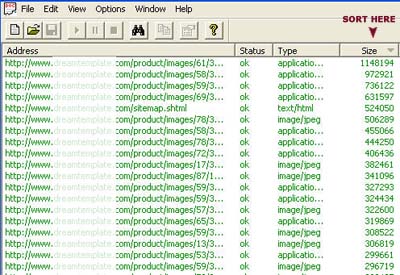
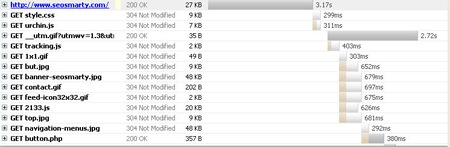
- Firebug is the best FireFox addon to test your site loading time:
Access Net tab: Each file there has a bar which shows you when the file started and stopped loading relative to all the other files.
The bars will teach you things you didn’t even know. For instance, did you know that JavaScript files load one at time, never in parallel. This will help you tune the order of files in page so that the user spends less time waiting for things to show up.
How to optimize:
- Make sure all the page elements (images, scripts, etc) are optimized to be of minimum size (with no effect on quality). It is a good rule of thumb to keep image size no more than 100 KB;
- (Especially if the page is huge) Use SOC (Source Ordered Content) to ensure that text content is the first to load: i.e. text content is on top of the source code (this will ensure that both bots and people have something to read waiting for the all the page elements to load).
- If the source code includes a lot of scripts or CSS, they can be moved into linked files.
Further reading:

