Search Engine Tools and Downloads

How to Remove Redirects from Google SERPs

Ann Smarty

08/25/09

18 Comments

Let me first explain why you need the tools described in this post. Google uses redirects to link to each page from its results page. This way it tracks your clicks in and out, and at the same time this way it makes it very difficult to copy the destination URL from SERPs.

A non-SEO user may never notice that but to me that sometimes turns into the real headache. Say, I am writing a post and want to find earlier published articles on the topic to refer to. So I just go to Google, type [site:domain.com keyword] and get the list of related articles. Now, I remember what each post is about in tiniest detail (because that was me who wrote them) and all I need is the URL but to get it I need to click through.
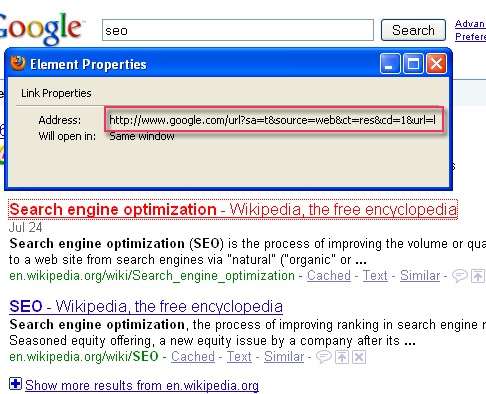
Google redirect

Luckily, there are a number of Greasemonkey scripts that remove redirects from Google SERPs for privacy and usability purposes:

Google Anonymizer (or a similar one: Disable Google Search Result Redirect) "transforms you into a ghost for google" by anonymizing search requests to google and removes tracking systems on the results page.
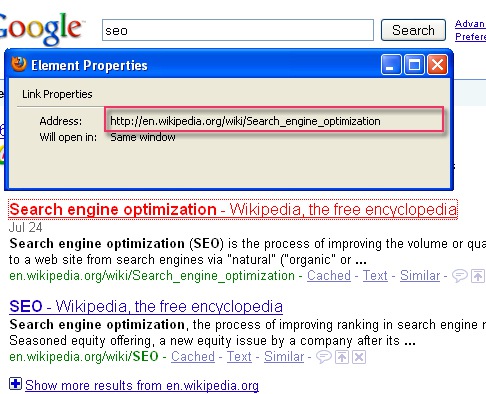
Google anonymizer

"Linkify Google Search Results" – this script turns the green URL below each Google search result into a clickable link (when hovered over). What makes it a great tool is that it "linkifies" every directory in the file path. For example, in the example below, you can quickly access

www.seomoz.org as well as www.seomoz.org/blog as well as www.seomoz.org/blog/the-web-developers-seo-cheat-sheet destination:

Google redirect

"Obviously Scrub Google Redirect Links" – this one removes the Google redirect in search result links, and adds an extra plain link so you can be sure it’s done it:
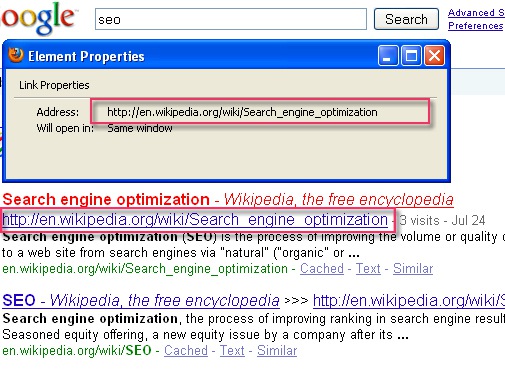
Google redirect

18 Comments

  • Sankar says:

    Nice tips Ann.

    Thanks for letting me know about the unknown techniques. This is a usual problem most of the people face always. Got a solution now.

    Thanks
    Sankar

  • Sankar says:

    Small suggestion Ann.

    I am unable to copy the post title ( to tweet it ) in firefox. At least there is no tweet button in your post to tweet a particular post. It would be better if could fix those two issues. So that posts will become more user friendly.

    Thanks
    Sankar

  • David says:

    Ann,

    Always a good article, but I agree that new “cufon cufon-canvas” article titles are a little painful, and has this affected your seo in any way?

    A “tweetme” button always is nice :)

  • Lohith says:

    I have literally find difficult to tweet…… a tweetme button is needed

  • Nadia says:

    Thanks Ann- would this affect analytics at all? i.e. If I use the Google Anonymizer, would Google Analytics still register this as a visit from Google or not? I’m guessing GA wouldn’t be affected, but just checking…

    Also, do any of these work with Yahoo? Those redirects always drive me bananas, as well :)

  • Jori says:

    Hey Ann, any insight on removing “https:” URLs from Google? Just finished with a massive clean up of a dynamic site nightmare, and all that’s left is secure page URLs, that actually, no longer exist.

    Any insight?

    P.S. Great post.

  • Google Chrome uses can just use the mouse right-click and select “Copy link address” (to the clipboard) function.

    No scripts required.

    • Joe Blough says:

      At some point during the month of august 2009, when I right-click on a google search result hot-link and select “copy link location”, the link I get is not the URL (as printed on the search page) but instead it’s some long URL that points back to google (a re-direction through google). This is for ALL search results (not just sponsored hits). Here is an example (a search for the word “goodbye” – no quotes):

      http://www.google.ca/url?sa=t&source=web&ct=res&cd=3&url=http%3A%2F%2F
      users.elite.net%2Frunner%2Fjennifers%2Fgoodbye.htm&ei=aAWlSseUDJSx8Qbg
      zuHwDw&rct=j&q=goodbye&usg=AFQjCNER-SNGIAAFAOk5RnHlv2M51e7ytQ

      This started to happen in mid august. Anyone know why?

      • Ann Smarty says:

        In FireFox you mean? Or in Chrome?

        If FireFox is meant, see the scripts above to eliminate the problem.

        Chrome doesn’t seem to have the problem at all

    • SEO-Doctor says:

      I’m using IE8 and you can do the same. I don’t see what the fuss is about or why you would really bother.

  • Keri Morgret says:

    I use the Copy Link Text extension for Firefox. It copies the anchor text onto the clipboard instead of the underlying URL.

  • xomero says:

    this is an anti-seo recomendation post. What will happen if the half of the visitors to a site have one of this plugins on, google will not count their hits/vists, and our site will “transform into a ghost TO google”

  • Please finish an enormous clean nightmare of dynamic website upwards, the left like that is in the page of safe URL, in fact, no longer exist.

  • surely it is better to have both url listed in SERPs?…

  • Neotech-r3 says:

    What is the differences between
    http://google.com/url?q=the url of that website and the google redirect in your article?

    thanks.

  • DiagonalArg says:

    Ann – notice this discussion of Google Anonymizer:

    http://userscripts.org/topics/34754

    It doesn’t do what you think it does. You also have to turn off javascript.

  • Charles says:

    I didn’t get most of this to work (in Firefox 3.6), but one option that does work for me is to install IE View as a Firefox add-on. That is a useful add-on in any case since it allows you to see Firefox pages in IE if -god forbid – they don’t render well in Firefox. You can use this option also to see the real URL (in IE) rather than the Google redirect.

Leave a Reply