


It’s been quite some time since we had a new broken link checker reviewed here. At last I’ve come across something simple, fresh and useful!
Pinger is a great FireFox addon that checks all (or selected) links on a page and does it very fast!
To use it, you just need to:
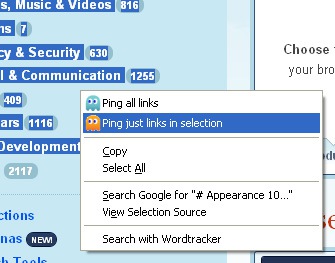
- Right-click anywhere on the page and select “Ping all links”;
- Select any links on page and click either “Ping all links” or “”:
After running through the page links, the tool returns a summarized report:
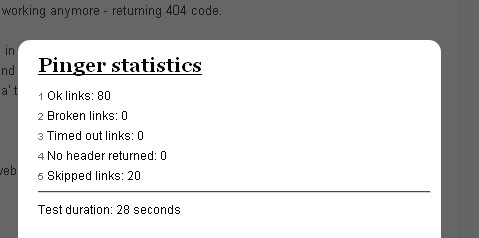
The above statuses stand for the following:
- Link returned HTTP code between 200 and 300, meaning it’s ok
- Returned code was either 404, or some of other ‘can’t get here’
- Every link has 45 seconds to open and return header. “This one didn’t make it, so you better check it yourself”
- Link didn’t return any HTTP header. Either is server down, or it’s redirecting to protocol other than http / https.
The tool also visualizes the link status nicely by highlighting working links in green, broken links in red, skipped links in grey:
Other broken link checkers we have tried previously:
- 7 Things You Can Do With Xenu Link Sleuth: this post is full of screenshots that visualize how you can use Xenu in many more ways than just checking for broken links;
- 3 Broken Link Checkers Reviewed and Compared: the post compares Xenu, LinkAider and W3C Link Checker head-to-head.
- Tools to Explore and Validate Page Outbound Links: how to both check and analyze page outbound links;
- LinkExaminer: SEO Friendly Link Scanning Utility: a neat tool that also has quite a few SEO-friendly features.
Category
Tools

