

A successful search engine optimization strategy includes competitive analysis. The tools available today offer incredible value at generally reasonable fees.
They help users accomplish more in less time, and many may find that the tools are so useful that they essentially end up paying for themselves. Here are 10 popular SEO competitive analysis tools, their pricing, and how you can use them to bolster the success of your SEO strategy.
[Agency SEO Tools] Download the free guide →
1. Semrush
- Pricing: Plans start at $119.95 per month.
Semrush not only offers good data for search results analysis, but everything functions the way you expect it to – it’s that easy to use.
There is no need to read a manual to use Semrush’s SERP analysis tool.
Every link, button, and heading has a tooltip that explains what it is so that everything makes sense.
Semrush Tooltip Explains SERP Analysis Tool Data
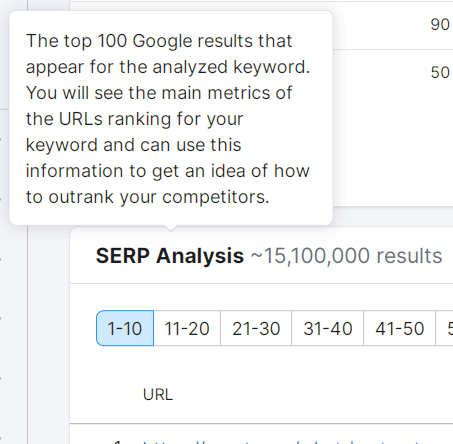
Semrush Tooltip Explains Jargon
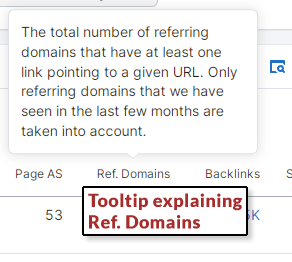
Semrush’s Authority Score is assigned to every URL listed in the SERP Analysis.
Like any third-party metric, the Authority Score is just a score based on factors like backlinks, traffic, and referring domains.
The metric makes it easy to make a quick judgment about a webpage without having to spend hours researching all of the factors for each webpage.
The research is already done; that’s what Semrush’s Authority Score is about.
That’s just one part of the Semrush SERP analysis, but it’s the part that is directly tied to competitor research.
Semrush is useful for researching competitor backlinks. The ease of use makes the workflow of researching links a pleasure.
There’s no need to read a manual. Everything is self-explanatory.
Starting an analysis consists of entering a domain name or an entire URL.
The resulting page shows various metrics that help you see the competition at a glance, literally.
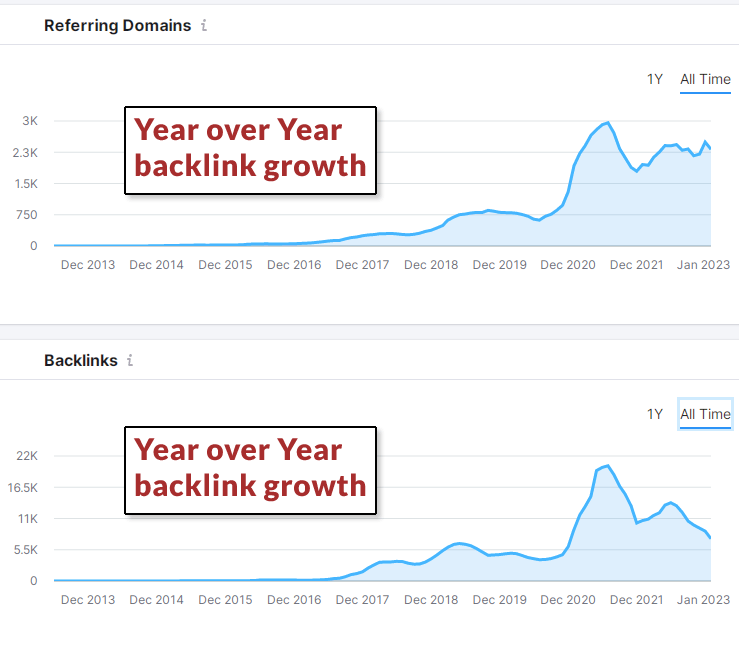
There’s a graph that shows the growth of referring domains and also backlinks by year, which provides a quick idea of how aggressively they’re building links, organized by time.
Beneath that graph, there’s another visual representation of the backlinks organized by the categories of referring domains.
The categories are the general niche areas that the backlinks belong to.
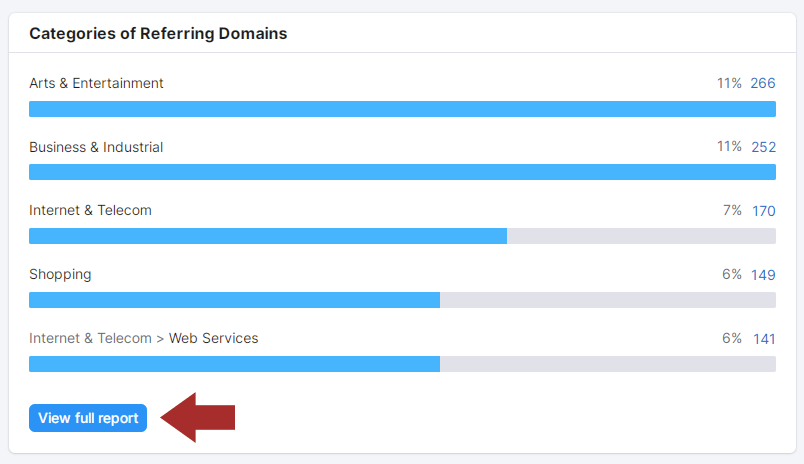
When you click through a category, the tool presents a filter where you can add a word, a phrase, or a TLD, which means Top Level Domain (.net or .org), to find all the relevant links.
There’s also a drop-down menu for selecting “zones by TLD,” but I found that typing in the TLD works better.
Or you can get granular and click on the View Full Report button to see all of the categories in granular detail.
It’s easy to recommend Semrush because it truly is designed for researching competitors and for link building.
The tools for competitive research are easy to use and give a visual snapshot of their activities and offer a useful user interface for drilling down by category.
2. Ahrefs SERP Checker (Free And Paid)
- Pricing: Free checker tool, then starts at $99 per month.
Ahrefs has a free SERP checker that shows the same SERP data as the paid version, only for just the first few positions.
The paid version has more data. But if you’re on a budget, the free version is a useful start.
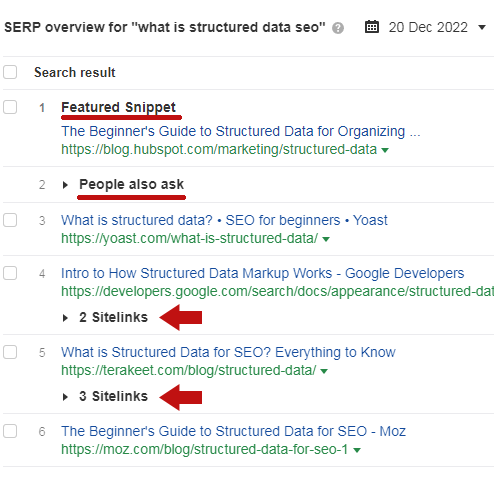
Below is a screenshot of the SERP overview that lists featured snippets, people also ask, and the sitelinks enhancements.
This extra data gives a good overview of what the SERPs look like, plus page and domain rating metrics.
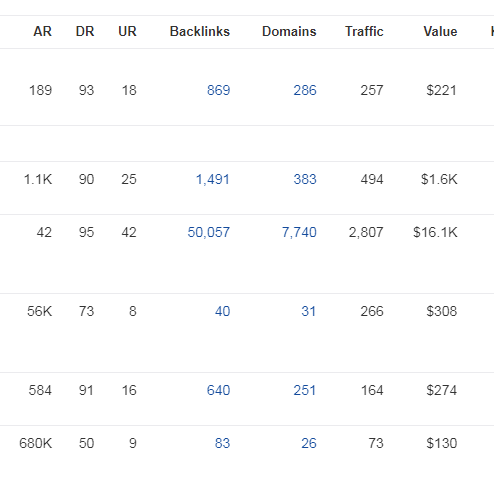
Here is a screenshot showing more data from the SERP analysis tool.
All of the column headings show a tooltip that explains what each column means.
Ahrefs is a solid choice for search results competitor analysis.
3. Serpstat
- Pricing: Free version, then starts at $69 per month.
Serpstat is an affordably priced SEO platform that offers SERP analysis tools. It’s possible to sign up for free to test it out.
Serpstat is focused on analyzing the search results and is useful for Backlinks Analysis and Competitor Analysis.
4. SpyFu
- Pricing: Free analysis tool, then starts at $39 per month (or $16 per month on an annual plan).
SpyFu is a very reasonably priced service that is dedicated specifically to competitive research and offers many useful features.
The benefit of the tool is that it generates all the data necessary for competitive research.
SpyFu basically takes the “research” part out of competitive research tasks and provides the data.
The SERP Analysis tool, which can be used for free, offers unique information, such as indicators that signal a website rises or drops in the search results.
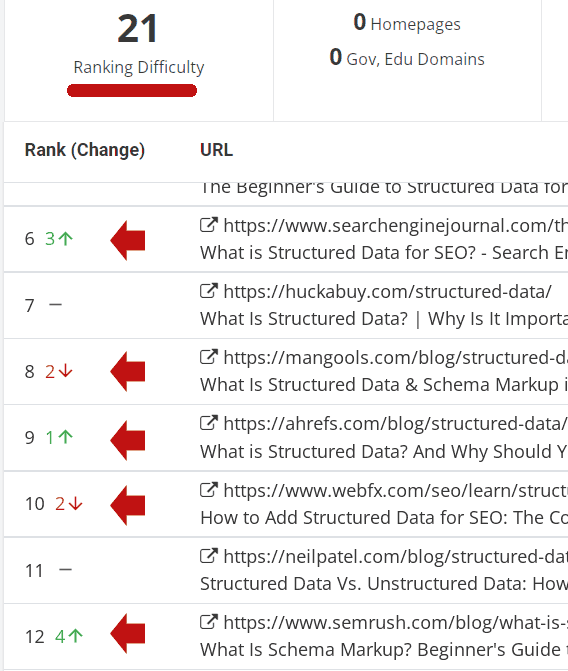
Another interesting feature is that it offers a Ranking Difficulty score, data on whether .gov or .edu sites are ranking, and the number of homepages that are ranking in the top 100 positions.
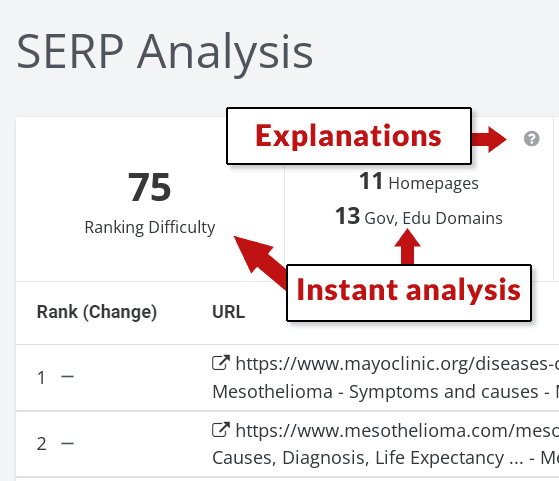
SpyFu Backlinks Report
Another unique feature is how SpyFu identifies what it determines are the strongest webpages to get a link from.
Just enter a keyword phrase into the search box, and SpyFu searches the backlinks of the top 5,000 ranked sites, including for similar keyword phrases, and identifies all the backlinking domains that the ranked sites have in common.
Even better, SpyFu allows users to filter those webpages by backlink types.
The backlink types one can filter for are .gov/.edu/, sites with affiliate links, blogs, news sites, forums, and directories.
Filtering for forums reveals all the strongest forum backlinks, filtering for .edu domains shows the best .edu sites to get a link from, and so on.
Another cool feature is called Backlink Kombat.
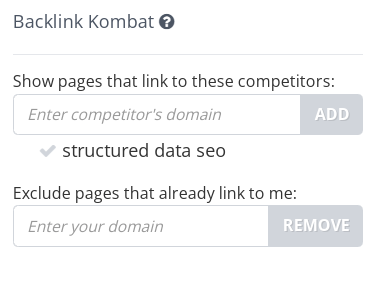
This tool allows you to enter two competitor domains and then exclude your own domain. It will then show you all the links the competitors have in common that your site does not.
I like using tools in creative ways to get even more or better data.
What I would suggest doing with the SpyFu Backlink Kombat tool is comparing sites that aren’t your direct competitors. This can help you discover opportunities you might not otherwise.
So if your topic is plumbers in City X, compare roofers in City X.
Competitor backlink research with SpyFu is incredibly easy. I would like the flexibility to filter by keywords (like Favorite Sites) or by TLD (to find .org or .us domains).
A limited amount of this data is free, and the complete data set is available to paid subscribers.
SpyFu is an interesting tool because it takes the extra step of presenting the data while minimizing research.
It’s easy to use, specific to competitor research, and reasonably priced.
5. Sandboxweb.io SERP Analysis Tool
- Pricing: Free version, then pricing starts at $19 per month.
Sandboxweb.io offers a SERP analysis tool that provides data on top-ranked competitors.
This tool shows the schema types, Core Web Vitals data, and word counts.
You can click on each competitor in the SERP to research further.
The free version of this tool offers a lot of information. But it’s limited to 10 keywords per month.
The data is somewhat limited, but it does offer a quick analysis.
6. Screaming Frog
- Pricing: Free version and a paid version at $209 per year.
Screaming Frog has a SERP analysis function. It’s not easy to use, but it’s not excessively difficult.
I’d like to see Screaming Frog make it easier to run this kind of analysis without getting technical.
If you take the time to figure it out, Screaming Frog can scrape the SERPs and provide analysis.
It’s also useful for analyzing competitors one at a time to get a sense of what sites they link to, how much content they have, interlinking patterns, headings used across the site, and many other competitor data points.
7. Inlinks
- Pricing: Free version, then pricing starts at $39 per month.
Inlinks is a content optimization-focused tool that can extract relevant data points from search results and competitors.
Inlinks features a SERP analysis function that offers multiple data points about the sites in the search results, such as semantically related topics and user intent data.
The user intent data and topic suggestion features are quite unique.
There is also a Topic Analysis feature that provides competitors’ related topics and other data that is useful for creating content.
Other SERP Analysis tools look at the top 100 through the top 5,000 for their analyses.
But in my opinion, what really matters most are the top 10 search results because not every site in the top 100 or even the top 10 is a competitor.
So, I really appreciate that Inlinks’ SERP analysis tool focuses on the top 10.
The Inlinks SERP analysis tool offers data on the following:
- Topic density.
- Internal and external link counts.
- Readability scores.
- List of H2 headings.
I asked one of the founders, Dixon Jones, to explain what Inlinks does regarding competitor analysis.
Dixon answered:
“Inlinks analyzes ten competing pages for any Keyword. It aggregates the combined number of times entities are used in the SERP and uses this to build a Knowledge Graph of entities related to a given search.
This is then compared to the entities in the content on YOUR competing page, highlighting material gaps in your content.
At a site level, Inlinks can build a knowledge graph of any site, but does not currently have many tools to compare whole sites.
We look at the verbs used to describe entities (in competing pages for a SERP) and cluster them into verb based intent.
This helps content publishers answer a genuine user query, rather than use words in the wrong context.”
Inlinks offers more tools; it’s more than just competitor analysis.
There is a free, pro, and enterprise level.
8. MarketMuse
- Pricing: Free version and paid plans starting at $600 per month.
MarketMuse is an AI-based content analysis tool that functions within the entire content creation workflow, from research to content brief and more.
What I appreciate about MarketMuse is that it looks at the top-ranked pages and offers a keyword overview of the topics.
A key competitor analysis function in MarketMuse is called Compete.
The Compete tool analyzes the competition and suggests what to write about and ways to do better than the competitors, such as covering overlooked related topics.
Compete’s unique selling proposition, in my opinion, is that it is focused on helping users create content that is better than the competition.
My understanding of MarketMuse is that it’s not just focused on helping users beat their competition.
The tool streamlines the entire content creation workflow, with competitor research being one part of the process.
There is a learning curve to MarketMuse.
9. SimilarWeb
- Pricing: Free version and paid plans starting at $167 per month for the starter package.
SimilarWeb is a unique competitor analysis tool.
It’s focused less on SEO and more on providing a clear image of the differences between the two websites.
There are multiple data points related to traffic, keywords, traffic share by country, and even a comparison of audience demographics.
SimilarWeb offers a free and paid version.
The free version offers a generous amount of data that helps users compare competitors.
10. LinkResearchTools
- Pricing: Starts at $599 per month. One-week trial for $17.
LinkResearchTools is an enterprise-class link research tool.
It’s the most sophisticated and comprehensive link-building tool I’ve ever used.
One of the qualities I like most is that it feels like it has a comprehensive inventory of crawled links.
The tool makes it easy to find links with normal searching, like adding a TLD, but you can also find links multiple sites have in common.
Most of the functionality is geared toward businesses that want to disavow backlinks, which is useless for link builders.
I’d like to see a tool that does away with all of the link-disavowing-related features and just focuses on researching competitor backlinks.
One can subscribe to most of the other lower-priced tools and use their combined competitor backlink research features and still pay less than LinkResearchTools.
For most people, that’s more than enough.
But the data in LinkResearchTools is, in my experience, possibly the most comprehensive backlink data available.
Backlink Analysis
Backlink analysis is more than just poaching keywords from competitors.
It’s a way to understand what the barrier to entry might be, which means how easy or difficult it might be to compete.
Competitor links can be a starting point for building better links as well.
Sometimes a group of links might stand out, giving you an idea of a direction to take.
Doing solid link building requires a flexible backlink analysis tool.
Competitor Research
There are many useful SEO tools available today. They don’t do the SEO for you, but they make it easier to accomplish better results faster.
The tools also provide time-saving access to a huge amount of data that would ordinarily take days to compile.
Saving time, being more productive, and having the data to make informed decisions is the hallmark of all of these SEO tools.
Featured Image: Paulo Bobita/Search Engine Journal
