
Google is updating its image search results pages with icons indicating what type of content the images lead to.
If an image surfaced in search results comes from a product page, a recipe, or a video, Google will highlight it with a special icon.
Danny Sullivan, Google’s Search Liaison, shared the following example on Twitter:
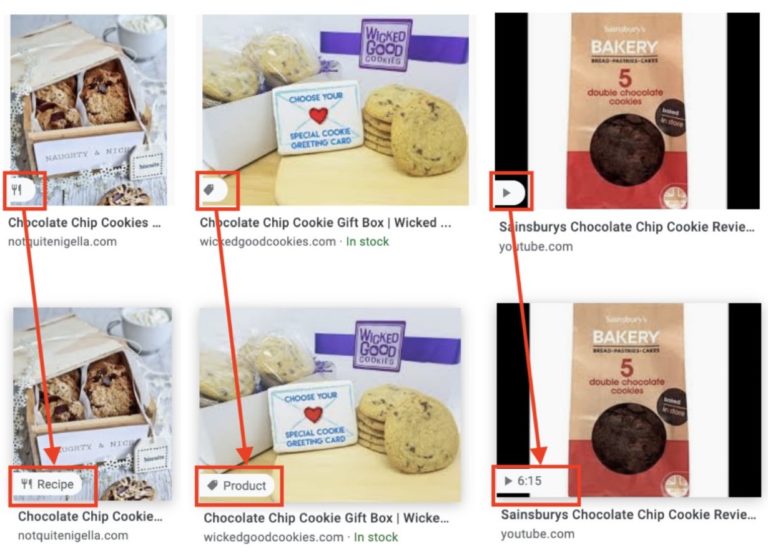
As shown in the example, you can mouse-over the icons to either expand the text or reveal the length of a video.
Sullivan says this change is rolling out later in the week to Google Images on desktop.
Google Giveth and Google Taketh Away
The new icons for product, recipes, and videos in image search will be shown where the image’s dimensions have traditionally been displayed.
Rather than figuring out a different way to display an image’s dimensions on mouse-over, Google is simply removing that feature.
Not to worry though, as this information can still be retrieved by clicking on the thumbnail and then mousing-over the image that appears in the larger preview. An example is shown below:
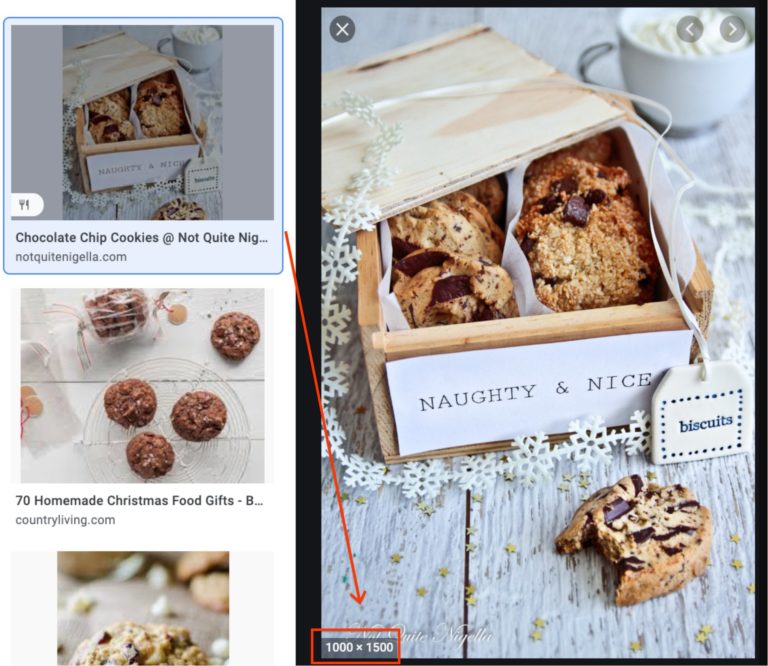
Image Licensing Information Still in Beta Testing
Sullivan reminds site owners that Google is still beta testing the ability to display image licensing information in search results.
News broke last week that Google would begin testing this feature, which pulls licensing information from a web page’s structured data.
Google also provided directions for site owners on how to mark up their licensable images with the appropriate structured data.
You can learn more about that here: Google to Highlight Image Licensing Information in Image Search Results
