
Ann Smarty

Get Alerted Once Any Page Is Changed

August 26th, 2008 by Ann Smarty | 10 Comments

Being automatically updates once a page is changed opens up a wealth of (probably missed) opportunities:

  • Make sure your own page is save from hackers’ attack: receive email alerts once a hacker adds any illegitimate links or text on your page;
  • Keep track of new comments (an alternative to services like Co.mments which by the way doesn’t work for all types of pages) or new threads in a forum;
  • Get updates of page changes introduced by site co-authors: if several people edit the site, you can moderate how they change the pages;
  • Get alerted once your competitors issue a press release by tracking specific words and their corporate website;
  • Track Google SERPs (especially useful to track most recent name mentions for reputation management; example: tracking this page [ann smarty];
  • More options to track.

There are two handy ways I personally use to keep track of changes introduced to any webpage:

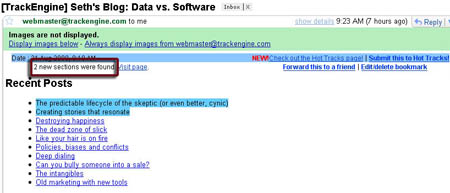
  • Track Engine allows for 5 free “bookmarks” and also offers unlimited subscriptions for about $20 per year. The service sends an email alert once any changes are introduced and allows for a number of very handy “expert” tracking parameters:
    • track a page daily/ every two days/ every three days/ weekly;
    • highlight new content and send the full copy of the changed page or highlight changes and send the summary of those changes;
    • send the report only in case XX edits were introduced;
    • track only specified keywords (e.g. news);
    • track changes to: hyperlinks / images / dates / numbers;
    • exclude changes containing any specified keywords;
    • disable tracking once some time passes.
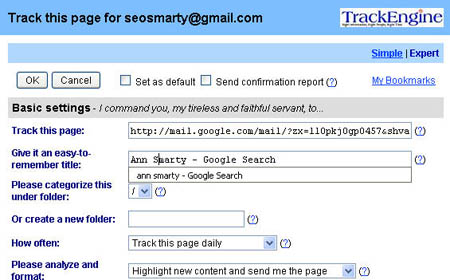
Track Engine: Expert Settings
Track Engine: Expert Settings

Track Engine: Email Alerts

Track Engine: Email Alert

  • Check and get (paid with 30-day trial) will alert you of changes each time the program is launched:
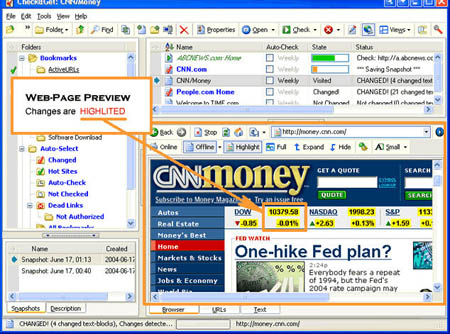
Check&Get: Changes Alerts

Check&Get Changes Preview


Comments

10 responses so far ↓

  • Nick Stamoulis on Aug 26, 2008 at 5:49 am

    This is a wonderful new tool that will help webmasters and business owners monitor their top pages and competitors as well…thanks for sharing this.

  • Oliver Taco on Aug 26, 2008 at 6:18 am

    I remember what a *big* service this was gonna be in the slightly web 1.0 boom.

    As I recall this service slightly post-dated portals but pre-dated the heavy e-commerce era.

    Cool blast from the past updated.

    -OT

  • Keri Morgret on Aug 26, 2008 at 9:04 am

    I’ve used CodeMonitor from Pole Position. It’s simple and text-based, but it works for me — there are a couple of sites that change infrequently that I forget to check, and it’s great to get an email when they change.
    http://polepositionweb.com/roi/codemonitor/index.php

  • Scott Clark on Aug 26, 2008 at 12:24 pm

    I love Update Patrol… http://www.updatepatrol.com/

  • paisley on Aug 27, 2008 at 10:06 am

    also google alerts works real well. or PR dept. has alerts for each client each in it’s onw gmail account that auto forwards to the PR reps email.

  • Utah SEO on Aug 27, 2008 at 10:57 am

    There are so many uses for a page updater, great to see a post about it.

  • Stoney deGeyter on Aug 27, 2008 at 11:27 am

    Keri, thanks for the plug of our CodeMonitor tool. I’ll check out the others listed in the post to see how they compare. But for us CodeMonitor is pretty simple and works great for monitoring client sites!

  • Avi on Aug 27, 2008 at 11:54 am

    Another great post Smarty.

    Another great tip would be to create a google alert for a particular term, for a “particular site”.

    For example, creating an alert for “ann smarty” will notify you whenever the term appears anywhere across the net.

    Create an alert for “ann smarty” site: searchengineland.com will notify you anytime your name appears on that specific site.

    The major problem with Google Alerts is you need to know the term - it will not notify you when a page has been updated.

    Wondering if there are any free, non subscription tools that notify you when a page has been changed or updated?

  • Niche Traffic Guide on Aug 28, 2008 at 1:39 am

    Thanks for the post

    Hackers are becoming a major nuisance for webmasters especially those of us making a living on the internet

    Alerts is one way of keeping track of the problem

  • Jeremy, PR4Pirates on Aug 28, 2008 at 10:12 pm

    You could also tie together a cron job with wget + diff which would be crude but free.

Leave a Comment
