<?xml version="1.0" encoding="utf-8"?><rss version="2.0"
	xmlns:content="http://purl.org/rss/1.0/modules/content/"
	xmlns:dc="http://purl.org/dc/elements/1.1/"
	xmlns:atom="http://www.w3.org/2005/Atom"
	xmlns:sy="http://purl.org/rss/1.0/modules/syndication/"
		>
<channel>
	<title>Comments on: FireFox for SEOs: Working with Several FireFox&#160;Profiles</title>
	<atom:link href="http://www.searchenginejournal.com/firefox-for-seos-working-with-several-firefox-profiles/7319/feed/" rel="self" type="application/rss+xml" />
	<link>http://www.searchenginejournal.com/firefox-for-seos-working-with-several-firefox-profiles/7319/</link>
	<description></description>
	<lastBuildDate>Tue, 14 Feb 2012 22:19:40 +0000</lastBuildDate>
	<sy:updatePeriod>hourly</sy:updatePeriod>
	<sy:updateFrequency>1</sy:updateFrequency>
	<generator>http://wordpress.org/?v=</generator>
	<item>
		<title>By: roaringchicken</title>
		<link>http://www.searchenginejournal.com/firefox-for-seos-working-with-several-firefox-profiles/7319/comment-page-1/#comment-1123661</link>
		<dc:creator>roaringchicken</dc:creator>
		<pubDate>Thu, 08 Oct 2009 21:42:14 +0000</pubDate>
		<guid isPermaLink="false">http://www.searchenginejournal.com/firefox-for-seos-working-with-several-firefox-profiles/7319/#comment-1123661</guid>
		<description>April -

Thank you for sharing your insight into managing profiles. I may be able to have a work around a long term problem by using multiple profiles.

Do you know a way to to compare profiles to see the difference. I can have a totally functional Firefox with GoogleToobar and then after x days, I am unable to log in to a particular reference resource site that I use frequently? I would love to know what it is that casues it to go from working to not working. I can always solve by creating a new profile in FireFox. (I also know that my desktop never has this problem.)

- roaring chicken</description>
		<content:encoded><![CDATA[<p>April -</p>
<p>Thank you for sharing your insight into managing profiles. I may be able to have a work around a long term problem by using multiple profiles.</p>
<p>Do you know a way to to compare profiles to see the difference. I can have a totally functional Firefox with GoogleToobar and then after x days, I am unable to log in to a particular reference resource site that I use frequently? I would love to know what it is that casues it to go from working to not working. I can always solve by creating a new profile in FireFox. (I also know that my desktop never has this problem.)</p>
<p>- roaring chicken</p>
]]></content:encoded>
	</item>
	<item>
		<title>By: Utah SEO</title>
		<link>http://www.searchenginejournal.com/firefox-for-seos-working-with-several-firefox-profiles/7319/comment-page-1/#comment-1085474</link>
		<dc:creator>Utah SEO</dc:creator>
		<pubDate>Wed, 17 Sep 2008 23:46:39 +0000</pubDate>
		<guid isPermaLink="false">http://www.searchenginejournal.com/firefox-for-seos-working-with-several-firefox-profiles/7319/#comment-1085474</guid>
		<description>That is really useful, I had no idea that you could even do this</description>
		<content:encoded><![CDATA[<p>That is really useful, I had no idea that you could even do this</p>
]]></content:encoded>
	</item>
	<item>
		<title>By: Jack</title>
		<link>http://www.searchenginejournal.com/firefox-for-seos-working-with-several-firefox-profiles/7319/comment-page-1/#comment-1083491</link>
		<dc:creator>Jack</dc:creator>
		<pubDate>Fri, 01 Aug 2008 12:00:32 +0000</pubDate>
		<guid isPermaLink="false">http://www.searchenginejournal.com/firefox-for-seos-working-with-several-firefox-profiles/7319/#comment-1083491</guid>
		<description>Thank you for sharing. It&#039;s a great tip. Now I can truly have multiple sessions.</description>
		<content:encoded><![CDATA[<p>Thank you for sharing. It&#8217;s a great tip. Now I can truly have multiple sessions.</p>
]]></content:encoded>
	</item>
	<item>
		<title>By: Garrett Pierson</title>
		<link>http://www.searchenginejournal.com/firefox-for-seos-working-with-several-firefox-profiles/7319/comment-page-1/#comment-1082899</link>
		<dc:creator>Garrett Pierson</dc:creator>
		<pubDate>Tue, 22 Jul 2008 17:10:30 +0000</pubDate>
		<guid isPermaLink="false">http://www.searchenginejournal.com/firefox-for-seos-working-with-several-firefox-profiles/7319/#comment-1082899</guid>
		<description>Thanks for the very helpful tip ANN!~</description>
		<content:encoded><![CDATA[<p>Thanks for the very helpful tip ANN!~</p>
]]></content:encoded>
	</item>
	<item>
		<title>By: Nature</title>
		<link>http://www.searchenginejournal.com/firefox-for-seos-working-with-several-firefox-profiles/7319/comment-page-1/#comment-1082876</link>
		<dc:creator>Nature</dc:creator>
		<pubDate>Tue, 22 Jul 2008 09:09:39 +0000</pubDate>
		<guid isPermaLink="false">http://www.searchenginejournal.com/firefox-for-seos-working-with-several-firefox-profiles/7319/#comment-1082876</guid>
		<description>Thanks for sharing.</description>
		<content:encoded><![CDATA[<p>Thanks for sharing.</p>
]]></content:encoded>
	</item>
	<item>
		<title>By: Software Testing</title>
		<link>http://www.searchenginejournal.com/firefox-for-seos-working-with-several-firefox-profiles/7319/comment-page-1/#comment-1082873</link>
		<dc:creator>Software Testing</dc:creator>
		<pubDate>Tue, 22 Jul 2008 08:50:26 +0000</pubDate>
		<guid isPermaLink="false">http://www.searchenginejournal.com/firefox-for-seos-working-with-several-firefox-profiles/7319/#comment-1082873</guid>
		<description>@Ann, Thanks and welcome :)</description>
		<content:encoded><![CDATA[<p>@Ann, Thanks and welcome :)</p>
]]></content:encoded>
	</item>
	<item>
		<title>By: Ann Smarty</title>
		<link>http://www.searchenginejournal.com/firefox-for-seos-working-with-several-firefox-profiles/7319/comment-page-1/#comment-1082872</link>
		<dc:creator>Ann Smarty</dc:creator>
		<pubDate>Tue, 22 Jul 2008 08:40:25 +0000</pubDate>
		<guid isPermaLink="false">http://www.searchenginejournal.com/firefox-for-seos-working-with-several-firefox-profiles/7319/#comment-1082872</guid>
		<description>@ Software Testing : the FireFox extension mentioned in the post can also do that - I&#039;ve edited the post to make it clearer. Thank you for your great addition!</description>
		<content:encoded><![CDATA[<p>@ Software Testing : the FireFox extension mentioned in the post can also do that &#8211; I&#8217;ve edited the post to make it clearer. Thank you for your great addition!</p>
]]></content:encoded>
	</item>
	<item>
		<title>By: Software Testing</title>
		<link>http://www.searchenginejournal.com/firefox-for-seos-working-with-several-firefox-profiles/7319/comment-page-1/#comment-1082867</link>
		<dc:creator>Software Testing</dc:creator>
		<pubDate>Tue, 22 Jul 2008 07:15:43 +0000</pubDate>
		<guid isPermaLink="false">http://www.searchenginejournal.com/firefox-for-seos-working-with-several-firefox-profiles/7319/#comment-1082867</guid>
		<description>@ Ann, I use the command &quot;firefox -no-remote&quot; to switch/open an existing profile from the list. I don&#039;t think that &quot;firefox.exe -ProfileManager&quot; will help to open 2 or more profile simultaneously.</description>
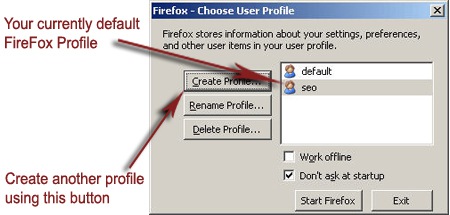
		<content:encoded><![CDATA[<p>@ Ann, I use the command &#8220;firefox -no-remote&#8221; to switch/open an existing profile from the list. I don&#8217;t think that &#8220;firefox.exe -ProfileManager&#8221; will help to open 2 or more profile simultaneously.</p>
]]></content:encoded>
	</item>
	<item>
		<title>By: Ann Smarty</title>
		<link>http://www.searchenginejournal.com/firefox-for-seos-working-with-several-firefox-profiles/7319/comment-page-1/#comment-1082865</link>
		<dc:creator>Ann Smarty</dc:creator>
		<pubDate>Tue, 22 Jul 2008 06:23:12 +0000</pubDate>
		<guid isPermaLink="false">http://www.searchenginejournal.com/firefox-for-seos-working-with-several-firefox-profiles/7319/#comment-1082865</guid>
		<description>@Gidseo : just to be perfectly clear, this is not about various online identities but about running several FireFox profiles to separate your different areas of work/life :) a post about several online identities is coming soon ;)</description>
		<content:encoded><![CDATA[<p>@Gidseo : just to be perfectly clear, this is not about various online identities but about running several FireFox profiles to separate your different areas of work/life :) a post about several online identities is coming soon ;)</p>
]]></content:encoded>
	</item>
	<item>
		<title>By: Vinicius Paes</title>
		<link>http://www.searchenginejournal.com/firefox-for-seos-working-with-several-firefox-profiles/7319/comment-page-1/#comment-1082852</link>
		<dc:creator>Vinicius Paes</dc:creator>
		<pubDate>Tue, 22 Jul 2008 01:50:12 +0000</pubDate>
		<guid isPermaLink="false">http://www.searchenginejournal.com/firefox-for-seos-working-with-several-firefox-profiles/7319/#comment-1082852</guid>
		<description>It´s really a good idea, i installed the profile switcher extension, makes everything very ease! Now i have plenty os space on each profile for several purposes. The test profile is a smart joice either. Thanks for the tip.</description>
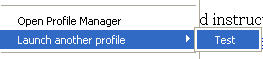
		<content:encoded><![CDATA[<p>It´s really a good idea, i installed the profile switcher extension, makes everything very ease! Now i have plenty os space on each profile for several purposes. The test profile is a smart joice either. Thanks for the tip.</p>
]]></content:encoded>
	</item>
</channel>
</rss>