Create a Technology Report of Any Website with W3Techs

I have once shared a web-based tool that allows to view “technologies” behind any website (like server information, widgets, etc). This week I am sharing another similar tool.

W3Techs is a nice little addon that creates a technology report of any website. It provides less information than BuiltWith we saw earlier but very often a short concise report is actually what we really need.

First, let’s install it.

Download the extension and restart your browser.

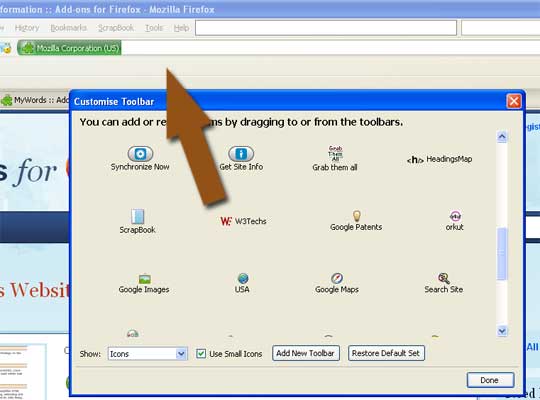
What happens next is actually a wide-spread issue. After you restart the browser, the addon is nowhere to find. This is because FireFox will hide the tool icon by default and you need to install it manually:

  • Right-click on your FireFox top toolbar and select “Customize” (OR go: View->Toolbars->Customize)
  • Find the W3Techs icon there and drag it to one of your toolbars (whichever you prefer):
w3techs install

Now, whenever you land on a web page and feel like checking what it is built with, click the icon and see (the report will open in a new tab):

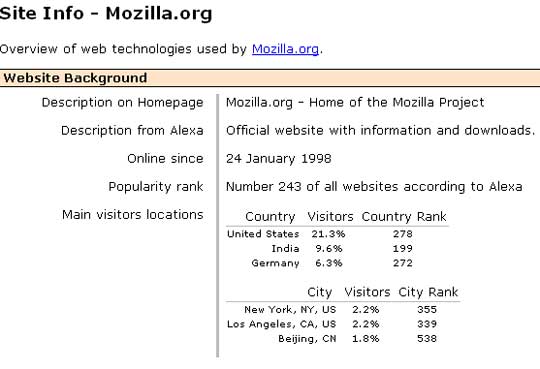
1. Website Background (powered by Alexa):

  • Time online;
  • Traffic rank and geography:

website background

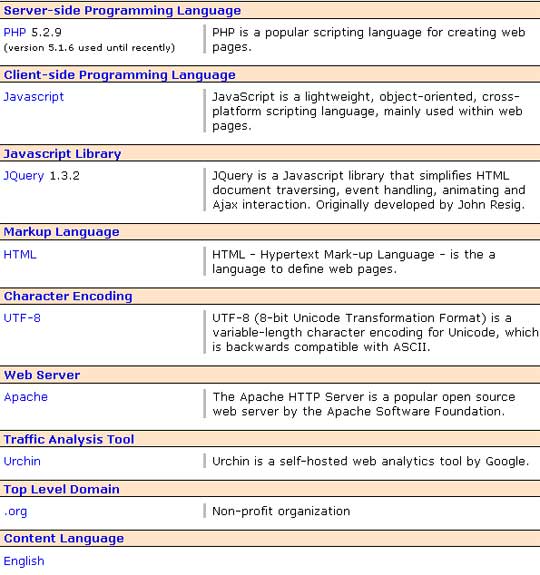
2. The technologies shown include:

  • content management systems,
  • server-side and client-side programming languages,
  • JavaScript libraries,
  • markup languages,
  • character encoding,
  • web servers,
  • operating systems,
  • advertising networks:

technology report

3. Additionally, you get warnings on potential quality problems of the site.

warnings

Written By:
PG

| My Blog Guest | @seosmarty

Ann Smarty is the blogger and marketer specializing in SEO consulting and guest blogging. Ann's expertise in blogging and tools serve as a base for her writing, tutorials and her guest blogging project, MyBlogGuest.com.

More Posts By

Comments

  1. P.K.Chouhan says:

    I was looking for such informative blog and found yours very good. You got a regular commentator.

  2. web design company says:

    We have used W3Techs and it is an excellent tool to generate reports.

  3. liyas mamat says:

    very nice and informative!

  4. Tuv2009 says:

    why everything i do, i'm still have dificulty to avoid what i need.

  5. Phil says:

    This is nice blog, first time reader and will need to read all utilities posts, this is good tools to which we need time to time in our SEO Projects…thanks

    • K. Smith says:

      I agree Phil I will probably use it as well not only for SEO but also for reports I am creating on different technology projects that I will place on my business.

  6. websearchworkshop says:

    That sounds like a very useful tool.Thanks for pointing it out, Ann.

  7. websearchworkshop says:

    That sounds like a very useful tool.Thanks for pointing it out, Ann.

  8. seo says:

    Wow, that's a handy extension…will definitely get it installed. Thanks!

  9. Industrial Training India says:

    I was looking for such a addon. Thanks for sharing that wonderful addon