Search Engine Optimization

10 Ways to Increase Your Site Crawl Rate

Ann Smarty

06/24/08

68 Comments

Regular and frequent visits by the crawler is the first sign that your site appeals to Google. Thus the most efficient way to get frequent and deep crawls is to develop a website that search engines see as important and valuable.

Note that you can’t force Googlebot to visit you more often – what you can do is to invite it to come. Possible measures to take to increase the crawl rate may include:

  1. Update your content often and regularly (and ping Google once you do) – well, an obvious one, so not much to describe here; in a word, try to add new unique content as often as you can afford and do it regularly (3 times a week can be the best solution if you can’t update your site daily and are looking for the optimal update rate).
  2. Make sure your server works correctly: mind the uptime and Google Webmaster tools reports of the unreached pages. Two tools I can recommend here are Pingdom and Mon.itor.us.
  3. Mind your page load time: note that the crawl works on a budget – if it spends too much time crawling your huge images or PDFs, there will be no time left to visit your other pages.
  4. Check the site internal link structure: make sure there is no duplicate content returned via different URLs: again, the more time the crawler spends figuring your duplicate content, the fewer useful and unique pages it will manage to visit.
  5. Get more back links from regularly crawled sites.
  6. Adjust the crawl speed via Google Webmaster tools.
  7. Add a sitemap (though it’s up for a debate whether the sitemap can help with crawling and indexing issues, many webmasters report they have seen increased crawl rate after adding it).
  8. Make sure your server returns the correct header response. Does it handle your error pages properly? Don’t make the bot figure out what has happened: explain it clearly.
  9. Make sure you have unique title and meta tags for each of your pages.
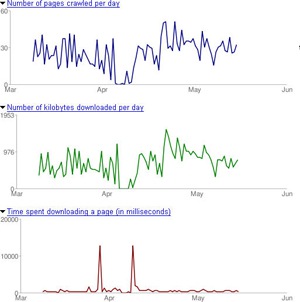
  10. Monitor Google crawl rate for your site and see what works and what not:

crawl rate via Google Webmaster tools

crawl rate tracker

68 Comments

  • Mercy says:

    Ann,

    Have a small clarification in your last point. If we use plugins to track the crawl(Google) rate, doesn’t mean that we are querying Big G thro third party tool, and its against their guidelines?

    At the same time i accept that the plugin you have mentioned is a real good wonder. I have read reviews on many blogs abt this crawlrate plugin.

  • Ann Smarty says:

    I will need Patrick Altoft to confirm that but I am pretty sure the plugin analyzes the log files; so it in no way queries Google…

  • Mercy says:

    Thanks for clarifying!

  • Austin says:

    The download link for the crawl rate tracker is plugin is broken. Don’t bother trying to leave a comment to let Patrick know because the comment plugin is broken too.

  • @Austin, I’ve contacted Patrick and alerted him of this issue.

  • Ann Smarty says:

    @Austin I’ve downloaded the plugin some time ago, so wasn’t aware of that. But the plugin itself works fine with me right now…

  • TheMadHat says:

    “3 times a week can be the best solution if you can’t update your site daily and are looking for the optimal update rate”

    You getting this number based on some sort of evidence?

  • Sorry, blogstorm is moving hosts today so quite a few things are broken.

    Please give it 24 hours.

  • Austin says:

    @Ann – thanks for letting us know about the great plugin, and good article BTW!

    @Loren – wow, that was a pretty quick response!

    @Patrick – thanks for the update. I’ll definitely go back later and try out that plugin. Sounds pretty neat and thanks for sharing!

  • Ann Smarty says:

    @TheMadHat – just my personal experience. Do you have another opinion?

  • Realtor says:

    Nicely summarized. It will be interesting!

  • TheMadHat says:

    @Ann – not really, I only randomly take a look at it for significant dips. In my opinion, they would probably take a look at historical data (no guess as to how far back) to determine crawl rate. If you’ve been updating multiple times per day for the last year they’re going to crawl you more, if you’ve been updating once a week for the last year rate will be much slower. I’d guess you could pretty much control your crawl rate by your update rate and it wouldn’t really be a “certain number of days” thing.

  • Pratheep says:

    @Ann,

    Lets say I have a popular website which was not updated for more than 3 months. Will increasing only the back-links help in good position in SERPs (especially in google)

    -Pratheep

  • Great top 10 points…another one might be making sure your site XHTML and CSS validates.

  • These are excellent tips to better ones crawal rate………I will certainly use this advice………

  • Excellent tips.It´s important to get the site frequently crawled at least if you post a new blogpost every day.

  • Nicely summarized. The crawl rate as I understand from web master tools can only be slowed down if needed, not increased.

  • Bill says:

    I am somewhat new to this web site stuff when you say “ping” google in your article are you refering to resubmitting the web pages through something like “web ceo” or other software?

  • Michael says:

    As a niche marketer, we can certainly attest to a lot of the points you make in this article. Now I’ll have to try some of your suggestions that are new to me.

  • If you have a big website: Don’t forget about deep links!

  • Sunil says:

    Hmm…. I was getting PR3 prediction for past 4 months … but still Google has not indexed me… Hope it will… It crawls and caches everything I have posted … But not indexing in the Google directory.. STill N/A….

  • Nintendo wii says:

    Fantastic ! My blog is crawled every day even if i forget to post some day. I don’t know how google is working

  • OPENGIGA says:

    very informative posts and with great resource which is really great for my site. thanks

  • Mel says:

    Excellent post, bookmarked! and the deep links and xhtml/css verification is are good tips, add those to your post!

  • Heri says:

    Nice post for information

  • Thank you for sharing information. The Wordpress plugin is really great. So cute graphics. :) It is interesting if it will support more search engines…

  • SEO Links says:

    These are excellent tips for your site crawl…….I have used them many times.

  • Thanks A Smarty for useful tips.

  • Baliinc says:

    Excellent tips for better crawl rate, and I think tips no 5: Get more back links from regularly crawled sites is really work for me

  • Off course, back links from relevant web site and high ranking is most important for get good page rank from Google.

    Safdar

  • Pics says:

    How to increase this rate for blogger

  • Jobs Boston says:

    I was just in my Google Webmaster tools and my most recent sites all say “crawl rate cannot be changed”

  • Ann Smarty says:

    The fact that you can’t change the crawl rate doesn’t mean anything bad. Apparantly, Google has found the most suitable rate for your site and doesn’t want you to interfere.

  • vicky says:

    Thanks for the info dear…really appreciate that

    Vicky
    http://www.vickyadvani.blog.co.in

  • Hi pics,
    Please review your webblog site in detail and followed the above excellent tips. I hope you can get yours desire results and your web site crawled successfully.

  • deepsiion says:

    thanks for the informat

  • i found it very usful

    vicky

  • your information was very good

    Mentor Securio

  • Puslespil says:

    Thanks for this great information. I use this for my own websites, and the advice for making backlinks make a big diffrence. :-)

  • Mikayel says:

    for uptime you can check also premium version of mon.itor.us – http://www.monitis.com

  • Dean says:

    Good post and the only clarification is how do we increase the crawl rate.

  • michael says:

    Thanks for the great tips !

  • nice information

  • Tom Allen says:

    I’m loving the charts :D

  • Mr.Choice says:

    It is feasibly impossible to set a crawl rate when using Google’s Blogger.

  • bsdinfo says:

    Is backlink the same as deep link?

    Example of a deep link:
    http://www.nwvd.org/cisco/cisco_lab/index.php

  • leo says:

    After i set up everything to Google webmaster tool, do i need to write google to index my page.
    I ask this question because i saw my site said “no index” on the dashboard after i set the the sitemap and sign up my site on google webmaster tool.

  • Debbie Ray says:

    Thanks for the tips !

  • It’s really such a nice information you posted here About Site Crawl Rate. I really love the way information presented in your post. I have added to you in my social bookmark…..look forward to hear more from you!!!

    Keep Going for next level

  • biz says:

    Appreciate the information!

    Regarding “1. Update your content often and regularly (and ping Google once you do),” how to *ping* Google?

  • nadrolski says:

    open the command prompt, and type in “ping google.com” (without the quotes) and smash ENTER.

  • Nita says:

    What I would like to know is what the sites that Google crawls often?

  • tks says:

    the “ping google” is not clear for me… How does it work?

  • kev dock says:

    I have a site that has plenty of back links and this list is growing daily, the content is changing daily yet it has been over a month and still Google has’nt picked it up – its related/relevant only for the christmas season
    http://www.santas-christmas-letters.com
    if Google doesnt pick it up soon – it will have been a wasted effort – very frustrating

  • B2B Trade says:

    Hello, I would like to comment about using sitemaps. As per my experience, I have worked and still working with several b2b websites of over million pages where content is updated frequently too, that sitemaps on google websmater tool is really effective for small websites. For the websites I just mentioned, managing these sitemaps is hack of job. So without sophisticated programming, do not waste time in sitemaps, search engines are made to crawl our websites to keep their databases fresh, they can not afford to take risk of not crawling anyways.

  • Blaine sword says:

    Great article. I will start working on moe back links just as soon as I figure out where to get some good ones. Any ideas? Thanks again.

  • amit says:

    I posting content daily my website is 56 month old. 40-50 visitors daily. please check my website and tell me the solution.

  • Asad says:

    my google Crawl stats, Pages crawled per day high:88, Average: 10, Low: 0. what ? this is best crawl stats ? Or not , please tell me anyone coz im new on google webmaster tools.

  • dhaneshmane says:

    Hey thanks a lot for these steps. I am going to start working around these steps to increase my sites crawl rate.

  • sonal says:

    I submitted some pages of my website in delicious, digg. but now i removed those pages from my website because google adsense fired me duplicate content. now these pages fired 404 error. i want to redirect 404 error page to my homepage..can u advise me?
    how can i do this?

  • Very simple use 301 redirect the old page with new pages. if you would like to increase the crawl rate update your website content on regular basis. Only quality and updated website text or content can help you to increase the chances of your immediate crawl.

    All the best Sonal!

  • dhanesh mane says:

    Hey sonal,

    This post is to increase crawl rate to your pages. I suggest you to post such questions in some other forums or yahoo answers. Its quick.
    Well for your 404 problem I suggest you to implement the errordocument instead of redirecting them to home page.
    Because redirecting will not solve the issue, server response code is important.

    You can implement it with help of .htaccess file if u r running site on apache.
    redirect rule is –
    ErrorDocument 404 /error.php

    This code will redirect all 404 requests to error.php and you design the error.php which will have some message like “The page that you are trying to open is not exists”. also provide some navigation there.

    This will help your users and search engines also.

  • gptc team says:

    Very useful tips. I have query regarding the “Crawl rate Graph”. The data shown in the webmaster tool is not matching with my web access-log

  • james says:

    Thanks for the helpful tips. I have had a few problems with getting google to crawl my webpages recently and your post has really helped me get my website crawled properly again. This is a really helpful website you have alot of very helpful information. Thanks again

Leave a Reply